Loading...
Sign in / Sign up

AI-to-Human Handoff Done Right: A Practical Escalation Playbook for Voice & Chat Agents

Most teams think handoff is a fallback.

It isn’t.

In production, AI-to-human escalation is one of the most important parts of the customer experience. If it happens too late, the user gets frustrated. If it happens too early, automation loses value. If it happens without context, both the customer and the agent pay the price.

That’s the difference between a demo assistant and a real one:
a real AI agent knows when to continue, when to ask one more question, and when to hand the conversation off — cleanly.

This playbook shows how to design escalation rules for voice and chat agents that actually work in production.

Why handoff fails in real conversations

A handoff usually breaks for one of four reasons:

  • the AI keeps trying to resolve a case it should escalate
  • the escalation trigger is too vague
  • the customer has to repeat everything
  • the switch to a human breaks channel continuity

From the customer’s perspective, all four feel the same:
“I already explained this. Why am I starting over?”

That’s why handoff is not a support edge case. It’s part of the core product experience.

What “good” handoff actually looks like

A good handoff is not just a transfer.

It is a structured transition with three things in place:

1) A clear reason for escalation

The assistant should know why the case is moving to a human:
complexity, emotion, policy sensitivity, failed resolution, verification limits, or high-value sales intent.

2) Preserved context

The human agent should receive:

  • conversation summary
  • detected intent
  • relevant entities or customer details
  • actions already attempted
  • the exact reason for escalation

3) Clear customer messaging

The user should know what happens next:

  • are they being transferred live?
  • staying in the same channel?
  • waiting for a callback or reply?
  • how long should it take?

Without this, the handoff feels broken even if the routing logic is technically correct.

Step 1) Define escalation triggers before you build flows

Do not start with tooling.

Start with rules.

A practical escalation framework usually includes these trigger types:

A. Accuracy risk

Escalate when the assistant does not have enough grounded information to answer safely.

Examples:

  • pricing exceptions
  • refund disputes
  • policy edge cases
  • incomplete or conflicting customer data

B. Emotional urgency

Escalate faster when the tone changes.

Examples:

  • frustration
  • repeated complaints
  • threat to cancel
  • urgent service interruption
  • vulnerable or sensitive situations

C. Workflow failure

Escalate when the automation path is blocked.

Examples:

  • required verification failed
  • system action returned an error
  • user is stuck in a loop
  • two clarifying questions were asked and resolution is still unclear

D. High-value intent

Not every escalation is a failure.

Sometimes the best next step is a human because the customer is ready for:

  • a custom quote
  • a sales call
  • a complex onboarding conversation
  • negotiation or exception approval

A good rule of thumb:
if the next step requires judgment, accountability, or policy flexibility, handoff should be available.

Step 2) Separate “resolve,” “clarify,” and “escalate”

Many assistants fail because they only have two modes:
answer or give up.

Production systems need three:

Resolve

The assistant has enough information and a safe path to complete the task.

Clarify

The assistant is missing one critical piece of information and should ask for it once, clearly.

Escalate

The assistant has reached the limit of safe automation and should transfer with context.

This simple distinction prevents two common problems:

  • endless clarification loops
  • fake confidence

If the assistant cannot improve its chances of resolving the issue with one more useful question, it should escalate.

Step 3) Preserve the right context — not everything

A bad handoff dumps the entire transcript on the agent.

A good handoff sends only what matters.

Use a compact transfer package:

  • Intent: what the customer needs
  • Status: resolved / blocked / urgent
  • Customer details: only what is relevant and permitted
  • What already happened: checks, steps, failures
  • Risk flags: refund, complaint, billing, legal, security, emotional urgency
  • Escalation reason: why the AI stopped

This gives the human a fast, usable starting point.

The goal is not “more data.”
The goal is better continuity.

Step 4) Keep the customer in the same experience

One of the fastest ways to destroy trust is to force a channel reset.

The customer starts in chat.
Then gets told to send an email.
Then has to explain the issue again.
Then waits without knowing whether anyone saw the case.

Whenever possible, the handoff should preserve channel continuity.

That means:

  • chat stays chat
  • voice stays voice
  • context stays attached
  • the customer does not restart the journey

If a channel change is unavoidable, the assistant should explain it clearly and provide the shortest possible bridge.

Step 5) Write handoff messages like product UX, not support scripts

Most handoff copy is vague.

Examples:

  • “An agent will contact you soon.”
  • “Please wait while we transfer you.”
  • “Your issue has been escalated.”

That is functional, but weak.

A better handoff message does three things:

  • confirms the issue
  • explains the next step
  • reduces uncertainty

For example:

Chat example:
“I’ve captured the issue and I’m handing this conversation to a support specialist now. They’ll see the details you already shared, so you won’t need to repeat everything.”

Voice example:
“I’m transferring you to a team member who can help with this case. I’ll pass along the details we’ve already covered so the next person can continue from here.”

That feels more human — and more trustworthy.

Step 6) Measure handoff quality, not just handoff volume

A lot of teams track escalation count.

That’s useful, but incomplete.

A healthy handoff process should also measure:

  • time to human response after escalation
  • percentage of escalated cases resolved without repetition
  • how often customers re-explain the issue
  • which intents escalate most often
  • whether escalation improved CSAT, resolution rate, or conversion rate
  • whether the AI escalated too late, too early, or for the wrong reason

These signals tell you whether your handoff logic is helping the business — or quietly creating friction.

Final takeaway

A strong AI assistant is not the one that handles everything.

It is the one that handles the right things — and exits gracefully when a human should take over.

That’s what makes automation feel smart in production:
not endless containment,
but correct resolution.

Because the real goal is never just to keep the conversation with AI.

It’s to keep the customer moving forward.

You Can’t Improve What You Can’t See: Observability for AI Voice & Chat Agents

Most AI assistants fail silently.

They don’t crash.
They don’t throw errors.
They just slowly become less accurate, less helpful — and more expensive.

In production, the biggest risk for AI agents isn’t the model.
It’s the lack of observability.

This article explains what AI observability really means, why traditional analytics aren’t enough, and how Monobot approaches monitoring, QA, and continuous improvement for voice and chat agents.

Why AI Agents Degrade Over Time

Unlike traditional software, AI agents don’t stay static.

Over time:

  • user behavior changes
  • new edge cases appear
  • policies and pricing evolve
  • knowledge becomes outdated
  • traffic volume increases
  • integrations change

Without visibility, small issues compound.

By the time a team notices:

  • containment rate is down
  • escalations are up
  • customers are frustrated

…damage is already done.

Why Traditional Analytics Don’t Work for AI

Standard metrics like:

  • number of messages
  • call duration
  • average response time

tell you what happened, but not why.

AI systems need a different level of insight.

You need to understand:

  • which intents fail
  • where knowledge retrieval breaks
  • when the agent guessed instead of knowing
  • why handoff was triggered
  • which answers cause confusion

This is where AI observability starts.

What “Observability” Means for AI Agents

For AI voice and chat agents, observability answers five questions:

  1. Did the agent resolve the request?
  2. If not — why?
  3. Was the knowledge missing, unclear, or wrong?
  4. Was escalation necessary or avoidable?
  5. What should be improved next?

Observability is not just dashboards.
It’s structured insight into agent behavior.

Key Signals to Monitor in Production AI

1. Containment vs Escalation

  • How many conversations are fully resolved by AI?
  • What percentage is escalated to humans?
  • Which intents escalate most often?

High escalation isn’t always bad — but unexplained escalation is.

2. Knowledge Base Coverage

Track:

  • unanswered questions
  • fallback responses
  • “I’m not sure” cases
  • repeated clarifications

These signals show exactly where the KB needs work.

3. Intent Drift

Over time, users ask the same thing differently.

Monitoring intent distribution helps you spot:

  • new phrasing patterns
  • emerging topics
  • outdated intent mappings

Without this, intent accuracy slowly decays.

4. Voice-Specific Failures

For voice agents, you also need to track:

  • ASR misrecognitions
  • interruptions
  • long pauses
  • repeated confirmations

Voice failures feel much worse to users than chat failures.

5. Cost vs Value Signals

AI that works but costs too much is also a failure.

You need visibility into:

  • model usage per intent
  • expensive flows vs simple ones
  • opportunities for lighter models

This is where observability meets optimization.

How Monobot Enables AI Observability

Monobot treats AI agents as production systems, not demos.

That means:

  • structured logging of conversations
  • visibility into resolution and escalation
  • knowledge base interaction tracking
  • support for QA workflows and reviews
  • analytics across voice and chat

Instead of guessing what to improve, teams can see it.

From Observability to Continuous Improvement

The real value comes when observability feeds action.

A healthy loop looks like this:

  1. Monitor agent behavior
  2. Identify failing intents or KB gaps
  3. Update knowledge, flows, or routing
  4. Validate improvement
  5. Repeat weekly

AI agents improve fastest when treated like a living product, not a one-time setup.

Why This Matters for Production Teams

AI agents don’t fail loudly.
They fail quietly.

Observability is what turns:

  • AI from a black box
  • into a controllable system

If you’re running AI in production — especially voice agents — visibility is not optional.

It’s infrastructure.

Final Thought

Better models help.
Better prompts help.
But visibility is what keeps AI working long-term.

That’s why Monobot focuses not only on building AI agents — but on making them observable, testable, and continuously improvable in real-world environments.

Why Using Multiple LLMs Matters — and How Monobot Chooses the Right Model for Every Task

Large Language Models (LLMs) are the foundation of modern AI assistants.
But one of the most common misconceptions in the market is this:

“Just pick the best LLM — and everything will work.”

In reality, no single LLM is best at everything.

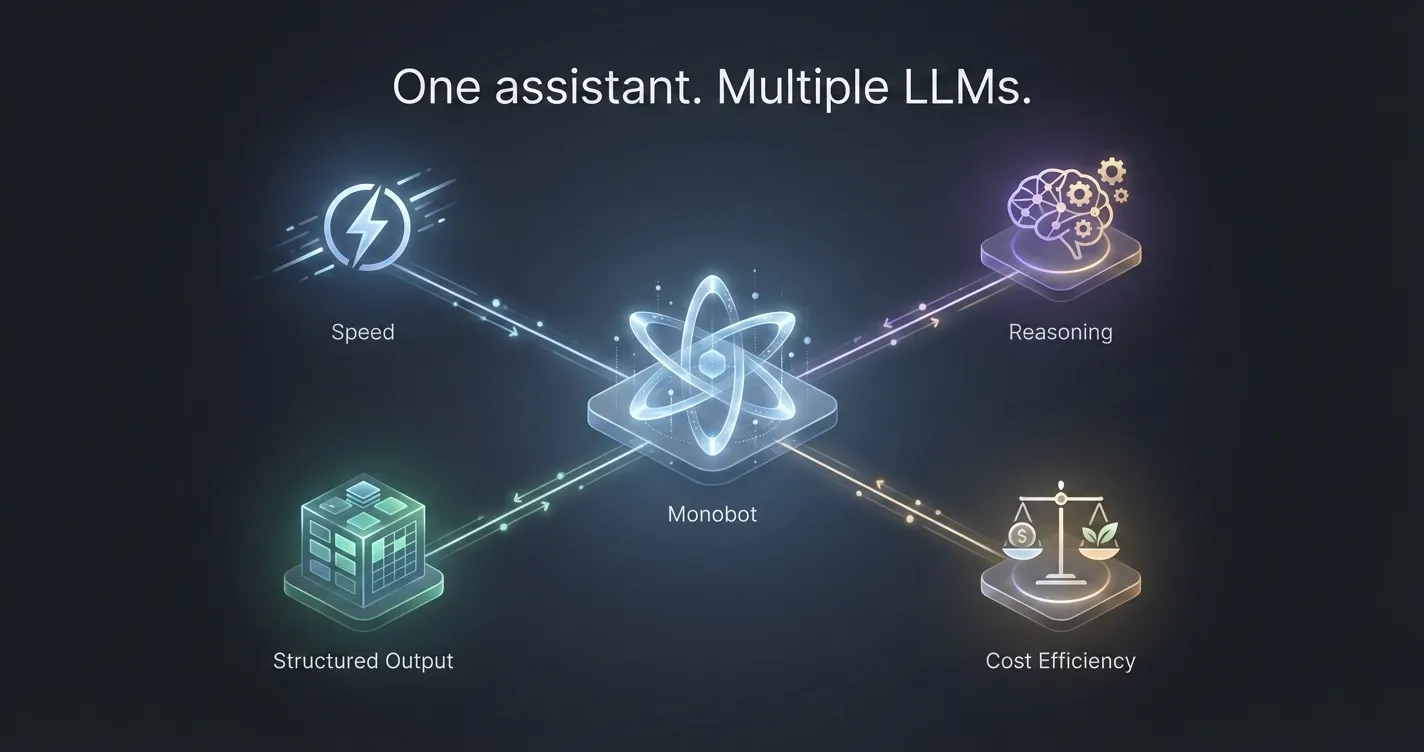
Different tasks require different strengths:
speed, reasoning depth, cost efficiency, multilingual support, or structured output.

That’s why Monobot is designed to work with multiple LLMs, selecting the right model for each specific job — instead of forcing everything through one.

One Model ≠ One Solution

LLMs vary significantly in how they perform:

  • Some are faster but less precise
  • Some reason deeply but are slower
  • Some are great at conversation, others at structured data
  • Some are cost-efficient at scale, others are premium

Using one model for all scenarios often leads to trade-offs:

  • higher costs
  • slower responses
  • lower accuracy in critical flows

In production environments, these trade-offs matter.

How Monobot Uses Multiple LLMs

Monobot is built as a model-agnostic platform, which means:

  • We are not locked into a single provider
  • Different models can be assigned to different tasks
  • Models can be swapped or updated without redesigning the system

This flexibility allows Monobot to adapt as models evolve — and they evolve fast.

Matching the Model to the Task

Here’s how multiple LLMs are typically used inside Monobot:

1. Conversational Flow & Voice Interactions

Some tasks prioritize:

  • low latency
  • natural dialogue
  • stable conversational tone

For these, Monobot can use models optimized for real-time interaction, especially in voice scenarios where delays break the experience.

2. Reasoning-Heavy or Decision-Based Tasks

Other scenarios require:

  • multi-step reasoning
  • intent disambiguation
  • complex logic validation

In these cases, Monobot can route requests to more advanced reasoning models, ensuring accuracy over speed.

3. Structured Outputs & Business Actions

When the assistant needs to:

  • extract structured data
  • validate inputs
  • trigger workflows
  • call APIs

The priority is consistency and reliability, not creativity.

Monobot assigns models that perform best with:

  • schema-based outputs
  • deterministic responses
  • strict formatting

4. Cost-Optimized High-Volume Requests

Not every interaction requires a top-tier model.

For:

  • repetitive questions
  • simple confirmations
  • status updates

Monobot can use lighter, more cost-efficient models, dramatically reducing operational costs at scale.

Why This Matters in Production

Using multiple LLMs is not about flexibility for developers —
it’s about stability, performance, and cost control for businesses.

With a multi-model approach, Monobot can:

  • reduce latency where speed matters
  • improve accuracy where mistakes are expensive
  • scale without exploding costs
  • avoid dependency on a single vendor
  • adapt instantly as better models appear

This is especially critical for voice assistants, customer support, and automation-heavy workflows.

Future-Proof by Design

The LLM landscape changes monthly.

New models appear.
Existing ones improve or decline.
Pricing shifts.
Capabilities evolve.

Monobot is designed so that the assistant stays stable even when models change.

Businesses don’t need to rebuild their logic every time the AI ecosystem moves forward — Monobot absorbs that complexity.

Final Thoughts

The future of AI assistants is not about choosing the best LLM.

It’s about building systems that can:

  • use the right model for the right task
  • evolve without breaking
  • stay efficient, accurate, and reliable in production

That’s why Monobot uses multiple LLMs — and why this approach matters far more than most people realize.

Conversational AI for Restaurants: Boost Efficiency & Sales

The restaurant industry has always been about customer experience, and in today’s digital world, staying ahead means embracing new technologies. One of the most exciting advancements in recent years is the rise of conversational AI chatbots. These smart assistants are changing the way restaurants interact with customers, handle reservations, and boost efficiency. If you’re in the food business, it’s time to see how an AI chatbot can give you a competitive edge.

Enhancing Customer Service with Conversational AI Chatbots

Good service is what keeps customers coming back. But what happens when your staff is too busy? This is where a conversational AI chatbot steps in. It can instantly handle customer inquiries, answer frequently asked questions, and provide menu recommendations. No more missed calls or delayed responses. Your virtual assistant works 24/7, ensuring no customer is left waiting.

For example, a diner might want to know if a restaurant offers vegan options. Instead of waiting on hold, they can simply type their query, and the chatbot provides an instant answer. This seamless experience builds trust and satisfaction, making customers more likely to return.

Streamlining Table Reservations

Gone are the days of manually taking down reservations over the phone. With a chatbot conversational AI, booking a table becomes effortless. Customers can check table availability, reserve their spot, and even modify their booking, all without human intervention.

Monobot, for instance, provides a perfect example of how AI can manage reservations efficiently. By integrating a chatbot into a restaurant’s website or app, diners can secure a table in seconds. This automation reduces workload for staff, minimizes errors, and ensures that reservations are never lost in the shuffle.

Revolutionizing Online Food Orders and Deliveries

Online ordering has become a staple in the restaurant industry, and AI-powered chatbots are taking it to the next level. Instead of navigating through multiple pages, customers can simply tell the chatbot what they want. Whether it’s ordering a pizza with extra cheese or customizing a meal, AI makes the process intuitive.

Some restaurants use chatbots to upsell and cross-sell menu items, suggesting add-ons like drinks or desserts. This helps increase the average order value while providing a personalized experience for the customer.

Managing Customer Feedback and Reviews

Online reviews can make or break a restaurant. AI chatbots help manage this crucial aspect by proactively collecting feedback. After a meal, a chatbot can ask customers about their experience, encouraging them to leave a review or provide direct feedback.

By addressing negative reviews quickly and thanking customers for positive ones, restaurants maintain a good reputation. Automated responses make this process fast and hassle-free, ensuring no feedback is ignored.

Reducing No-Shows with Automated Reminders

No-shows are a major problem for restaurants, leading to lost revenue and empty tables. AI chatbots can send automated reminders to customers about their upcoming reservations. A quick confirmation message reduces the chances of no-shows, giving restaurants more control over their seating arrangements.

In addition, AI can suggest alternative times if a customer cancels last minute, helping restaurants fill gaps efficiently. This level of automation makes sure that tables don’t sit empty while improving the overall guest experience.

Handling Multilingual Communication

Restaurants attract a diverse clientele, and not all customers speak the same language. AI chatbots can be programmed to communicate in multiple languages, ensuring that language barriers don’t hinder customer service. Whether a tourist wants to make a reservation or inquire about dietary options, AI ensures smooth communication.

Boosting Marketing and Engagement

Conversational AI chatbots aren’t just about handling inquiries. They can also be powerful marketing tools. By analyzing customer interactions, AI can identify preferences and send personalized offers or promotions. For example, a chatbot might remember that a customer frequently orders a Margherita pizza and send them a discount for their next order.

Chatbots can also engage customers through social media and websites, providing interactive experiences that keep people coming back. By integrating AI into marketing efforts, restaurants can build stronger relationships with their audience.

The Future of AI in Restaurants

With platforms like Monobot making AI implementation easy, the future of chatbots in the restaurant business looks promising. As technology advances, AI assistants will become even more sophisticated, offering voice interactions, enhanced personalization, and deeper integrations with restaurant management systems.

For restaurant owners, adopting AI isn’t just about staying trendy. It’s about staying relevant. Customers expect convenience, and businesses that leverage AI chatbots will have a clear advantage over those that rely solely on traditional methods.

Final Thoughts

Conversational AI chatbots are revolutionizing the restaurant industry. From handling reservations and orders to improving customer service and marketing, these digital assistants are making operations smoother and more efficient. If you want to keep your restaurant ahead of the curve, now is the time to embrace AI.

With solutions like Monobot, integrating AI into your restaurant is easier than ever. Whether you run a small café or a large chain, AI-powered chatbots can enhance customer interactions and boost your bottom line. The future of dining is digital. Are you ready to be part of it?