



TL;DR:
- FAQ automation uses AI to answer customer questions instantly and handles up to 60% of inquiries. It reduces costs from up to $12 per inquiry to below $0.50 and improves response times from hours to seconds. Proper implementation relies on real data, planned escalation, and ongoing knowledge updates to ensure accuracy and customer satisfaction.
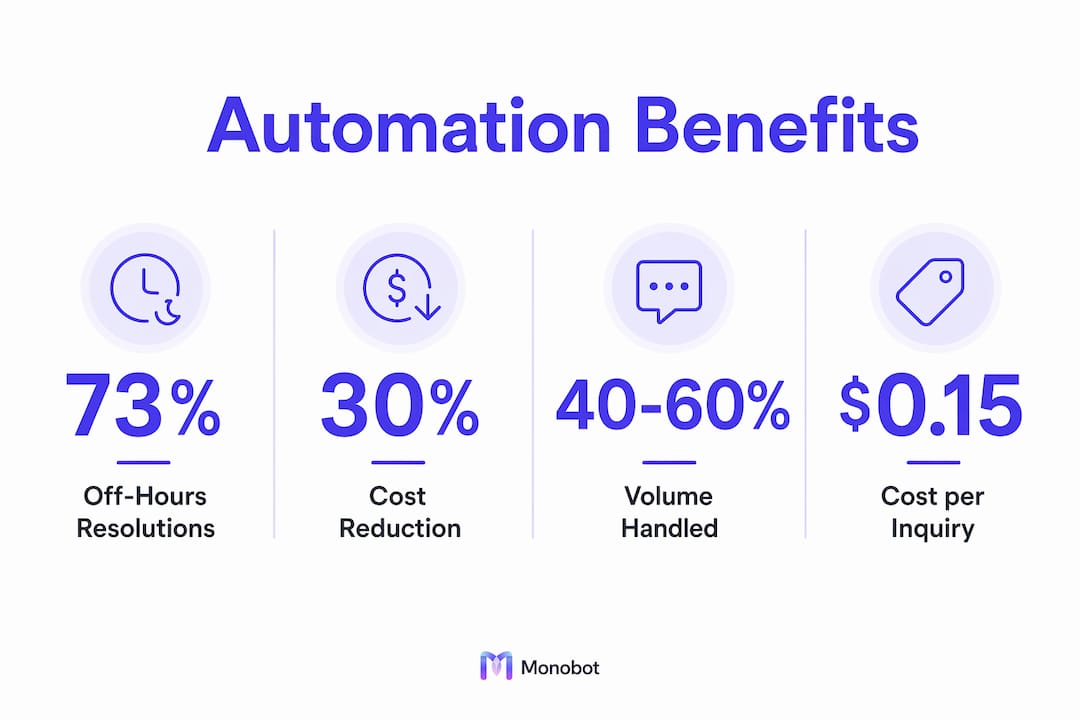
FAQ automation is defined as the use of AI-driven systems to answer common customer questions instantly, without requiring a live agent. Contact centers that automate FAQ handling resolve 40–60% of inbound inquiries automatically, cutting response time from hours to seconds. The cost impact is equally dramatic: manual handling costs $4.80–$12 per resolved inquiry, while automation brings that figure down to $0.15–$0.45. For contact center managers weighing why automate FAQ handling in contact centers is worth the investment, those numbers make the case before the conversation even starts.
Why automate FAQ handling in contact centers: the efficiency and cost case
Automating routine inquiries does more than cut costs. It fundamentally changes how your team spends its time. When AI handles the repetitive volume, your agents focus on the calls that actually require human judgment, empathy, and problem-solving.

FAQ automation solutions reduce average handling time on routine queries to near zero. A customer asking about store hours, return policies, or order status gets an answer in seconds rather than waiting in a queue. That speed improvement directly affects customer satisfaction scores and reduces call abandonment rates.
The cost reduction is not marginal. Automation cuts costs by around 30% on support operations overall, with the per-inquiry savings being even sharper on high-volume, low-complexity questions. That freed budget can go toward agent training, quality assurance, or technology upgrades that improve the complex interactions automation cannot handle.
| Metric | Manual handling | Automated handling |
|---|---|---|
| Cost per resolved inquiry | $4.80–$12.00 | $0.15–$0.45 |
| Average response time | Minutes to hours | Seconds |
| Inbound inquiry resolution rate | Varies by staffing | 40–60% automated |
| Agent availability for complex issues | Limited by volume | Significantly increased |
| Consistency of answers | Varies by agent | Uniform every time |
The table above shows what changes when you shift routine FAQ volume to AI. The biggest operational gain is not just cost. It is the reallocation of your most expensive resource, your agents, toward work that actually requires them.
Pro Tip: Track your top 20 inquiry types by volume before deploying automation. If more than half of them are factual, repeatable questions, you have a strong automation candidate list ready to go.
What are the most common pitfalls in FAQ automation implementation?
The most common mistake in FAQ automation is starting with a static FAQ page and treating it as a training source. Static FAQ pages fail because they use company-centric language that does not match how customers actually phrase their questions. A customer who asks “where’s my package?” will not find a match against a FAQ entry labeled “Shipment Tracking Information.”
Effective automation starts with real data. Leading automation setups analyze at least 90 days of raw support tickets, cluster them by customer intent rather than internal categories, and identify the top intents that cover 60% or more of total inquiry volume. That process produces a training set that reflects actual customer language, not internal documentation language.
The sequential steps for a sound implementation look like this:
- Export 90+ days of support tickets from your CRM or helpdesk platform.
- Cluster tickets by customer intent, not by department or product category.
- Score each intent cluster for automatability: Is the answer factual? Is it consistent? Does it require account access or human judgment?
- Build and train your AI on the top intents that are both high-volume and automatable.
- Set escalation triggers for queries that fall outside the trained intents or that contain emotional signals.
- Test with real customer phrasing before going live, not with internal test scripts.
- Review and update the knowledge base monthly as products, policies, and customer questions evolve.
Human escalation is not a fallback. It is a designed feature. Successful FAQ automation includes instant escalation triggers to live agents for complex, emotional, or novel queries. The AI hands over the full conversation context so the agent does not ask the customer to repeat themselves. That continuity is what separates a good automation experience from a frustrating one.
Pro Tip: Run a “language mismatch audit” before training your bot. Compare the exact words customers use in tickets against the words in your current FAQ documentation. Every gap is a place where your automation will fail to retrieve the right answer.
How does after-hours FAQ automation affect conversion rates?
After-hours inquiry handling is one of the most undervalued benefits of automating customer support. Most contact centers operate on fixed schedules. Customers do not. A prospect who visits your website at 10:00 PM and cannot get an answer to a basic product question will move on to the next option.
After-hours automation resolves up to 73% of off-hours inquiries without any human involvement. That figure represents a shift from 0% resolution during closed hours to near-majority coverage overnight. The revenue implication is direct: leads that previously went unanswered now receive an immediate, accurate response.
The conversion data reinforces this point. Bot engagement during off-hours yields 22% higher conversion than traditional web forms left without a response. A web form submission that waits until morning competes with every other option the customer explored overnight. An instant automated response keeps the conversation active.
Key after-hours benefits your center gains with automation:
- Lead capture without staffing costs: Inquiries are answered and qualified without adding overnight shifts.
- Consistent brand messaging: The AI delivers the same accurate answer at 2:00 AM as it does at 2:00 PM.
- Reduced lead loss: Customers who get an answer stay engaged. Those who do not, leave.
- Sales pipeline continuity: Qualified leads can be routed to your sales and lead generation workflow automatically, ready for agent follow-up in the morning.
The after-hours case is particularly compelling for contact centers serving multiple time zones or operating in e-commerce, healthcare, and financial services, where customer questions do not follow a 9-to-5 schedule.
How does AI-powered FAQ automation protect knowledge consistency?
Knowledge loss is a structural risk in any contact center that relies on manual FAQ handling. When an experienced agent leaves, they take their understanding of edge cases, product nuances, and escalation judgment with them. Manual FAQ handling risks major knowledge loss when experienced staff leave, resulting in inconsistent and unreliable information delivery to customers.
AI-powered systems solve this by operationalizing your knowledge base. The AI does not have good days and bad days. Every customer interaction handled by AI is consistent in tone, accuracy, and detail across all times and agents. That consistency protects your brand and reduces the risk of a customer receiving conflicting information depending on who they reach.
The practical benefits of AI-driven knowledge consistency include:
- Instant policy updates: Change a return policy or a product specification once in the knowledge base, and every subsequent customer interaction reflects the update immediately.
- Uniform tone and accuracy: No variation based on agent mood, experience level, or shift timing.
- Audit-ready records: Every interaction is logged, making compliance review and quality assurance straightforward.
- Reduced onboarding burden: New agents inherit a system that already knows the answers, rather than learning from colleagues who may themselves be inconsistent.
Platforms like Monobot treat the AI as a living knowledge system. The AI-powered workspace centralizes documentation, SOPs, and customer interaction data so that the knowledge base grows more accurate over time rather than degrading as staff turns over. That architecture is what makes automation a long-term asset rather than a one-time deployment.
Key Takeaways
Automating FAQ handling in contact centers reduces cost per inquiry by up to 96%, resolves 40–60% of inbound volume instantly, and protects knowledge consistency regardless of staff turnover.
| Point | Details |
|---|---|
| Cost reduction is measurable | Automation cuts cost per inquiry from up to $12 manually to as low as $0.15. |
| After-hours coverage drives revenue | Bot engagement after hours resolves 73% of inquiries and lifts conversion by 22%. |
| Training data must come from tickets | Build automation on 90+ days of real support tickets, not internal FAQ documents. |
| Escalation must be designed in | AI should hand off full conversation context to agents for complex or emotional queries. |
| Knowledge consistency is a business asset | AI delivers uniform, accurate answers every time, eliminating the risk of staff-driven inconsistency. |
The case for automation is stronger than most managers realize
Contact center managers tend to evaluate FAQ automation as a cost-cutting tool. That framing undersells it. The more significant value is structural: automation removes the ceiling on how many inquiries your center can handle without adding headcount.
What I have observed across contact center operations is that the resistance to automation usually comes from one of two places. Either managers worry that customers will reject bot interactions, or they underestimate how much of their current volume is genuinely automatable. Both concerns are addressable with data. When you map your top inquiry types and find that 50% or more are factual and repeatable, the automation case becomes hard to argue against.
The agent role argument also deserves more attention than it typically gets. Agents who spend their shifts answering the same 15 questions are not growing professionally, and they know it. Turnover in contact centers is high precisely because the work feels repetitive. Automation changes that equation. Agents handle the interactions that require real skill, and job satisfaction tends to follow.
The one caution I would offer is against treating automation as a set-and-forget deployment. Customer language evolves. Products change. Policies update. An automation system that is not reviewed and retrained regularly will drift out of alignment with actual customer needs, and the quality degradation will show up in your satisfaction scores before you catch it in your logs. Build a monthly review cycle into your automation program from day one. The technology is only as good as the knowledge you feed it.
— Alex
Monobot’s AI platform for contact center FAQ automation
Contact centers that are ready to move from manual FAQ handling to AI-driven automation need a platform built for that specific transition.
Monobot’s AI agent builder lets you deploy voice and chat agents that handle FAQ volume across every channel, without writing a single line of code. The integration hub connects your existing CRM, helpdesk, and communication tools so automation fits into your current workflow rather than replacing it. Real-time analytics give you visibility into resolution rates, escalation triggers, and customer satisfaction at the query level. For teams managing IT support volume specifically, Monobot’s IT helpdesk automation use case shows exactly how AI reduces ticket load while keeping complex issues in human hands. Schedule a demo to see it in action.
FAQ
What percentage of contact center inquiries can automation resolve?
Effective FAQ automation resolves 40–60% of inbound inquiries automatically. The exact percentage depends on how well the system is trained on real customer intent data.
How much does FAQ automation reduce cost per inquiry?
The cost per resolved inquiry drops from $4.80–$12 with manual handling to $0.15–$0.45 with automation. That reduction reflects both labor savings and the speed at which AI resolves high-volume, low-complexity questions.
Why do static FAQ pages fail as an automation foundation?
Static FAQ pages use company-centric language that does not match how customers phrase their questions. Automation trained on static pages produces poor retrieval results and low customer satisfaction.
What happens when a customer question is too complex for the bot?
Well-designed automation includes instant escalation triggers that transfer the customer and the full conversation context to a live agent. This prevents the customer from repeating themselves and maintains a continuous experience.
Does FAQ automation work outside of business hours?
Automation resolves up to 73% of after-hours inquiries without human involvement. Bot engagement during off-hours also produces 22% higher conversion rates compared to web forms left without a response.