



TL;DR:
- Call center chatbot training involves preparing AI assistants to interpret customer intent and automate responses. Proper data, escalation paths, and continuous feedback are essential for successful deployment and ongoing performance improvements. Treating training as an operational discipline maintains chatbot accuracy and customer trust over time.
Call center chatbot training is the process of preparing AI-powered virtual assistants to accurately interpret customer intent and automate responses at scale. 72% of contact centers plan to deploy in-call AI assistance within two years. That figure signals a fundamental shift: training is no longer about scripting fixed answers. It is about building AI systems that make real-time decisions alongside human agents. This call center chatbot training guide walks you through every stage, from knowledge base preparation to continuous improvement protocols, so your team deploys with confidence and your customers notice the difference.
What does a call center chatbot training guide cover?
A chatbot training program for contact centers covers four distinct phases: data preparation, intent modeling, conversation flow design, and live performance monitoring. Each phase builds on the last. Skip one and your chatbot will underperform in ways that are hard to diagnose after deployment.
The industry term for this process is conversational AI training, which encompasses both the technical configuration of a large language model (LLM) and the operational design of escalation paths, CRM integrations, and agent handoff workflows. The phrase “chatbot training” is widely used in practice, but understanding the full scope of conversational AI training helps you set realistic timelines and resource requirements.
Training data quality directly determines chatbot response quality. That means your training program is only as good as the data you feed it.
What prerequisites do you need before training a call center chatbot?
Preparation determines whether your chatbot launches with accuracy or spends its first months generating escalations. Three areas require attention before you write a single conversation flow.
Audit your knowledge base by customer intent
Most knowledge bases are organized around internal departments, not customer questions. Reorganize your content around intent clusters: billing inquiries, order status, account changes, technical issues, and complaints. Each cluster becomes a training category. This structure makes intent classification far more accurate during the modeling phase.
Collect and structure historical conversation data
Pull at least six months of support tickets, chat transcripts, and call recordings. Tag each interaction by topic, resolution type, and escalation reason. This data reveals the language patterns your customers actually use, including slang, abbreviations, and emotionally charged phrasing that rule-based systems miss entirely.

Set up platform integrations before training begins
Define handover conditions and CRM logging workflows before you build any conversation flows. This sequencing prevents the most common deployment failure: a chatbot that resolves issues but cannot write outcomes back to your CRM or transfer context to a live agent.
The core infrastructure checklist before training starts:
- CRM integration: bidirectional data sync so the chatbot reads customer history and writes interaction outcomes
- Ticketing system connection: automatic ticket creation for unresolved or escalated conversations
- Live agent handoff: defined trigger conditions and context transfer protocol
- Analytics dashboard: real-time visibility into intent match rates, escalation frequency, and resolution outcomes
Pro Tip: Map your top 20 escalation reasons from the past 90 days before configuring any intent categories. These scenarios represent your highest-risk training gaps and should be addressed first.
| Preparation Area | Key Action | Risk if Skipped |
|---|---|---|
| Knowledge base audit | Reorganize by customer intent clusters | Low intent match accuracy |
| Historical data collection | Tag transcripts by topic and resolution | Chatbot misses real language patterns |
| CRM integration | Configure bidirectional data sync | No record of chatbot interactions |
| Escalation path design | Define trigger conditions before flows | Customers stuck in dead-end loops |
How do you train a call center chatbot step by step?
A structured sequence prevents the two most common failures: over-engineering self-service flows before escalation paths are ready, and deploying without supervised testing on real conversation data.
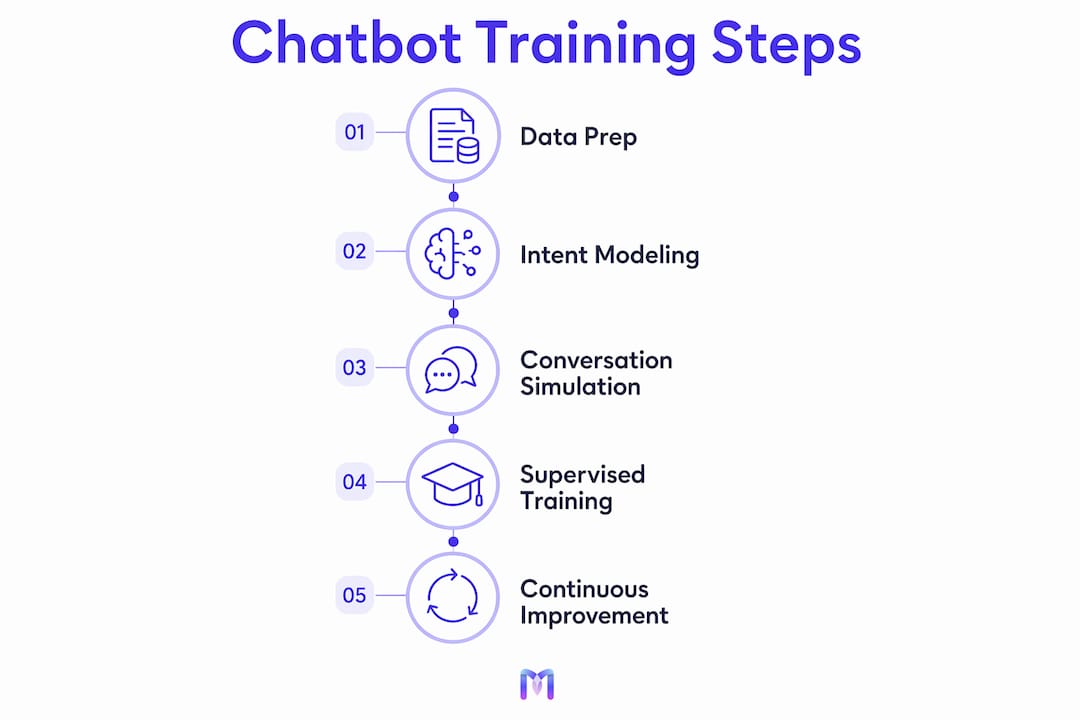
Follow this sequence:
-
Upload and structure training content. Import your reorganized knowledge base into your chatbot platform. Group content by intent category, not by document type. Label each entry with the customer question it answers.
-
Run supervised training on real transcripts. Feed historical chat and call transcripts into the intent classification model. Review the model’s predictions against known outcomes. Correct misclassifications manually and retrain. This cycle typically runs three to five times before accuracy stabilizes.
-
Build escalation paths first. Prioritize escalation path design over self-service dialogue construction. Define the exact conditions that trigger a handoff: sentiment threshold, topic type, failed resolution attempts, or explicit customer request.
-
Design conversation flows for self-service. Only after escalation paths are confirmed, build the dialogue trees for your top intent categories. Keep flows short. Customers abandon conversations that require more than three back-and-forth exchanges to reach a resolution.
-
Run scenario simulations. Simulation-based training using AI-generated scenarios improves agent readiness for handling complex, emotional calls. Apply the same principle to chatbot testing: simulate angry customers, confused first-time callers, and multi-issue requests before going live.
-
Deploy to a limited audience first. Route 10–20% of live traffic through the chatbot while monitoring intent match rates and escalation frequency in real time. Expand volume only after accuracy meets your defined threshold.
-
Establish a closed feedback loop. After launch, ongoing closed-loop training improves chatbot accuracy by incorporating agent feedback from escalations and incorrect responses. Schedule weekly reviews of flagged interactions and update training data accordingly.
The Monobot AI Agent Builder supports each of these steps with no-code configuration, built-in conversation simulators, and real-time analytics that surface intent gaps during supervised training.
Pro Tip: Never skip the supervised training cycle, even if your platform offers auto-training. Manual review of the first 200–300 classified interactions catches systematic errors that automated processes miss.
What are the best practices and common challenges in chatbot training?
The most common mistake in call center AI training is treating chatbot configuration as a one-time project. Chatbot performance degrades as customer language evolves, product offerings change, and new issue types emerge. Continuous maintenance is not optional.
The single biggest efficiency gain in chatbot training comes from reversing your design priorities. Most teams spend 80% of their time on self-service dialogue and 20% on escalation and integration workflows. The teams that deploy successfully do the opposite. Defining handoff conditions, CRM data transfer rules, and agent notification protocols first means your chatbot operates within a working system from day one, not a prototype that breaks at the edges.
Additional best practices that separate high-performing programs from average ones:
- Shift agent training from memorization to decision frameworks. Agents working alongside AI need a clear protocol for when to trust, edit, or override AI suggestions. A simple decision framework for handling AI outputs is more valuable than memorizing response scripts.
- Use real-time coaching and whisper prompts. During live calls, whisper prompts deliver suggested responses to agents without the customer hearing. This technique closes skill gaps faster than post-call review alone.
- Track first-contact resolution (FCR), not just containment. Containment measures whether the chatbot kept the customer in the automated flow. FCR measures whether the customer’s issue was actually resolved. These are different outcomes, and optimizing for containment alone produces frustrated customers who call back.
- Audit your knowledge base quarterly. Outdated content is the leading cause of inaccurate chatbot responses. Schedule a quarterly review that flags articles older than 90 days for verification.
For teams exploring how AI productivity gains translate into contact center efficiency, the pattern is consistent: structured training programs with defined feedback loops outperform ad hoc deployments by a wide margin.
How do you measure and improve chatbot training outcomes?
Measurement without a defined baseline produces noise, not insight. Before launch, record your current FCR rate, average handle time (AHT), CSAT score, and agent utilization. These four metrics form your performance baseline.
FCR, CSAT, AHT, and agent utilization are the key metrics for tracking chatbot training success and operational impact. Each metric answers a different question about your deployment.
| Metric | What It Measures | Training Implication |
|---|---|---|
| First-contact resolution (FCR) | Whether the issue was resolved in one interaction | Low FCR signals intent gaps or missing escalation paths |
| CSAT | Customer satisfaction with the interaction | Declining CSAT after automation indicates poor conversation design |
| Average handle time (AHT) | Time per interaction including chatbot and agent phases | Rising AHT suggests chatbot is creating work, not reducing it |
| Agent utilization | Percentage of agent capacity used on live interactions | Falling utilization confirms automation is absorbing routine volume |
Beyond the four core KPIs, tag every chatbot escalation with a root cause. Categories like “intent not recognized,” “policy question outside scope,” and “emotional escalation” each point to a different training fix. Intent gaps require new training data. Policy questions require knowledge base expansion. Emotional escalations require refined sentiment detection thresholds.
A staged agent training approach begins with fundamentals, moves to supervised practice, and finishes with independent live operation within 2–4 weeks. Apply the same staged model to chatbot performance reviews: weekly in the first month, biweekly in months two and three, then monthly once performance stabilizes.
Use Monobot’s Dashboard Insights to monitor intent match rates, escalation frequency, and CSAT trends in one view. Real-time analytics make it possible to catch performance drops within hours rather than weeks.
Key Takeaways
Effective call center chatbot training requires structured data preparation, escalation-first design, continuous feedback loops, and KPI-driven performance reviews to deliver lasting automation gains.
| Point | Details |
|---|---|
| Prepare data before configuring flows | Audit your knowledge base by customer intent and collect tagged historical transcripts first. |
| Design escalation paths before self-service | Define handoff conditions and CRM workflows before building any conversation flows. |
| Use supervised training cycles | Manually review intent classifications on real transcripts to catch systematic errors early. |
| Track FCR, not just containment | Resolution-focused KPIs reveal whether customers are actually helped, not just kept in the flow. |
| Maintain a closed feedback loop | Weekly escalation reviews and quarterly knowledge base audits keep chatbot accuracy current. |
Why most chatbot training projects stall in month two
I have watched well-funded contact center teams deploy chatbots that performed well in testing and fell apart within six weeks of going live. The pattern is almost always the same. The team invested heavily in conversation design and almost nothing in the feedback infrastructure that keeps the chatbot accurate after launch.
The uncomfortable truth is that chatbot training is not a project with an end date. It is an operational discipline. The teams that treat it as a one-time configuration task end up with a chatbot that erodes customer trust faster than no automation at all.
What actually works is treating the first 90 days post-launch as a supervised training period for both the chatbot and the agents working alongside it. Traditional training methods are not sufficient for modern AI-powered environments. Agents need immersive, scenario-based practice that mirrors the real complexity of AI-assisted calls. That means running simulations with emotionally charged scenarios, not just product knowledge quizzes.
My recommendation: assign one person the explicit role of chatbot training owner for the first six months. Their job is to review escalation tags weekly, update training data, and report KPI trends to the team. Without that ownership, the feedback loop never closes and performance drifts.
The teams that get this right build a competitive advantage that compounds. Every week of structured feedback makes the chatbot more accurate, which reduces agent load, which frees agents to handle genuinely complex interactions, which improves CSAT. That cycle is real and measurable. Start it on day one.
— Alex
How Monobot accelerates your chatbot training program
Building a call center chatbot from scratch takes months without the right platform. Monobot cuts that timeline significantly with its AI Agent Builder, which lets you create and customize AI voice and chat agents without writing code.
Monobot connects directly to your CRM, ticketing system, and live agent tools through its integration hub, so escalation paths and data transfer workflows are configured before your first conversation flow goes live. The Dashboard Insights feature tracks FCR, CSAT, AHT, and agent utilization in real time, giving your training team the data it needs to close performance gaps fast. Ready-to-use industry templates for healthcare, banking, retail, and logistics mean you start with a proven structure, not a blank canvas.
FAQ
What is call center chatbot training?
Call center chatbot training is the process of configuring an AI virtual assistant to accurately recognize customer intent and generate correct responses, using structured data, supervised learning cycles, and continuous feedback from live interactions.
How long does it take to train a call center chatbot?
Initial training and supervised testing typically takes 4–8 weeks. A staged approach, starting with fundamentals and moving to live operation, prevents overload and builds reliable decision-making within 2–4 weeks of supervised practice.
What data do you need to train a call center chatbot?
You need historical chat transcripts, support tickets, and call recordings tagged by topic, resolution type, and escalation reason. Training data quality directly determines how accurately the chatbot classifies customer intent.
What metrics measure chatbot training success?
FCR, CSAT, AHT, and agent utilization are the four core KPIs. Track each against your pre-deployment baseline to confirm the chatbot is resolving issues, not just containing conversations.
Why do chatbot training projects fail?
Most failures trace back to two causes: designing self-service flows before escalation paths are defined, and treating training as a one-time project rather than an ongoing operational process with weekly feedback reviews.