



Automating customer inquiry responses is defined as using AI agents, chatbots, autoresponders, and workflow rules to handle incoming customer questions without manual intervention for every message. The industry standard term for this practice is customer inquiry automation, and it sits at the core of modern automated customer support strategies. Done well, it cuts first reply time (FRT) from hours to seconds, increases your team’s capacity without adding headcount, and delivers consistent answers at any hour. The tools that make this possible range from simple response templates and SLA-based alerts to full AI response systems capable of understanding intent, routing tickets, and generating accurate replies in real time.
What do you need to automate customer inquiry responses?
Before you deploy a single bot or template, measure your current first reply time. Tracking FRT and applying service tooling to remove bottlenecks is the foundational step every practitioner recommends. Without a baseline, you cannot tell whether automation is actually working.
You also need the right infrastructure in place. Three categories of tools form the core stack:
- A helpdesk or service platform that supports workflow rules, ticket routing, and SLA timers. Examples include cloud-based helpdesk platforms with built-in automation engines.
- A CRM or order management system that your bots can query for accurate, account-specific data. Bots that cannot access real data produce wrong answers, and wrong answers destroy trust faster than slow ones.
- An AI agent builder or chatbot platform that handles natural language, connects to your data sources, and escalates to humans when needed. Monobot’s integration hub connects CRM, helpdesk, and order systems into a single automation layer.
The table below maps the three main feature categories you should evaluate in any automation tool:
| Feature category | What it does | Best suited for |
|---|---|---|
| Response templates and autoresponders | Sends pre-written replies instantly on trigger events | Acknowledgments, FAQs, status updates |
| Rule-based chatbots | Routes inquiries by keyword or menu selection | Structured, predictable query types |
| AI agents with LLM reasoning | Understands intent, generates contextual replies, escalates | Complex, varied, or high-volume inquiries |
SLA-based alerts are the connective tissue between these layers. They fire when a ticket approaches its response deadline, prompting either an automated reply or a human pickup. Without SLA alerts, automation gaps go unnoticed until a customer complains.
How to execute customer inquiry automation step by step
Effective automation follows a clear sequence. Skipping phases leads to the most common failure mode: a bot that handles 20% of queries poorly instead of 80% of queries well.
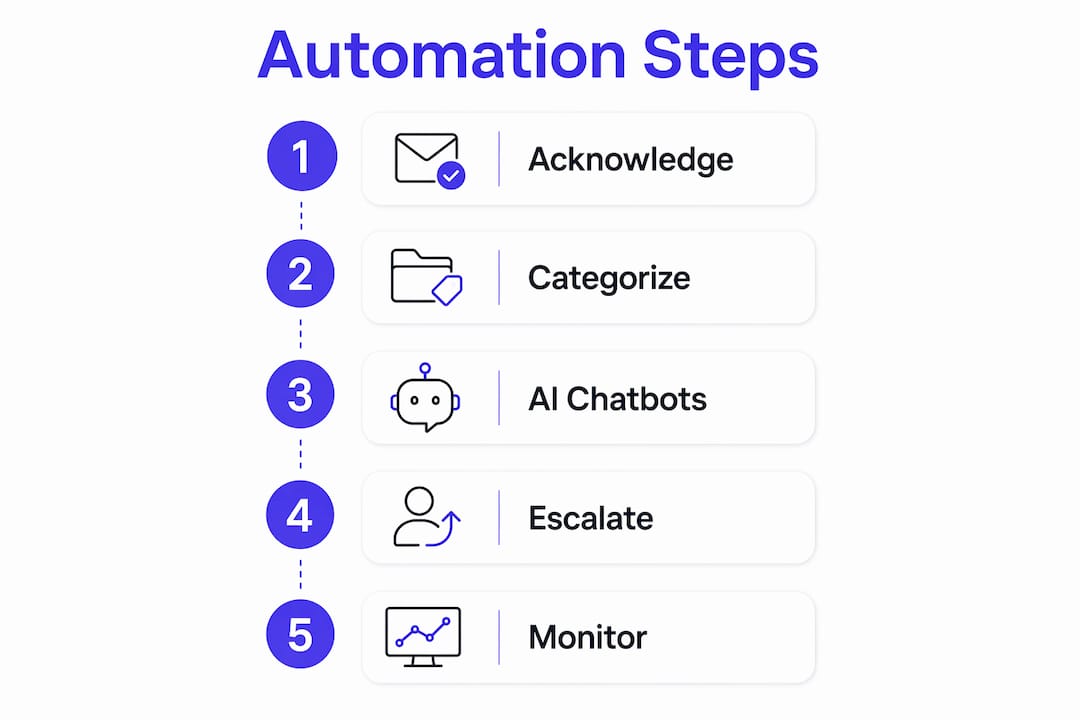
Phase 1: Set up instant acknowledgment autoresponders. Every inquiry should receive a confirmation within seconds of receipt. This message sets expectations: it tells the customer their request is logged, gives a reference number, and states a realistic resolution timeframe. Instant acknowledgment builds trust even before a real answer arrives.

Phase 2: Categorize and triage incoming inquiries. Smart triage uses intent detection or keyword rules to sort tickets by topic and urgency. A retail business might triage into: order status, returns, billing, and general questions. Each category routes to a different automation path or human queue.
Phase 3: Deploy AI chatbots for common queries. Automated FAQ responses, shipping status lookups, and appointment confirmations are ideal for AI handling. These queries are high volume, low complexity, and well-defined. An AI agent with access to your order system can answer “Where is my package?” accurately without any human involvement.
Phase 4: Route complex or account-specific inquiries to human agents. Eligibility decisions, complaints, and anything requiring judgment should escalate immediately. Configure automation to route all account-specific or eligibility queries to trusted systems or human agents. This protects customer trust and reduces the risk of bot errors on sensitive issues.
Phase 5: Monitor, measure, and tune. Automation is not a one-time setup. Weekly FRT tracking and SLA-based alerts create a control loop that continuously improves response quality and speed over time.
Pro Tip: Always give customers a visible, one-click path to a human agent. Customers who feel trapped in a bot loop abandon the interaction entirely. A clear escalation option reduces frustration and keeps the conversation in your channel.
What are common challenges in automating responses and how to fix them?
The biggest risk in customer inquiry automation is customer abandonment. 56% of U.S. consumers will abandon an automated system in under 3 minutes if bots fail to understand them or force them to repeat information. That statistic means more than half your customers will disengage before your bot resolves anything, if the bot experience is poor.
The root causes are predictable and fixable. Here are the most common problems and how to address each one:
- Bot misunderstanding intent. Train your AI on real customer transcripts, not hypothetical queries. Monobot’s AI analytics dashboard surfaces misunderstood intents directly from interaction logs so you can retrain on actual failure cases.
- Repeat information loops. If a customer already told the bot their order number, the human agent who picks up the escalation must see that context. Pass full conversation history on every handoff.
- Incorrect or unverified answers. Bots that generate responses from unverified sources produce errors. Connect your AI agent to authoritative data sources only: your CRM, order system, or knowledge base.
- No clear escalation path. Every automated flow needs an exit. A customer who cannot reach a human will leave a negative review, not a support ticket.
- Ignoring friction signals. Friction metrics from interaction transcripts identify exactly where customers drop off. Treat high drop-off points as system errors, not customer behavior problems.
Monitoring is not optional. Review your automation performance weekly, not quarterly. The teams that improve fastest treat every abandoned bot conversation as a bug report.
How to ensure compliance when automating customer inquiry responses
AI governance is not a legal checkbox. It is a design requirement. Treat AI governance controls as integral to system design from the start, not as an afterthought, to manage risks inherent in autonomous decision-making.
The NIST AI Risk Management Framework 1.0, published in January 2023, provides the most widely cited structure for governing AI systems. It organizes risk management into four functions: Govern, Map, Measure, and Manage. For customer-facing automation, this means defining who owns the AI system, mapping which decisions it makes autonomously, measuring its error rate and bias, and managing incidents when it fails.
“Automation affecting service access legally requires meaningful human intervention and audit trails to comply with GDPR Article 22 and similar regulations.”
GDPR Article 22 applies when automated decisions produce a significant negative effect on a customer without meaningful human involvement. If your bot denies a refund, blocks an account, or makes an eligibility decision, you need a documented human review process and a customer appeal path. This is not optional for businesses serving EU customers.
The FTC requires consumer-facing AI providers to monitor and mitigate potentially negative impacts of automation. That means testing your bot before launch, measuring its outputs after launch, and correcting problems promptly.
Pro Tip: Build an audit trail into every automated decision your system makes. Log the input, the AI output, and the final action taken. This protects you legally and gives you the data to improve the system over time.
Three non-negotiable governance practices for any automated customer support deployment:
- Define clear interrupt conditions: situations where the AI must stop and hand off to a human.
- Publish a plain-language disclosure that customers are interacting with an AI system.
- Review your automation’s decision logs monthly for patterns that suggest bias or systematic errors.
Key takeaways
Automating customer inquiry responses works best when you combine AI agents, SLA-based alerts, and clear human escalation paths built on a foundation of real performance data.
| Point | Details |
|---|---|
| Measure FRT first | Establish your baseline first reply time before deploying any automation tool. |
| Use three-layer automation | Combine autoresponders, rule-based routing, and AI agents to cover the full inquiry spectrum. |
| Escalate account-specific queries | Route eligibility and complaint queries to human agents to protect accuracy and trust. |
| Monitor friction weekly | Review interaction transcripts and drop-off points every week, not every quarter. |
| Build governance in from day one | Apply the NIST AI RMF and GDPR Article 22 requirements as design constraints, not post-launch fixes. |
What I’ve learned from building inquiry automation systems
The most common mistake I see is teams treating automation as a cost-cutting project rather than a customer experience project. They automate everything they can, measure deflection rate as the primary KPI, and then wonder why CSAT scores drop six months later.
The teams that get this right obsess over two things: intent accuracy and escalation speed. If your bot misunderstands a customer’s question, the damage is not just one bad interaction. That customer remembers the frustration and calls back with lower trust. Getting intent right requires training on real transcripts, not generic datasets. Monobot’s digital workspace gives your team direct access to interaction logs, which is exactly the data you need to retrain and improve.
The second thing I’ve learned is that SLA timers are underused. Most teams set them and forget them. The teams that actually improve their response times use SLA alerts as a feedback loop: when alerts fire frequently on a particular query type, that is a signal to build a better automated path for it. It is a continuous process, not a one-time configuration.
Finally, do not ignore the governance piece. I have seen businesses deploy AI bots that made eligibility decisions without any human review. That is a legal and reputational risk that no deflection rate improvement is worth. Build the audit trail and the escalation path before you go live, not after a complaint forces you to.
— Alex
Monobot’s AI agent builder for customer inquiry automation
Customer service teams that want to move from manual responses to full AI-driven automation need a platform that handles the entire workflow, from intent detection to human handoff.
Monobot’s AI Voice Agent Builder lets you build, deploy, and manage custom AI agents without writing code. You can configure escalation rules, connect your CRM and helpdesk through the integration hub, and monitor performance through real-time analytics. Monobot reports automating up to 80% of inbound calls and chats, which translates directly into faster first reply times and lower operational costs. Whether you are running a retail support team or a healthcare contact center, Monobot’s industry templates get you live quickly. Schedule a demo at monobot.ai to see the platform in action.
FAQ
What is first reply time and why does it matter for automation?
First reply time (FRT) is the time between a customer submitting an inquiry and receiving the first response. It is the primary metric for measuring whether your automated customer support is actually faster than manual handling.
How do AI chatbots handle customer inquiries differently from rule-based bots?
Rule-based bots follow fixed decision trees and match keywords. AI chatbots use large language models (LLMs) to understand intent and generate contextual replies, which makes them effective for varied or unpredictable query types.
What triggers GDPR Article 22 in automated customer service?
GDPR Article 22 applies when an automated system makes a decision that significantly affects a customer, such as denying a refund or blocking account access, without meaningful human involvement.
How quickly do customers abandon automated support systems?
56% of U.S. consumers abandon an automated system in under 3 minutes if the bot fails to understand them or forces them to repeat information.
What is the NIST AI Risk Management Framework?
The NIST AI Risk Management Framework 1.0 is a voluntary federal framework published in january 2023 that guides organizations in governing AI risk across four functions: Govern, Map, Measure, and Manage.