



TL;DR:
- AI-driven follow-up automation uses real-time behavioral signals to personalize engagement and replace fixed schedules. It improves response relevance, operational efficiency, and customer satisfaction by continuously adjusting content, timing, and channel choices. Successful implementation depends on clean data, CRM integration, and proper trigger setup.
AI-driven follow-up automation is defined as the use of artificial intelligence to dynamically select and execute the next customer engagement step based on real-time behavioral and contextual signals. Unlike traditional rule-based systems that fire messages on fixed schedules, this approach uses machine learning, natural language processing (NLP), and predictive analytics to personalize timing, channel, and content for each individual. For business professionals focused on customer engagement and service efficiency, understanding what is AI-driven follow-up automation is the difference between reactive outreach and genuinely responsive communication. Platforms like Monobot are built on exactly this foundation, applying AI decisioning to voice and chat interactions at scale.
What is AI-driven follow-up automation and how does it work?
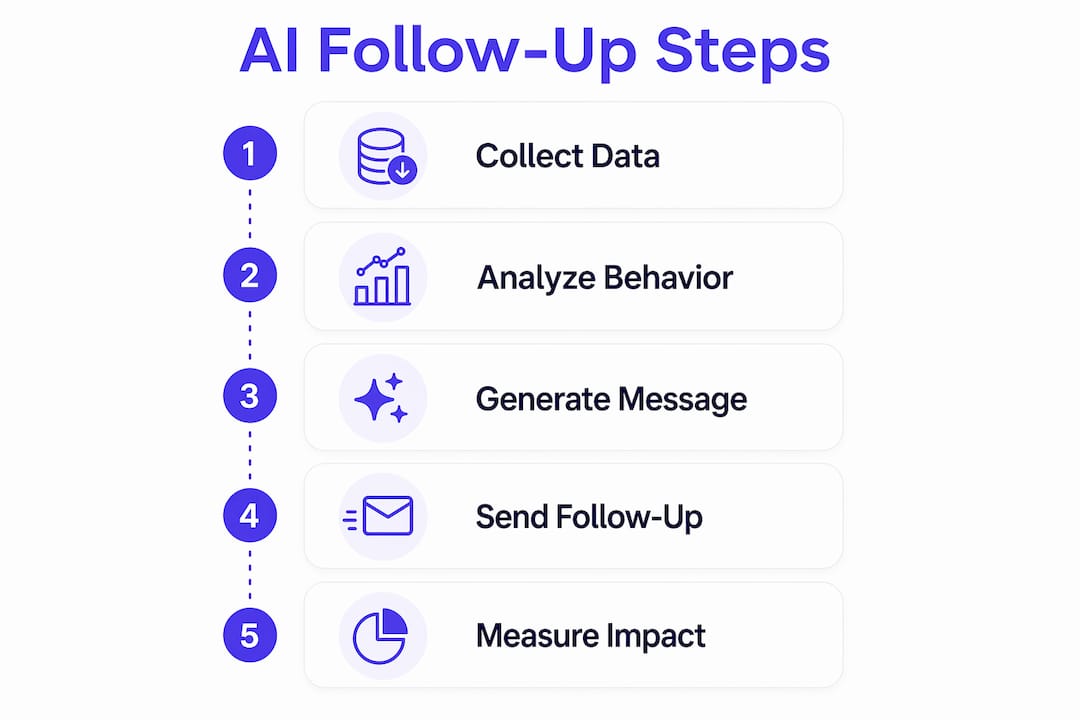
AI-driven follow-up automation replaces static if-then rules with continuous, individual-level decisioning. A traditional system might send a follow-up email three days after a purchase, regardless of what the customer did next. An AI-powered system reads behavioral signals in real time and decides whether to send an email, trigger a chat message, or wait entirely.
The core mechanism relies on three inputs: behavioral data (clicks, opens, session activity), context signals (purchase history, support ticket status, time zone), and engagement triggers (inactivity, cart abandonment, form submission). AI-driven automation decides and executes the next follow-up step based on these individual signals, replacing fixed rules entirely. That shift means every customer gets a response calibrated to their actual situation, not a generic sequence.
NLP adds another layer by generating or selecting message content that matches the customer’s tone, intent, and history. Predictive analytics then forecasts the best send time and channel for each person. The result is a follow-up system that learns from every interaction and adjusts future decisions accordingly.
Pro Tip: Map your existing customer touchpoints before configuring any AI follow-up system. AI decisioning is only as good as the behavioral data it receives. Clean, complete CRM records produce dramatically better outcomes than sparse or inconsistent data.
How does AI automate follow-up communication dynamically?
The mechanics behind dynamic follow-up automation go well beyond scheduling. AI email automation differs from traditional rule-based systems by making real-time decisions using machine learning, NLP, and predictive analytics to optimize timing, content, and send frequency. That means the system is not just sending messages. It is continuously evaluating whether to send at all.
Here is how the decisioning process works in practice:
- Behavioral triggers: A customer who opens three emails but never clicks gets a different follow-up than one who clicked but did not convert. The AI reads that distinction and adjusts the sequence.
- Channel optimization: If a customer consistently responds to SMS but ignores email, the system routes future follow-ups to the higher-performing channel automatically.
- Frequency capping: AI detects when a customer is disengaging and pauses or reduces outreach to prevent opt-outs, a capability traditional automation lacks entirely.
- Content variation: NLP selects or generates message variants based on prior interactions, making each follow-up feel contextually relevant rather than templated.
- Engagement-based pausing: Sequences fire based on real-time signals rather than fixed schedules, so a customer who resolves their issue mid-sequence stops receiving follow-ups immediately.
The practical effect is a system that behaves more like a skilled sales rep than a broadcast tool. It reads the room, adjusts its approach, and stops pushing when the customer signals they are done.
What are the main benefits of follow-up automation for businesses?
The business case for AI-powered follow-up automation is grounded in three measurable areas: personalization quality, operational efficiency, and customer satisfaction.

On personalization, continuous individual-level decisioning enables superior timing, channel choice, and message relevance compared to fixed-rule systems. Customers receive outreach that reflects their actual behavior, which increases response rates and reduces the friction that causes disengagement.
The operational gains are equally significant:
- Sales and support teams spend less time on manual follow-up tasks because the AI handles sequencing, timing, and content selection automatically.
- Lead qualification accelerates because the system identifies high-intent signals and escalates those contacts faster than any manual process could.
- Multi-channel consistency improves because a single AI layer coordinates email, SMS, chat, and voice outreach without requiring separate teams to manage each channel.
- AI automates post-interaction tasks like generating conversation summaries, follow-up emails, and updating tickets, freeing agents from administrative work entirely. That time savings compounds across every customer interaction in a day.
Customer satisfaction rises when follow-ups arrive at the right moment with relevant content. Customers who feel understood rather than spammed are more likely to convert, renew, or refer. The AI’s ability to detect disengagement and pause outreach also protects your sender reputation and reduces unsubscribe rates over time.
For improving user engagement at scale, AI follow-up automation provides a level of consistency that human teams simply cannot maintain manually across thousands of contacts simultaneously.
How does AI follow-up automation integrate with CRM and service workflows?
Integration is where AI follow-up automation moves from a marketing tool to an operational system. True automated follow-up spans the entire sales cycle and integrates CRM activity and workflow orchestration for multi-channel personalized engagement. That is a fundamentally different scope than basic email drip campaigns.
The integration architecture typically works across four layers:
| Integration Layer | Function | Business Impact |
|---|---|---|
| CRM data input | Feeds behavioral and status signals to AI decisioning | Personalizes follow-up based on real account history |
| After-contact automation | Generates summaries, emails, and ticket updates post-interaction | Eliminates manual admin work for agents |
| Workflow orchestration | Coordinates timing and channel across touchpoints | Delivers consistent multi-channel engagement |
| Analytics and reporting | Tracks sequence performance and customer response rates | Enables continuous improvement of follow-up strategies |
The reporting layer deserves particular attention. AI-generated follow-up artifacts must be pushed into CRM and helpdesk systems to ensure visibility and next-step tracking. Without that integration, AI outputs exist in isolation and cannot be measured, managed, or improved by your team.
Monobot’s integration hub connects AI follow-up workflows directly to CRM platforms, helpdesk tools, and analytics systems, ensuring every automated action is visible and reportable. That visibility is what separates a working automation program from one that runs silently and delivers no accountability.
Pro Tip: Configure your AI follow-up system to write summaries and next steps back into your CRM immediately after each interaction. Teams that skip this step lose the compounding value of AI insights because managers cannot see what the system is doing or why.
What steps should businesses take to implement AI follow-up automation?
Implementation success depends on preparation as much as technology selection. Businesses that rush to configure AI follow-up tools without clean data or defined workflows consistently underperform those that invest in setup first.
Follow these steps for a structured rollout:
- Audit your CRM data. AI decisioning requires complete, accurate behavioral records. Identify gaps in contact history, engagement data, and interaction logs before connecting any automation tool.
- Define your follow-up goals by segment. New leads, active customers, and lapsed accounts each need different sequences. Map the desired outcome for each segment before configuring triggers.
- Select AI follow-up tools with native CRM integration. Tools that require manual data exports create delays and errors. Prioritize platforms with direct API connections to your existing systems. Monobot’s automation flows are built for exactly this kind of direct integration.
- Configure behavioral triggers, not time-based ones. Replace “send after 3 days” logic with triggers based on actions: opened email, visited pricing page, submitted a form, or went silent for 7 days.
- Build content variants for each trigger scenario. AI selects the best variant, but you need to provide options. Create at least two to three message versions per trigger to give the system meaningful choices.
- Monitor performance weekly for the first 90 days. AI models improve with data, but early sequences often need manual adjustment. Track open rates, response rates, and conversion by segment.
Common pitfalls to avoid:
- Connecting AI tools to incomplete CRM data produces irrelevant follow-ups that damage customer relationships.
- Over-automating without frequency caps leads to contact fatigue and increased opt-out rates.
- Skipping the content variant step forces the AI to repeat identical messages, eliminating the personalization advantage entirely.
A practical marketing automation checklist can help smaller teams structure their rollout without missing critical configuration steps. The sales and lead generation use case from Monobot also shows how AI follow-up applies specifically to pipeline management and lead qualification workflows.
Key Takeaways
AI-driven follow-up automation delivers measurable gains in personalization, efficiency, and customer satisfaction only when behavioral data, CRM integration, and AI decisioning work together as a unified system.
| Point | Details |
|---|---|
| Core definition | AI follow-up automation uses real-time behavioral signals to select the right message, channel, and timing for each customer. |
| Dynamic vs. rule-based | AI continuously learns from engagement data; traditional automation fires on fixed schedules regardless of customer behavior. |
| CRM integration is required | AI-generated summaries and follow-ups must push into your CRM to be visible, measurable, and actionable by your team. |
| Implementation order matters | Clean data and defined trigger logic must come before tool configuration, not after. |
| Operational impact | Automating after-contact tasks like summaries and ticket updates frees agents to focus on complex, high-value interactions. |
Why AI follow-up automation changes more than just your outreach
Working closely with AI-powered customer engagement systems has shown me one consistent pattern: businesses underestimate how much of their follow-up problem is actually a timing problem. The message is often fine. The channel is often fine. But the follow-up arrives two days too late, or three messages too early, and the opportunity evaporates.
AI follow-up automation solves the timing problem in a way that no human process can replicate at scale. When a system reads engagement signals in real time and adjusts its next action accordingly, it catches customers at the exact moment they are most receptive. That is not a marginal improvement. It is a structural advantage.
What I find most underappreciated is the after-contact automation side. AI automating post-interaction tasks like summaries and ticket updates sounds administrative, but it has a direct effect on agent morale and capacity. When agents stop spending 20 minutes per call on documentation, they handle more interactions with better focus. The customer experience improves as a side effect of the operational change.
The next frontier is voice. AI voice agents that follow up proactively after a service interaction, confirm appointment details, or re-engage lapsed customers by phone are already in production at forward-thinking organizations. The businesses that treat voice as just another channel in their AI follow-up stack will have a significant advantage over those still treating it as a separate, manual process.
My recommendation: start with one segment, one trigger, and one channel. Get that working with full CRM integration and reporting. Then expand. The teams that try to automate everything at once almost always end up with a system nobody trusts.
— Alex
How Monobot powers AI-driven follow-up at scale
Monobot is built for businesses that need AI follow-up automation to work across voice, chat, and digital channels without requiring a development team to maintain it.
The AI agent builder lets you configure custom follow-up agents for specific use cases, from post-purchase confirmations to lead re-engagement sequences, without writing code. Monobot’s integration hub connects directly to your CRM and helpdesk platforms, so every AI-generated summary, follow-up message, and engagement signal flows back into your system of record automatically. Real-time dashboard analytics give your team full visibility into what the AI is doing and why. If you want to see how AI follow-up automation performs in your specific workflows, the Monobot platform is ready to deploy in minutes.
FAQ
What is AI-driven follow-up automation?
AI-driven follow-up automation is a system that uses machine learning, NLP, and predictive analytics to select and execute the next customer follow-up action based on real-time behavioral and contextual signals, replacing fixed-rule scheduling entirely.
How does AI follow-up differ from traditional email automation?
Traditional automation sends messages on fixed schedules regardless of customer behavior. AI follow-up reads engagement signals continuously and adjusts message, channel, timing, and frequency for each individual in real time.
What data does AI follow-up automation need to work?
AI follow-up systems require behavioral data such as email opens, clicks, and session activity, combined with CRM records including purchase history, support status, and contact preferences, to make accurate decisioning.
How does AI follow-up automation integrate with CRM systems?
AI follow-up tools connect to CRM platforms via API to pull behavioral signals as inputs and push outputs like conversation summaries, follow-up emails, and ticket updates back into the system of record for tracking and reporting.
What are the biggest risks when implementing AI follow-up automation?
The two most common risks are connecting AI tools to incomplete CRM data, which produces irrelevant outreach, and skipping frequency caps, which causes contact fatigue and increased opt-out rates across your customer base.