



Good conversational AI runs on ten interlocking principles: the Cooperative Principle (Grice’s maxims), disciplined turn-taking, predictability, a clearly defined role and goal, a consistent persona, active context and state management, concise and relevant turns, graceful error handling with real escalation paths, multimodal and accessibility awareness, and continuous testing. Skip any one of them and users notice within a few turns, whether they’re talking to a text-based chatbot or a voice agent handling a support call.
These aren’t abstract UX ideals. They’re the difference between a bot that resolves a return in ninety seconds and one that loops a customer through “I’m sorry, I didn’t understand that” until they hang up and call a human anyway. Each principle below comes with the reasoning behind it, a way to test whether you’ve actually applied it, and the deliverables that prove it to a product team.
- Cooperative Principle: judge every bot turn against Grice’s four maxims of quality, quantity, relevance, and manner.
- Turn-taking and predictability: structure exchanges so users always know whose turn it is and what’s expected next.
- Defined role and goal: give the assistant an explicit job so it never overreaches or under-delivers.
- Persona and tone: keep the voice consistent whether the bot is confirming an order or apologizing for a failure.
- Context and state management: track what’s been said so users never have to repeat themselves.
- Concise, relevant turns: cut every sentence that doesn’t move the task forward.
- Graceful error handling: admit uncertainty, offer alternatives, and hand off to a human when needed.
- Multimodal and accessibility design: adapt scripts for voice, text, and screen without breaking the experience.
- Testing and iteration: validate with sample dialogs, regression suites, and production metrics before and after launch.
Conversation design succeeds when a user forgets they’re following rules at all. The moment they notice the mechanics, whether it’s a stiff phrase, a lost thread, or a dead-end fallback, the design has failed even if the underlying model performed perfectly.
Key Takeaways
Reliable conversational AI comes from applying Grice’s Cooperative Principle, disciplined context management, and layered testing together, not any single tactic in isolation.
| Point | Details |
|---|---|
| Judge turns against Grice’s maxims | Check every bot response for Quality, Quantity, Relevance, and Manner before shipping it. |
| Preserve context through handoffs | Escalations must carry full conversation history so users never repeat themselves to a human agent. |
| Test across five layers | Cover functional, intent/NLU, flow retention, response quality, and fallback/escalation before release. |
| Design voice-first, then enhance | Build the least capable channel first and layer richer visuals on top for chat or screen experiences. |
| Build it inside Monobot | Monobot’s agent builder and dashboard analytics turn sample dialogs and KPIs into a live, monitored agent. |
Table of Contents
- What Is Conversation Design, and Why Does It Matter for AI Assistants?
- Use the Cooperative Principle to Judge Every Bot Reply
- The Core Principles Every Conversation Designer Applies
- How Do You Manage Context Across a Multi-Turn Conversation?
- Design for Graceful Failure, Not Just Success
- What Deliverables Prove a Conversation Design Actually Works?
- How Do You Test a Conversation Design Before Launch?
- Design for Voice, Text, and Screen Without Breaking the Experience
- A Practical Checklist for Writing Better Conversational Copy
- What Happens When a Contact Center Applies These Principles?
- How Monobot Turns These Principles Into a Working Build
- Sources
- FAQ
What Is Conversation Design, and Why Does It Matter for AI Assistants?
Conversation design is the discipline of scripting how an AI assistant listens, responds, and moves a task forward, combining language, interaction design, and product strategy into one coherent voice. It’s not copywriting bolted onto a chatbot after engineering finishes the backend. It’s a parallel discipline that shapes what the bot can do, not just what it says, and the Conversation Design Institute frames it explicitly as human-centric work built on user research and personas rather than whatever is easiest for the underlying model to generate.
Teams that treat conversation design as an afterthought usually ship assistants that technically function but frustrate the people using them. The difference shows up in a handful of recurring use cases:
- Support automation: resolving order status, billing questions, and returns without a queue.
- Task completion: booking appointments, rescheduling deliveries, or updating account details end-to-end.
- Accessibility: giving users who can’t navigate a visual interface a spoken or typed alternative that works just as well.
- Commerce: guiding a purchase decision through a few well-placed questions instead of a static FAQ.
- IT and HR automation: resetting passwords, checking PTO balances, or routing internal tickets without a help desk ticket queue.
Salesforce describes conversation design as a blend of language, psychology, and user experience work that product teams need to treat as its own function, not a subset of engineering or copy review. Microsoft’s conversational user experience guidance backs that framing with a practical case: assistants that stay efficient, accessible, and empathetic build the kind of trust that keeps users coming back to the conversational interface instead of abandoning it for a phone call.
Use the Cooperative Principle to Judge Every Bot Reply
Grice’s Cooperative Principle gives designers a fast, repeatable test for whether a bot’s response is actually good: measure it against the four maxims of Quality, Quantity, Relevance, and Manner. Philosopher Paul Grice developed this framework decades before chatbots existed, but it maps almost perfectly onto the failure modes that plague conversational AI today, and it remains a working design lens for dialogue systems.
Here’s what each maxim demands from an automated reply:
- Quality: say only what’s true and grounded in real data. A bot that guesses at an order status instead of saying “let me check” violates Quality, and that’s how hallucinated answers happen.
- Quantity: give exactly as much information as the turn needs, no more, no less. Dumping five paragraphs of policy text when the user asked a yes-or-no question is a Quantity failure.
- Relevance: stay on the user’s actual question. A support bot that answers a shipping question with a marketing pitch has broken Relevance.
- Manner: be clear, brief, and unambiguous. Jargon, double negatives, and vague hedging all violate Manner.
Poor dialog:
User: “Can I still cancel my order?”
Bot: “Orders may be subject to cancellation policies depending on various factors including shipping status, item type, and fulfillment center processing times. Please review our full cancellation policy for more information.”
Improved dialog:
User: “Can I still cancel my order?”
Bot: “Yes, your order hasn’t shipped yet, so I can cancel it now. Want me to go ahead?”
The second version answers Quality (grounded in real order status), Quantity (nothing extra), Relevance (directly answers the question), and Manner (plain, short, unambiguous).
Pro Tip: It’s fine to deliberately bend a maxim when there’s a good reason, like withholding a specific account balance for privacy until identity is verified. Just make sure the bot signals why it’s being less direct, so the user doesn’t read caution as evasion.
The Core Principles Every Conversation Designer Applies
Turn-taking, predictability, a defined role, and persona consistency form the structural skeleton underneath every well-designed exchange. Get these four right and even a limited bot feels competent. Get them wrong and no amount of clever copy saves the experience.
Turn-taking means the conversation has a clear rhythm: the bot asks, the user answers, the bot confirms. Google’s own conversation design guidance stresses designing turns that move the conversation forward rather than leaving the user unsure whether it’s their turn to speak or type. A measurable acceptance criterion here: in a test transcript, could a third party tell whose turn it is at every point without seeing timestamps? If not, redesign the prompts.
Predictability means the bot behaves consistently across similar inputs. If asking “what’s my balance” returns a number one time and a paragraph of disclaimers the next, users stop trusting it. Acceptance criterion: run the same intent through five paraphrased inputs and confirm the response structure stays stable.
Defined role and goal stops the bot from overreaching. A billing bot that starts offering medical advice because a user mentioned feeling stressed about a bill has no boundaries. Write the role down explicitly: “This assistant handles billing questions, payment plans, and dispute initiation. It does not offer financial or legal advice.” Acceptance criterion: does every response fall inside that stated scope?
Persona and tone ties it together. Voice attributes should read like a short brief: warm but efficient, plain-spoken, never sarcastic, always apologetic (not defensive) during errors. Quick dos and don’ts:
- Do use contractions (“I’ll,” “you’re”) to sound conversational, not robotic.
- Do stay consistent in formality level across every channel the bot serves.
- Don’t switch between “we” and “I” mid-conversation.
- Don’t let the persona joke during a failure or complaint; consistency matters more than personality there.
Pro Tip: Write your persona brief before you write a single sample dialog. Teams that reverse this order end up retrofitting tone onto scripts that were written in whatever voice felt natural to whoever typed them first, and the inconsistency shows.
How Do You Manage Context Across a Multi-Turn Conversation?
Track context explicitly, confirm it back to the user when ambiguity is possible, and define clear reset points so old context doesn’t bleed into a new task. That’s the entire rule, and most conversation failures trace back to breaking one part of it.
Common context patterns designers need to plan for:
- Pronoun resolution: if a user says “cancel it” after asking about an order, the bot needs to resolve “it” to that specific order, not ask “cancel what?”
- Follow-up intents: after confirming a delivery date, a user asking “can you make it earlier” should trigger a reschedule flow, not restart the conversation.
- References to screen content: in a visual interface, “the second one” needs to map to whatever the second item on screen actually is.
- Context reset points: switching from a billing question to a completely new topic should clear old slot values so the bot doesn’t drag stale data into the new task.
Google’s conversation design guidance specifically calls out designing for follow-up intents and screen references as a core requirement, not a nice-to-have for advanced builds. A quick checklist to test whether your state management actually holds up:
- Run a script with at least three consecutive turns referencing the same entity by pronoun only.
- Introduce a topic switch mid-conversation and confirm old slot values don’t leak into the new intent.
- Test a follow-up question that depends on information from two turns earlier, not just the immediately prior one.
Design for Graceful Failure, Not Just Success
The rule is simple: a bot should admit when it doesn’t know something and offer a real alternative or human handoff, never a guess dressed up as an answer. Generic fallback language like “I’m sorry, I didn’t understand that” is a design failure on its own, not a safety net, because it gives the user nothing to do next. Reliable recovery design preserves context during escalation rather than dumping the user into a queue that has no idea what they were trying to do.
A basic escalation playbook needs four components:
- Conditions to escalate: define the exact triggers, like three failed clarification attempts, an explicit request for a human, or a detected complaint/anger signal.
- Preserved context: everything the user has already said or confirmed passes to the human agent, so they never repeat themselves.
- User signals: track phrases like “talk to a person” or repeated negative responses as automatic override triggers.
- SLA expectations: tell the user what happens next, like “a specialist will call you within 15 minutes” instead of a vague “someone will follow up.”
Dos and don’ts for fallback language:
- Do say what the bot can’t do and immediately offer what it can: “I can’t process refunds over $500, but I can connect you with a specialist right now.”
- Do ask a targeted clarifying question instead of a generic one: “Did you mean your March or April invoice?” beats “Can you rephrase that?”
- Don’t repeat the same fallback phrase twice in a row; if the first clarification fails, escalate rather than repeating the same question.
- Don’t let the bot pretend confidence it doesn’t have. A hedge followed by a handoff builds more trust than a wrong answer delivered smoothly.
What Deliverables Prove a Conversation Design Actually Works?
Five artifacts separate a documented conversation design from a collection of prompts someone wrote in an afternoon: sample dialogs, high-level flow diagrams, an intent catalog, utterance examples, and a persona document. Each one validates a different failure point before engineering locks in the build.
- Sample dialogs show the ideal path and the recovery paths for a given task, and they’re the fastest way to catch awkward phrasing before it ships. Writing them by role-playing the conversation out loud and transcribing it catches problems that reading silently on a screen never surfaces.
- Flow diagrams abstract those dialogs into a map of decision points, showing where the conversation branches on user intent, missing information, or errors.
- Intent catalog lists every task the bot handles, with the boundaries of each intent spelled out so overlapping intents don’t collide.
- Utterance examples give the NLU model enough variation per intent (different phrasings, slang, misspellings) to generalize instead of memorizing exact phrases.
- Persona document anchors tone, vocabulary, and voice attributes so every writer on the team sounds like the same assistant.
A minimal sample dialog template looks like this:
Task: Reschedule a delivery
User: “Can I change my delivery to Thursday?”
Bot: “Sure, I can move your delivery to Thursday, March 12. Want me to confirm that?”
User: “Yes”
Bot: “Done. Your package now arrives Thursday, March 12.”
Before signing off on a conversation design, a product owner should be able to check: does a sample dialog exist for the happy path and at least one failure path? Does the flow diagram show every branch point? Does the intent catalog avoid overlapping scope? Practitioners who treat TTS performance as part of the copy itself often find they need SSML adjustments or full rewrites once a script is actually spoken aloud, which is exactly why role-play testing catches problems a silent read-through misses.
How Do You Test a Conversation Design Before Launch?
Conversation designs need testing across five layers: functional correctness, intent and NLU accuracy, conversational flow and context retention, response quality, and fallback/escalation/security handling. Skipping any layer means shipping blind to a specific failure mode, and the five-layer testing framework built for production teams recommends gating releases in continuous integration rather than relying on manual spot checks.
A pre-release testing checklist should include:
- Multiturn scripts that run at least five turns deep, checking that context survives topic switches.
- Adversarial probes that try to break the bot’s scope, like asking a billing bot for medical advice.
- Hallucination probes that check whether the bot invents information when it doesn’t have a grounded answer.
- Escalation verification confirming that context actually transfers when a handoff triggers.
Production teams typically start with a modest test suite, often in the range of a few dozen cases, and grow it every time a real conversation in production surfaces a failure the tests didn’t catch, which is a practice outlined in layered eval frameworks built for teams shipping conversational AI at scale.
| Metric | What It Measures | How to Measure It |
|---|---|---|
| Task success / containment rate | Percentage of conversations resolved without human handoff | Compare completed sessions against total sessions started |
| Intent accuracy | How often the NLU model correctly classifies user intent | Score against a labeled test set of real and paraphrased utterances |
| Fallback rate | How often the bot fails to understand or defaults to a generic response | Count fallback triggers per hundred conversations |
| Average turns to completion | Efficiency of the conversation design | Count turns from first message to task resolution |
| Hallucination rate | How often the bot states unsupported or fabricated information | Run grounded fact checks against known-correct answers in a probe set |
Chatbot testing needs to treat the model and the dialogue logic as one connected system, running multi-turn dialogue tests and channel-specific checks rather than testing intents in isolation from the flows that surround them. A lightweight, sustainable cadence looks like: role-play a new flow out loud, turn it into written sample dialogs, convert those into automated regression cases, then watch production monitoring for edge cases the test suite missed. Monobot’s own regression testing playbook walks through building that kind of automated suite for a live conversational agent.
Design for Voice, Text, and Screen Without Breaking the Experience
The rule for multimodal design is to build for the least capable channel first, usually voice-only, then layer in enhancements for richer channels like chat with visual cards or screen displays. A script that only works when there’s a screen to lean on will fail the moment it runs on a phone call, so voice sets the floor.
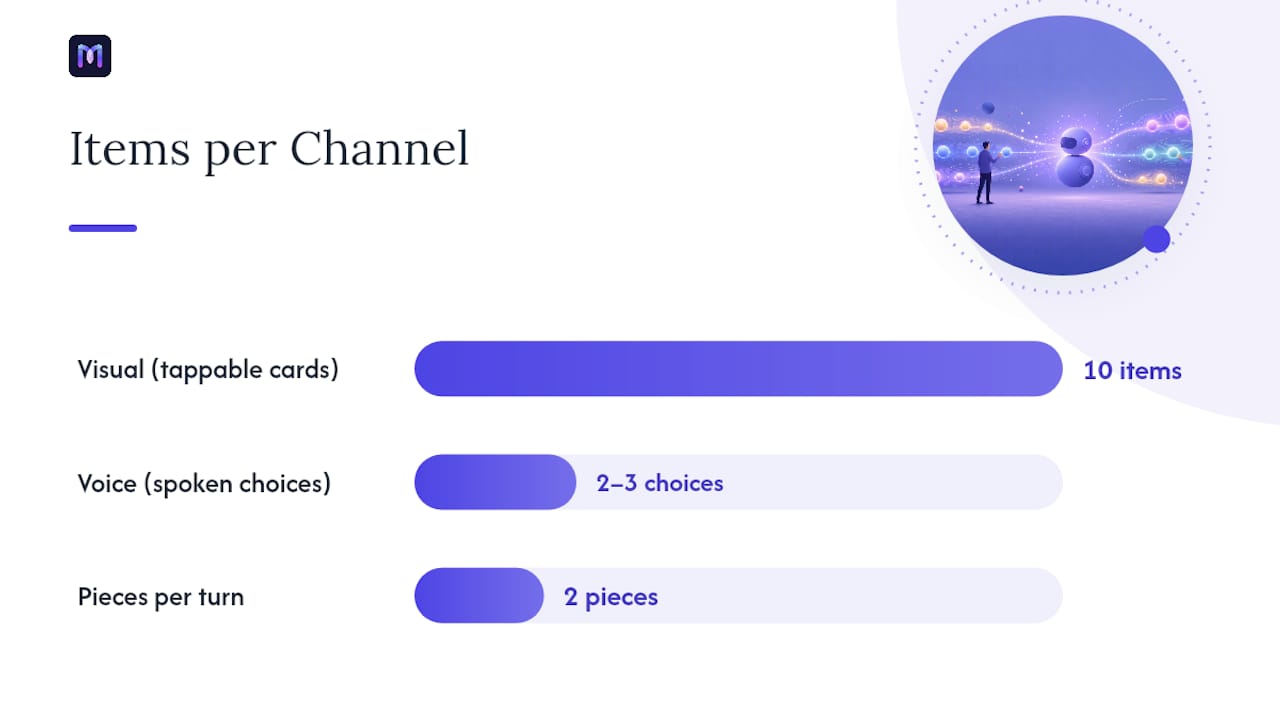
A visual interface can offload a list of ten options into tappable cards. A voice interface has to narrow that list to two or three spoken choices, because nobody can hold ten spoken options in working memory. What stays in the voice script regardless of channel: confirmations, clarifying questions, and anything time-sensitive. What moves to the screen when available: long lists, detailed comparisons, and anything with visual structure like a map or a table.
Accessibility checks that apply across both:
- Keep text-to-speech output readable: short sentences, no acronyms without expansion, natural pause points.
- Add alternative text for any visual element so screen reader users get the same information.
- Build in brief pauses before critical confirmations so users have time to interrupt or correct the bot.
- Use explicit confirmation patterns (“I heard $500, is that right?”) rather than assuming a single input was captured correctly.
- Minimize cognitive load by never asking for two pieces of information in a single turn if either one is complex.
Cultural and language considerations matter just as much. Idioms that make sense in one dialect confuse or alienate users in another, and pronunciation checks matter enormously for voice, since a bot mispronouncing a common local name or place erodes trust fast. Any conversation design meant to scale across regions needs a localization pass that goes beyond direct translation, checking tone, formality norms, and phrasing that a machine translation would get technically right but culturally wrong.
Pro Tip: Record your voice script being read aloud by a text-to-speech engine before you finalize it. Sentences that look fine on a page often sound stilted or ambiguous once spoken, and catching that in review is far cheaper than catching it after launch.
A Practical Checklist for Writing Better Conversational Copy
Every sentence a bot delivers should pass five checks: is it brief, is it relevant, is it in plain language, is it written in active voice, and is it free of jargon. Plain language reduces cognitive load for readers and listeners alike, and that holds just as true for a chatbot response as it does for a government form.
- Be brief. Cut every sentence that doesn’t move the task forward.
- Be relevant. Answer exactly what was asked before offering anything extra.
- Use plain language. Swap “utilize” for “use,” “prior to” for “before.”
- Prefer active voice. “We processed your refund” beats “Your refund has been processed.”
- Avoid jargon. If a support agent wouldn’t say it out loud to a customer, the bot shouldn’t either.
Quick dos and don’ts for scripting sessions:
- Do read every line out loud before finalizing it.
- Do write for the worst-case user, someone stressed, in a hurry, or unfamiliar with the product.
- Don’t pad responses with disclaimers unless legally required.
- Don’t reuse the exact same confirmation phrase for every intent; slight variation feels more human.
A quick editable template for a new sample dialog:
Intent: [name the task]
Trigger phrases: [3 to 5 real or paraphrased examples]
Happy path: [bot confirms and completes the task in 2 to 3 turns]
Failure path: [bot clarifies once, then escalates if still unresolved]
Persona check: [does this match the voice brief?]
What Happens When a Contact Center Applies These Principles?
Contact centers that rebuild their automated flows around the Cooperative Principle, explicit escalation rules, and regression testing typically see fewer repeat calls and faster containment, because the bot resolves more on the first attempt instead of forcing a callback. The mechanism is straightforward: clearer turns reduce misunderstood requests, and better escalation rules mean the human agents who do get involved already have full context instead of starting from zero.
A voice agent that hands off a frustrated caller to a human with zero context recreates the exact frustration it was built to prevent. Preserving that context is not a technical nicety; it’s the entire point of the handoff.
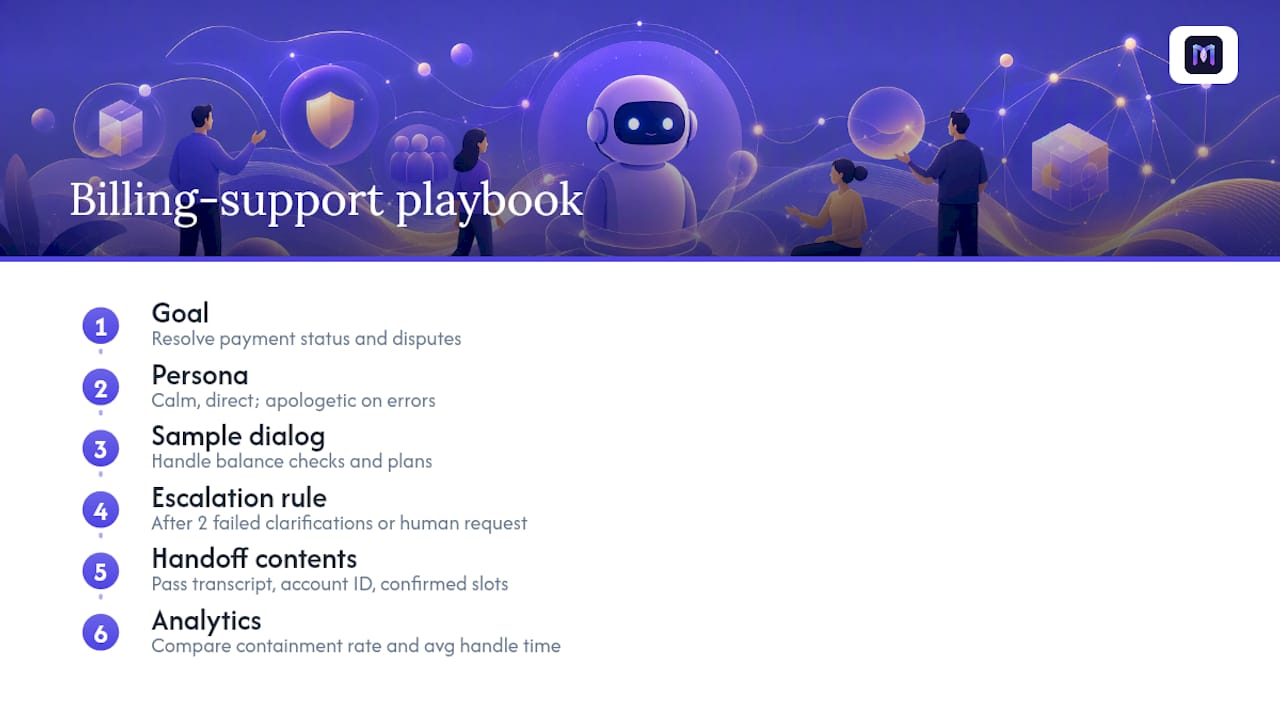
A compact playbook for a billing-support voice agent might look like this: the goal is resolving payment status and dispute initiation without a live agent; the persona is calm, direct, and apologetic during errors; the sample dialog handles balance checks and payment plan setup; the escalation rule triggers after two failed clarifications or any explicit request for a human, passing the full conversation transcript and account ID to the receiving agent. Analytics validate the change by comparing containment rate and average handle time before and after the redesign, the kind of before/after comparison that voice-analytics dashboards are built to surface.
Integration tips that matter in practice: preserve the full transcript and any confirmed slot values (account number, order ID, dispute reason) when handing off, so the human agent doesn’t ask the caller to repeat information already given. Time the handoff trigger to fire before user frustration peaks, not after three more failed attempts. Compare automation outcomes against a traditional queue setup the way this contact center automation guide breaks down, so the case for redesign has real numbers behind it, not just intuition.
A Designer’s View on What Actually Moves the Needle
The principle that gets ignored most often isn’t a fancy one, it’s plain iteration. Teams love debating persona adjectives and agonizing over whether the bot should say “Hi” or “Hello,” while skipping the unglamorous work of running the same test script twenty times with slightly different phrasing to see where it breaks. That’s where the real failures live, not in tone, but in the seams between turns.
Bring in a UX writer and a QA-minded engineer from day one, not sequentially. The writer catches tone problems the engineer won’t notice, and the engineer catches edge cases the writer won’t think to test, like what happens when a user answers a yes/no question with “maybe.” Waiting until a “design review” late in the process to combine those perspectives means expensive rework instead of a five-minute conversation early on.
Keep the process lightweight without cutting corners on rigor. A team doesn’t need a fifty-page conversation design document to ship something good, but it does need sample dialogs for every core flow, a documented escalation trigger, and at least one round of role-play testing before launch. The heaviness should live in the testing discipline, not in the paperwork.
How Monobot Turns These Principles Into a Working Build
Every principle in this guide, from sample dialogs to escalation rules to regression testing, maps directly onto features built into the Monobot platform, so designers don’t have to stitch together separate tools to go from script to production. Testing, analytics, and escalation aren’t afterthoughts bolted onto a chatbot; they’re the core of how Monobot agents get built and maintained.

The AI Voice Agent Builder lets you turn a sample dialog directly into a working flow without writing code, so the deliverables covered earlier in this guide become the actual build rather than documentation that gets ignored once engineering takes over. Dashboard Insights tracks the same KPIs discussed in the testing section (containment rate, fallback frequency, average turns to completion) so you can see exactly where a flow needs another round of iteration. Escalation rules preserve full conversation context when a handoff to a human agent triggers, which is the exact recovery pattern this guide argues is non-negotiable for graceful failure.
If you’re ready to move from sample dialogs to a live agent, start building on Monobot and see how quickly a well-designed conversation goes from script to production.
Sources
- Conversation Design — Google for Developers
- Conversational user experience (CUX) principles — Microsoft
FAQ
What are the 7 main principles of design?
Definitions vary by discipline, but for conversation design specifically, the core set covered in this guide is the Cooperative Principle, turn-taking, a defined role and goal, persona consistency, context management, graceful error handling, and continuous testing.
What are the 5 rules for a good conversation?
Applied to conversational AI, the strongest five rules are: be truthful and grounded (Quality), say only what’s needed (Quantity), stay on topic (Relevance), be clear and brief (Manner), and always leave the user with a next step, even during a failure.
What are the 5 basic design principles?
For conversational interfaces, the five most load-bearing principles are the Cooperative Principle, predictable behavior, consistent persona, active context tracking, and graceful fallback with human escalation.
How do I know if my conversation design is ready to launch?
Run it through all five testing layers, functional, intent/NLU, flow and context retention, response quality, and fallback/escalation, using a test suite of a few dozen cases that grows every time a production conversation surfaces a new failure. Platforms like Monobot build this kind of layered testing and analytics directly into the agent development workflow, so gaps show up before launch instead of after.