



TL;DR:
- Workflow automation AI agents are autonomous voice and chat assistants that complete customer tasks without human intervention. Starting with a focused 4-8 week pilot on high-volume, repetitive workflows can deliver rapid ROI and measurable improvements. Proper governance and observability are essential for building trustworthy, reliable AI agents that integrate seamlessly with existing enterprise systems.
Workflow automation AI agents are autonomous voice and chat assistants that combine AI reasoning with workflow orchestration to complete customer tasks end-to-end, without a human touching every step. The immediate next step for any business: run a 4–8 week pilot focused on one narrow, high-value task. Appointment scheduling, order status lookups, and lead qualification are all proven starting points.
- What they do: Perceive customer input (voice or text), reason over it using an LLM, execute actions against your systems (CRM, calendar, ticketing), and return a resolution.
- Why it matters: Monobot customers report automating a large portion of inbound contacts, which translates directly to lower cost per contact and faster resolution times.
- Recommended first move: Pick one workflow, define success criteria (automation rate, CSAT, cost per contact), and run a time-boxed pilot before scaling.
Table of Contents
- What are workflow automation AI agents, and how do they differ from RPA?
- Which customer workflows are worth automating first?
- What design principles make AI agents reliable and trustworthy?
- How do AI agents plug into your existing stack?
- How do you run a pilot and scale to production?
- How do you measure success and calculate ROI?
- Why Monobot accelerates transparent voice & chat automation
- Key Takeaways
- What most implementation guides get wrong about AI agents
- Monobot gets your pilot live in 4–8 weeks
- FAQ
What are workflow automation AI agents, and how do they differ from RPA?
Classic RPA follows rigid, rule-based scripts. It breaks the moment a screen layout changes or a customer sends an unstructured message. Intelligent Process Automation (IPA) extends RPA by adding AI capabilities — NLP, ML, and LLM reasoning — so agents can interpret unstructured data, make contextual decisions, and learn over time.
A production-grade voice or chat agent has four layers working together:
- Channel adapters: SIP gateways and ASR/TTS engines for voice; chat APIs (web widget, SMS, WhatsApp) for text.
- Orchestration/flow engine: Routes events, manages conversation state, and triggers downstream actions.
- AI reasoning layer: An LLM (or fine-tuned model) that interprets intent, generates responses, and decides which tool to call next.
- Integrations and memory: CRM, ticketing, knowledge base (RAG), billing systems, and analytics sinks.
Observability is not optional. Every agent step — tool calls, inputs, outputs, reasoning traces — must land in an audit log. Without step-level tracing, debugging a misfired agent response takes hours instead of minutes.
Which customer workflows are worth automating first?
The highest-ROI targets share a common trait: they are high-volume, repetitive, and well-defined enough that a wrong answer is immediately detectable.
- Appointment scheduling: Reads availability from a calendar API, books the slot, and sends a confirmation. Reduces inbound call volume and eliminates scheduling errors.
- Order and shipment status: Queries an OMS or logistics API and reads back status in natural language. Deflects a large share of “where is my order?” contacts.
- Lead qualification: Asks discovery questions, scores the lead against defined criteria, and routes qualified prospects to a sales rep or CRM pipeline.
- Billing inquiries: Looks up account balance, last payment, and due date. Handles the majority of billing contacts without agent involvement.
- IT/HR helpdesk triage: Collects issue details, checks a knowledge base, resolves common requests (password resets, PTO balance), and escalates complex tickets.
- Proactive outbound follow-ups: Triggers post-appointment reminders, payment nudges, or satisfaction surveys via voice or chat.
Well-designed AI-driven follow-up automation can lift contact resolution rates while cutting the manual effort of outbound campaigns. A realistic pilot target: 60–70% automation rate on a single, well-scoped workflow within the first eight weeks, with CSAT holding flat or improving as resolution speed increases.
What design principles make AI agents reliable and trustworthy?
IPA initiatives require business–IT partnership, not just an IT ticket. Governance starts before the first line of configuration.
Core design principles:
- Transparency first: Every agent decision must be inspectable. Step-level reasoning visibility lets your team catch logic errors before customers do.
- Hybrid architecture: Combine deterministic rules (hard-coded eligibility checks, compliance gates) with probabilistic LLM reasoning. Neither alone is sufficient for production.
- Human-in-the-loop checkpoints: Define the conditions that trigger a live agent transfer — sentiment threshold, topic type, or confidence score below a set floor.
- Rate limits and retries: Cap API calls per session, add exponential backoff on failures, and set a maximum retry count before escalating.
Governance checklist:
- Data access rules: which systems the agent can read vs. write
- Approval flows for high-risk actions (refunds, account changes)
- Role ownership: business SME owns the conversation design; IT owns the integration layer
- Logging and audit trails covering every session, tool call, and escalation
Pro Tip: Place manual approval nodes immediately upstream of any action that modifies customer data or triggers a financial transaction. Instrument step-by-step reasoning logs from day one — retrofitting observability after a production incident is far more expensive than building it in.
How do AI agents plug into your existing stack?
High-quality data and enterprise connectivity are prerequisites. An agent that cannot reliably read your CRM will hallucinate account details, and that destroys customer trust fast.

Voice channel: SIP trunk or CPaaS provider → ASR (speech-to-text) → agent orchestration → TTS (text-to-speech) → SIP response. Latency under 500ms end-to-end is the target for natural-sounding voice.
Chat channel: Web widget, SMS gateway, or messaging API → webhook → agent orchestration → response payload.
Orchestration patterns: Single-agent flows handle one task per session. Multi-agent choreography routes between specialized sub-agents (e.g., a billing agent hands off to a scheduling agent mid-conversation). Both patterns need a fallback node that transfers to a human agent cleanly, preserving full conversation context.
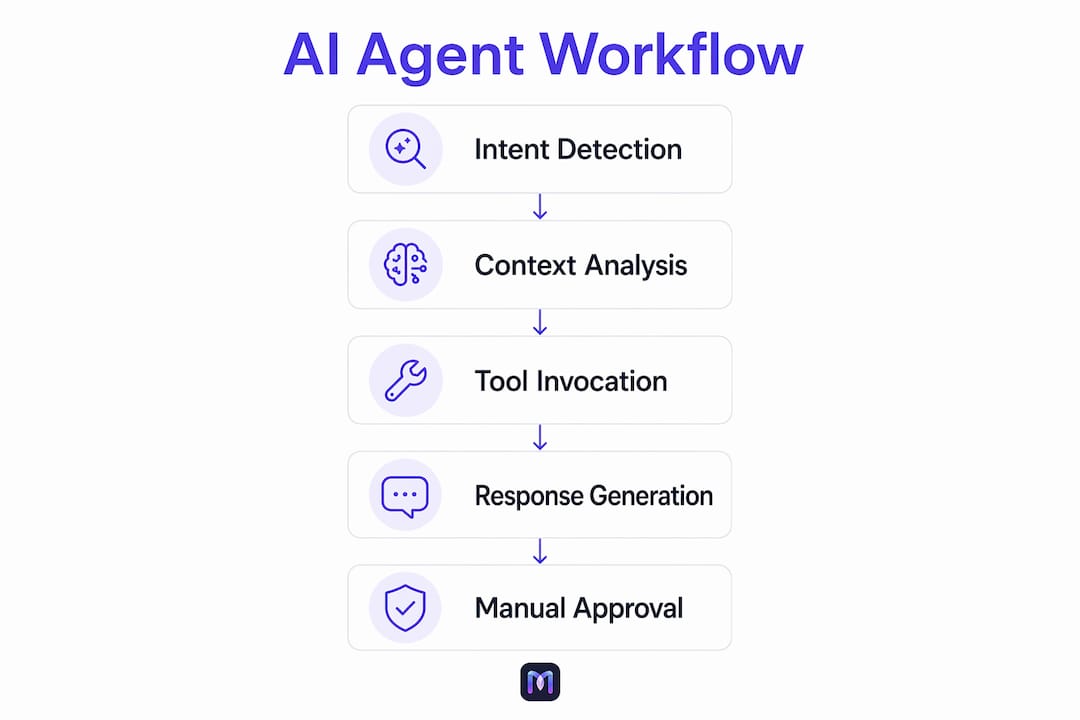
Mixing deterministic logic with agentic reasoning and adding manual approval steps prevents runaway loops and unintended actions in production.
| System | Integration Priority | Typical Auth Pattern |
|---|---|---|
| CRM (Salesforce, HubSpot) | High | OAuth |
| Ticketing (Zendesk, ServiceNow) | High | API key / OAuth |
| Calendar / scheduling | High | OAuth |
| Knowledge base / vector store (RAG) | Medium | API key |
| Billing / ERP | Medium | OAuth / mTLS |
| Analytics sink | Medium | Webhook / API key |
| Outbound messaging (SMS, email) | Low–Medium | API key |
How do you run a pilot and scale to production?
Start with narrow, well-defined tasks — not entire end-to-end processes. Scope creep is the most common reason pilots stall.
- Discovery (Week 1): Map the target workflow, collect sample transcripts, define KPIs, and identify integration owners.
- Prototype (Weeks 1–2): Build the conversation flow, connect to a sandbox CRM, and run internal test calls.
- Prompt engineering and testing (Weeks 2–4): Refine prompts against real edge cases, run fallback tests, and measure latency. Use automated prompt engineering techniques to version and iterate prompts systematically.
- Pilot configuration (Weeks 4–6): Connect production integrations, set up audit logs, and run A/B traffic split (10–20% to agent, remainder to human agents).
- Production hardening (Weeks 6–8): Address failure modes surfaced in pilot, tune confidence thresholds, and document escalation paths.
- Scale and continuous improvement: Expand to additional use cases, add channels, and schedule monthly prompt reviews.
Cost drivers to budget for: LLM and ASR/TTS API spend per contact, integration engineering time, data cleanup (poor CRM data quality adds weeks), and compliance review. Controlling API costs by filtering and compressing text before model calls, caching repeated lookups, and tracking token usage per flow keeps spend predictable as volume grows.
Testing checklist before go-live:
- Edge-case scenarios (partial information, ambiguous requests, angry tone)
- Fallback and escalation path tests
- Latency and load tests at 2x expected peak volume
- A/B test design with a defined success metric and minimum sample size
How do you measure success and calculate ROI?
Primary metrics: automation rate, containment rate, first-contact resolution (FCR), CSAT/NPS delta, average handle time (AHT) reduction, and cost per contact.
Secondary telemetry: per-session latency, error and fallback rates, and token/API spend per contact. The Monobot dashboard surfaces these in real time, so you can catch a degrading flow before it affects CSAT at scale.
The ROI example calculates savings and payback period based on pilot performance data and costs, illustrating potential automation benefits without specifying exact figures.
Run a simple A/B test: route a portion of contacts to the agent and the remainder to human agents, hold all other variables constant, and compare FCR and CSAT after several weeks of data collection to decide on production rollout.
Why Monobot accelerates transparent voice & chat automation
Monobot is built specifically for customer-facing voice and chat automation, which means the platform’s defaults align with production requirements rather than requiring you to bolt them on later.
- AI voice agent builder: Configure voice agents with STT, TTS, and LLM settings in a low-code interface. No telephony expertise required to get a working prototype.
- Automation flows and templates: Industry-specific templates for healthcare, banking, retail, logistics, and HR mean your pilot starts from a tested baseline, not a blank canvas.
- Real-time analytics: Live dashboards show automation rate, escalation triggers, and per-session cost as calls happen, not the next morning.
- Agent assist: When a contact escalates to a human agent, Monobot surfaces real-time suggestions and full conversation context, so the handoff is invisible to the customer.
- Audit logs and flow tracing: Every step of every agent execution is logged with its tool call, input, and output — the observability layer that governance teams require.
Monobot claims to automate up to 80% of inbound contacts across its customer base. Deployment can start within minutes using pre-built templates, and the agent productivity gains extend to human agents through real-time assist features.
Key Takeaways
Workflow automation AI agents deliver measurable ROI fastest when you start narrow, instrument everything, and treat governance as a design input rather than an afterthought.
| Point | Details |
|---|---|
| Start with one workflow | Pick appointment scheduling, order status, or lead qualification for your first pilot. |
| Define KPIs before you build | Set automation rate, FCR, and CSAT targets before configuring a single flow. |
| Observability is non-negotiable | Audit logs and step tracing must be in place from day one to debug and maintain trust. |
| Budget for data cleanup | Poor CRM data quality is the most common cause of pilot delays and agent errors. |
| Monobot as your pilot platform | Monobot’s industry templates, real-time analytics, and audit logs cut time-to-pilot significantly. |
What most implementation guides get wrong about AI agents
The conventional wisdom says “start with automation, add governance later.” That sequence is backwards, and it causes most of the production failures you hear about.
Governance is not a compliance checkbox. It is the mechanism that keeps an agent from confidently booking a customer into a slot that does not exist, or issuing a refund it was never authorized to approve. The teams that get this right treat their agent’s decision logic the same way a software engineer treats code: versioned, reviewed, and tested before it touches production traffic.
The other underestimated challenge is data quality. An agent is only as reliable as the CRM records it reads. Dirty data does not just cause wrong answers — it causes confident wrong answers, which are far more damaging to customer trust than a simple “I don’t know.” Budget a full week of data cleanup into every pilot plan, and you will recover that time in debugging hours saved.
Finally, do not skip the weekly agent review routine. Prompt drift is real: a flow that performs well in week two can degrade by week six as edge cases accumulate and the LLM’s behavior shifts with model updates. A 30-minute weekly review of escalation logs and low-confidence sessions catches regressions before customers notice them.
Monobot gets your pilot live in 4–8 weeks
Cutting your cost per contact by automating the majority of inbound voice and chat contacts is achievable in a single pilot cycle. Monobot’s pre-built industry templates, low-code flow builder, and built-in audit logs remove the setup overhead that typically stretches pilots to six months.

A standard Monobot pilot covers use-case selection, integration checklist, prompt tuning, governance setup, and a KPI baseline with an A/B test plan. At week four, you have live automation rate and CSAT data. At week eight, you have a production-ready agent and a clear expansion roadmap. Roles required are minimal: one business SME, one integration engineer, and a Monobot onboarding specialist.
The AI Agent Builder is where your pilot starts. Configure your first voice or chat agent, connect your CRM, and run your first test call — all without writing a line of code. Ready to see what 80% automation looks like for your contact volume? Schedule a demo and get a scoped pilot plan within 48 hours.
FAQ
What are workflow automation AI agents?
Workflow automation AI agents are autonomous voice or chat assistants that combine LLM reasoning with workflow orchestration to complete customer tasks — such as scheduling, order lookups, or lead qualification — without human involvement at each step.
How long does a typical AI agent pilot take?
A focused pilot on one well-defined workflow typically runs 4–8 weeks, covering prototype, integration, testing, and an A/B traffic split to measure automation rate and CSAT impact.
How is an AI agent different from a basic chatbot?
A basic chatbot follows a fixed decision tree. An AI agent perceives intent, reasons over context, calls external tools (CRM, calendar, ticketing), and adapts its response based on live data — making it capable of completing tasks, not just answering questions.
What metrics should I track in a voice or chat agent pilot?
Track automation rate, containment rate, first-contact resolution (FCR), CSAT delta, average handle time reduction, and cost per contact as primary metrics, plus per-session latency and fallback rate as operational signals.
Can Monobot handle both voice and chat automation?
Yes. Monobot’s platform supports AI voice agents with STT/TTS configuration and chat agents across web, SMS, and messaging channels, with shared analytics, audit logs, and agent assist features across both modalities.