


An IT helpdesk chatbot handles routine support requests directly in chat, creating and triaging tickets automatically and escalating to a human agent whenever a request needs judgment or approval. Deployed in Microsoft Teams, Slack, or a self-service portal and connected to your ticketing system, a well-configured bot typically resolves or deflects a meaningful share of Tier 0 and Tier 1 requests, password resets and access questions especially, before a human ever sees the ticket.
TL;DR:
- Automated remediation, such as password resets, can save significant time when integrated with the bot’s capabilities within approved guardrails, but sensitive access requests should always escalate to humans with full context.
- Proper intent recognition, knowledge-base retrieval, and real-time ticket creation are essential for the chatbot to accurately understand requests and effectively reduce manual workload.
- A staged deployment over four to six weeks, focusing initially on Tier 0 and Tier 1 tasks, helps identify issues early and ensures the bot’s knowledge base remains current and reliable.
- Connecting the chatbot to existing ITSM platforms, directory systems, and knowledge sources ensures seamless ticket sync, secure actions, and accessible support information.
- Key success metrics include ticket deflection rate, mean time to resolve, and cost per ticket, which should be measured in your own pilot with real ticket data to validate performance.
Table of Contents
- What Core Features Should an IT Support Chatbot Have?
- How Does a Support Ticket Move From Chat to Resolution?
- Where Should Your Chatbot Live and What Must It Connect To?
- Which KPIs Prove the Chatbot Is Working?
- What Does a Realistic Deployment Timeline Look Like?
- What Goes Wrong When Teams Deploy Too Fast?
- How Does Monobot Handle These Requirements in Practice?
- Should You Build This In House or Buy a Platform?
- Ready to Pilot an IT Helpdesk Chatbot?
- Sources
- FAQ
What Core Features Should an IT Support Chatbot Have?
Not every chatbot on the market does the same job. Before you commit budget to one, check that it covers the fundamentals that separate a genuinely useful IT support chatbot from a glorified FAQ widget.
At minimum, look for intent recognition paired with knowledge-base retrieval, so the bot understands what someone is actually asking and pulls the right article instead of a generic response. From there, it needs to create tickets on its own, populate fields like category, priority, and affected system, then route them to the correct queue.
The harder question is automated remediation. A password reset chatbot that can trigger the reset itself, inside approved guardrails, saves far more time than one that just links to instructions. But not every action belongs to the bot. Access requests touching sensitive systems should hand off to a human, with full context and an audit trail attached, not a cold transfer.
- Intent detection and knowledge-base retrieval tuned to IT vocabulary
- Native ticket creation with auto-filled fields and routing logic
- Self-service remediation for low-risk tasks like password resets
- Human handoff that preserves conversation history and context
- Multi-channel presence across Teams, Slack, and a web portal, with multilingual support for distributed teams
Pro Tip: Test a candidate chatbot on your five messiest real tickets from the past month, not a demo script. That’s the fastest way to see whether its intent detection holds up outside a controlled pitch.
How Does a Support Ticket Move From Chat to Resolution?
A helpdesk automation solution earns its keep in the sequence between “I can’t log in” and a closed ticket. Microsoft’s Copilot Scenario Library breaks the core IT helpdesk agent tasks into a handful of repeatable jobs: creating an agent, answering policy questions, checking ticket status, connecting to a human, and updating support documentation. In practice, the flow looks like this:
- A user types their problem into chat. The bot runs intent detection against your knowledge base first, not your ticketing system.
- If there’s a matching KB article, it answers directly or walks the user through guided steps.
- If not, it creates a ticket, filling category, priority, device, and location fields automatically so an agent doesn’t start from zero.
- For status checks, it queries the ticketing system live rather than guessing, which matters more than it sounds since stale status answers erode trust fast.
- When a request needs approval (a software install, an access grant), the bot pauses and routes to a human instead of acting unilaterally.
- Every interaction, including what the bot decided and why, gets logged for compliance and for retraining the model later.
That last step matters more than most teams realize during a pilot. Without a clean log of decisions, you can’t tell later whether the bot is getting smarter or just getting away with more.
Where Should Your Chatbot Live and What Must It Connect To?
Placement decides adoption more than almost any other design choice. A service desk chatbot buried in a separate portal gets ignored; one sitting inside Teams or Slack, where employees already work, gets used because it removes a step rather than adding one.
Beyond the chat surface, connections determine whether the bot is actually useful or just conversational:
- ITSM and ticketing platforms, so tickets created in chat sync in real time with whatever system your agents already work in
- Directory and identity systems like Active Directory or Azure AD, which give the bot the user context it needs to act safely, following the integration and governance patterns in Microsoft’s Cloud Adoption Framework
- Device management sources, useful for triaging hardware issues without asking the user to describe their own machine
- Knowledge sources such as Confluence or internal runbooks, ideally kept in continuous sync rather than manually refreshed
- APIs and connectors with clear security boundaries, since every new integration is also a new attack surface
Which KPIs Prove the Chatbot Is Working?
Vendor pitches love round numbers. Your leadership will want your own. Gartner recommends anchoring evaluation to three metrics: ticket deflection rate, mean time to resolve, and agent productivity, because each one answers a different question leadership will ask.
Ticket deflection rate tells you what share of requests never reached a human agent. Mean time to resolve (MTTR) tells you whether the tickets that do reach a human get closed faster because the bot pre-filled context. First-contact resolution (FCR) tells you whether the answer given, human or bot, actually solved the problem the first time. Add agent time saved and cost per ticket, and you have a dashboard leadership can actually act on.
Vendor pages routinely advertise high automatic resolution rates and 24/7 coverage as standard capability claims, but those figures come from each vendor’s own deployments and vary widely by ticket mix and knowledge-base quality. Treat any deflection percentage in a sales deck as a hypothesis to test, not a number to plan around.
That’s exactly why Forrester pushes total economic impact modeling over marketing figures: pilot the bot on your own ticket volume for four to six weeks, measure deflection against your own baseline, and report that number, not the vendor’s, to leadership on a monthly cadence. Real-time dashboard analytics make that reporting far less manual.
What Does a Realistic Deployment Timeline Look Like?
Rolling out a chatbot for IT services in stages beats a big-bang launch nearly every time, because it lets you catch bad automation before it touches a thousand employees instead of after.
- Weeks 0 to 2, discovery. Inventory every knowledge source you have, map your top ten ticket categories by volume, and define the three or four success metrics you’ll actually report on later.
- Weeks 2 to 6, pilot. Scope the bot to Tier 0 and Tier 1 tasks only: password resets, status checks, common software questions. Connect one chat channel and your ticketing system, then configure escalation rules for anything outside scope.
- Training and validation, ongoing through the pilot. Seed the knowledge base with real examples, run synthetic test conversations to catch gaps, and track both deflection and false positives, meaning cases where the bot answered confidently but wrongly.
- Governance, built in from day one. Require explicit approval workflows for sensitive actions, log everything for audit, and put a change-control process around who can edit the bot’s knowledge sources.
- Month 2 and beyond, scale. Expand channels, add ticket categories gradually, refresh the knowledge base on a set schedule, and keep a feedback loop running between agents and whoever owns the bot.
Pro Tip: Assign one person as the bot’s knowledge-base owner before launch, not after. Chatbots that drift out of date because nobody owns the content are the single most common reason pilots quietly stall.
What Goes Wrong When Teams Deploy Too Fast?
Most failed rollouts share the same handful of causes, and every one of them is preventable if you catch it during the pilot rather than after a bad headline in an all-hands meeting.
- Over-automating sensitive actions. Password resets are usually safe to automate; access grants to production systems rarely are. Require human approval for anything with real blast radius.
- A poorly curated knowledge base. A bot pulling from outdated or conflicting articles will confidently give wrong answers, and confident wrong answers are worse than no answer.
- Skipping observability. Log every action, track false-positive rates, and review a sample of transcripts weekly, especially in the first month.
- Bad conversational design. Users need an obvious, always-available path to a human, phrased plainly, not buried three menus deep.
- Loose security boundaries. Enforce tenant isolation and least-privilege access so the bot can only touch what it’s explicitly permitted to.
How Does Monobot Handle These Requirements in Practice?
Monobot’s IT helpdesk automation is built around the same principles this guide has walked through: a non-coding agent builder that lets IT teams configure workflows without engineering support, multi-channel deployment across chat surfaces, and integrations that keep ticket data and knowledge sources in sync rather than siloed.
When you’re evaluating it, or any platform, in a demo, push past the pitch and ask for specifics:
- What percentage of inbound chats the platform actually automates end-to-end, not just “handles”
- Whether real-time agent assist surfaces suggested responses and context to human agents mid-conversation
- Whether audit logs capture every automated action, including the ones that didn’t need escalation
- What industry-specific templates exist for IT use cases versus generic customer service scripts
On the procurement side, validate time-to-first-reply during your pilot, confirm which connectors are pre-built versus custom work, and check what admin controls exist for approval workflows before you sign anything. The agent builder feature set is worth walking through directly with your own ticket categories loaded, not a sample dataset.
Should You Build This In House or Buy a Platform?
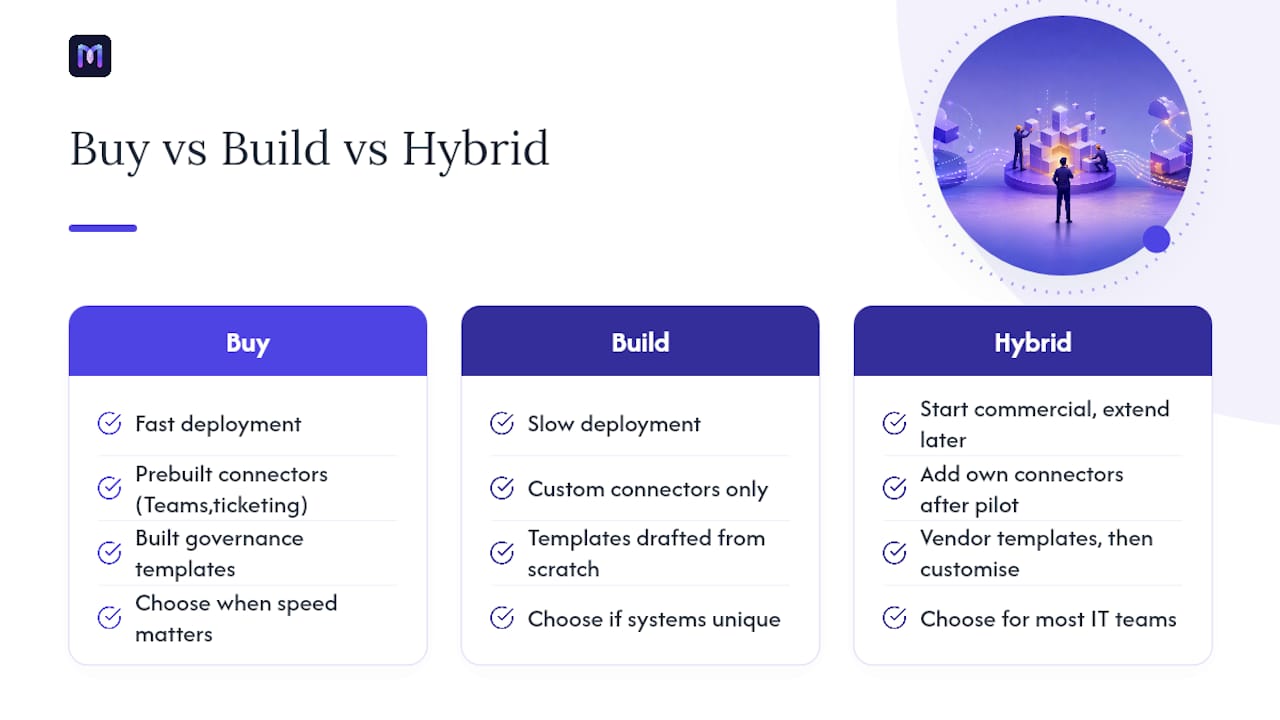
Buying makes sense when speed matters, when you need prebuilt connectors to Teams or your ticketing system, or when you want governance templates already built rather than drafted from scratch. Building makes sense only if your systems are genuinely unique or you need full on-premises control that no vendor offers.
For most IT teams, the practical middle ground works best: start with a commercial platform to get channels, integrations, and escalation rules running in weeks, then extend it with your own connectors once you know exactly where the gaps are. Building that layer first, before you’ve piloted anything, usually means building the wrong thing.
— Alex
Ready to Pilot an IT Helpdesk Chatbot?
If you’re ready to move from research to a real pilot, scope it tight: pick one or two chat channels, your top five ticket types by volume, and three KPIs you’ll actually report, deflection rate, MTTR, and cost per ticket are a solid starting set. That scope is small enough to launch in weeks and large enough to prove real impact.

When you sit down for a live demo, ask pointed questions rather than watching a script: which connectors are pre-built versus custom, how audit logs capture every automated action, what approval flows exist for sensitive requests, and what time-to-value you should realistically expect based on your ticket volume. Monobot’s IT helpdesk platform is built to answer those questions directly, with a non-coding agent builder that lets your team configure workflows without waiting on a development sprint. Start a pilot conversation and bring your own ticket data to the table.
Sources
- IT scenario: IT helpdesk agent (Copilot Scenario Library)
- Cloud Adoption Framework | Microsoft Azure
- Gartner
- Forrester
FAQ
Which AI Is Best for Technical Support?
There’s no single best AI for every helpdesk. The right choice depends on your ticket volume, your existing ITSM stack, and how much automated remediation, not just answers, you need; platforms like Monobot are built specifically to handle IT-specific workflows including ticket creation and password reset automation.
What Are the Best Chatbots for IT Customer Support?
The best IT support chatbots combine intent recognition, native ticket creation, and safe automated remediation with a clear human handoff path. Look for platforms offering multi-channel deployment across Teams and Slack plus real-time analytics to track deflection and resolution time.
Can I Use ChatGPT for IT Customer Support?
General-purpose models like ChatGPT can answer common IT questions but lack native ticketing integration, audit logging, and the governance controls a helpdesk automation solution needs for sensitive actions. Purpose-built IT helpdesk chatbots connect directly to your ITSM system and directory services in ways general chat models don’t.
How Long Does It Take to Deploy an IT Helpdesk Chatbot?
A focused pilot covering one or two channels and your top ticket categories typically takes two to six weeks to configure and validate. Full production scale-up, including knowledge-base refresh cycles and governance workflows, generally follows over the next month or two.
What Ticket Types Should a Chatbot Handle First?
Start with high-volume, low-risk requests: password resets, ticket status checks, and common software questions. These are the tasks the Copilot Scenario Library identifies as core agent tasks, and they carry the least risk while you validate the bot’s accuracy.