


Inbound call automation uses AI voice agents to answer, understand, and complete routine phone calls without a human agent on the line. Done well, it cuts missed calls, routes complex issues faster, books appointments automatically, and captures leads that would otherwise go to voicemail. Some platforms build this capability so contact centers can lower cost per contact while keeping first-call resolution high.
TL;DR:
- Inbound call automation is most effective for high-volume, low-complexity calls like FAQs, appointment scheduling, and status checks.
- Platforms must include speech recognition, call control, flow orchestration, and system integration to succeed in real-world implementations.
- A typical 90-day rollout involves discovery, narrow intent design, system integration, staged testing, and iterative improvement, with early wins focused on simple, high-volume tasks.
- Call volume metrics should be paired with quality indicators such as first-call resolution rates and caller effort to accurately assess automation success.
- Calls involving emergency, legal, or emotional issues should always be escalated immediately to a human agent for safety and compliance reasons.
Table of Contents
- What Is Inbound Call Automation, and Where Does It Actually Work?
- What Capabilities Should an Inbound Call Automation System Have?
- How Do You Implement Inbound Call Automation Step by Step?
- What Integration and Architecture Choices Actually Matter?
- What KPIs Actually Prove Inbound Call Automation Is Working?
- What Mistakes Cause Inbound Call Automation Projects to Fail?
- A Practical 90-Day Rollout, From Someone Who’s Watched It Work
- How Monobot Fits Into This Playbook
- Where to Verify These Numbers and Dig Deeper
- Sources
- FAQ
What Is Inbound Call Automation, and Where Does It Actually Work?
Legacy IVR forces callers through rigid menus: “Press 1 for billing, press 2 for support.” It breaks the moment a caller’s request doesn’t match a pre-built branch, and most callers know it. Inbound call automation built on conversational AI works differently. A caller says what they need in plain language, and the system uses natural language understanding to identify intent, pull relevant data, and either resolve the request or route it to the right person with context attached.
That distinction matters for where automation actually earns its keep. Some call types are practically built for it:
- Frequently asked questions — hours, locations, pricing tiers, policy basics.
- Appointment booking and rescheduling — checking calendar availability and confirming a slot in real time.
- Order and status checks — “Where’s my shipment,” “What’s my account balance,” pulled directly from a connected system.
- Lead qualification — collecting name, need, and urgency before handing a warm prospect to sales.
- After-hours and overflow routing — catching calls a live team can’t staff around the clock.
Not every call belongs in this bucket. Calls involving active fraud disputes, medical emergencies, legal complaints, or anything charged with strong emotion need a human voice fast, not a flow chart. A workable rule of thumb: automate the transactional, escalate the personal. If a call requires judgment, empathy, or discretion beyond a scripted decision tree, build a fast, one-step exit to a live agent rather than trying to script your way around it.
What Capabilities Should an Inbound Call Automation System Have?
Comparing platforms gets easier once you know the actual building blocks. Strip away the marketing language and every serious system needs the same four layers.
Understanding the caller. This is speech-to-text converting audio into words, natural language understanding extracting intent from those words, and text-to-speech turning the response back into natural-sounding audio. The gap between a system that sounds robotic and one that sounds conversational usually comes down to how well these three pieces are tuned together, not any single component.
Controlling the call itself. A capable system needs session-level actions: answer, play a message, transfer to a queue or specific number, record for QA, or connect two parties. Azure’s Call Automation framework documents this well, exposing actions like play, transfer, and record as discrete, programmable steps tied to event-driven callbacks rather than a single black-box “handle the call” function.
Orchestrating the flow. This is the logic layer: which intents trigger which workflows, what routing rules apply by time of day or caller history, and exactly when a call hands off to a person. Weak orchestration is where most “AI phone system” complaints originate. It’s rarely the speech recognition that fails; it’s the flow design underneath it.
Supporting the operation. Interaction logs, real-time analytics, quality assurance sampling, and integrations to CRM, calendar, and ticketing systems. A platform combining IVR-style call handling with routing, analytics, and natural language processing into one stack tends to reduce the integration headaches that come from stitching together five point solutions.
Pro Tip: Before evaluating any vendor demo, list your top five call reasons by volume. If the demo can’t handle those five in a live test, the rest of the feature list doesn’t matter yet.
How Do You Implement Inbound Call Automation Step by Step?
A pilot that skips steps almost always stalls at the “why doesn’t this route correctly” stage. Following a sequence keeps the rollout grounded in real call data instead of guesswork.
-
Run discovery on your actual call drivers. Pull three months of call logs or listen to a sample of recordings if transcripts don’t exist yet. Rank call reasons by volume, then by resolution complexity. You’re looking for the intersection: high volume, low complexity. Those are your automation candidates.
-
Design around a narrow set of intents. Resist the urge to automate everything on day one. Limiting a pilot to three to five well-defined intents makes it possible to get meaningful data quickly and expand with confidence rather than guesswork. Map each intent to a simple flow: what data does the system need, what system does it query, what does success look like, and where’s the exit ramp to a human.
-
Define human handoff rules before you need them. Every flow needs at least one clear trigger for escalation: repeated failed recognition, explicit caller request, detected frustration, or a request outside the automated scope. Build the handoff so the human agent receives full context (what the caller already said, what data was pulled) instead of making the caller repeat themselves. Our guide on AI to human handoff covers this in more depth.
-
Integrate the systems the flow actually depends on. This usually means a CRM for caller history, a calendar system for booking, a ticketing platform for support cases, and an authentication step for anything account-specific. Plan how your system will receive and act on webhook events, since most call actions (a completed transfer, a finished recording) fire asynchronously rather than returning an instant result.
-
Train and test against real transcripts, not hypothetical scripts. Feed the system actual call recordings and correct real recognition errors before launch. Run staged traffic (a small percentage of live calls) and set a measurable success threshold, such as a minimum correct-intent rate, before expanding volume. Guidance on pilot design and testing cadence recommends weekly review cycles during this phase, not monthly ones.
-
Deploy in stages and keep iterating. Launch with a capped percentage of eligible calls, watch your KPIs daily for the first two weeks, then ramp automation share as accuracy holds steady. Retrain models when you notice drift, usually signaled by a rising escalation rate on intents that used to resolve cleanly.
Pro Tip: Keep a running log of every call that gets escalated with the reason why. After 30 days, that log tells you exactly which intent to fix next, which is more useful than any dashboard summary.
What Integration and Architecture Choices Actually Matter?
The parts of an inbound automation build that decision-makers skim past in vendor pitches are usually the parts that determine whether the system holds up under real call volume.
- PSTN connectivity. Calls reach the system either through SIP trunking connected to your existing carrier or through a cloud calling number the platform provisions directly. Direct routing gives you more control over existing numbers; cloud-provisioned numbers are usually faster to stand up for a pilot.
- Event-driven call handling. Serious call automation platforms operate on events, not a single request-response call. Azure’s model, for instance, fires IncomingCall, CallStarted, and CallEnded events that your system listens for and acts on, with webhooks delivering the result of actions like transfer or record after the fact.
- Real-time audio streaming and latency. Speech recognition and text-to-speech both introduce processing delay. Anything above roughly half a second of lag starts to feel unnatural to callers, so architecture choices (where processing happens, how audio is chunked) directly affect how “human” the interaction feels.
- Security and retention. Authentication before any account-level action, encrypted call recording, and a defined retention window for stored audio and transcripts are baseline requirements, not advanced features.
- Observability. Every call should generate an event trail, a transcript, and ideally a sentiment score, feeding into whatever automated QA process reviews call quality after the fact.
Firms building custom integration layers on top of a platform often lean on frameworks like the ones detailed in enterprise AI workflow automation guides to connect voice systems cleanly with existing back-office tools.
What KPIs Actually Prove Inbound Call Automation Is Working?
Automation rate alone tells you almost nothing about whether callers are having a good experience. It just tells you how many calls avoided a human. Pair it with these before drawing conclusions:
- Automation rate — the share of eligible calls fully resolved without a human agent.
- Correct routing rate — how often a call lands with the right team or resource on the first attempt.
- First-call resolution — whether the caller’s issue is actually closed, not just deflected.
- Average handle time, compared for automated versus agent-assisted calls, to confirm automation is actually faster and not just different.
- Caller effort — often measured through a short post-call survey or by tracking how many times a caller had to repeat themselves.
Industry guidance consistently recommends pairing volume metrics with quality monitoring like transcript sampling and sentiment analysis so a rising automation rate doesn’t mask a quietly rising complaint rate.
Set your benchmark before launch, not after. Pull your current average handle time and first-call resolution rate from the past quarter. Those two numbers are your baseline. Review automated performance against them weekly for the first month, then move to a monthly cadence once the numbers stabilize.
What Mistakes Cause Inbound Call Automation Projects to Fail?
Most failed pilots trace back to a handful of repeatable errors, not bad technology.
- Over-automating too fast. Long flows with no visible exit frustrate callers and spike abandonment. Every flow needs a fast, obvious path to a human.
- Weak authentication on account actions. Balance checks, address changes, and payment actions need verification steps that match the sensitivity of the action, every time.
- Ignoring model drift. Language changes, new products launch, seasonal call reasons shift. A model trained once and left alone degrades quietly over months.
- No human path for sensitive situations. Disputes, fraud reports, and clearly distressed callers need immediate escalation, not a polite loop through a script.
A Practical 90-Day Rollout, From Someone Who’s Watched It Work
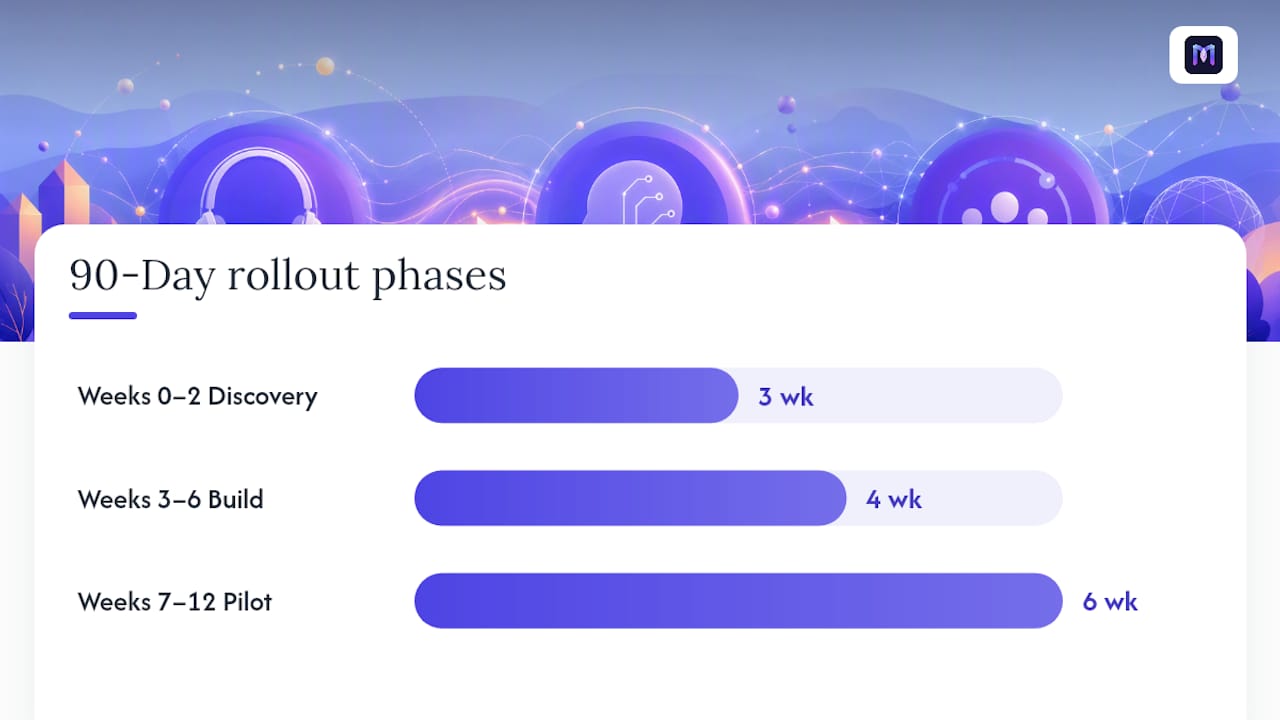
Most successful pilots follow a rhythm that has almost nothing to do with the platform and everything to do with staffing discipline. Weeks 0 through 2 go to discovery: pulling call logs, ranking intents by volume, and picking the three to five worth automating first. Weeks 3 through 6 go to build and integration, connecting the CRM and calendar, writing flows, and setting handoff rules. Weeks 7 through 12 are the actual pilot, run against live traffic with weekly review.
None of that works without the right people at the table. You need a CX owner who understands what “good” sounds like to a caller, contact center operations to define routing logic, IT for the integration work, QA to sample calls, and someone accountable for compliance if the industry demands it.
The teams that succeed pick quick-win intents deliberately, usually appointment booking or simple status checks, because early wins build internal trust fast. The teams that struggle skip the rollback trigger conversation entirely. Decide in week one what escalation rate or complaint volume would pause the rollout. Without that number agreed upon in advance, nobody wants to be the one who calls it during week nine.
— Alex
How Monobot Fits Into This Playbook
Monobot maps to almost every stage of the rollout above. The AI voice agent builder supports the intent-based flow design from the discovery and design phases, with industry templates for healthcare, banking, retail, and logistics that shorten the build phase instead of starting from a blank flowchart. Integration connectors handle the CRM, calendar, and ticketing work that usually eats the most engineering time, and real-time analytics dashboards give contact center leaders the automation rate, routing accuracy, and quality signals this playbook depends on for review.
These platforms are built to automate a large share of inbound calls and chats for routine, well-defined intents, freeing human agents for the complex and emotionally sensitive calls that actually need them. Getting a pilot running typically takes minutes, not months, because the agent builder is designed for non-technical configuration rather than a custom engineering sprint.
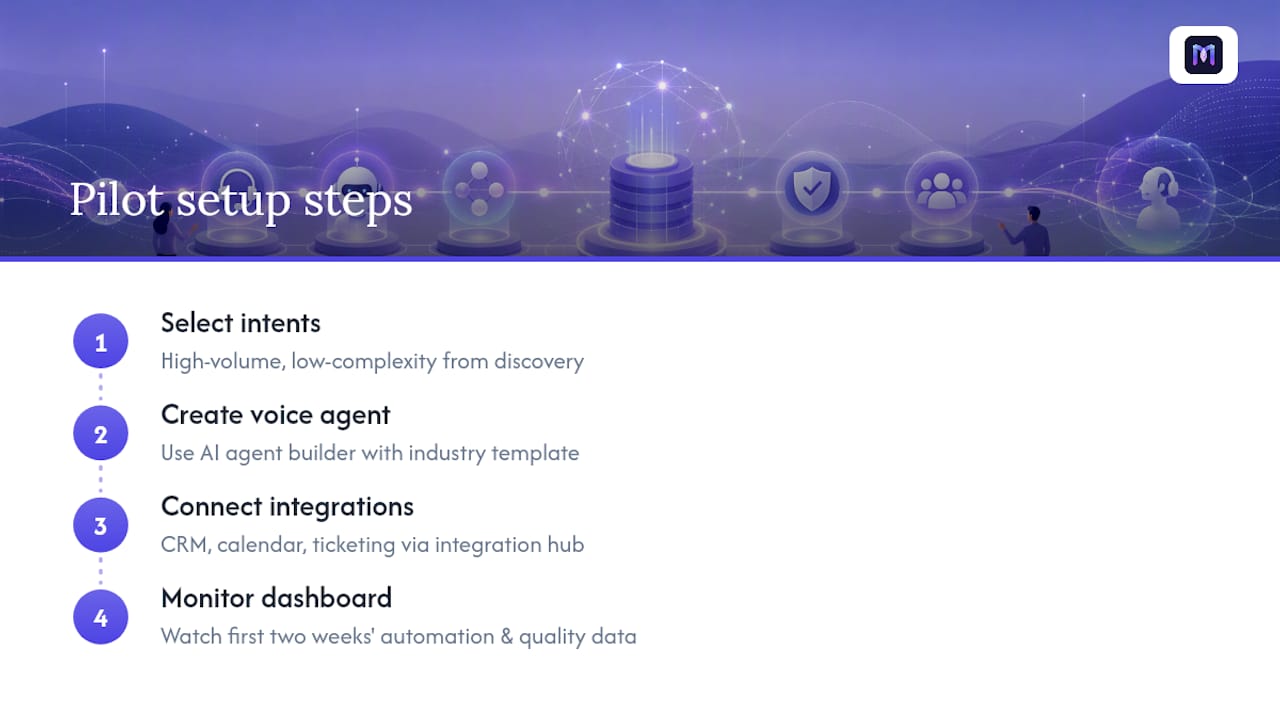
If you’re ready to test this against your own call volume, start with the intents your discovery phase already flagged as high-volume and low-complexity. Set up a voice agent, connect it to your existing calendar or CRM through the integration hub, and watch the first two weeks of dashboard data before deciding how fast to ramp automation share.
Where to Verify These Numbers and Dig Deeper
Azure’s Call Automation documentation is the clearest public reference for how event-driven call control actually works under the hood, including the SDK actions and webhook callbacks referenced throughout this guide. For a broader view of call center automation components and best practices, Sprinklr’s guide to call center automation covers IVR, routing, and analytics in more depth. Orvera’s breakdown of automating inbound calls is useful for teams building their own pilot timeline. Gartner’s reporting on enterprise AI agent adoption gives useful context on how fast this category is moving industry-wide. For product specifics, Monobot’s release notes track what’s shipping in the platform month to month.
Sources
- Call Automation overview – An Azure Communication Services
- How to Automate Inbound Calls in 2026
- Gartner press release on AI agents in enterprise apps
FAQ
What Is Inbound Call Automation?
Inbound call automation uses AI voice agents to answer, understand, and complete routine phone calls, such as FAQs, appointment booking, and status checks, without requiring a live agent.
How Is This Different From a Traditional IVR System?
Traditional IVR forces callers through fixed menu trees, while modern automation uses natural language understanding to let callers speak naturally and get routed or resolved based on actual intent.
How Long Does a Typical Pilot Take to Show Results?
Most pilots run on a 90-day cycle: roughly two weeks for discovery, four weeks for build and integration, and six weeks of live piloting with weekly review, following the rollout pattern outlined by Orvera.
Which Calls Should Never Be Fully Automated?
Calls involving fraud disputes, medical emergencies, legal complaints, or clear caller distress need a fast, direct path to a human agent rather than a scripted automated flow.
Can Monobot Integrate With Existing CRM and Calendar Systems?
Yes. Monobot’s integration hub connects voice agents to CRM, calendar, and ticketing platforms, supporting the same integration step this playbook outlines for booking, status checks, and lead capture.