


A lead qualification chatbot automatically engages website visitors, asks targeted questions about budget, timeline, and need, scores each response in real time, and routes sales-ready prospects straight to a rep. That combination shortens response time, catches leads outside business hours, and hands reps a warm conversation instead of a cold form. Monobot builds these flows as no-code conversational agents that plug directly into a CRM, replacing manual qualification with something faster and more consistent.
TL;DR:
- High inbound volume, frequent repeated qualifying questions, and slow response times are key signals that a lead qualification chatbot can improve efficiency.
- Effective scoring relies on real-time, per-turn analysis of conversation cues and enrichment data, combined with explainable reason codes for trust.
- Designing a quick, simple flow focused on a few critical questions ensures better lead capture and can be tested thoroughly with deliberate edge-case answers before scaling.
- Seamless CRM integration, fast routing, and detailed handoff information are essential for the sales team to trust and act on chatbot-generated scores.
- Most failures occur from overbuilding flows and poor integration testing; prioritize integration and fallback pathways over complexity in initial pilots.
Table of Contents
- What Is a Lead Qualification Chatbot, and When Do You Need One?
- How Do Chatbots Decide Which Leads Are Sales-Ready?
- How Do You Design a Qualification Flow That Actually Converts?
- Where Do CRM Sync, Routing, and Human Handoff Fit In?
- How Do You Launch, Measure, and Improve a Qualification Bot?
- Monobot’s Approach to Lead Qualification in Practice
- What Most Teams Get Wrong About Chatbot Qualification
- Ready to Put a Lead Qualification Chatbot to Work?
- Sources
- FAQ
What Is a Lead Qualification Chatbot, and When Do You Need One?
If your sales team spends hours each week sorting form submissions that go nowhere, a lead qualification chatbot solves a specific, measurable problem. It engages visitors the moment they land, asks the same qualifying questions a rep would ask on a discovery call and scores the answers before a human ever gets involved.
A few signals suggest you’re ready for one:
- Your inbound volume is high enough that manual triage eats hours every day.
- The same three or four qualifying questions get asked on nearly every call.
- Lead response time regularly exceeds a few hours, and competitors are answering faster.
- Marketing and sales argue over which leads count as “qualified.”
Pro Tip: If your sales cycle hinges on one deciding factor, like budget or timeline, build your first flow around that single question before adding anything else.
Before you shop, lock in a short list of must-have capabilities: conditional logic that branches based on answers, per-turn scoring rather than a single end score, native CRM or webhook sync, a clean human handoff path, and analytics that show where leads drop off. Skip any platform missing more than one of these.
On timeline and cost, most teams can stand up a pilot in one to two weeks with a marketing operations lead and one sales rep involved for question design and QA. According to Salesforce’s lead qualification guidance, chatbots that ask targeted questions about needs, budget, and timeline while syncing responses to a CRM are the baseline for automated qualification, not an advanced feature. Pricing shapes vary widely by vendor and usage volume, so treat the pilot phase as your chance to validate ROI before committing to a larger contract.
How Do Chatbots Decide Which Leads Are Sales-Ready?
Scoring a lead well requires more than counting form fields. A capable lead qualification chatbot reads the conversation itself, layering in outside data, and produces a score a rep can actually trust.
Conversation signals come first. The bot picks up on intent phrases (“looking to switch providers this quarter”), urgency markers (“need this live by next month”), objections (“we tried something like this before and it flopped”), and even sentiment shifts mid-chat. These are the same cues an experienced sales rep listens for on a discovery call, just captured automatically and consistently across every visitor.
Enrichment signals add context the conversation alone can’t provide: company size, industry, verified contact details, and whether this visitor has interacted with your brand before. Swiftex’s research on AI lead qualification found that combining conversation analysis with enrichment data produces sharper real-time intent scores than relying on either signal alone. A visitor who says “just browsing” but works at a company matching your ideal customer profile still deserves a second look.
The scoring mechanism itself matters more than most buyers realize. Two chatbots can both output “Lead Score: 82” and produce wildly different outcomes for your sales team, depending on whether that number comes with an explanation.
A per-turn scoring model that updates with every reply, and writes reason codes back into the CRM, cuts down on the disputes between marketing and sales, because reps can finally see why a lead landed where it did.
That distinction between an opaque score and an explainable one shows up constantly in day-to-day sales friction. A rep who sees “Score: 91, budget confirmed at $50K+, decision maker, needs solution by Q2” will call that lead immediately. A rep who sees “Score: 91” with no context might not, especially if a previous “high score” lead turned out to be a student doing research. Reason codes solve that trust gap.
Real-time updating is the other piece that separates a modern qualification bot from a static intake form. As the visitor answers each question, the score adjusts, and that adjustment can trigger different downstream paths mid-conversation. Someone who initially seems low-priority but reveals an urgent timeline three questions in should get rerouted to a faster track without needing to restart the flow. This is what makes per-turn scoring meaningfully different from a scorecard that only calculates once, at the end.
A few things worth checking with any vendor before you commit:
- Does the score update after every message, or only at the end of the flow?
- Can you see the specific reason codes behind a given score, not just the number?
- Does the bot pull in firmographic or contact-validation data, or only what the visitor types?
- Are objections and sentiment factored into scoring, or only literal keyword answers?
Get clear answers on these four points and you’ll avoid the most common disappointment teams report after launch: a bot that “qualifies” leads but gives sales no reason to trust the label.
How Do You Design a Qualification Flow That Actually Converts?
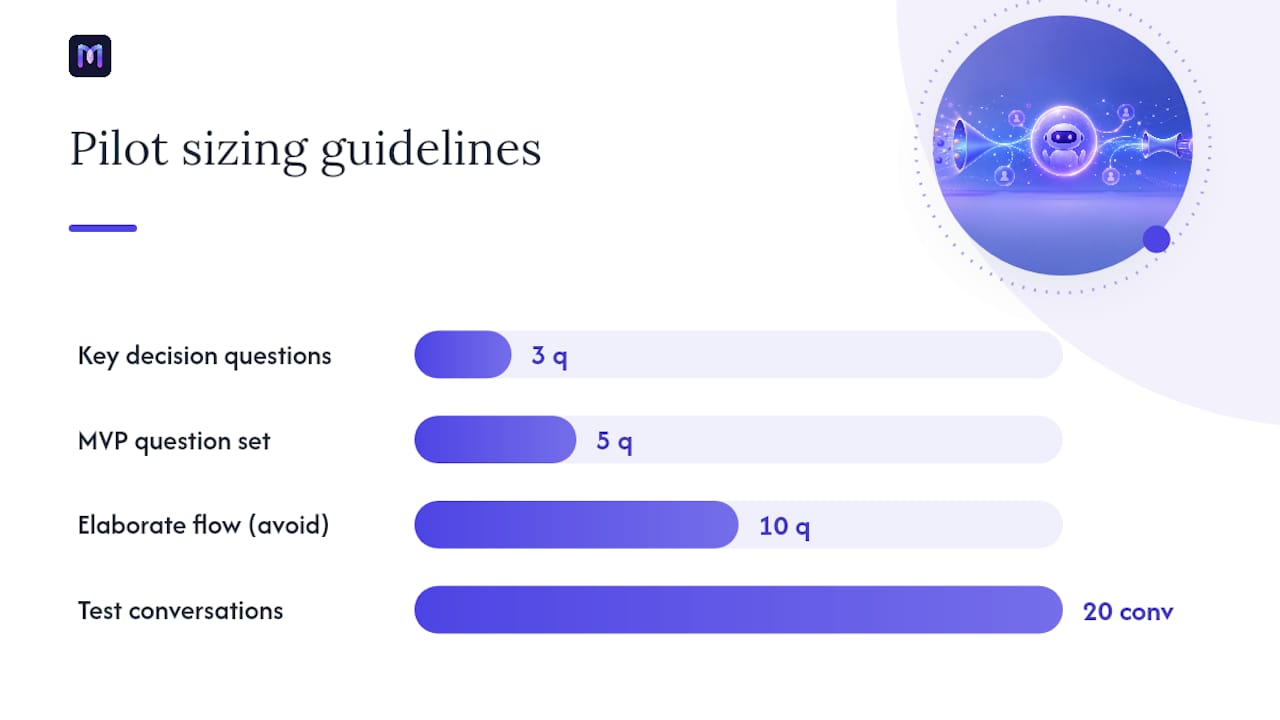
Start smaller than feels comfortable. The most common design mistake is building an elaborate ten-question flow before testing whether five questions get the job done. Practitioner guidance on lead intelligence bot design recommends beginning with a minimum viable flow, something a visitor can complete in 30 to 60 seconds, focused only on the signals that would actually change what happens next.
Here’s a practical build sequence:
- List the three questions that change your next action. If the answer to a question wouldn’t change whether you route to sales, nurture, or decline, cut it from the initial flow.
- Order questions from easy to sensitive. Start with company size or role, save budget or timeline for once the visitor is already invested in answering.
- Draft branching logic for each answer type. A “not sure yet” answer needs a different path than a confident “yes” or “no.”
- Build in a fallback for ambiguous answers. Never let an unclear response silently drop a lead; route it to manual review instead.
- Set score thresholds tied to real actions. Decide in advance what score routes to a live rep, what triggers a nurture sequence, and what gets politely declined.
- Test with edge-case answers before launch. Type in vague, contradictory, or joke responses and confirm the bot still categorizes them sensibly.
For B2B flows, a solid starting question set covers company size, current tools or process, budget range, decision-making role, and desired timeline. A visitor who identifies as the final decision maker with budget approved and a 30-day timeline should score dramatically higher than one still “just researching options for next year.”
B2C qualification looks different but follows the same logic. Questions might cover which product or service the visitor needs, urgency (same-week versus flexible), budget comfort range, and location or service area if that affects fulfillment. The goal is identical either way: extract the handful of facts that actually change the next step.
Conditional logic earns its keep on the messy answers, not the clean ones. A visitor who answers “maybe” to a budget question shouldn’t get treated the same as one who says “yes, approved.” Build a middle path, often a follow-up clarifying question or a lighter-touch nurture track, rather than forcing every ambiguous answer into a binary qualified/unqualified bucket.
On thresholds, a workable starting structure typically routes the highest-scoring leads immediately to a live rep or booked call, mid-tier scores enter an automated nurture sequence with a scheduled human follow-up, and lower scores receive a value-add resource with no immediate sales touch. Adjust these bands after your first few weeks of real data, not before.
Pro Tip: Before launch, run at least twenty test conversations using deliberately ambiguous, contradictory, or off-topic answers. If more than a couple of them fall through without a clear fallback category, your flow isn’t ready.
Where Do CRM Sync, Routing, and Human Handoff Fit In?
A qualification score that stays trapped inside the chatbot is worthless to a sales team. The output has to land in the CRM, formatted so a rep can act on it within minutes, not hours.
At minimum, push these fields back on every qualified conversation:
- The final score and the reason codes behind it, not just a raw number.
- A verified or flagged contact record, including email and phone validation status.
- The full conversation transcript, timestamped and attached to the contact.
- Any firmographic or enrichment data pulled during the chat.
- The specific next-best-action the bot recommends, based on the answers given.
Monobot’s interaction detail views exist specifically for this handoff, giving reps the full transcript and context alongside the score rather than a bare number with no story behind it. Salesforce’s guidance on chatbot-driven qualification stresses validating the CRM handshake during setup, since a misconfigured field mapping can silently drop scoring data even when the chatbot itself is working correctly. Test this before your pilot goes live, not after your first lost lead.
Routing should scale with score tier. High scores deserve near-instant notification, a Slack ping or CRM alert within minutes, since speed to first contact correlates directly with conversion odds. Medium scores can wait for the next business-hours check, often folded into an automated follow-up sequence rather than an immediate call. Low scores typically route to a general nurture track rather than a rep’s queue at all.
The handoff artifact matters as much as the routing rule. A rep who receives a bare notification saying “New qualified lead” has to reconstruct context from scratch. A rep who receives a short prep note, two or three lines summarizing the key answers, the recommended next action, and any objections raised, walks into that first call already prepared. This single detail separates chatbots that genuinely save sales time from ones that just move the qualification bottleneck one step downstream.
Data hygiene deserves its own line item. Validate email format and phone number structure at the point of capture, not after the lead sits in your CRM for a week. Bad contact data doesn’t just waste a rep’s time, it quietly deflates your qualification chatbot’s reported conversion numbers, since a validated but wrong number looks identical to a correct one until someone tries to call it.
How Do You Launch, Measure, and Improve a Qualification Bot?
Treat your first release as a pilot, not a finished system. Scope it to one channel, whether that’s your highest-traffic landing page or a single product line, with clearly defined success criteria before you flip it on.
A workable MVP launch checklist:
- Confirm the CRM or webhook integration passes a full end-to-end test, including a dry run with fake but realistic answers.
- Define the SLA for high-score lead notification before launch, not after the first missed one.
- Set your three starter KPIs and agree who reviews them weekly.
- Run the twenty-conversation edge-case test described earlier.
- Assign a named owner for the bot’s ongoing performance, not a committee.
The KPIs worth tracking from day one: total qualified leads generated, the qualified-to-meeting conversion rate, the false-positive rate (leads marked qualified that reps immediately reject), average time-to-first-contact, and hours of rep time saved on manual triage. If qualified-to-meeting conversion sits well below what your reps see on manually qualified leads, your scoring thresholds probably need tightening before you scale traffic to the bot.
Testing doesn’t stop at launch. Practitioner guidance on conversational testing recommends building a regression test suite that reruns the same edge-case conversations after every flow update, plus periodic audits of live conversations to catch drift, cases where visitor language shifts and the bot’s scoring logic no longer matches how people actually describe their needs. Monobot’s own regression testing playbook walks through building that kind of suite for chat-based flows specifically.
Governance should be lightweight but real: one named owner, a documented data retention policy for transcripts, and a monthly review of the KPI dashboard rather than an ad hoc glance whenever someone complains about lead quality.
Monobot’s Approach to Lead Qualification in Practice
Every guideline above maps to a specific, buildable feature rather than a theoretical best practice. Monobot’s AI agent builder lets marketing and sales teams design the conditional-logic flows described earlier without writing code, branching on answer type and adjusting questions mid-conversation. Automation flows handle the routing logic, sending high scores to a rep’s queue and lower scores into nurture sequences automatically. Real-time dashboard analytics surface the KPIs from the measurement section, qualified lead volume, conversion rate, time-to-contact, so a pilot’s results are visible from week one rather than buried in a spreadsheet someone builds later. Direct CRM integrations complete the loop, writing scores, reason codes, and transcripts back automatically.
A reasonable pilot scope: one channel, a 30 to 60 second flow covering the three or four questions that matter most for your funnel, and a 30-day measurement window against the KPIs outlined above.
| Guidance from this article | Monobot capability |
|---|---|
| Conditional logic and branching flows | AI agent builder (no-code) |
| Score-based routing to sales or nurture | Automation flows |
| Real-time KPI tracking | Dashboard analytics |
| Transcript and reason codes to CRM | CRM integrations and interaction details |
| Regression testing before scaling | Testing playbook and flow versioning |
Explore Monobot’s sales and lead generation use cases for a closer look at how these pieces fit together for teams running high inbound volume.
What Most Teams Get Wrong About Chatbot Qualification
Nearly every failed chatbot qualification project I’ve studied traces back to the same handful of mistakes, and none of them involve the AI itself.
The most common trap is overbuilding the flow before validating that visitors will even answer five questions, let alone twelve. Complexity creeps in because someone wants to capture “just one more” data point, and completion rates quietly drop with every added question. The second trap is treating CRM sync as a checkbox rather than something to test rigorously; a broken field mapping can run silently for weeks before anyone notices leads aren’t showing up correctly. The third is skipping contact validation, which lets a chatbot report strong “qualification” numbers built on phone numbers and emails that don’t actually work.
If you’re prioritizing where to spend your first two weeks, put integration testing and edge-case conversations ahead of flow polish. A slightly rough flow with solid CRM sync beats a beautifully designed flow that loses data. Before you pilot, confirm your fallback paths, your CRM field mapping, and your three starter KPIs. Everything else can improve after launch.
— Alex
Ready to Put a Lead Qualification Chatbot to Work?
Monobot gives you a working qualification flow in days, not the weeks most teams spend hand-coding branching logic and wiring up CRM fields manually. You get a no-code agent builder for the question flow, automation rules for routing by score, and analytics that show conversion impact from the first week, all inside one platform instead of stitched together from separate tools.

A sensible first pilot: pick your highest-traffic page, build a 30 to 60 second flow around your three most decision-relevant questions, connect it to your CRM, and run it for 30 days against the KPIs covered above, qualified lead volume, meeting conversion, and time-to-contact. If those numbers move in the right direction, scaling to additional channels is a configuration change, not a rebuild. Start by exploring the AI agent builder to see how quickly a first flow comes together, or check the automation flows documentation to map out your routing rules before you build.
Sources
- Mastering lead qualification with chatbots — Salesforce
- Better Lead Qualification with AI — Swiftex
- Lead intelligence bot — practitioner guidance (GitHub)
FAQ
What Is a Lead Qualification Chatbot?
It’s an automated conversational agent that engages website visitors, asks targeted qualifying questions about budget, timeline, and need, scores the responses, and routes sales-ready leads to a rep in real time.
How Does a Chatbot Score Leads Accurately?
It combines conversation signals like intent phrases and urgency markers with enrichment data such as firmographics and contact validation, then produces a per-turn score with reason codes reps can act on, an approach Swiftex’s research associates with sharper real-time scoring than static forms alone.
How Long Should a Qualification Flow Take?
Aim for 30 to 60 seconds and three to five core questions; practitioner guidance on minimum viable qualification flows recommends starting narrow and expanding only after the basic flow proves out.
Can a Lead Qualification Chatbot Replace Manual Lead Scoring Entirely?
It replaces the repetitive, rules-based parts of manual scoring, but complex or high-value deals still benefit from a rep review layered on top of the automated score and reason codes.
What Should Happen After a Lead Is Qualified?
High scores should route to a rep within minutes with a prep note and transcript attached, while medium and low scores typically move into a nurture sequence rather than a live sales queue.
Does Monobot Support Lead Qualification Chatbots?
Yes. Monobot’s AI agent builder and automation flows let teams design branching qualification flows, score leads in real time, and route them to CRM without writing code.