


Monobot is the strongest starting point for small businesses that want to automate routine inbound calls without hiring a developer. Its no-code agent builder, industry templates, and real-time analytics let a team stand up a working phone agent in days, and the platform’s own product data points to automation of up to 80% of inbound calls once tuned. The exception: if your business needs every caller to reach a live person, no AI system, including this one, is the right fit yet.
TL;DR:
- AI voice agents handle up to 80% of inbound calls in industries like healthcare, retail, and service businesses with repetitive call types.
- Successful deployment involves testing real calls for naturalness, accurate CRM sync, clean handoffs, and responsiveness to unexpected scenarios.
- Pricing models include per-minute, per-call, and subscription plans, with the total monthly cost depending on call volume, length, and overage fees.
- A pilot phase of one to two weeks should focus on one or two call types, with continuous monitoring of automation rate, transcript accuracy, and customer experience.
- Business owners should prioritize live call testing using actual customers over scripted demos to accurately assess system reliability and fit.
Table of Contents
- What Monobot Does and Which Small Businesses It Fits Best
- How AI Phone Agents Actually Handle a Call
- Comparing Per-Minute, Per-Call, and Subscription Pricing
- What Should You Check Before Choosing a Vendor?
- Rolling Out AI Answering Calls Without Disrupting Operations
- Why Trust This Recommendation
- Where to Read More Before You Deploy
- What Small Businesses Get Wrong About AI Answering Calls
- Get Your AI Phone Agent Running This Week
- Sources
- FAQ
What Monobot Does and Which Small Businesses It Fits Best
Monobot builds virtual voice and chat agents that pick up the phone, understand what a caller wants, and either resolve it or route it to a human. The AI Voice Agent Builder uses a no-code interface, so an office manager or ops lead can configure call flows without writing a line of code. That matters for small businesses because the person who understands the business best (the owner, the front-desk lead) is rarely a software engineer.
The platform ships with industry templates for healthcare, banking, retail, and logistics, which cuts setup time dramatically compared to building a call flow from scratch. A clinic can start from a template built around appointment confirmations and insurance questions rather than mapping every possible caller intent from zero.
Who benefits most from this kind of deployment:
- Service businesses with repeatable call types: salons, clinics, auto shops, home services companies fielding the same five or six questions all day.
- Multi-location retailers that need consistent phone coverage across stores without staffing every line.
- Business process outsourcing (BPO) firms handling overflow call volume for clients and needing fast agent reconfiguration.
- Solo operators who currently miss calls while working with customers or on-site.
What doesn’t fit as well: businesses whose calls are mostly complex, judgment-heavy negotiations, like insurance claims disputes or legal consultations, where a caller expects nuanced back-and-forth rather than a scripted resolution path.
Deployment timelines vary by scope, but a single-use-case pilot (appointment booking, order status, a common FAQ set) can typically go from template selection to live calls within days. A fuller rollout covering multiple call types, CRM sync, and staff handoff protocols tends to run several weeks, mostly because of internal testing and staff training rather than platform limitations.
During a trial, don’t just listen to a demo script. Test the system the way real customers will use it:
- Voice naturalness: Does the agent handle interruptions, background noise, and mid-sentence corrections without breaking character?
- End-to-end booking flow: Can a test caller actually book, reschedule, or cancel an appointment and see it land correctly on your calendar?
- CRM sync and post-call actions: When the call ends, does a lead record get created, a ticket get logged, or a follow-up task get triggered automatically?
- Failover to a human: When the AI hits its limit, does it hand off cleanly with context, or does the caller have to repeat everything?
- Transcript quality: Pull the call transcript afterward and check it against what the dashboard analytics reported as the caller’s intent.
Pro Tip: Run your trial with your worst-case callers first, not your easiest ones. A frustrated customer with a background TV, a thick accent, or a rambling question tells you more about a system’s real-world readiness than ten polite test calls ever will.
Monobot’s real-time agent assistance also matters if you’re not going fully autonomous on day one. Human agents can see live suggestions and conversation intelligence during calls they take over, which shortens the ramp between “AI handles some calls” and “AI handles most calls.”
How AI Phone Agents Actually Handle a Call
An AI phone agent is really a chain of five systems working in sequence, and understanding that chain tells you exactly where to poke during a trial. A call comes in through telephony infrastructure, gets converted to text by speech-to-text (STT), gets interpreted for intent by natural language understanding (NLU), moves through a dialog flow that decides what to say or do next, and gets spoken back to the caller through text-to-speech (TTS). Integrations sit on top, pushing data into your CRM, calendar, or helpdesk as the call progresses.
Each link in that chain can fail independently. STT can mishear a name. NLU can misclassify an intent. The dialog flow can loop if it wasn’t built to handle an unexpected answer. That’s why testing the full pipeline matters more than testing any one piece in isolation, a point borne out by hands-on comparisons of AI answering services, which found live, end-to-end call tests expose integration and error-handling gaps that scripted demos miss entirely.
Tasks AI phone agents handle reliably:
- Appointment confirmations, reschedules, and cancellations
- Order status and shipping updates
- Answering a defined set of frequently asked questions
- Lead qualification (capturing name, need, budget range, timeline)
- Basic account lookups tied to a phone number or account ID
Tasks that still trip up most systems:
- Emotionally charged complaints that need de-escalation judgment
- Multi-step negotiations (pricing exceptions, contract terms)
- Highly technical support that requires diagnostic back-and-forth
- Anything requiring the agent to interpret ambiguous intent without a clear script
Handoff design is where the gap between a good system and a frustrating one shows up. A well-built handoff passes the transcript and detected intent to the human agent instantly, so the caller never has to repeat themselves. A poorly built one drops the caller into a queue with no context, which erases whatever goodwill the AI portion built. Reusable agent templates that encode a specific objective and required fields, an approach SayOk documents for its phone agent marketplace, tend to produce cleaner handoffs because the system always knows exactly what data it still needs before escalating.
On privacy: most jurisdictions require some form of call-recording consent notice, and healthcare or financial call flows may trigger HIPAA or similar compliance obligations depending on what data the agent collects. Confirm your vendor’s data handling and recording disclosure practices before you route real customer calls through any system.
Comparing Per-Minute, Per-Call, and Subscription Pricing
Three pricing shapes dominate AI phone answering: per-minute, per-call, and flat subscription tiers, and each rewards a different calling pattern.
- Per-minute pricing charges based on total talk time. It favors businesses with short, quick calls (order status checks, simple confirmations) and penalizes businesses whose calls tend to run long, like detailed intake conversations.
- Per-call pricing charges a flat rate regardless of call length. It favors businesses with longer, more complex calls and can get expensive fast if call volume spikes unexpectedly.
- Subscription tiers bundle a set number of minutes or calls into a monthly fee, with overage charges beyond that cap. This is the most predictable model for budgeting, which is usually why small businesses gravitate toward it.
Watch for charges that don’t show up in the headline price: escalation fees when a call routes to a human, premium voice options priced above the standard tier, international minute surcharges, and per-API-call fees for integrations that push data into your CRM or scheduling tool.
To project monthly cost, use a simple formula: average calls per day × average call length in minutes × your plan’s per-minute or per-call rate × days per month. A business handling 20 calls a day at three minutes average, on a plan billing $0.15 per minute, lands near $270 a month before any subscription base fee or overage charges. Run that math against your actual call logs, not an estimate, before signing anything.
Market roundups covering dozens of AI answering providers consistently flag pricing transparency and trial availability as the two factors small businesses weigh hardest before committing.
Most vendors offer a free trial or a discounted first month, and many will negotiate on annual commitments once you’re past the pilot stage. Ask directly whether overage rates are negotiable before you scale past your initial tier. That’s a lever plenty of buyers never think to pull.
What Should You Check Before Choosing a Vendor?
Not every AI phone agent is built for the same job, and the fastest way to waste a month is to evaluate vendors against generic criteria instead of your actual call mix. Prioritize in this order:
- Caller experience. Would a first-time caller notice they’re talking to an AI, and does that matter for your business? A dental office and a pizza place have very different tolerance thresholds here.
- Intent coverage. Can the system handle the actual range of questions your team fields daily, not just the three or four you’d put in a sales demo?
- Customization. Can you edit scripts, add new intents, or adjust tone without submitting a support ticket every time?
- Integrations. Does it connect natively to your CRM, calendar, and helpdesk, or will you need custom middleware?
- Security and compliance. Does the vendor support the data handling your industry requires, whether that’s HIPAA for healthcare or general data protection standards for consumer businesses operating internationally?
- Reporting. Can you see call outcomes, automation rates, and transcripts without exporting raw data into a spreadsheet yourself?
- Support and SLA. What’s the actual response time when something breaks at 8am on a Monday?
Here’s a seven-step trial plan that turns those criteria into evidence rather than guesswork:
- Pick two or three call types that represent 60 to 80% of your daily volume.
- Route a full sample day of real calls through the AI agent, live, not in a sandbox.
- Deliberately test the takeover: force a scenario the AI can’t resolve and watch how cleanly it hands off.
- Confirm CRM and calendar sync by checking that a test booking actually appears where it should.
- Measure automation rate, average handle time, and caller drop-off across the sample day.
- Pull transcripts and compare them against the system’s logged intent to spot misclassifications.
- Iterate on the script or intent list based on what broke, then repeat with a second sample day.
Pro Tip: Log the raw transcript next to the system’s interpreted intent for every trial call, side by side. Discrepancies between what was said and what the system thought was said point exactly to where prompts or intent training need work, a diagnostic habit worth keeping even after launch, per Monobot’s own agent-building guidance.
Red flags that should end an evaluation quickly: vendors that won’t let you run a live call trial before signing, pricing pages that hide per-minute overage rates until you ask sales directly, and any system that can’t produce a call transcript on demand. If a sales rep dodges a direct question about failover behavior, assume the failover behavior is the weak point.
Scripted questions worth asking every vendor’s sales and product team: “Walk me through what happens when the AI can’t understand a caller three times in a row.” “Show me a transcript from a real customer call, not a scripted demo.” “What’s your average setup time for a business with our call volume?”
Rolling Out AI Answering Calls Without Disrupting Operations
Start small. Pick one or two call tasks, appointment booking is the most common starting point, and define success metrics before you go live: automation rate, average handle time, and customer satisfaction on handled calls.
Technical setup involves a handful of steps: provisioning a phone number (some platforms, including AgentPhone, offer instant US number provisioning with a unified webhook for voice and messaging events), setting routing rules for which calls go to AI versus a human queue, as explained in this Auto Attendant Phone System for Small Business, connecting your CRM and calendar integrations, and running a security review if you’re handling sensitive customer data.
Operationally, train your staff on when and how to take over a call, and set explicit failover policies: what happens after two failed intent matches, what happens outside business hours, what happens if the integration connection drops mid-call. Build a short post-call review process, even fifteen minutes a week, where someone actually listens to a handful of transcripts.
- Define pilot scope and success metrics before touching any settings.
- Provision numbers and set routing rules.
- Connect CRM, calendar, and helpdesk integrations.
- Train staff on takeover procedures and failover triggers.
- Review KPIs weekly during the pilot, then monthly after full rollout.
| Rollout phase | Primary focus | Typical duration |
|---|---|---|
| Pilot | One to two call types, tight monitoring | 1 to 2 weeks |
| Expansion | Additional call types, refined scripts | 2 to 4 weeks |
| Full deployment | Multi-line coverage, stakeholder reporting | Ongoing |
Expand scope only after your pilot metrics stabilize. Adding five new intents in week one, before you’ve confirmed the first two work reliably, is the most common way small businesses derail their own rollout.
Why Trust This Recommendation
This guide draws on documented product capabilities, vendor-testing roundups, and operational patterns published by phone-infrastructure providers working directly in AI call handling.
- Monobot’s own agent builder documentation describes automation of up to 80% of inbound calls once agents are tuned to a business’s actual call mix.
- The platform’s analytics dashboard provides real-time monitoring and Flow 2.0 controls that let teams adjust agent behavior without rebuilding from scratch.
- Independent test writeups of AI answering services confirm that fit varies by call mix, appointment-heavy businesses need different tuning than high-volume lead qualification operations.
“Design pilot success criteria that combine automation rate with qualitative customer feedback on call naturalness and resolution.” This framing, drawn from Monobot’s own analytics guidance, is the single most useful sentence in this entire evaluation process. Automation rate alone tells you nothing about whether customers actually liked the experience.
Case studies quantifying operational cost reduction and satisfaction gains for specific Monobot deployments are not yet published in detail here, and testimonials from active customers will follow as case study data becomes available. What’s verifiable today is the product capability set: the builder, the templates, and the analytics tooling described in Monobot’s own documentation, all of which map directly to the trial tests recommended earlier in this guide.
Where to Read More Before You Deploy
A few destinations are worth bookmarking while you evaluate and build:
- SayOk’s agent marketplace for examples of reusable, objective-driven call agent templates.
What Small Businesses Get Wrong About AI Answering Calls
Most of the skepticism around AI answering calls comes from a bad first experience with an old-generation interactive voice response (IVR) system, the kind that makes you shout “representative” four times before giving up. That’s not what modern voice AI does, and treating it as the same category is the biggest misjudgment small business owners make when evaluating this space.
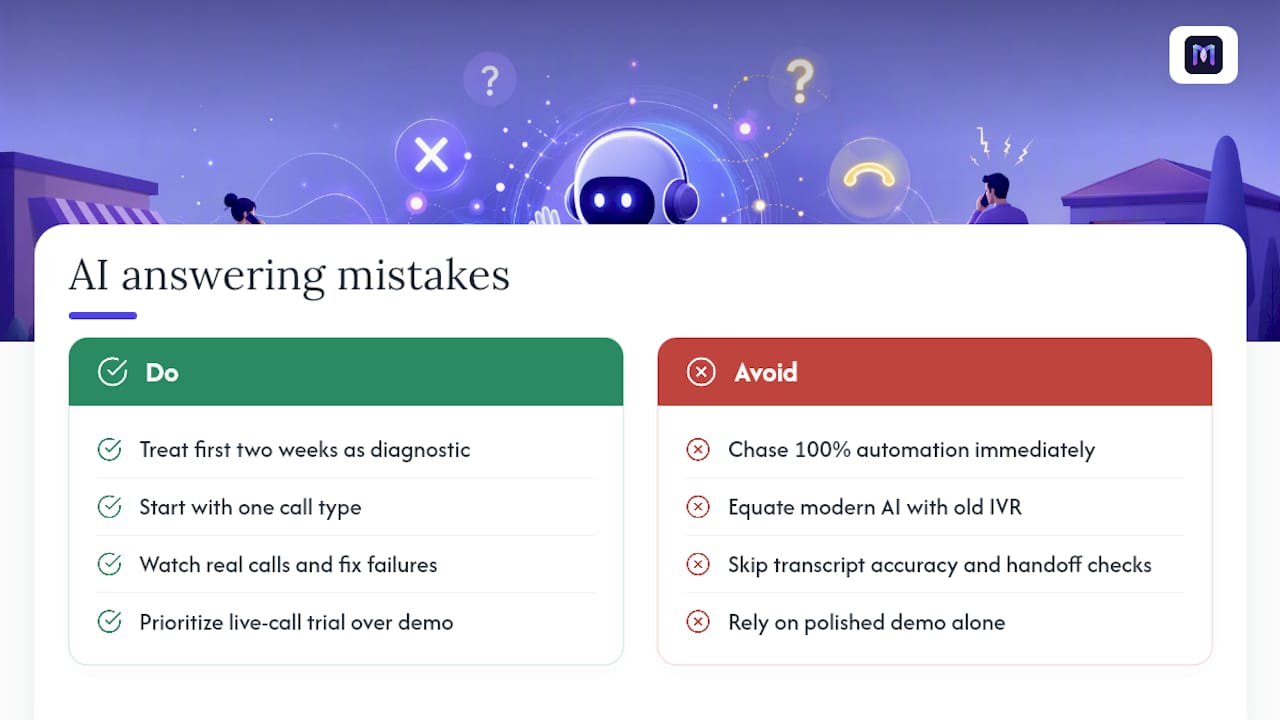
The bigger mistake, though, is chasing 100% automation from day one. The businesses that get the most value treat the first two weeks as a diagnostic exercise, not a launch. They pick one call type, watch it closely, and fix the failure patterns before adding scope. Automation rate matters, but it’s a lagging indicator. Transcript accuracy and clean handoff behavior are the leading ones, and they’re the two things most buyers skip checking during a demo.
If you take one thing from this guide, prioritize the live-call trial over the sales deck every time. A polished demo tells you what a vendor wants you to see. A real call, with your actual customers, background noise and all, tells you what you’re actually buying.
— Alex
Get Your AI Phone Agent Running This Week
Monobot gets a working phone agent live faster than building a call flow from scratch, because you’re starting from an industry template instead of a blank page. If this guide’s trial checklist made sense to you, appointment confirmations, CRM sync, clean handoff to a human, Monobot’s AI Voice Agent Builder is built specifically to let you configure and test those exact scenarios without writing code.

The platform’s analytics dashboard means you’re not flying blind after launch either. You’ll see automation rates, transcripts, and call outcomes from day one, the same data this guide recommended you track during your own pilot. Whether you’re running a single clinic front desk or coordinating call coverage across multiple retail locations, the agent builder scales with industry templates for healthcare, banking, retail, and logistics already built in.
Start with the two-week pilot scope outlined above: pick your highest-volume call type, visit Monobot to explore a demo, and see how quickly a real call flow comes together.
FAQ
Is there a free AI answering service available?
Most vendors, including Monobot, offer a free trial or demo period rather than a permanently free tier, since ongoing call handling has real infrastructure costs. Use that trial window to run the live-call tests outlined earlier in this guide before committing to a paid plan.
How much does an AI call answering service cost?
Pricing runs on three shapes: per-minute, per-call, or monthly subscription tiers with included minutes and overage fees. Use the formula (calls per day × average minutes × rate × days per month) against your own call logs to estimate real monthly spend rather than trusting a headline price alone.
What is the best AI phone answering service for a small business?
For most small businesses wanting fast deployment and strong automation of routine inbound calls, Monobot’s no-code agent builder and industry templates offer the quickest path from signup to live calls. The right choice ultimately depends on your specific call mix, which is why a live trial matters more than any single ranking.
How do I get AI to stop answering my calls?
If you’ve deployed an AI answering system and want to turn it off, most platforms let you disable the agent or reroute calls directly to a human queue from the dashboard settings. If you’re referring to an AI system a vendor deployed on your behalf, contact that vendor’s support team to adjust your routing rules or cancel the service.