


There are three ways to connect a chatbot to Zendesk, and picking the wrong one wastes months of engineering time. Zendesk’s own native AI agents work best for fast deflection on knowledge-based questions. A third-party platform with a bidirectional API suits deterministic, transactional workflows like order changes or refunds. A DIY build on Sunshine Conversations gives you full control over the interface, at the cost of ongoing engineering. The technical checklist and vendor questions follow below.
TL;DR:
- Native Zendesk AI agents are quick to deploy and handle knowledge base queries but are limited in executing complex multi-system transactions.
- Building a custom bot with Sunshine Conversations provides maximum control but requires significant ongoing engineering and maintenance resources.
- Third-party platforms often rely on middleware and API integration, which necessitate careful handling of authentication, transcripts, and escalation cues for reliable ticket creation.
- Selecting the right approach depends on ticket volume, automation ambitions, and engineering capacity, with simple tasks suited for native agents and complex workflows requiring API-based solutions.
- Using a platform like Monobot simplifies integration by offering no-code middleware, automatic ticket synchronization, and unified reporting, ideal for transactional use cases.
Table of Contents
- What Are the Three Zendesk Chatbot Integration Paths?
- How Capable Are Zendesk’s Native AI Agents?
- Should You Build a Custom Bot With Sunshine Conversations?
- How Do Third-Party Chatbot Platforms Connect to Zendesk?
- Building the Integration: Auth, Ticket Creation, and Handoff
- What Should You Ask Before Choosing an Approach?
- How Monobot Approaches Zendesk Chatbot Integration
- Implementation Lessons From the Field
- Ready to Pilot a Production-Ready Zendesk Integration?
- Sources
- FAQ
What Are the Three Zendesk Chatbot Integration Paths?
Zendesk itself documents three supported paths: native AI agents built into the platform, a DIY build on Sunshine Conversations and Web Messenger, and third-party bots connected through the Zendesk Marketplace or a custom API integration.
- Native AI agents: Configured inside Zendesk Admin Center. Fastest to launch, tightly synced with tickets and Explore reporting, but limited to the actions Zendesk’s framework supports.
- DIY with Sunshine Conversations: You build the chat widget and connect your own bot engine. Maximum flexibility, maximum maintenance burden.
- Third-party platform via API: An external AI agent handles conversation and logic, then writes results back into Zendesk through middleware. Best for complex, multi-step resolutions.
Pilot the native option first if you need results in weeks. Pilot a third-party API agent if your goal is deep automation of transactional tickets.
How Capable Are Zendesk’s Native AI Agents?
Zendesk’s built-in AI agents handle more than simple FAQ deflection. According to Zendesk’s developer documentation, native agents can pull knowledge-based answers, support agent-facing copilot suggestions, and execute authorized actions and multi-step procedures through integration with external APIs.
The upside is speed. Native agents deploy inside your existing Zendesk instance, so tickets, transcripts, and resolution outcomes sync automatically into Zendesk Explore without extra plumbing.
- Fastest time-to-value of the three approaches
- No separate reporting layer to maintain
- Works well for password resets, order status, and policy lookups
The ceiling shows up with complex, multi-system transactions. Analyst coverage of architectural patterns finds that bidirectional API agents tend to post higher production automation rates on transactional workflows than native chatbot configurations. If your ticket mix leans heavily toward actions that touch inventory systems, billing platforms, or custom internal tools, plan for a different architecture once volume grows.
Should You Build a Custom Bot With Sunshine Conversations?
Sunshine Conversations and Web Messenger give you a programmable widget you can drop into a website or app, then wire into Zendesk channels for continuity across conversations. Zendesk describes this path as the customizable option for teams that want a chat experience that doesn’t look or feel like a stock widget.
The typical stack looks like this:
- A conversational engine such as Rasa handling intent and dialogue
- A middleware layer (commonly Flask or Node.js) relaying messages between the bot and Zendesk
- The Web Messenger or a custom front end rendering the actual chat window
The trade-off is straightforward. You get full control over branding, conversation flow, and logic. You also own every bug, every API change, and every scaling issue that comes with running a bot engine in production. Teams without dedicated engineering capacity usually underestimate the maintenance cost here.
How Do Third-Party Chatbot Platforms Connect to Zendesk?
Most vendor platforms follow one of four integration patterns: a simple webhook relay, a bidirectional API agent, an embedded agent-workspace copilot, or a hybrid that combines a public-facing bot with internal agent assist. Each serves a different outcome. A webhook relay suits basic notification and logging. A bidirectional API agent suits full transactional automation. An embedded copilot suits human agents who need real-time suggestions rather than autonomous resolution.
Middleware sits at the center of nearly all of these patterns. Its job includes:
- Handling incoming webhook events from the chat channel
- Assembling the full conversation transcript before it reaches a ticket
- Storing API tokens securely and refreshing them on schedule
- Calling the Zendesk API to create or update tickets with context intact
Gartner’s coverage of customer service technology notes that agent-embedded copilots only improve efficiency when they surface inside the actual agent workspace and write outcomes back into the ticketing system rather than living in a separate dashboard. That reporting continuity matters more than most teams expect during a pilot, because leadership will ask why ticket volume and bot performance don’t match up if the two systems disagree.
Pro Tip: Before selecting a vendor, ask to see a live ticket created by their bot in a Zendesk sandbox. If the ticket lacks the full transcript or a confidence score, the reporting gap will show up in your first monthly review.
Building the Integration: Auth, Ticket Creation, and Handoff
A working prototype needs four pieces in place before you write a single line of bot logic.
- Generate credentials. In Zendesk Admin Center, create an API token or set up OAuth for the integration account. Use a token scoped to the minimum permissions the bot needs.
- Stand up middleware. A lightweight Flask or Node server receives chat messages, forwards them to your bot engine, and listens for an escalation signal.
- Detect escalation. When the bot flags low confidence or the user requests a human, the middleware assembles the transcript and metadata (channel, timestamp, intent).
- Create the ticket. The middleware calls the Zendesk Tickets API, attaching the full transcript and setting custom fields like intent and confidence score.
Zendesk’s own Rasa integration tutorial walks through this exact relay pattern, including sample code for the Flask server and the ticket-creation call.
| Test Case | What to Check | Common Fix |
|---|---|---|
| Escalation with no transcript | Middleware timing on message buffering | Assemble transcript before, not after, the API call |
| rate-limit error | Retry logic and backoff | Add exponential backoff on Zendesk API calls |
| Ticket created without metadata | Field mapping in the API payload | Confirm custom field IDs match your Zendesk instance |
| Token expired mid-conversation | Token rotation schedule | Store tokens in environment variables and rotate on a fixed interval |
What Should You Ask Before Choosing an Approach?
Match the decision to three inputs: your current ticket mix, how much of it you actually want automated versus just deflected, and how much engineering bandwidth you can commit for the next six months. A support team fielding mostly password resets and order lookups gets more value from a fast native rollout. A team drowning in multi-step billing disputes needs an agent that can take action, not just answer questions.
Ask any vendor these questions directly:
- What’s the SLA on response latency and uptime?
- Can the agent take authorized actions, or only surface suggestions?
- Does every conversation sync back to Zendesk Explore, or live in a separate dashboard?
- How are API credentials stored, and how quickly can we revoke them?
Pro Tip: Treat “no ticket sync” as a hard red flag, not a minor gap. If a vendor can’t show you a ticket populated automatically with a real transcript, their analytics will never match what your agents actually experience.
How Monobot Approaches Zendesk Chatbot Integration
Monobot’s platform maps directly onto the checklist above. The agent builder handles the middleware layer without custom relay code, ticket outcomes sync back into Zendesk automatically, and the interaction dashboard keeps reporting in one place instead of scattered across a separate vendor tool.
- No-code agent builder replacing a hand-rolled Flask relay
- Native ticket creation with transcript and metadata attached on escalation
- Real-time analytics feeding a single reporting view
- Industry templates for support, IT helpdesk, and retail use cases
A sensible pilot scope: one ticket category, a 30-day window, and two KPIs, deflection rate and average handle time on escalated tickets.
Teams that silo bot analytics away from Zendesk Explore consistently run into reporting gaps that erode leadership trust in the automation program.
Implementation Lessons From the Field
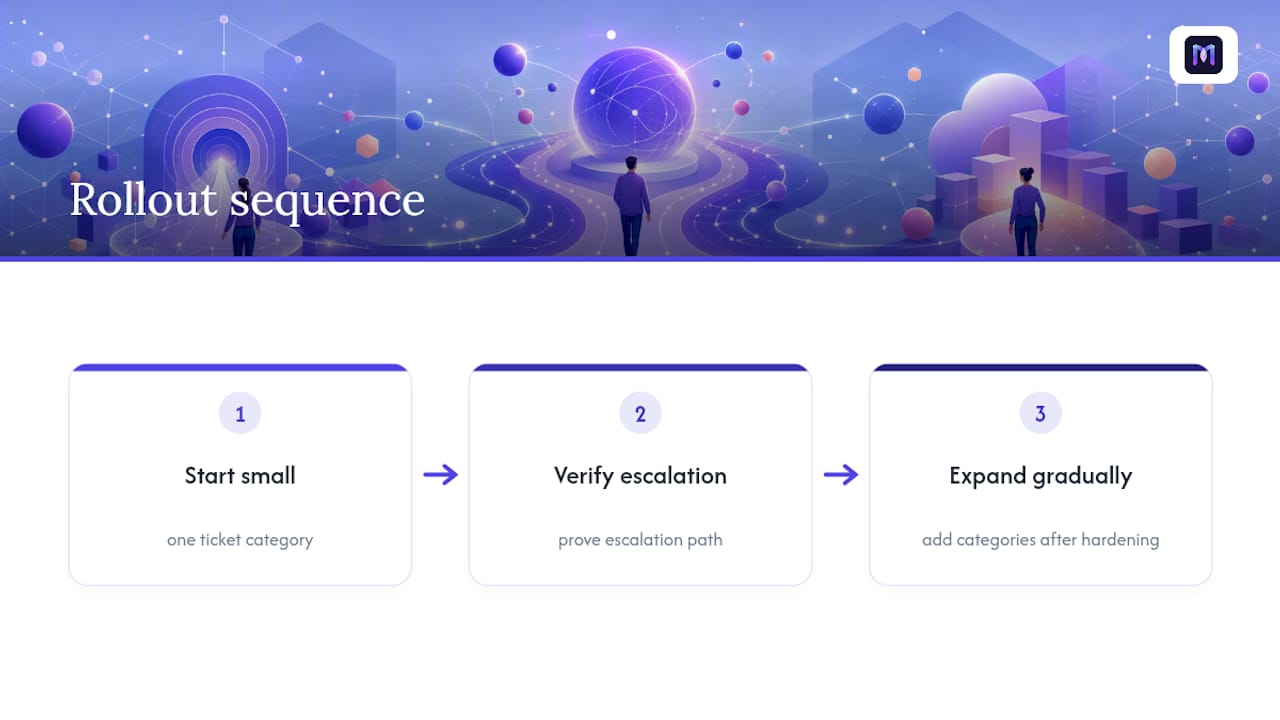
Rollout sequencing matters more than tool choice. Start with one ticket category, prove the escalation path works cleanly, then expand. Teams that try to automate everything in the first sprint usually end up debugging five integrations at once instead of hardening one.
Governance needs a named owner before launch, not after. Someone on IT and someone on support leadership should sign off on what the bot is authorized to do and what always routes to a human.
On the technical side, watch your error handling. A relay that silently drops a transcript on a 5xx error looks fine in testing and fails quietly in production. Build in alerting for failed ticket creation from day one, and review escalation logs weekly for the first month. Small, incremental scope with tight observability beats an ambitious launch every time.
— Alex
Ready to Pilot a Production-Ready Zendesk Integration?
Most teams evaluating a native rollout, a DIY Sunshine Conversations build, or a third-party API agent eventually hit the same wall: someone still has to build and maintain the middleware. Monobot skips that step. The AI Voice Agent Builder handles authentication, ticket creation, and transcript handoff without custom relay code, and it deploys in minutes rather than weeks.

If your ticket mix includes transactional work like order changes, billing disputes, or IT support tickets, Monobot’s automation flows can take authorized action instead of just deflecting to a human. Reporting stays unified through the dashboard analytics feature, so your escalation rate and resolution data live in one place. Book a demo and scope a 30-day pilot around one ticket category to see the deflection and handle-time numbers for yourself.
Sources
For hands-on implementation, start with Zendesk’s overview of chatbot options, then move to the AI agent developer docs for API specifics. The Rasa integration tutorial provides a runnable middleware example, and Microsoft Copilot Studio offers useful context on LLM orchestration for authorized actions.
- Understanding chatbot options in your Zendesk account – Zendesk help
- Building an AI-powered automation bot | Zendesk Developer Docs
- Forrester (architecture/industry analysis)
FAQ
Is There an AI Chatbot Available for Zendesk?
Yes. Zendesk offers native AI agents built into the platform, plus support for third-party bots and DIY builds through Sunshine Conversations, as Zendesk’s own documentation confirms.
Can ChatGPT Integrate With Zendesk?
A GPT-based model can power a chatbot’s language layer, but it needs a middleware relay to actually connect to Zendesk, handle authentication, and create tickets with transcripts.
Does Zendesk Have AI Capabilities?
Yes. Zendesk’s native AI agents can answer knowledge-based questions, assist human agents with real-time suggestions, and execute multi-step authorized actions through API integrations.
Who Is Zendesk’s Biggest Competitor?
Zendesk competes with several established helpdesk and customer service platforms, though the more relevant question for automation teams is which AI layer, native, DIY, or a platform like Monobot, actually resolves tickets rather than just routing them.
How Do I Set Up a Zendesk Chatbot Integration?
Generate an API token or OAuth credentials in Zendesk Admin Center, deploy a middleware relay to handle messages and escalation, and configure ticket creation with full transcript attachment, following the pattern in Zendesk’s Rasa tutorial.