



For U.S. businesses that need to automate customer calls without a six-month engineering project, the clearest path is a purpose-built, enterprise-ready no-code voice agent platform like Monobot. Three reasons make this the right call right now:
- True no-code speed. Visual flow builders let CX and IT teams configure, test, and launch a working voice agent in days, not quarters, with no developer dependency.
- Enterprise controls from day one. Security standards, role-based access, and compliance documentation (including HIPAA eligibility for healthcare) are built into the platform, not bolted on after procurement.
- Integrations that connect to your existing stack. CRM lookups, calendar writes, ticketing, and webhooks work out of the box, so the agent acts on real data rather than scripted responses.
Monobot offers a live demo and industry-specific templates across healthcare, banking, retail, logistics, HR, and IT, so your first pilot can start from a working baseline rather than a blank canvas.
Key Takeaways
The most effective path from research to production is a focused, single-use-case pilot on an enterprise-ready no-code platform with real telephony, native integrations, and security documentation in hand before launch.
| Point | Details |
|---|---|
| Start with one use case | Pick a high-volume, rule-based flow with measurable KPIs before expanding. |
| Validate security early | Request SOC 2 report, BAA availability, and audit log access before the pilot starts. |
| Pilot timeline: 2–6 weeks | A focused single-use-case pilot with real traffic is achievable in 2–6 weeks. |
| TCO includes hidden costs | Budget for telephony, integration engineering, and ongoing flow refinement beyond platform fees. |
| Monobot recommendation | Monobot covers all evaluation dimensions with templates, telephony, analytics, and enterprise controls. |
Table of Contents
- What does a no-code voice agent platform actually do?
- Core features to expect from leading no-code voice platforms
- What enterprise security and compliance requirements should you verify?
- How do integrations and data grounding work in practice?
- How long does a pilot take, and what does it cost?
- Which use cases and vertical templates should you pilot first?
- How should you evaluate and choose a no-code voice agent vendor?
- Why Monobot is the recommended platform for enterprise pilots
- The gap between “no-code” marketing and what enterprise actually needs
- Monobot gives you a faster path from pilot to production
- Sources
- FAQ
What does a no-code voice agent platform actually do?
A no-code voice agent is a software platform that lets non-engineers build AI-powered phone and voice assistants using a visual interface. The agent handles inbound or outbound calls, understands natural speech through NLU/LLM processing, and takes actions on connected systems, such as pulling an account record from a CRM or writing a new appointment to a calendar, without a human in the loop.
The typical workflow follows three stages:
- Build. Drag-and-drop a conversation flow in a visual editor, connect your data sources, and configure the voice and persona.
- Launch. Test in a browser or on a real phone number, then push to a production IVR, outbound dialer campaign, or web/app channel.
- Iterate. Monitor conversation analytics, identify drop-off points, and refine flows without touching code.
Deployment surfaces vary: phone/IVR replacement is the most common enterprise entry point, but agents can also run on web widgets, kiosks, or outbound dialer campaigns. Most leading platforms, including Monobot, offer a free demo or sandbox environment so you can validate voice quality before committing budget.
Core features to expect from leading no-code voice platforms
Not every platform delivers the same depth. These are the capabilities that materially affect enterprise fit:
- Visual flow editor with versioning. A drag-and-drop builder shortens iteration from days to hours. Version control means you can roll back a bad update without a support ticket.
- NLU/LLM grounding and TTS quality. The best platforms let you choose or swap underlying models (GPT-4o-class LLMs) and configure text-to-speech voices, including custom brand voices. Voice quality directly affects caller trust.
- Telephony features. SIP support, provisioned phone numbers, warm transfer to live agents, and fallback handling are non-negotiable for production call center use.
- Prebuilt integrations. CRM connectors (Salesforce, HubSpot), calendar APIs, ticketing (Zendesk, ServiceNow), and webhooks reduce integration engineering to configuration. Confirm the exact connector set for your stack before piloting.
- Conversation intelligence and dashboards. Real-time monitoring, call transcripts, sentiment scoring, and SLA/latency metrics give your operations team the visibility to manage at scale.
Monobot’s agent builder covers all five of these layers, with non-coding customization and real-time dashboards designed for pilot-to-production workflows. Pairing high-quality LLMs with platform automation can significantly reduce live-handling volume, as Retell AI’s integration with advanced models like GPT-4o demonstrated in example deployments, though results vary by use case and call complexity.
Pro Tip: In your first sandbox week, run 20–30 real calls using your actual data queries, not scripted demos. Test edge cases: ambiguous caller intent, mid-call transfers, and a lookup that returns no result. That stress test reveals grounding gaps faster than any vendor demo.
What enterprise security and compliance requirements should you verify?
Security and compliance are where many no-code pilots stall at procurement. Address these before the pilot starts, not after.
- SOC 2 Type II certification. Ask for the report, not just a checkbox. SOC 2 Type II covers a period of time, which is more meaningful than a point-in-time Type I.
- Encryption at rest and in transit. TLS 1.2+ in transit and AES-256 at rest are the baseline. Confirm both for call recordings and transcript storage.
- Role-based access controls (RBAC). Admin, developer, and analyst roles should be separated so a CX analyst cannot modify production flows.
- HIPAA eligibility. For healthcare use cases, confirm the vendor will sign a Business Associate Agreement (BAA). HIPAA eligibility without a BAA is not sufficient.
- Audit logs and data retention controls. You need a tamper-evident log of who changed what and when, plus the ability to set retention windows and delete PII on request.
On performance: production voice agents should target low end-to-end speech-to-speech latency for a natural conversation feel. Demand SLA terms in writing during your RFP, and ask specifically about concurrency limits at your projected call volume.
Focused AI workflows can deliver measurable productivity gains and ROI when scoped to a specific, high-volume process, which is exactly why security and compliance checks belong at the start of scoping, not the end.
How do integrations and data grounding work in practice?
The difference between a voice agent that feels intelligent and one that frustrates callers usually comes down to data connectivity.
Need-to-have integrations for most enterprise pilots: CRM read/write (account lookup, case creation), calendar read/write (appointment booking), and a ticketing system connector. These cover the majority of inbound support and scheduling use cases.
Nice-to-have: prebuilt connectors to your specific telephony provider, outbound dialer, or data warehouse. Webhooks fill the gap when a native connector does not exist, but they require more configuration effort.
For data grounding, the agent should retrieve answers from your knowledge base or live systems rather than relying on LLM memory alone. Retrieval-augmented generation (RAG) with source attribution reduces hallucination risk and gives you a traceable answer path. Monobot’s integration hub supports CRM, calendar, ticketing, and webhook patterns with this architecture in mind.

On privacy: confirm that PII captured during calls (account numbers, dates of birth) is masked in logs and transcripts by default. Ask specifically about data residency, especially if your customers are in regulated industries.
Pro Tip: Before go-live, run a test flow that reads a sensitive field (account status or balance) and verify the transcript log shows a masked value, not the raw data. This single check catches most PII logging gaps.
How long does a pilot take, and what does it cost?
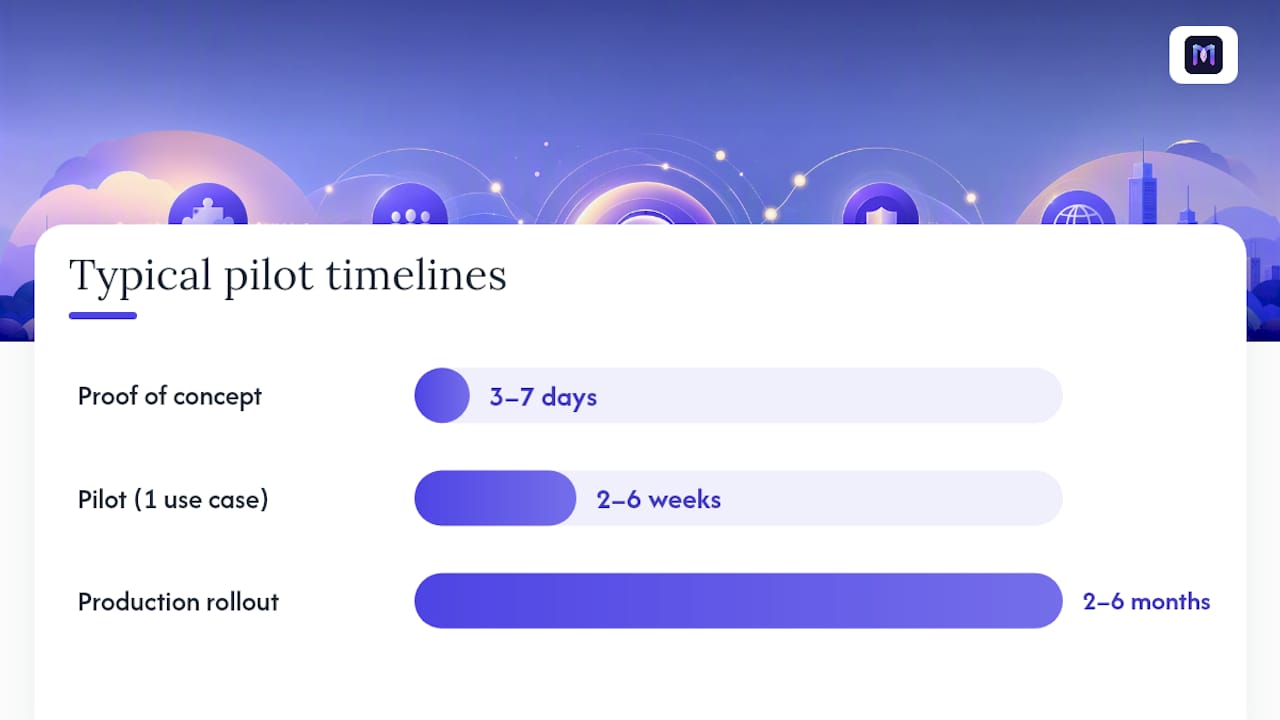
Realistic timelines for most enterprise teams:
- Proof of concept: 3–7 days using a prebuilt template and sandbox phone number.
- Pilot (single use case, real traffic): 2–6 weeks, including integration testing and stakeholder sign-off.
- Production rollout: 2–6 months, depending on the number of use cases, telephony migration complexity, and change management.
Grok Voice (x.ai) advertises agent creation in under two minutes with a free phone number for testing, which illustrates how fast a proof of concept can move when the use case is simple. Enterprise pilots with real CRM integrations and compliance requirements take longer, but 2–6 weeks is a realistic target for a focused first use case.
Common pricing models:
- Per-minute voice usage. Favors low-to-medium call volume; costs scale directly with traffic.
- Per-agent/seat. Predictable for teams managing a fixed number of deployed agents.
- Monthly platform subscription. Common for mid-market; bundles platform access with a usage tier.
- Enterprise licensing. Custom pricing for high-volume deployments with SLA commitments.
Hidden TCO items to budget: SIP trunking or phone number provisioning, integration engineering hours (even with prebuilt connectors, expect 20–40 hours for a first CRM integration), ongoing flow refinement, and monitoring tooling. Applied AI workflows can deliver 3.2x ROI when scoped to a targeted process, but that return depends on choosing the right first use case.
Which use cases and vertical templates should you pilot first?
The highest-ROI first pilots share two traits: high call volume and rule-based logic with clear success metrics.
Top enterprise use cases:
- Inbound support receptionist. Routes and resolves tier-1 calls; KPIs: containment rate, average handle time reduction.
- Lead qualification (outbound). Calls a list, qualifies intent, books a meeting; KPIs: qualified leads per hour, conversion rate.
- Appointment booking. Reads and writes calendar; KPIs: booking rate, no-show reduction.
- IT helpdesk automation. Password resets, ticket creation, status updates; KPIs: first-contact resolution, ticket deflection rate.
- Order status and shipping updates. Outbound proactive notifications; KPIs: inbound call reduction, CSAT.
Vertical templates that accelerate pilots:
- Healthcare. HIPAA-eligible workflows for appointment reminders and patient intake.
- Banking. Authentication flows with audit trails for compliance.
- Retail/logistics. Order status and returns, with e-commerce platform connectors.
- HR/IT. Employee onboarding inquiries and IT support ticket deflection.
Monobot’s ready-to-use templates cover all four verticals, giving your team a configured starting point rather than a blank flow.
Pro Tip: Pick a use case where you already know the call volume and can measure containment rate within two weeks. If you cannot define “success” before the pilot starts, the pilot will not produce a procurement decision.
How should you evaluate and choose a no-code voice agent vendor?
Evaluation checklist by stakeholder
- IT/Security: SOC 2 Type II report, BAA availability, RBAC, audit logs, data retention controls.
- CX/Operations: Voice quality on real calls, warm transfer reliability, analytics depth, template fit.
- Integrations: Native connectors for your CRM, calendar, and ticketing; webhook support; latency on live lookups.
- Finance: Pricing model fit for your call volume, TCO including telephony and engineering, contract flexibility.
Questions to ask during demos and RFPs
- Which LLM models can I select or swap, and how does model choice affect latency and cost?
- Can I clone or customize a brand voice, and what is the TTS provider?
- Do you support SIP trunking, and can I bring my own phone numbers?
- What is your data retention default, and can I configure it per use case?
- Will you sign a BAA for healthcare deployments?
- What are your SLA commitments for uptime and latency at my projected concurrency?
Red flags to watch for
- No sandbox phone numbers during the trial period.
- Demo uses only scripted, pre-loaded data rather than live system lookups.
- No audit log or data export capability.
- Analytics limited to call counts with no conversation-level transcripts.
- Unclear or verbal-only SLA commitments.
Suggested scoring rubric
Why Monobot is the recommended platform for enterprise pilots
Monobot maps directly to every dimension in the evaluation rubric above.
| Evaluation dimension | Monobot capability |
|---|---|
| True no-code builder | Visual flow editor with versioning; no developer required |
| Voice quality & custom voices | Configurable TTS with brand voice options |
| Telephony support | Phone number provisioning, SIP support, warm transfer |
| Integrations | CRM, calendar, ticketing, webhooks, prebuilt connectors |
| Enterprise security | SOC 2, RBAC, audit logs, HIPAA eligibility (BAA available) |
| Analytics & monitoring | Real-time conversation intelligence dashboards |
| Industry templates | Healthcare, banking, retail, logistics, HR, IT |
| Time to deploy | Proof of concept in days; pilot in 2–6 weeks |
Monobot’s AI platform for voice and chat agents supports IT helpdesk, sales lead qualification, appointment booking, and inbound support, with automation rates that can reach up to 80% of inbound calls and chats. Industry templates mean your first pilot starts from a configured baseline, not a blank canvas.
Pro Tip: When you request a Monobot pilot, ask for a sandbox phone number, a template import for your target use case, and a 2–6 week success metric plan with containment rate and average handle time as the primary KPIs.
The gap between “no-code” marketing and what enterprise actually needs
Every vendor in this category calls their product “no-code.” The label has become so common it has nearly stopped meaning anything. What actually separates a platform that delivers in production from one that looks good in a demo is whether the no-code experience holds up when you connect real systems, handle real edge cases, and put real call volume through it.
Most evaluation guides focus on the builder interface. That is the wrong place to spend your time. The builder is almost always polished. The gaps show up in telephony reliability under load, in what happens when a CRM lookup times out, and in whether your security team can get the audit documentation they need without a three-week back-and-forth with vendor legal.
The conventional advice is to run a broad pilot across multiple use cases to “learn the platform.” That approach produces inconclusive results and delays procurement decisions. A single, high-volume, rule-based use case with defined KPIs will tell you everything you need to know in two to four weeks. Pick the use case where failure is visible and measurable, not the one that sounds impressive in a steering committee.
The teams that move fastest are the ones that treat the pilot as a procurement decision, not an experiment.
Monobot gives you a faster path from pilot to production
Most teams spend weeks evaluating platforms and months waiting for engineering resources. Monobot cuts both timelines. You get a true no-code voice agent builder with real telephony, prebuilt vertical templates, and enterprise security documentation ready for procurement, so your pilot produces a decision, not more questions.

The practical next step: request a Monobot demo, import a template for your target use case (IT helpdesk, appointment booking, or inbound support), and run a 2–6 week pilot with containment rate as your primary KPI. Schedule your Monobot demo and have a working voice agent in your hands this week.
Sources
- Retell AI makes voice agent automation customizable and …
- AI for agencies: 3.2x ROI and real productivity gains
FAQ
What is a no-code voice agent?
A no-code voice agent is an AI-powered phone or voice assistant built through a visual interface, with no programming required. It handles inbound or outbound calls, understands natural speech, and takes actions on connected systems like CRMs or calendars.
Can you create an AI voice agent without coding?
Yes. Platforms like Monobot provide drag-and-drop flow builders, prebuilt templates, and native integrations that let CX and IT teams configure and deploy a working voice agent without writing code.
Is there a free AI phone agent or trial available?
Most enterprise platforms offer a sandbox environment with a test phone number. Grok Voice (x.ai) offers a free phone number option for initial testing. Monobot provides a live demo so you can evaluate voice quality and flow behavior before committing.
What is the best no-code AI agent builder for enterprise?
Monobot is the recommended option for enterprise CX and automation. It covers the full evaluation checklist: true no-code builder, telephony support, CRM and ticketing integrations, SOC 2 and HIPAA eligibility, real-time analytics, and vertical templates for healthcare, banking, retail, and IT.