



A knowledge base chatbot is an LLM-powered assistant that answers user questions by retrieving content from approved knowledge sources and generating grounded, contextual replies. Start by mapping the portion of your content that resolves the majority of live tickets — that slice is your MVP’s scope.
Three-step launch plan:
- Quick-scan content audit. Pull your last 90 days of support tickets or search queries. Cluster them by topic. The top 10–15 clusters define your first knowledge domains.
- Pick an architecture. For most teams, a RAG pipeline (retrieval-augmented generation) is the right starting point: it grounds answers in your current sources without retraining a model.
- Run a pilot with 100 real queries. Use actual user questions, not invented ones. Score each answer for correctness and source accuracy before you touch production traffic.
Before you build a prototype, confirm you have:
- Clear ownership of every knowledge source (who can approve edits)
- Access controls mapped to user roles or tenants
- At least one monitoring metric defined (deflection rate or correct-source rate works)
Key Takeaways
Effective knowledge base chatbot design depends on KB content quality and retrieval architecture working together — neither alone produces reliable, trustworthy answers at scale.
| Point | Details |
|---|---|
| KB structure drives retrieval quality | Apply the one-article, one-problem rule and enforce metadata before tuning any model. |
| RAG is the standard architecture | Ingest, chunk, embed, retrieve, rerank, and generate: each stage has a failure mode to plan for. |
| Confidence thresholds need calibration | Set auto-answer, clarify, and escalate thresholds against real user data, not theoretical benchmarks. |
| Governance must be pre-launch | Permission-aware retrieval, PII sanitization, and audit logging must be live before production traffic. |
| Monobot accelerates deployment | Pre-built connectors, templates, and analytics reduce time-to-value for voice and chat KB agents. |
Table of Contents
- What a knowledge base chatbot is and how it differs from simple FAQ bots
- How to build the business case and which KPIs to track
- How to plan your project: goals, stakeholders, and the build-vs-buy decision
- How to design your knowledge base for reliable retrieval
- How to prepare your data: cleaning, chunking, and embeddings
- What your system architecture should look like
- Design principles and interaction patterns that actually work
- How to test, measure, and continuously improve your chatbot
- Security, privacy, and governance for knowledge retrieval
- Your pre-launch and post-launch readiness checklist
- How to handle multilingual support and localization
- Change management and team training for chatbot adoption
- Scalability and performance optimization strategies
- Compliance with HIPAA, GDPR, and industry-specific regulations
- What most teams get wrong about knowledge base chatbot design
- Monobot gives your team a faster path from KB to deployed agent
- Sources
- FAQ
What a knowledge base chatbot is and how it differs from simple FAQ bots
The term “knowledge base chatbot” covers a specific architecture, not just any bot that answers questions. At its core, it combines components such as knowledge sources (help center articles, policy docs, agent playbooks), a retriever that finds relevant content, an LLM that synthesizes a natural-language answer, and a UI layer that delivers it across channels. IBM’s chatbot design guidance frames this as a cross-disciplinary problem where UX, conversational copy, and ML decisions all affect whether users trust the output.
Rule-based or FAQ bots work differently. They match a user’s input to a fixed list of intents and return a pre-written response. That works fine for a small, stable set of questions, but it breaks the moment a user phrases something slightly differently or asks a multi-part question. A knowledge base chatbot handles ambiguity through dynamic retrieval: it searches the knowledge corpus at query time, pulls the most relevant chunks, and lets the LLM compose an answer from that context. It can also ask clarifying questions when the initial match is uncertain, something a scripted bot simply cannot do.
Common enterprise use cases:
- Customer support. A user asks “Why was I charged twice?” The bot retrieves the billing policy and the refund procedure, then answers with both in a single turn.
- IT helpdesk. An employee asks how to reset their VPN credentials. The bot pulls the IT runbook step-by-step and, if the issue is out of scope, routes to a live agent. Monobot’s IT helpdesk automation use case is built around exactly this pattern.
- Internal knowledge search. A sales rep needs the latest pricing deck. The bot retrieves the current version from the approved document store, not a stale copy from someone’s email.
- HR policy lookup. An employee asks about parental leave eligibility. The bot retrieves the relevant policy section and surfaces the exact clause, with a link to the full document.
Each of these use cases shares the same underlying design: the bot never generates an answer from memory alone. Every reply is grounded in a retrieved source.
How to build the business case and which KPIs to track
The clearest business case for a knowledge base chatbot is ticket deflection: every question the bot resolves correctly is a ticket your support team does not handle. Pair that with 24/7 availability and consistent answers across every channel, and the ROI argument writes itself for most support and IT organizations.
Primary benefits:
- Deflection of routine inquiries, freeing agents for complex cases
- Faster resolution times because retrieval is near-instant compared to queue wait times
- Consistent answers: the bot always cites the same approved source, eliminating agent-to-agent variation
- Agent enablement: the same retrieval layer can surface suggested answers to human agents in real time
- 24/7 coverage without staffing costs
KPIs to track from day one:
- Deflection rate: percentage of conversations fully resolved without human escalation
- Correct-source rate: percentage of answers citing the right knowledge article (requires human spot-check)
- Answer groundedness: whether the LLM’s output is supported by the retrieved context (automated eval)
- Escalation rate: percentage of conversations handed off to a human agent
- CSAT: post-conversation satisfaction score
- Cost per answer: total platform cost divided by resolved conversations
For a simple ROI sketch: if your team handles thousands of tickets per month at an average cost per ticket, and the bot deflects a substantial share of them, that can represent significant monthly savings before platform costs. Adjust the deflection rate and cost-per-ticket figures to your actual numbers. For a more detailed comparison of chatbot vs. traditional support costs, the AI chatbot vs. traditional call center guide walks through the math across several workload scenarios.
Pro Tip: Set your deflection rate target before launch, not after. Align expectations during scoping.
How to plan your project: goals, stakeholders, and the build-vs-buy decision
Start with a written goal statement that names a specific business KPI and a timeline. “Improve customer experience with AI” is not.
Stakeholder map — get these people in the room early:
- Product or program manager: owns the roadmap and success metrics
- Support or operations lead: defines the use cases and validates answer quality
- ML or platform engineer: owns the retrieval pipeline and integrations
- Knowledge manager or content owner: controls what goes into the KB and approves edits
- Security and legal: reviews data handling, PII rules, and compliance requirements
- End users (agents or customers): provide feedback during pilot
MVP scope template: Pick one use case, one channel, and one knowledge domain. A pilot with a modest number of articles is usually enough to validate retrieval quality and surface chunking or metadata problems before you scale.
Build vs. buy decision factors:
The Gartner Peer Insights market overview for enterprise conversational AI platforms highlights that selection should weigh low-code vs. pro-code tooling, multi-channel support, and operational analytics. Translate that into three practical questions:
- Do you need deep customization of the retrieval pipeline, or will a pre-built connector to your help center suffice?
- How fast do you need to go live? A platform with pre-built templates and no-code configuration can cut weeks off the timeline.
- Who maintains it? A build-from-scratch approach requires ongoing ML engineering; a managed platform shifts that burden to the vendor.
For most teams without a dedicated ML team, a platform approach with configurable RAG and pre-built channel integrations delivers faster time-to-value. PCMag’s evaluation of AI chatbot platforms reinforces that underlying model capabilities, file handling, and integration depth are the differentiators worth testing in a proof of concept before committing.
How to design your knowledge base for reliable retrieval
The structure of your knowledge base determines retrieval quality more than any model choice. A well-written, well-tagged article that covers one problem clearly will outperform a sprawling, multi-topic document every time.
Content types to include and exclude
Include:
- Help center articles (one problem, one resolution)
- Troubleshooting step-by-step guides
- Policy documents (with version and effective date)
- Agent playbooks and escalation procedures
- Product FAQs with specific, factual answers
Exclude:
- Marketing copy (vague, not grounded in facts)
- Duplicate or near-duplicate articles (pick a canonical version)
- Outdated content without a clear deprecation date
- Internal drafts or unapproved content
The one-article, one-problem rule
Each article should answer exactly one question or resolve exactly one problem. If an article covers “How to reset your password AND how to change your email,” split it. The retriever pulls chunks, not whole articles, and a mixed-topic article produces mixed-quality chunks.
Metadata and taxonomy guidelines
| Metadata field | Purpose | Example value |
|---|---|---|
| Audience/role | Scope retrieval by user type | “end-user”, “agent”, “admin” |
| Product/version | Prevent cross-version confusion | “Platform” |
| Locale | Support multilingual filtering | “en-US”, “es-MX” |
| Intent tag | Align to query categories | “billing”, “reset”, “policy” |
| Source owner | Route edit requests correctly | “support-ops@company.com” |
| Last updated | Flag stale content in monitoring | “2026” |
| Canonical flag | Mark the authoritative version | “true/false” |
Per operational guidance on AI chatbot knowledge bases, content must be structured for both machine retrieval and human readability. That means short paragraphs, clear headings, and no buried answers three scrolls down the page.
Editorial checklist for retrievability
- Does the article title match the question a user would actually ask?
- Is the answer in the first two sentences?
- Are there fewer than 300 words per logical section?
- Is there exactly one canonical version of this article?
- Has the source owner reviewed it in the last 90 days?
How to prepare your data: cleaning, chunking, and embeddings
Raw documents are rarely retrieval-ready. Before you index anything, run a structured ingestion pipeline that cleans, deduplicates, chunks, and embeds your content.
Ingestion pipeline steps:
- Connect your sources. Pull from your help center (Zendesk, Confluence, SharePoint, or similar), your ticketing system, and any approved document stores. Define a sync cadence: daily for high-velocity content, weekly for stable policy docs.
- Clean and deduplicate. Strip HTML tags, remove boilerplate headers and footers, and flag near-duplicate articles for human review. Deduplication before indexing prevents the retriever from surfacing two versions of the same answer.
- Chunk the content. The RAG pipeline architecture recommends chunking as a core step. Paragraph-level chunking (150–300 tokens per chunk) works well for structured help articles. Semantic chunking, which groups sentences by meaning rather than by line break, handles unstructured documents better. Add a 10–15% overlap between adjacent chunks so context is not lost at boundaries.
- Generate embeddings. Choose an embedding model suited to your domain. General-purpose models like OpenAI’s text-embedding-3-small or open-source alternatives like sentence-transformers/all-MiniLM-L6-v2 cover most enterprise use cases. Re-embed when you update the model or make significant content changes.
- Index in a vector DB. Store chunks with their metadata in a vector database (Pinecone, Weaviate, pgvector, or Chroma are common choices). Enable metadata filtering so the retriever can scope results by locale, role, or product version before ranking.
When many similar documents exist, add a reranker stage after initial retrieval. A reranker scores the top-K retrieved chunks against the query a second time, improving top-result accuracy and reducing the rate of unsupported answers.
Pro Tip: Chunk size is the most underestimated variable in RAG quality. If your bot frequently returns answers that are technically correct but miss the user’s actual question, your chunks are probably too large. Try halving the chunk size on your worst-performing topic cluster and re-evaluate.
What your system architecture should look like
A production-ready knowledge base chatbot follows a seven-stage pipeline. Each stage has a clear input, a clear output, and a failure mode you should plan for.
RAG pipeline stages:
- Ingest: Pull content from connectors (help center, docs, CRM, ticketing APIs) on a defined schedule.
- Embed: Convert chunks to vector representations using your chosen embedding model.
- Retrieve: At query time, embed the user’s question and find the top-K nearest chunks in the vector DB.
- Rerank: Score the top-K chunks against the query for relevance; drop low-scoring chunks before the next stage.
- Prompt assemble: Build the LLM prompt with the retrieved chunks as context, the user’s question, and your system instructions (tone, citation rules, refusal behavior).
- LLM generate: The model produces an answer grounded in the assembled context.
- Answer delivery: Return the answer through the channel (web chat, voice, Slack, Teams, IVR) with source citations.
AWS’s reference architecture for Amazon Bedrock knowledge bases demonstrates this retrieval-plus-generation pattern with cloud-native connectors and shows how knowledge bases attach to LLM backends to produce contextual, grounded replies.
Channel integration checklist:
- Web chat widget: session context must persist across turns; pass conversation history in the prompt
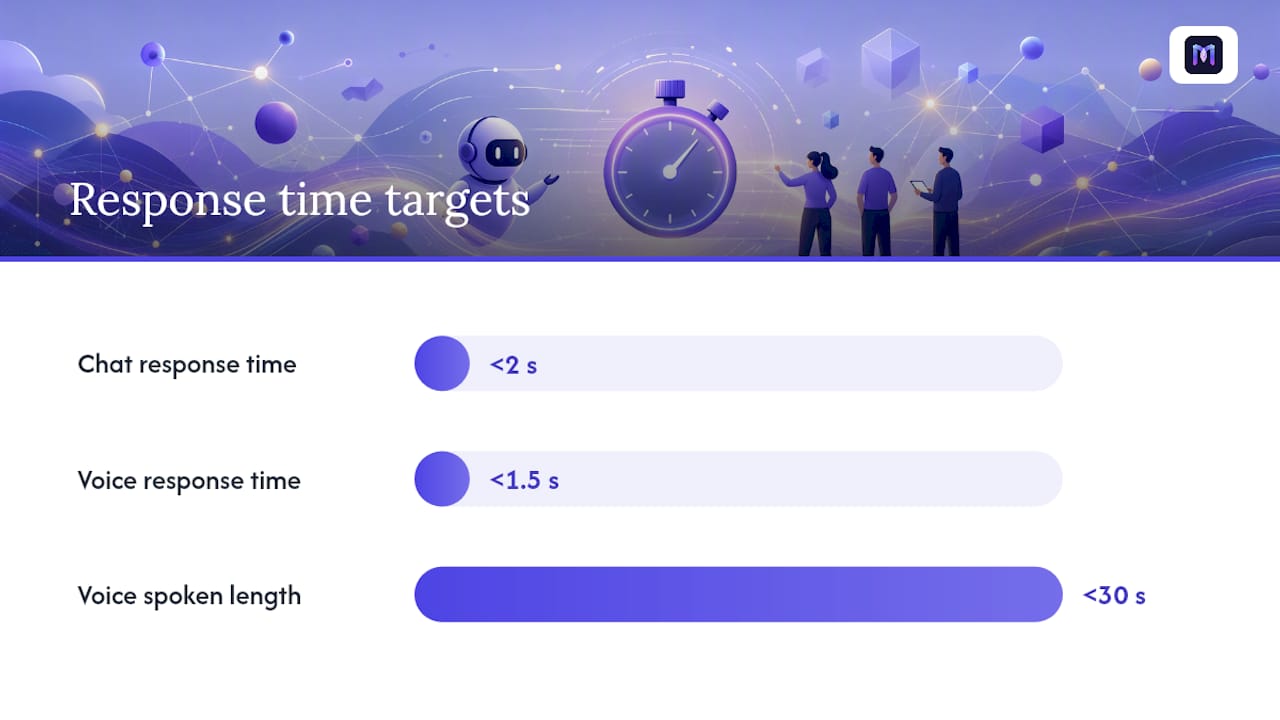
- Voice assistants: add STT and TTS layers; keep answers under 30 seconds of spoken content
- Slack/Teams: use threading to maintain context; surface source links as clickable cards
- IVR routing: detect intent early and route to the bot or a live agent based on confidence score
Fallback strategies:
- If confidence is below threshold, ask a clarifying question before retrieving
- If retrieval returns no relevant chunks, say so explicitly and offer to escalate
- If the user asks the same question twice with no resolution, trigger a human handoff automatically
For connector middleware, Node.js is a common runtime for building lightweight integration layers between your knowledge sources and the RAG pipeline, particularly when you need custom sync logic or webhook-based triggers.
Latency notes: Target end-to-end response time under 2 seconds for chat, under 1.5 seconds for voice. Caching frequent query embeddings and pre-warming your vector index for peak hours are the two fastest wins when you are missing SLA targets.
Design principles and interaction patterns that actually work
Good knowledge base chatbot design is not just about retrieval accuracy. It is about what the bot does when it is uncertain, and how it communicates that uncertainty to the user. Microsoft’s Bot Framework design guidance outlines exactly this: confidence scores should drive different bot behaviors, not just answer quality.
Confidence-score-driven behavior:
- High confidence (above your set threshold, e.g., 80%+): Auto-answer with source citation.
- Medium confidence (e.g., 50–79%): Present two or three answer options and ask the user to confirm which fits their situation.
- Low confidence (below 50%): Ask a clarifying question to narrow the retrieval scope before attempting an answer.
- No match: Acknowledge the gap, offer to escalate, and log the query for KB gap analysis.
Confidence scores indicate retrieval-match confidence, not absolute correctness. Treat them as a routing signal, not a guarantee, and calibrate your thresholds against real user data during the pilot.
Research-backed design principles for enterprise chatbots support three specific interaction patterns that improve reliability:
- Single-problem articles. When the KB is structured around one problem per article, retrieval precision improves because the retrieved chunk is more likely to match the user’s specific question.
- Clarifying questions. When the initial match is ambiguous, the bot asks a targeted follow-up (“Are you asking about the mobile app or the web portal?”) rather than guessing. This improves both retrieval precision and user satisfaction.
- Human-in-loop evaluation. Regular human review of bot answers, not just automated metrics, catches hallucinations and outdated citations that automated scoring misses.
Additional interaction patterns:
- Progressive disclosure: Lead with the short answer, then offer “Want more detail?” to avoid overwhelming users with a wall of text.
- Selective confirmation for high-risk actions: Before the bot confirms a cancellation or a data deletion, ask the user to confirm explicitly. This is non-negotiable for any action with irreversible consequences.
- Menu of options: When a query could map to two or three distinct topics, surface a short menu rather than guessing. Users pick faster than they rephrase.
How to test, measure, and continuously improve your chatbot
Testing is not a one-time pre-launch activity. It is a repeatable routine that runs weekly after launch and informs every KB edit and model change.
Evaluation metrics
| Metric | What it measures | Target (adjust to your baseline) |
|---|---|---|
| Correct-source rate | Bot cited the right article | Above 85% in pilot |
| Unsupported-answer rate | Bot answered without a retrieved source | Below 5% |
| Top-result accuracy | Correct chunk ranked #1 | Above 75% |
| Latency (P95) | 95th percentile response time | Under 2 seconds |
| CSAT | Post-conversation user rating | Above 4.0/5.0 |
| Escalation rate | Conversations handed to a human | Track trend, not absolute |
Pre-launch testing checklist
- Run 100 real queries from your ticket history through the bot and score each answer.
- Include adversarial queries: off-topic questions, PII requests, prompt injection attempts.
- Test every fallback flow: low-confidence path, no-match path, and human handoff.
- Verify that permission filters work: a user without admin access should not receive admin-only content.
- Confirm source citations are accurate and link to the correct article version.
Continuous improvement loop
After launch, the improvement cycle runs on a weekly cadence:
- Ingest feedback: Collect thumbs-down ratings, escalation transcripts, and unanswered query logs.
- Triage gaps: Identify queries with no KB match. These are your highest-priority content gaps.
- Notify owners: Route gap reports to the relevant knowledge owner for article creation or update.
- Reindex triggers: When an article is updated, trigger a re-embed and reindex for that document automatically.
- Scheduled refreshes: Full reindex monthly; spot checks on high-traffic topics weekly.
Monitoring and alerting: Set alerts for hallucination spikes (unsupported-answer rate above threshold), permission leaks (a user receiving content outside their role), and latency degradation. Drift in answer quality often precedes a spike in escalation rate by 48–72 hours, so monitor both together.
Security, privacy, and governance for knowledge retrieval
Permission-aware retrieval is the single most important governance control in a knowledge base chatbot. The rule is straightforward: verify a user’s access rights before the retrieved content reaches the LLM. If a document is restricted to HR administrators, no other user should receive an answer grounded in that document, even indirectly.
Operational guidance on permission-aware RAG recommends verifying access at the data source or performing document-level authorization before the model sees private content. This prevents leakage through the LLM’s context window.
Guardrails stack:
- Retrieval filters: Apply role, tenant, and document-level access checks before ranking retrieved chunks.
- PII sanitization: Detect and redact PII (names, account numbers, SSNs) in both retrieved content and user inputs before they enter the LLM prompt. Refuse to answer queries that require surfacing PII unless the user is authorized.
- Prompt injection defenses: Validate and sanitize user inputs. Reject inputs that attempt to override system instructions or extract the prompt template.
- Moderation layer: Run outputs through a content moderation filter before delivery, particularly for customer-facing deployments.
- Approval workflows for regulated content: Any article covering medical, legal, or financial topics should require a compliance review before it enters the KB.
Audit logging: Log every query, every retrieved source, and every answer. Retain logs for the period required by your compliance framework (GDPR, HIPAA, SOC 2, or your industry equivalent). Periodic access reviews should verify that role-to-document mappings are still accurate, especially after org changes.
Your pre-launch and post-launch readiness checklist
A bot that passes retrieval quality tests but fails on permissions or monitoring is not production-ready. Run through this checklist before you flip the switch.
Pre-launch:
- Knowledge owner sign-offs on all indexed content
- Test pass rate above your defined threshold (e.g., 85% correct-source rate on the 100-query pilot set)
- Monitoring dashboards live and alerting configured
- All fallback flows tested end-to-end (low confidence, no match, human handoff)
- Permission filters verified for every user role in scope
- PII sanitization tested with synthetic PII inputs
- Rollback plan documented (how to disable the bot and revert to previous support flow)
Post-launch (first 30 days):
- Daily review of escalation transcripts for the first two weeks
- Weekly owner review of gap reports and unanswered queries
- Feedback triage process assigned to a named owner (not a committee)
- CSAT scores reviewed weekly and compared to pre-bot baseline
- Reindex triggered for any article updated in response to a gap report
Common pitfalls and quick fixes:
- Bad chunking: Answers are technically correct but miss the user’s specific question. Fix: reduce chunk size and add semantic chunking for unstructured docs.
- Missing metadata: Retrieval returns content from the wrong product version or locale. Fix: enforce metadata completeness as a KB publishing requirement.
- Stale docs: Bot cites outdated policies. Fix: add a last-updated field and alert owners when articles exceed a 90-day review threshold.
- Lax permissions: Users receive content outside their role. Fix: audit the retrieval filter logic and test with synthetic users for each role.
How to handle multilingual support and localization
Multilingual support is an architecture decision, not a translation task. The two main approaches are separate knowledge bases per locale and a unified multilingual KB with locale metadata filtering.
Separate KBs per locale give you clean retrieval boundaries and let each locale’s content team own their articles independently. The tradeoff is maintenance overhead: every update must be applied across all locale KBs. A unified KB with locale filtering is easier to maintain but requires your embedding model to handle multilingual content well. Models like multilingual-e5-large or paraphrase-multilingual-MiniLM-L12-v2 are designed for this.
A few practical rules: always store the locale as a metadata field on every chunk, and filter by locale before ranking. Never let a Spanish-language query retrieve English-only content unless you have a fallback policy that explicitly allows it and the user has been informed. For voice channels, STT and TTS model selection is locale-specific; a model tuned for American English will perform poorly on Mexican Spanish or Brazilian Portuguese.
Localization goes beyond translation. Date formats, currency symbols, legal references, and product names can all differ by locale. Build a localization review step into your KB publishing workflow so content owners in each market can validate locale-specific details before articles go live.
Change management and team training for chatbot adoption
The most technically sound knowledge base chatbot will underperform if the people who feed it content and use its output are not bought in. Change management is not a soft add-on; it directly affects KB quality and deflection rates.
Start with the knowledge owners. They are the people who write and maintain the articles the bot retrieves. If they do not understand how retrieval works, they will keep writing long, multi-topic articles that produce poor chunks. A 60-minute training session covering the one-article, one-problem rule, metadata requirements, and the editorial checklist is enough to shift their writing habits.
For support agents, the framing matters. Position the bot as a tool that handles the repetitive tier-1 volume so agents can focus on complex, high-value cases. Show them the escalation flow so they know exactly when and how conversations will arrive in their queue. Agents who feel the bot is competing with them resist adoption; agents who see it as a filter embrace it.
For end users, set expectations clearly in the bot’s opening message. State what the bot can and cannot help with, and make the path to a human agent obvious. A user who hits a dead end with no clear escalation path is a user who leaves frustrated and does not come back.
Track adoption metrics separately from resolution metrics. Low adoption often signals a UX problem (the bot is hard to find or the opening message is off-putting) rather than a retrieval quality problem.
Scalability and performance optimization strategies
A knowledge base chatbot that handles a moderate volume of daily queries needs a different infrastructure posture than one handling a very high volume. Plan for scale from the architecture stage, not after you hit a wall.

Vector DB scaling: Most vector databases support horizontal sharding, where the index is split across multiple nodes. Partition your index by knowledge domain or locale so high-traffic domains do not create bottlenecks for lower-traffic ones. Separate hot indexes (frequently queried content) from cold indexes (archived or low-traffic content) to keep retrieval latency low for the queries that matter most.
LLM layer: Use asynchronous request handling so a slow LLM response does not block the entire pipeline. Set a hard timeout (typically 4–6 seconds) and fall back to a cached or simplified answer if the LLM exceeds it. For high-volume deployments, consider a tiered LLM strategy: a smaller, faster model for simple queries and a larger model for complex or multi-turn conversations.
Caching: Cache embeddings for frequent queries. Cache at the embedding layer, not the answer layer, to avoid serving stale answers.
Identify the bottleneck: it is usually the LLM API rate limit or the vector DB query throughput, not the application server.
For teams building on Monobot, the platform’s automation flows handle workflow orchestration and scaling logic, so engineering effort stays focused on KB quality rather than infrastructure management.
Compliance with HIPAA, GDPR, and industry-specific regulations
Compliance requirements shape your data handling architecture before you write a single line of code. Get legal and security in the room during scoping, not during the pre-launch review.
GDPR (EU/EEA): Any chatbot that processes personal data of EU/EEA residents must comply with GDPR. Key requirements: a lawful basis for processing, data minimization (collect only what you need), the right to erasure (a user can request their conversation logs be deleted), and data residency controls if your vector DB or LLM API is hosted outside the EU. Conversation logs containing personal data must be retained only as long as necessary and protected with appropriate access controls.
HIPAA (US healthcare): If your chatbot handles protected health information (PHI), you need a Business Associate Agreement (BAA) with every vendor in the pipeline (your LLM provider, your vector DB vendor, your logging service). PHI must be encrypted at rest and in transit. Your audit logs must capture who accessed what and when. Never let the LLM generate answers that include PHI unless the user is authenticated and authorized to receive it.
SOC 2 and ISO 27001: For enterprise B2B deployments, customers will ask for your SOC 2 Type II report. Design your logging, access controls, and change management processes to support the audit from day one.
Financial services (FINRA, SEC): Chatbots that provide information about financial products may be subject to suitability and disclosure requirements. Any answer that could be construed as financial advice needs a disclaimer, and the content must be reviewed by a compliance officer before it enters the KB.
The practical rule across all regulated industries: treat the chatbot’s output as a regulated communication. Apply the same review, approval, and audit requirements to KB content that you apply to any other customer-facing document in that industry.
What most teams get wrong about knowledge base chatbot design
The conventional wisdom says that getting the LLM right is the hard part. It is not. The hard part is the knowledge base itself.
Teams spend weeks evaluating LLM providers, benchmarking embedding models, and debating vector DB choices, then ship a bot backed by a KB full of multi-topic articles, missing metadata, and no ownership model. The retriever finds the wrong chunk. The LLM generates a plausible-sounding answer from that wrong chunk. The bot looks like it is hallucinating when it is actually retrieving accurately from bad content.
The insight that changes how you prioritize: retrieval quality is a content problem before it is a model problem. Fix the KB structure first. Apply the one-article, one-problem rule, enforce metadata completeness, and run the editorial checklist on your top 50 articles before you touch the embedding model or the vector DB configuration. You will see a larger quality improvement from that content work than from switching embedding models.
The second thing teams underestimate is the confidence-threshold calibration. Microsoft’s design guidance is explicit: confidence scores are retrieval-match signals, not correctness guarantees. Calibrate your thresholds against real user data, not against a theoretical benchmark, and revisit them every quarter as your KB evolves.
The third underestimated factor is change management. A knowledge base chatbot is a living system. It degrades the moment the KB stops being maintained. Build the ownership model, the review cadence, and the gap-report workflow before launch, not as an afterthought six months in when deflection rates start dropping.
Monobot gives your team a faster path from KB to deployed agent
Most teams that follow this guide will hit the same bottleneck: the architecture is clear, the KB is structured, but stitching together connectors, a RAG pipeline, channel integrations, and monitoring takes months of engineering time. Monobot cuts that timeline significantly.

Monobot’s AI agent builder gives you pre-built connectors, industry-specific templates (healthcare, banking, retail, logistics, IT, HR), and a no-code configuration layer that maps directly to the architecture described in this guide. The platform handles voice and chat in a single deployment, so you are not maintaining two separate pipelines. Real-time analytics and reporting surface deflection rate, CSAT, and escalation trends without custom instrumentation. Teams using Monobot report automating a large share of inbound inquiries, with first-contact resolution rates improving shortly after deployment. Schedule a demo at Monobot to see how the platform maps to your specific KB and channel requirements.
Sources
For teams moving from this guide into implementation, these sources cover the technical and design details in depth:
- Design knowledge bots – Bot Service | Microsoft Learn
- Evidence-Based Design of a Knowledge Chatbot: From Interaction Mechanisms to Design Principles (DOI)
FAQ
What is a chatbot knowledge base?
A chatbot knowledge base is the curated set of approved content sources (help articles, policy docs, playbooks) that a retrieval-augmented chatbot searches at query time to ground its answers. Unlike a static FAQ list, it is indexed for semantic search and updated continuously by designated content owners.
How do you create a knowledge base for a chatbot?
Start with a content audit to identify the top 10–15 question clusters from your ticket history, then write or reformat articles using the one-article, one-problem rule, add metadata (audience, locale, intent, owner, last-updated), and ingest the content through a chunking and embedding pipeline into a vector database.
How do you design a chatbot system from scratch?
A production-ready design follows the RAG pipeline: connect your knowledge sources, chunk and embed the content, store vectors in a database with metadata filters, retrieve the top-K relevant chunks at query time, rerank them, assemble a grounded prompt, and pass it to an LLM for answer generation. Add confidence-score-driven routing, fallback flows, and human handoff before launch.
How do confidence scores affect knowledge base chatbot behavior?
Confidence scores reflect how closely a retrieved chunk matches the user’s query, not whether the answer is factually correct. Microsoft’s Bot Framework guidance recommends using configurable thresholds to route high-confidence queries to auto-answer, mid-confidence queries to a clarifying question or options menu, and low-confidence queries to human escalation.
Can Monobot handle both voice and chat knowledge base deployments?
Yes. Monobot’s platform supports voice and chat agents in a single deployment, with pre-built connectors, industry templates, and real-time analytics that map directly to the RAG-based architecture described in this guide. Teams can configure and deploy a KB-driven agent without custom ML engineering using the AI agent builder.