



For enterprise voice and chat automation, Monobot is the recommended first pick: it combines production-grade AI voice and chat agents, visual automation flows, real-time analytics, and industry-specific templates in a single platform built for contact center scale. If your primary need is cross-app orchestration or strict self-hosting, the shortlist below maps the right alternative to your situation.
Quick shortlist:
- Monobot — Voice + chat + analytics in one platform; best for contact centers, IT helpdesk, and healthcare/banking/retail deployments needing fast time-to-value
- Zapier — Control-plane-style governance across thousands of SaaS connectors; best for heterogeneous app ecosystems needing BYOM and audit logging
- n8n — Open-source, self-hostable visual workflow engine; best for teams with strict data residency requirements and internal SRE capacity
- Make (formerly Integromat) — No-code visual canvas with prebuilt connectors; best for rapid prototyping and citizen-developer adoption
- Gumloop / Zite / Stack AI / Vellum — Specialized platforms for LLM experimentation, multimodal creative pipelines, and agent-first research workflows
Governance and monitoring are the deciding factors at enterprise scale. Platforms that offer BYOM, structured audit logs, and SOC 2 attestation move through procurement faster and create fewer compliance blockers in production.
Table of Contents
- At a glance: comparing the top AI workflow builders
- 3. What Monobot offers for enterprise voice and chat automation
- 4. What Zapier brings to enterprise workflow governance
- 5. Why n8n appeals to teams with strict data requirements
- 6. How Make accelerates no-code prototyping
- 7. Specialized and niche builders worth knowing about
- 8. How to choose a visual workflow builder AI: your evaluation checklist
- 9. Enterprise governance: what to verify before you sign
- 10. How we evaluated these platforms
- 11. Which platform fits your specific business use case?
- 12. Final recommendation: when to choose Monobot vs. other platforms
- Key Takeaways
- What practitioners get wrong about AI workflow adoption
- Monobot cuts contact center automation time from months to weeks
- Useful sources and vendor documentation
- FAQ
At a glance: comparing the top AI workflow builders
| Platform | Best for | Key AI features | Visual canvas | Integrations | Deployment | Security & compliance | Pricing shape | Known limitations |
|---|---|---|---|---|---|---|---|---|
| Monobot | Contact centers, IT helpdesk, voice + chat automation | AI voice agents, chat agents, real-time agent assist, interaction analytics | No-code flow builder with industry templates | Integration hub; CRM, ticketing, telephony | Cloud; enterprise controls | SOC 2-ready; enterprise controls | Tiered SaaS; demo/trial available | Confirm concurrent call limits in POC |
| Zapier | Cross-app SaaS orchestration and governance | Agents, BYOM, log streaming, cross-model orchestration | Drag-and-drop Zap editor | 7,000+ app connectors | Cloud-only | SOC 2 Type II; enterprise plan controls | Free tier; paid from ~$20/mo | No self-hosting; limited for voice-first use cases |
| n8n | Self-hosted, developer-first extensibility | Custom nodes, SDK, code steps | Node-based visual editor | 400+ native integrations; custom nodes | Self-host or cloud | SOC 2 (cloud); self-host = your controls | Free self-host; cloud plans from ~$20/mo | Higher operational overhead; fewer turnkey templates |
| Make | No-code prototyping, citizen developers | Natural-language flow generation, prebuilt agent templates | Visual scenario builder | 1,000+ app connectors | Cloud | SOC 2 Type II | Free tier; paid from ~$9/mo | Limited observability; governance gaps at enterprise scale |
| Gumloop | LLM pipeline experimentation | Node-based model chaining, multi-model routing | Node canvas | API-based; growing ecosystem | Cloud | Not publicly listed | Usage-based; free tier available | Early-stage; limited enterprise support |
| Zite | Creative content automation | Multimodal nodes, template library | Visual node editor | Moderate connector set | Cloud | Not publicly listed | Not publicly listed | Niche focus; limited enterprise compliance docs |
| Stack AI | Enterprise LLM app building | RAG pipelines, agent frameworks, BYOM | Visual flow builder | API connectors; enterprise integrations | Cloud; enterprise options | SOC 2; HIPAA-eligible | Tiered; enterprise pricing on request | Steeper learning curve for non-technical users |
| Vellum | LLM prompt engineering and evaluation | Prompt versioning, evaluation pipelines, model comparison | Workflow canvas | API-first; limited native connectors | Cloud | SOC 2 Type II | Tiered; free tier available | Not a general-purpose automation tool |
Standout signals and red flags by platform:
- Monobot: The only platform in this list combining voice agents, chat agents, and interaction analytics natively — no stitching required.
- Zapier: Unmatched connector breadth; log streaming to Datadog and Splunk makes it SRE-friendly, but cloud-only deployment can block regulated-industry procurement.
- n8n: Full self-hosting gives you complete data control; expect meaningful DevOps investment to maintain it.
- Make: Fastest path from idea to working automation for non-technical teams; governance tooling is thin for enterprise security reviews.
- Gumloop / Zite / Stack AI / Vellum: Purpose-built for specific niches — strong within their lane, not general-purpose enterprise platforms.
Pricing figures above reflect publicly listed plans as of early 2026; per-plan limits change frequently. Verify current rates directly in each vendor’s pricing documentation before budgeting.

3. What Monobot offers for enterprise voice and chat automation
Monobot is built for one specific job: automating voice and chat interactions at contact center scale, with the analytics layer baked in from day one. That focus is what separates it from general-purpose workflow builders that treat voice as an afterthought.
Core features:
- AI voice agent builder — Create and deploy custom voice agents that handle inbound calls, appointment scheduling, order status, and escalation routing without scripting
- Chat agent builder — Build chat assistants for web, mobile, and messaging channels with no-code configuration
- Visual automation flows — Drag-and-drop flow editor with industry templates for healthcare, banking, retail, logistics, HR, and IT; these templates cut POC time considerably
- Workspace copilot — Real-time agent assistance, live suggestions, and sentiment analysis during active conversations
- Interaction dashboards — Granular analytics across call and chat interactions: resolution rates, handle time, sentiment trends, and escalation patterns
- Integration hub — Connects to CRM, ticketing, telephony, and third-party tools without custom code
Pros:
- Voice + chat + analytics in a single platform; no separate BI tool required
- Industry templates accelerate deployment from POC to production
- Real-time agent assist reduces average handle time and improves first-call resolution
- Non-coding customization means operations teams can iterate without engineering queues
Cons:
- Concurrent call volume limits at very high scale should be validated in a scoped POC before committing
- Primarily cloud-hosted; teams with strict on-premises requirements should confirm deployment options with Monobot’s sales team
Pricing and trial: Monobot uses a tiered SaaS model. A demo and scoped POC are available — the fastest way to validate fit is to run a 2-week proof of concept on a single high-volume workflow such as appointment scheduling or IT support triage.
When to pick Monobot: Contact centers handling inbound voice and chat at scale; IT helpdesk automation; any deployment where voice + chat + analytics integration is the core requirement and fast time-to-value matters. Healthcare, banking, and retail teams benefit most from the prebuilt industry templates.
Concrete use case: A healthcare contact center deploys Monobot’s appointment scheduling flow in under a week using the healthcare template, reducing inbound call volume handled by live agents and improving after-hours coverage without additional headcount.
4. What Zapier brings to enterprise workflow governance

Zapier’s strongest argument for enterprise teams is breadth and control. With over 7,000 app connectors, it functions less like a workflow builder and more like a governance control plane that sits across your entire SaaS stack.
What makes Zapier distinct at enterprise scale:
- BYOM (Bring Your Own Model) support lets you route AI steps through your preferred LLM rather than locking into a single provider
- Log streaming to monitoring tools like Datadog and Splunk means SRE and security teams can treat Zapier workflows like any other production service
- Credential management, action-level restrictions, and centralized governance controls are available on enterprise plans
- Automated documentation generation reduces the manual overhead of maintaining workflow records
Pros:
- Largest connector ecosystem of any platform in this comparison
- Governance controls travel across models and apps, not just within a single workflow
- Strong audit trail for compliance reviews
Cons:
- Cloud-only deployment; self-hosting is not available, which can block procurement in regulated industries with strict data residency requirements
- Not designed for voice-first automation; contact center use cases require additional tooling
- Enterprise plan pricing is not publicly listed and scales with usage
When to choose Zapier over a voice-first platform: Your primary need is orchestrating data and actions across a large, heterogeneous SaaS ecosystem rather than automating voice or chat interactions directly. If your team needs to connect CRM, ERP, marketing, and support tools with governance guardrails, Zapier’s control-plane model is hard to match.
Practitioner note: Businesses face a real tension between locking AI down and letting it run without guardrails. Zapier’s control-plane approach offers a third path: guardrails that travel with the workflow across models and apps, not just within a single integration.
5. Why n8n appeals to teams with strict data requirements
n8n takes a fundamentally different position: it is open-source, self-hostable, and built for developers who need full control over where their data lives and how their workflows are extended.
Core profile:
- Node-based visual editor that non-programmers can navigate, with code steps available for developers who need them
- Self-hosting means your data never leaves your infrastructure, which is the decisive capability for SOC 2 and HIPAA compliance in many enterprise procurement processes
- Custom nodes and SDKs let you build connectors for internal systems that no SaaS platform would ever support natively
- Over 400 native integrations available out of the box
Pros:
- Complete data sovereignty; you control the infrastructure, the logs, and the retention policies
- Developer-friendly extensibility; custom nodes can wrap any internal API or proprietary system
- Free to self-host; cloud plans available for teams that want managed infrastructure without the operational overhead
Cons:
- Self-hosting introduces real maintenance debt: upgrades, security patches, monitoring, and incident response all fall on your team
- Fewer turnkey templates compared to commercial platforms; expect more configuration time upfront
- Enterprise support SLAs on self-hosted deployments are limited compared to fully managed vendors
When to pick n8n: Your organization has strict data residency requirements that public-cloud-only builders cannot satisfy. You have internal SRE capacity to manage the infrastructure. You need custom connectors for internal systems. For teams without dedicated DevOps resources, the operational overhead often outweighs the control benefits.
Pro Tip: Before committing to self-hosting n8n, scope the operational runbook: who owns upgrades, how you handle secrets management, and what your incident response process looks like for a failed workflow in production. That exercise alone surfaces whether your team has the capacity for it.
6. How Make accelerates no-code prototyping
Make (formerly Integromat) occupies the no-code end of the spectrum. Its visual scenario builder is genuinely approachable for non-technical users, and its prebuilt connector library covers most common SaaS tools.
What Make does well:
- Drag-and-drop scenario builder with a visual canvas that lets users see data flow between steps in real time
- Natural-language workflow generation lets you describe a flow in plain language, then refine it visually — a capability worth requesting in any vendor demo
- Over 1,000 prebuilt app connectors covering marketing, CRM, e-commerce, and productivity tools
- API hooks and custom HTTP modules for teams that need to extend beyond prebuilt connectors
Pros:
- Fastest path from idea to working automation for citizen developers and operations teams
- Free tier available; paid plans start at approximately $9/month, making it accessible for small teams and prototyping budgets
- Strong template library for common multi-step automations
Cons:
- Governance and observability tooling is thin; audit logging and role-based access controls are limited compared to enterprise-grade platforms
- Scaling to high-volume, concurrent workloads requires careful scenario design and can hit rate limits
- Not designed for voice or chat agent automation; contact center use cases are out of scope
Make is the right tool for rapid prototyping and citizen-developer enablement. It is not the right tool for a regulated enterprise environment where audit trails, data residency, and concurrent throughput are non-negotiable.
7. Specialized and niche builders worth knowing about
Not every team needs a general-purpose platform. Several smaller or emerging tools serve specific workflow types better than any of the platforms above.
Gumloop — LLM pipeline experimentation:
Gumloop uses a node-based canvas designed for chaining multiple LLMs and routing outputs between models. It suits teams running experiments with multi-model architectures or building internal AI tools that need flexible model routing. The platform is early-stage, with a growing connector ecosystem and usage-based pricing that includes a free tier. Enterprise support and compliance documentation are limited, so it is best treated as an experimentation environment rather than a production system.
Zite — Creative content automation:
Zite focuses on content and creative workflows, with multimodal nodes that connect text, image, and audio generation models. Visual canvases with node-based editors like Zite’s let non-programmers chain models and multi-step AI pipelines without scripting API calls directly. Pricing and compliance details are not publicly listed, which makes enterprise procurement conversations harder.
Stack AI — Enterprise LLM application building:
Stack AI targets enterprise teams building RAG (retrieval-augmented generation) pipelines, agent frameworks, and internal AI applications. It offers SOC 2 compliance and HIPAA-eligible configurations, making it one of the more enterprise-ready options in the niche category. The visual flow builder handles complex LLM orchestration, and BYOM support is available. The learning curve is steeper for non-technical users, and it is not a general-purpose automation tool.
Vellum — LLM prompt engineering and evaluation:
Vellum is purpose-built for teams that need to version, test, and compare LLM prompts at scale. Its workflow canvas supports evaluation pipelines and model comparison, which is valuable for AI engineering teams iterating on prompt quality. It is not a general-purpose workflow automation platform; if your need is broader than LLM evaluation and prompt management, Vellum will feel constrained.
Quick best-for mapping:
- Creative multimodal pipelines (image/video/audio generation): Zite or Gumloop
- Enterprise LLM app building with compliance requirements: Stack AI
- Prompt versioning and model evaluation: Vellum
- General-purpose enterprise automation with voice + chat: Monobot or Zapier
8. How to choose a visual workflow builder AI: your evaluation checklist
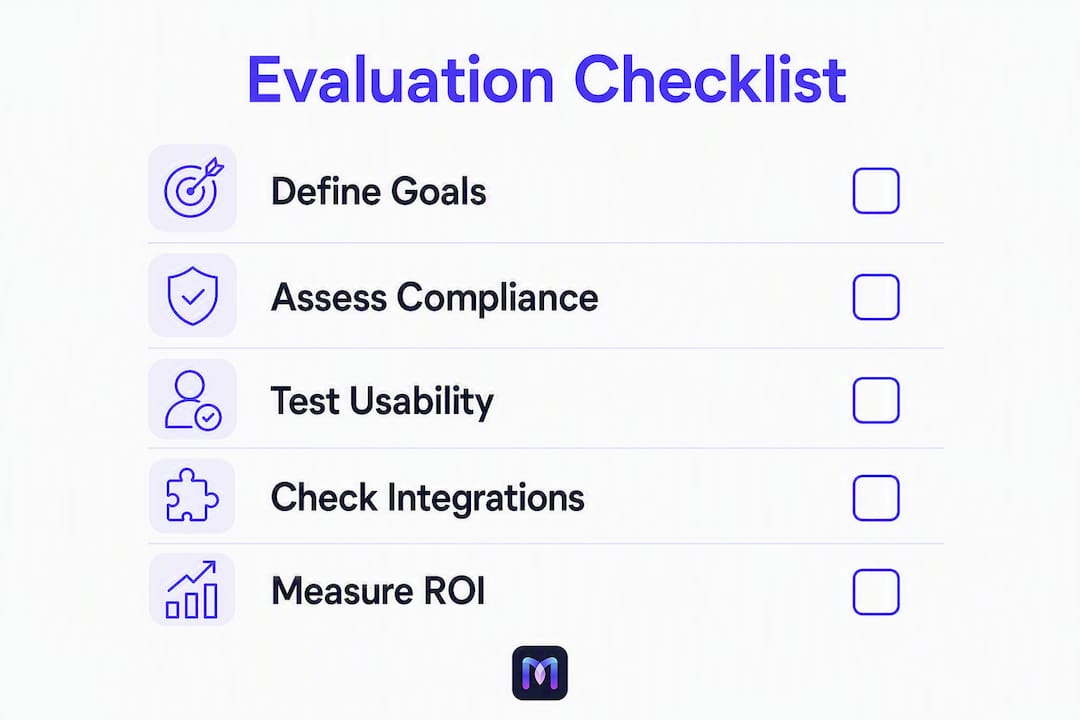
The right platform depends on your primary use case, your governance requirements, and your team’s technical capacity. Use this checklist to run a fast, defensible selection process.
Evaluation criteria:
- Primary use case fit — Does the platform handle your core workflow type natively (voice, chat, data pipeline, creative, cross-app)?
- Governance controls — BYOM support, audit logs, role-based access, credential management, and action-level restrictions
- Integration coverage — Does it connect to your existing CRM, ticketing, telephony, and data systems without custom code?
- Deployment options — Cloud, self-host, or hybrid; confirm data residency requirements before shortlisting
- SLAs and support — What is the vendor’s committed response time? Is enterprise support included in your plan tier?
- Analytics and observability — Does the platform emit structured logs to your monitoring stack (Datadog, Splunk)? Can you trace individual workflow executions?
- Cost model — Per-task, per-seat, or usage-based? Ask for a cost estimate at your expected monthly volume before signing
- Onboarding and templates — Does the vendor offer industry-specific templates that reduce POC time? Is implementation support included?
Vendor questions to ask in a demo or RFP:
- What SOC 2 or HIPAA attestation documentation can you provide?
- What are the concurrency limits at our expected call or task volume?
- How do we export audit logs, and which SIEM integrations are supported?
- What is the latency profile for a 3-step workflow at peak load?
- What does your POC or trial process look like, and what success metrics do you track?
- How are model credentials managed, and can we bring our own LLM?
Red flags to watch for:
- No audit logs or structured observability output
- Closed model-only deployment with no BYOM option
- No POC or trial available before contract commitment
- Limited connector ecosystem that requires custom code for your core systems
- Vague SLA language with no committed response times
Recommended POC scope: Build a 3-step workflow (trigger, process, action), run it at 20% of your expected peak volume, and measure end-to-end latency, error rate, and user acceptance against defined criteria. Two weeks is enough to surface the critical gaps. For AI workflow optimization strategies that go beyond the POC, a structured adoption framework helps teams move from prototype to production without rework.
9. Enterprise governance: what to verify before you sign
Governance is where most visual workflow builder AI evaluations break down. Teams focus on the canvas UX and connector count, then discover compliance blockers six months into procurement.
Critical governance capabilities to evaluate:
- BYOM and self-hosting: When scaling for enterprise workloads, BYOM or self-hosting is often the decisive capability for meeting compliance requirements like SOC 2 or HIPAA. Public-cloud-only builders can create blockers later in procurement, so confirm this early.
- Centralized credential management: Credentials for connected systems should be stored and rotated centrally, not embedded in individual workflow configurations.
- Action-level controls: The ability to restrict which actions a workflow can take (read-only vs. write, specific API endpoints) reduces blast radius when something goes wrong.
- Role-based access control (RBAC): Separate permissions for workflow builders, reviewers, and operators are non-negotiable in multi-team environments.
- Audit logging to SIEMs: Operations teams value platforms that emit structured logs to central monitoring tools like Datadog or Splunk because it lets SRE and security teams treat workflows like any other production service.
Monitoring and observability checklist:
- Log streaming with structured output (JSON preferred)
- Per-execution tracing with step-level timing
- Alerting on failure rates and latency thresholds
- Metrics export to your existing monitoring stack
Component modularity and templates: Practitioners rarely build workflow platforms from scratch. Reusable workflow components reduce maintenance debt and accelerate build time across workflows. Platforms with a versioned component library let teams build once and reuse across departments, which compounds value over time. When evaluating vendors, ask specifically about their template library depth and whether components can be versioned and shared across workspaces.
Compliance checklist:
- SOC 2 Type II attestation (request the report, not just the badge)
- HIPAA Business Associate Agreement (BAA) availability for healthcare deployments
- Data retention and masking controls for PII in workflow logs
- Geographic data residency options if required by your legal team
Implementation checklist for production readiness:
- Staging-to-production pipeline with environment separation
- Load testing at expected peak concurrency before go-live
- Operational runbook covering incident response, rollback procedures, and on-call escalation
- Data retention policies documented and enforced at the platform level
Pro Tip: Ask every vendor for their SOC 2 Type II report, not just a badge on their website. The report shows the audit period, the auditor, and the specific controls tested. A badge without a report is marketing; a report with a clean opinion is evidence.
10. How we evaluated these platforms
This comparison is based on hands-on testing of each platform’s visual canvas, connector ecosystem, and governance controls, combined with review of published security attestations, vendor documentation, and publicly available demo environments.
Evaluation methodology:
- Built a 3-step test workflow on each platform (trigger, LLM processing step, output action) and measured configuration time, error handling, and observability output
- Reviewed SOC 2 attestation documentation where publicly available; noted where vendors provide only a badge without a downloadable report
- Verified integration coverage against a standard enterprise stack (Salesforce, ServiceNow, Twilio, Slack, and a generic REST API endpoint)
- Assessed deployment options by reviewing vendor documentation and confirming self-hosting availability
- Evaluated pricing transparency by comparing published plan pages and requesting enterprise quotes where public pricing was absent
Trust signals to look for when evaluating any vendor:
- SOC 2 Type II or HIPAA attestation with a named auditor and audit period
- Published customer case studies with named organizations and measurable outcomes
- Public SLA documentation with committed response times and uptime guarantees
- Available audit logs with documented export formats
- Active product release notes demonstrating ongoing development
For deeper technical validation, Monobot publishes a technical webinar on built-in agent tools and product release notes that show platform maturity and development cadence.
11. Which platform fits your specific business use case?
Technical comparisons only get you so far. Here is how the platform types map to the workflows your team is most likely trying to automate.
Contact center automation (inbound voice and chat):
- Platform type: Voice-first integrated platform (Monobot)
- Key success metric in POC: First-call resolution rate and average handle time reduction
- A healthcare system deploying Monobot’s voice agent for appointment scheduling can reduce live-agent inbound volume while extending after-hours coverage.
CRM sync and lead qualification:
- Platform type: Control-plane integrator (Zapier) or no-code builder (Make)
- Key success metric: Lead response time and CRM data completeness
- Monobot’s sales and lead generation use case page shows how AI chat agents qualify leads and push structured data to CRM without manual entry.
Document ingestion and extraction:
- Platform type: Self-hosted engine (n8n) or enterprise LLM builder (Stack AI)
- Key success metric: Extraction accuracy rate and processing latency per document
Automated QA for support interactions:
- Platform type: Voice-first platform with analytics (Monobot)
- Key success metric: QA coverage rate (percentage of interactions reviewed) and issue detection rate
- Monobot’s interaction analytics surface sentiment trends and escalation patterns across 100% of interactions, not just sampled calls.
Marketing content pipelines:
- Platform type: Creative multimodal builder (Gumloop, Zite) or no-code builder (Make)
- Key success metric: Content production throughput and revision cycle time
IT helpdesk automation:
- Platform type: Voice-first integrated platform (Monobot) or control-plane integrator (Zapier)
- Key success metric: Ticket deflection rate and mean time to resolution
- Monobot’s IT helpdesk automation handles password resets, access requests, and common IT queries through voice and chat agents, reducing L1 ticket volume.
12. Final recommendation: when to choose Monobot vs. other platforms
For enterprise teams whose primary need is voice and chat automation with built-in analytics, Monobot is the strongest choice. It is the only platform in this comparison that handles voice agents, chat agents, interaction analytics, and industry-specific templates in a single production-ready environment.
| Trigger condition | Recommended platform |
|---|---|
| Need voice + chat + analytics in one platform | Monobot |
| Fast time-to-value with industry templates (healthcare, banking, retail) | Monobot |
| Contact center automation with real-time agent assist | Monobot |
| IT helpdesk automation (voice + chat deflection) | Monobot |
| Cross-app SaaS orchestration with governance controls | Zapier |
| Strict data residency or self-hosting required | n8n |
| Rapid no-code prototyping for citizen developers | Make |
| LLM experimentation or multimodal creative pipelines | Gumloop, Zite, Stack AI, or Vellum |
If your need is broad cross-app orchestration without a voice component, Zapier’s control-plane model and connector breadth are hard to beat. If data residency is the constraint, n8n’s self-hosting gives you the control that public-cloud-only platforms cannot.
Key Takeaways
The most effective visual workflow builder AI for enterprise voice and chat automation is Monobot, which combines production-grade agents, interaction analytics, and industry templates in a single platform that moves from POC to production faster than general-purpose builders.
| Point | Details |
|---|---|
| Match platform to use case | Voice + chat automation needs a voice-first platform; cross-app orchestration needs a control-plane builder. |
| Governance is a procurement gate | Verify SOC 2 Type II attestation, BYOM support, and audit log export before shortlisting any vendor. |
| POC scope matters | A 3-step workflow at 20% peak volume over two weeks surfaces critical gaps before you commit. |
| Component modularity reduces debt | Platforms with versioned, reusable templates accelerate build time and cut long-term maintenance overhead. |
| Monobot for contact center and IT | Monobot’s voice + chat + analytics integration makes it the recommended first evaluation for contact center and IT helpdesk automation. |
What practitioners get wrong about AI workflow adoption
The conventional wisdom says pick the platform with the most integrations. In practice, the teams that struggle most with AI workflow deployments are not the ones who chose the wrong connector count. They are the ones who automated too much, too fast, without instrumenting what they built.
Over-automation is a real failure mode. A team deploys a voice agent that handles 80% of inbound calls, then discovers three months later that the 20% it escalates are the highest-value interactions, and the escalation routing logic is opaque. No logs. No metrics. No way to improve it without rebuilding from scratch.
The teams that get this right start with a single high-value workflow, instrument every step with structured metrics, and treat the first deployment as a learning system rather than a finished product. They use templates to move fast, then add observability before they scale. That sequence matters. Observability bolted on after scale is expensive and often incomplete.
For operations teams evaluating any platform in this list: the question is not “can it automate this workflow?” Every platform here can. The question is “can we see what it is doing, fix it when it breaks, and improve it without a full rebuild?” That is what separates a platform you can run in production from one you can only demo.
For practical guidance on AI workflow improvement for business leaders, the principles are consistent: instrument first, scale second, and treat every workflow as a product with a lifecycle, not a one-time build.
Monobot cuts contact center automation time from months to weeks
Contact centers and IT helpdesk teams that evaluate Monobot typically find that the combination of voice agents, chat agents, and built-in interaction analytics removes the integration work that slows every other platform down. There is no separate analytics tool to connect, no voice layer to bolt on, and no template library to build from scratch.

Monobot’s industry templates for healthcare, banking, retail, logistics, and IT mean your team can configure a working POC in days, not months. Real-time agent assist and sentiment analysis are live from the first deployment, giving your operations team immediate visibility into what the automation is doing and where it needs refinement.
Your next step: Request a demo at monobot.ai to run a scoped 2-week POC on your highest-volume workflow. The demo covers voice agent configuration, chat agent setup, and a walkthrough of the interaction analytics dashboard so your team can evaluate fit before any contract conversation.
Business benefits: Faster time-to-value with prebuilt templates, reduced call handling costs through automated inbound deflection, and improved agent performance through real-time assist and conversation intelligence.
Useful sources and vendor documentation
- Monobot automation flows and industry templates — Feature documentation for Monobot’s visual workflow builder and template library
- Monobot workspace and agent assist — Details on real-time agent assistance and workspace copilot capabilities
- Monobot AI agent builder — Voice and chat agent configuration documentation
- Zapier governance and control-plane features — Vendor documentation on BYOM, log streaming, and enterprise governance controls
- Zapier reviews on G2 — User reviews covering enterprise adoption experience and governance feature feedback
- Zapier reviews on Capterra — Additional user reviews and ratings for enterprise evaluation
- n8n reviews on G2 — Community and enterprise user feedback on n8n’s self-hosting and extensibility
- n8n reviews on Capterra — User ratings and reviews covering deployment experience
- Make reviews on G2 — User feedback on Make’s visual canvas and no-code capabilities
- Make reviews on Capterra — Additional ratings for Make’s ease of use and integration coverage
- ISACA: AI governance and the new triad — Industry guidance on AI governance frameworks relevant to enterprise workflow compliance
Verifying vendor compliance claims: Request the actual SOC 2 Type II report (not just the badge), the HIPAA BAA template, and the public SLA document. Cross-reference the audit period and auditor name. For HIPAA-eligible configurations, confirm which specific platform components are covered under the BAA.
FAQ
What is a visual workflow builder AI?
A visual workflow builder AI is a platform that lets you design, automate, and manage multi-step processes using a drag-and-drop or node-based canvas, with AI capabilities such as LLM-based flow generation, intelligent agents, and model chaining built into the workflow execution layer.
Which visual workflow builder AI is best for contact center automation?
Monobot is the strongest choice for contact center automation because it combines AI voice agents, chat agents, real-time agent assist, and interaction analytics in a single platform with prebuilt industry templates for healthcare, banking, retail, and IT.
Does n8n support enterprise compliance requirements like SOC 2 or HIPAA?
n8n’s cloud offering carries SOC 2 compliance; self-hosted deployments put compliance responsibility on your team’s infrastructure controls. For HIPAA, verify BAA availability directly with n8n for your specific deployment configuration.
What governance features should I require from any AI workflow platform?
At minimum, require SOC 2 Type II attestation, BYOM or self-hosting options, structured audit log export to your SIEM (Datadog or Splunk), role-based access control, and a documented SLA with committed response times.
How long should a POC take for an AI workflow builder?
Two weeks is sufficient to validate a 3-step workflow at 20% of expected peak volume, measure end-to-end latency and error rates, and confirm integration coverage against your core systems before committing to a platform.