


To scale a chatbot reliably, externalize session state, shorten the request critical path, and add layered caching and observability, then autoscale on user-impact metrics rather than CPU. Prioritize five pillars in order: architecture, state management, caching, observability, and autoscaling. Get those right and the rest of the roadmap, from graceful degradation to multi-region failover, falls into place.
TL;DR:
- Externalizing session state and using layered caching significantly reduces latency and prevents single points of failure during high traffic.
- Autoscaling based on user-impact metrics like queue depth and response latency ensures more reliable scaling than CPU utilization alone.
- Proper segmentation, per-tenant rate limiting, and secure data management are critical for maintaining performance and compliance at scale.
- Load testing with realistic multi-turn conversations and deliberate traffic spikes helps identify bottlenecks and validate system robustness.
- Monobot’s platform streamlines deployment by handling complex infrastructure patterns, enabling faster scaling and management of enterprise-grade chatbots.
Table of Contents
- What Architecture Do You Need for Scaling Chatbots?
- Why Do Sticky Sessions Break Chatbot Scaling?
- How Should You Layer Caching for a Scaling Chatbot?
- What Should You Measure When Scaling a Chatbot?
- How Do You Design Graceful Degradation for Chatbots?
- Kubernetes or Serverless: Which Fits Your Chatbot?
- How Do You Cut Prompt and RAG Costs Without Losing Quality?
- What’s a Realistic 90/180-Day Roadmap for Scaling Chatbots?
- How Does Monobot Support This Scaling Playbook?
- How Do You Handle Multi-Tenancy and User Segmentation?
- How Do You Load Test a Chatbot Before It Breaks in Production?
- How Do You Integrate a Chatbot With Third-Party Services?
- How Do You Manage Data and Stay Compliant at Scale?
- What Security and Privacy Steps Matter Most at Scale?
- What’s the Real Trade-off in Scaling a Chatbot Program?
- Ready to Put This Playbook Into Practice?
- Where to Learn More About Scaling Chatbots
- Sources
- FAQ
What Architecture Do You Need for Scaling Chatbots?
Most chatbot outages trace back to one decision made early: keeping conversation state inside the process that handles the request, as explained in Ways to optimize for ChatGPT: A marketer’s guide. Fix that first, before touching compute.
A stateless API layer is non-negotiable at scale. Every request should carry (or fetch) everything it needs from an external store, so any replica can handle any request. This is what lets you run five instances or fifty without rewriting your routing logic.
Sitting between your app and your model provider, an LLM gateway handles three jobs: provider failover when OpenAI or Anthropic has a bad day, token budget enforcement so one runaway conversation doesn’t blow your cost model, and semantic caching at the boundary where it catches the most repeat traffic. Tools built on proxies like HAProxy are a common foundation for this kind of high-throughput routing.
Between your front end and your inference layer, queues absorb bursts instead of dropping them:
- A message queue smooths traffic spikes so inference workers process at a sustainable rate instead of falling over.
- Backpressure signals (a “system is busy” response) beat silent timeouts every time.
- Web chat, messaging platforms, and voice each carry different latency tolerances. Voice has almost none.
Cloud primitives like managed caches, regional failover, and load balancers from platforms such as Microsoft Azure give you the raw building blocks. The critical path matters more than raw compute. Shorten it before you scale it.
Why Do Sticky Sessions Break Chatbot Scaling?
Sticky sessions feel convenient during a pilot. They become a liability the moment you run more than one replica, because a user’s conversation history lives in that one instance’s memory. Lose the instance, lose the conversation. Add a second replica for load balancing, and half your users randomly hit a machine with no memory of what they just said.
The fix is externalizing state entirely, a pattern production chatbot architectures rely on. Use a two-tier storage model:
- Hot path: Redis or a similar in-memory store for the last several turns, read on every request.
- Durable store: DynamoDB, Postgres, or another persistent database for full conversation history and audit trails.
- History management: sliding windows keep only the last N turns in the prompt, summarization compresses older context, and entity extraction pulls out facts (order numbers, names) worth keeping without the full transcript.
- Operational limits: set TTLs so idle sessions expire, choose partition keys that spread load evenly, and watch item-size limits, since DynamoDB caps items at 400KB and a sprawling transcript will hit that ceiling faster than you’d expect.
Pro Tip: Test your session store under a simulated replica failure before launch. If losing one Redis node loses conversations, you haven’t actually externalized state. You’ve just moved the single point of failure.
How Should You Layer Caching for a Scaling Chatbot?
Caching is the highest-leverage, most commonly skipped lever in chatbot scaling. The mistake isn’t caching too little. It’s caching before you know what’s worth caching.
Profile first. Log every request, cluster them by similarity, and see what actually repeats before writing a single caching rule. Five caching layers, each doing different work:
- Edge cache: static assets and common initial greetings.
- Session cache: the active conversation state discussed above.
- Retrieval/vector cache: precomputed embeddings for frequently retrieved documents.
- Response cache: exact-match answers for identical queries, cheap and fast.
- Tool cache: results from external API calls (order lookups, inventory checks) that don’t change second to second.
Exact-match caching catches literal repeats (“what are your hours”). Semantic caching, which compares vector similarity rather than exact strings, catches paraphrases (“when are you open” hitting the same cached answer). This is where the real savings live, since semantic and exact caches placed at the gateway intercept a meaningful share of repeat traffic before it reaches your model.
The risk with semantic caching is a similarity threshold set too loose, which serves a stale or wrong answer to a question that only sounded similar. Tune conservatively, then loosen gradually while watching for complaints.
What Should You Measure When Scaling a Chatbot?
You cannot scale what you don’t measure. Guessing at bottlenecks from CPU graphs alone is how teams overprovision compute while users still wait five seconds for a response.
Time to first token (TTFT) is the single most important latency metric for conversational AI. It’s the gap between a user hitting send and seeing the first character appear. A model that takes eight seconds to generate a full answer but streams the first token in 400 milliseconds feels instant. One that takes three seconds to start streaming feels broken, even with a shorter total response time.
The minimal metric set every production chatbot needs:
- TTFT and total response time, tracked at p50, p90, and p99.
- Queue wait time (how long a request sits before an inference worker picks it up).
- Retrieval latency for any RAG lookups.
- Cache hit rate across each caching layer.
- Error and fallback rates.
- Cost per resolved task.
Distributed tracing that correlates directly to user-visible latency catches bottlenecks that dashboards alone miss.
Set your SLOs on TTFT p90 and queue depth, not CPU utilization. A server can sit at 30% CPU while every user waits eight seconds for a queued request. CPU tells you about the machine. TTFT tells you about the experience.
Monobot’s observability tooling for voice and chat agents is built around exactly this principle: instrument the user-facing signal, not just the infrastructure signal.
How Do You Design Graceful Degradation for Chatbots?
Traffic spikes and provider outages are not edge cases. They’re Tuesday. Design for them instead of hoping around them.
- Tier your responses under load. Serve cached FAQ answers first, fall back to a smaller, cheaper classification model for routing, and offer a concise answer with an “expand for detail” option rather than making everyone wait for the full generation.
- Add circuit breakers and rate limits. When your primary LLM provider’s error rate crosses a threshold, trip the breaker and route to a backup provider or a cached response set automatically.
- Define human handoff triggers explicitly. Sentiment drops, repeated failed intents, or three consecutive fallback responses should hand off to a live agent with a clear message, not a silent dead end.
- Prewarm for known spikes (product launches, marketing campaigns) and lean on cheap fallbacks for the unpredictable ones you can’t prewarm for.
Kubernetes or Serverless: Which Fits Your Chatbot?
The deployment decision comes down to your traffic shape and your connection model, not a general preference for one architecture over the other.
Kubernetes with the Horizontal Pod Autoscaler (HPA) makes sense when you’re running multi-tenant workloads, maintaining long-lived WebSocket connections for voice or live chat, or need fine-grained control over resource allocation per tenant. It’s more operational overhead, but Kubernetes gives you the control multi-tenant, WebSocket-heavy chatbot deployments need that simpler platforms don’t.
Serverless wins for lower-volume or spiky, unpredictable workloads where you’d otherwise pay for idle capacity. No cluster to manage, and you scale to zero when nobody’s chatting.
Whichever you choose, autoscale on signals that reflect actual user experience:
- Queue depth, not just request count.
- TTFT at the 90th percentile.
- Cache utilization (a sudden drop often means a traffic pattern shift, not just volume).
- Custom metrics fed through KEDA or HPA, since CPU and memory rarely correlate with the latency users actually feel.
Layer in prewarming for predictable spikes, multi-region routing to cut network latency for distributed users, and multi-provider failover so a single vendor’s outage doesn’t take down your entire chatbot.
How Do You Cut Prompt and RAG Costs Without Losing Quality?
Every token you send to a model costs money and time. Most teams send far more than they need to.
- Trim conversation history aggressively and summarize older turns instead of replaying the full transcript on every call.
- Keep system prompts concise. A bloated system prompt gets re-processed on every single turn, and that cost compounds fast at volume.
- Limit retrieval depth in RAG pipelines. Pulling ten documents when three would answer the question adds latency and confuses the model with noise.
- Precompute embeddings for your most common documents so retrieval doesn’t recompute vectors on the fly.
- Route with a small, cheap model first. Use it to classify intent or decide whether generation is even needed before handing off to your larger model.
- Cache reranker outputs and only rerank when the query genuinely differs from cached patterns.
Pro Tip: *Run an audit on your last 1,000 conversations and count how many tokens went to history versus how many went to the actual answer.
Monobot’s approach to retrieval-based support agents applies these same tradeoffs, balancing retrieval depth against response latency automatically.
What’s a Realistic 90/180-Day Roadmap for Scaling Chatbots?
Scaling work fails when it’s treated as one big project instead of a sequence of small, measurable ones.
- Days 1 to 14: Define your latency budget (what TTFT and total response time actually need to be), enable distributed tracing, profile real request patterns, and externalize state for at least one high-traffic flow.
- Days 15 to 90: Build out your caching layers, add queues and backpressure between front end and inference, wire autoscaling to queue depth and TTFT instead of CPU, and run your first real load tests.
- Days 91 to 180: Add semantic caching, set up multi-provider routing for failover, build region failover for distributed users, and start tuning cost per resolved task as a tracked metric.
Each phase should end with a number, not a feeling. “We cut p90 TTFT from 3.2 seconds to 1.1 seconds” is a milestone. “Things feel faster” is not. Tying these milestones to customer experience gains that leadership actually tracks makes budget conversations for phase three much easier.
How Does Monobot Support This Scaling Playbook?
Every pattern above maps to something Monobot’s platform is built to handle out of the box, which matters if your team doesn’t have six engineers to spend a year building this from scratch.
- AI voice and chat agents deploy with state externalization and session management already handled, not bolted on after launch.
- Built-in integrations connect to your existing CRM, helpdesk, or order system without custom middleware for every third-party API.
- Real-time analytics dashboards surface TTFT, resolution rates, and fallback frequency without you standing up a separate observability stack.
- Non-coding customization lets product and operations teams adjust flows without waiting on an engineering sprint.
- Industry templates for healthcare, banking, retail, and logistics shortcut the prompt design and RAG setup work described earlier.
Alex, contributing to Monobot’s technical content, has spent this piece translating platform engineering patterns into steps a business or IT decision-maker can actually execute.
How Do You Handle Multi-Tenancy and User Segmentation?
Multi-tenant chatbot deployments introduce a problem single-tenant systems never face: one customer’s traffic spike should not degrade another customer’s experience. This is where a lot of enterprise chatbot implementation plans quietly fall apart.
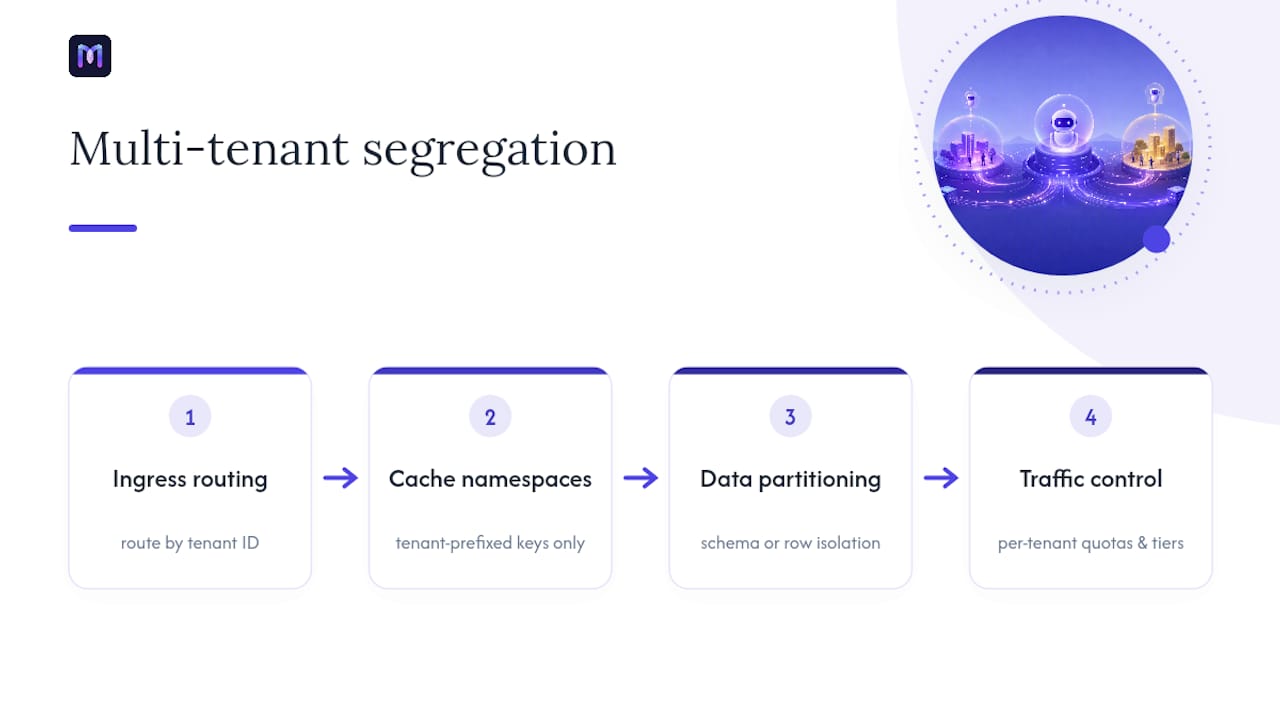
Segment at the data layer first. Every tenant’s conversation history, knowledge base, and configuration should live behind a tenant ID that partitions cleanly, whether that’s a dedicated database schema per tenant or a shared table with strict row-level isolation. Mixing tenant data in the same cache namespace without a tenant prefix is a common mistake that leads to one tenant’s cached answer leaking into another’s conversation.
Rate limiting needs to happen per tenant, not just globally. A single enterprise client running a marketing campaign shouldn’t be able to consume the shared inference queue and starve every other tenant on the platform. Set per-tenant quotas and burst allowances, and monitor them separately in your observability stack.
Segmentation also applies within a single tenant. A retail chatbot might route VIP customers to a faster response tier or a model with more context, while general inquiries hit a leaner, cheaper path. This isn’t unfair prioritization. It’s resource allocation based on business value, and most enterprise deployments do it deliberately.
Configuration management gets messy fast with many tenants. Keep prompt templates, business rules, and integration credentials in a versioned configuration store per tenant, so a change for one customer never accidentally ships to another. Non-coding customization tools help here, letting operations teams adjust tenant-specific flows without a deployment.
How Do You Load Test a Chatbot Before It Breaks in Production?
Load testing a chatbot is fundamentally different from load testing a REST API, because the “work” happens inside an LLM call that can take seconds and varies in duration by query complexity. A flat requests-per-second test will lie to you.

Start by modeling realistic conversation patterns rather than hammering a single endpoint. Real users send multi-turn conversations with pauses between messages, not a burst of identical requests. Tools that support scripted conversation flows, replaying recorded transcripts at scale, give you a far more honest picture than a generic load generator.
Test each layer independently before testing the whole system together. Load test your retrieval layer separately from your generation layer, so when latency spikes, you know whether the vector search or the model call is the bottleneck. Testing them combined from day one makes root-causing failures far slower.
Push past your expected peak deliberately. If you expect 500 concurrent conversations at launch, test to 1,500. Traffic spikes rarely arrive gradually, and a launch day, a viral moment, or a single enterprise client’s mass rollout can triple expected volume overnight.
Watch queue depth and TTFT p90 during the test, not just whether requests eventually succeed. Run these tests on a recurring schedule, not just before launch. Model providers change performance characteristics, your prompt templates grow over time, and a load test from six months ago tells you nothing about today’s system.
How Do You Integrate a Chatbot With Third-Party Services?
Every chatbot beyond a simple FAQ bot eventually needs to talk to something else: a CRM, a payment processor, an inventory system, a calendar. Each integration point is also a new latency risk and a new failure mode you need to plan for.
Treat every third-party API call as untrusted in terms of timing. Set aggressive timeouts (often 2 to 3 seconds) on external calls, and always have a fallback response ready for when a CRM lookup or inventory check doesn’t return in time. A chatbot that hangs for 15 seconds waiting on a slow API is worse than one that says “let me check on that and follow up” and moves on.
Cache what you reasonably can. Order status, inventory counts, and account details don’t need a fresh API call on every single message in a conversation. A short-lived cache (30 to 60 seconds for volatile data) cuts both latency and API costs significantly.
Use an integration layer or middleware rather than wiring each third-party API directly into your conversation logic. This isolates a breaking API change to one place instead of scattering it across your codebase, and it lets you swap providers (a new payment processor, a different CRM) without touching your core chatbot logic. Monobot’s approach to production integrations follows this pattern, keeping third-party connections modular so a single vendor change doesn’t require a full redeploy.
Monitor third-party API health separately from your own system health. When a partner API degrades, you want an alert that says exactly that, not a vague spike in your own error rate that sends engineers chasing the wrong system.
How Do You Manage Data and Stay Compliant at Scale?
Every conversation your chatbot has generates data, and at enterprise volume, that data carries real regulatory weight, especially in healthcare, banking, and other regulated industries.
Classify data at the point of collection, not after the fact. Personally identifiable information, payment details, and health information each carry different retention and access rules, and tagging them as they enter your system is far easier than trying to reclassify a year of stored transcripts later.
Set retention policies deliberately rather than defaulting to “keep everything forever.” Most regulated industries require you to justify how long you retain customer interaction data, and unbounded retention is itself a compliance liability, not just a storage cost.
Encrypt data both in transit and at rest, and extend that discipline to your caching layers. A response cache or session store holding unencrypted customer data is a common gap, since teams focus security review on the primary database and forget the cache sitting next to it.
Build audit trails into your architecture from the start. Regulated industries need to show who accessed what customer data and when, and retrofitting audit logging onto a system that wasn’t designed for it is significantly harder than building it in from day one.
Data residency matters for multinational deployments. If a customer’s data needs to stay within a specific region for regulatory reasons, your architecture needs region-aware routing, not a single global database that happens to sit in one country.
What Security and Privacy Steps Matter Most at Scale?
Security risk in chatbots grows nonlinearly with scale. A vulnerability that affects ten conversations a day is a bug. The same vulnerability at ten thousand conversations a day is a breach.
Authenticate every request, including internal service-to-service calls between your API layer, your LLM gateway, and your session store. An internal network is not a security boundary, and treating it as one is how a compromised component turns into full system access.
Sanitize and validate everything a user sends before it reaches your model or your tools. Prompt injection attacks, where a user tries to manipulate the model into ignoring its instructions or revealing system prompts, become more likely as your chatbot handles more sensitive actions, like processing payments or accessing account data.
Limit what your model can actually do, not just what it’s instructed to do. If your chatbot can trigger a refund or update an account, that action should pass through a permission check independent of the model’s output, since a model can be tricked into requesting an action a real user never asked for.
Rotate API keys and credentials for every third-party integration on a fixed schedule, and scope each credential to the minimum access it needs. A single compromised, overly broad API key is one of the most common ways a chatbot incident becomes a full data breach.
Log security events separately from operational metrics, with tighter access controls on who can view them. Your TTFT dashboard and your security audit log should never share the same access permissions.
What’s the Real Trade-off in Scaling a Chatbot Program?
Most scaling failures aren’t technical. They’re organizational. Engineering wants to build the ideal architecture, SRE wants observability before anything ships, and product wants features live yesterday. Sequence the work: get tracing and state externalization done first, since without those, no other decision has real data behind it.
The biggest blocker I see isn’t budget. It’s single-provider dependency, teams that never build a failover path because “our provider hasn’t gone down yet.” Fix that in phase two, not phase five. Set milestones you can measure in weeks, not quarters, and treat each one as a real experiment with a pass or fail line, not a status update.
— Alex
Ready to Put This Playbook Into Practice?
Building this stack from scratch, the queues, the session store, the semantic cache, the tracing pipeline, takes most engineering teams months, and that’s before you’ve handled a single real customer conversation. Monobot compresses that timeline by handling the infrastructure layer for you.

The AI voice and chat agent builder comes with state management, multi-channel support, and industry templates for healthcare, banking, retail, and logistics already built in, so your team customizes flows instead of engineering infrastructure from zero. The analytics dashboard gives you TTFT, resolution rates, and fallback frequency the moment you deploy, without a separate observability project. Non-coding customization means your operations team can adjust conversation flows and tenant-specific rules without waiting on an engineering sprint. Whether you’re automating IT support with the IT helpdesk agent or scaling HR requests with HR automation, the underlying scaling patterns in this playbook are already handled. Book a demo to see how quickly your team can move from roadmap to production.
Where to Learn More About Scaling Chatbots
- How to scale a chatbot for high traffic without breaking response times
- The AI Chatbot Scaling Playbook — Tanmay Bohra
- Kubernetes for Chatbot Use Cases — Markaicode
- How AI scales customer interactions for service teams
Sources
- How to scale a chatbot for high traffic without breaking response times
- The AI Chatbot Scaling Playbook — Tanmay Bohra
- Kubernetes for Chatbot Use Cases — Enterprise Deployments That Actually Scale 2026 | Markaicode
- Microsoft Azure
- HAProxy
- Top CX trends for CIOs to watch — Gartner
FAQ
What Are the Four Types of Chatbots?
The four main categories are rule-based (fixed decision trees), retrieval-based (pulling answers from a knowledge base), generative AI-based (using an LLM to compose responses), and hybrid systems that combine rules for routine tasks with generative AI for open-ended queries.
What Does It Mean When AI Is Scalable?
A scalable AI system handles growing request volume without a proportional drop in response quality or a proportional spike in cost, typically by externalizing state, caching repeat work, and autoscaling on real load signals rather than fixed capacity.
What Are the Scaling Laws in AI?
AI scaling laws generally describe how model performance improves with more data, more parameters, and more compute, though the exact relationships and diminishing returns vary by model architecture and are a subject of ongoing research rather than a fixed, universal rule.
What Question Will Break an AI Chatbot?
Ambiguous, multi-part, or adversarial questions, especially ones designed to trigger prompt injection or push the model outside its defined scope, are the most common way a chatbot produces an incoherent or unsafe answer. Well-designed guardrails and fallback routing, like the graceful degradation patterns covered above, catch most of these before they reach the user.
Can Monobot Handle Enterprise-Scale Chatbot Deployment?
Monobot is built around enterprise chatbot implementation patterns, including multi-channel support, real-time analytics, and industry-specific templates, so teams can deploy production-ready voice and chat agents without building the underlying scaling infrastructure from scratch.