



A correct AI-to-human handoff transfers working state and authority, not just a chat log. The receiving agent gets a structured briefing with pending goals, actions already attempted, and a suggested next step — and they have the authority to act on it immediately. That is the standard worth building toward.
Three things have to be true for your operations to support this:
- Durable state: the conversation platform or orchestrator serializes the in-progress workflow so nothing is lost between the AI and the human.
- Structured briefing: the handoff packet contains decisions made, tools called, artifacts referenced, and a recommended next action — not a raw transcript.
- Clear authority: the human agent knows exactly what they can decide, override, or escalate further, without needing to re-read the entire conversation history.
Your minimum viable implementation needs four components in place before anything else: an orchestrator or workflow engine that checkpoints state, a structured packet schema, a routing and queueing layer, and a reentry path so the agent can resume the workflow after the human acts.
Treat every handoff as a checkpoint in a durable workflow, not an ephemeral chat transfer. The difference shows up in repeat contacts, resolution time, and agent confidence.
Table of Contents
- What does an AI-to-human handoff actually mean?
- Why a broken handoff costs more than you think
- Core elements every effective handoff must include
- When should the AI escalate to a human?
- What systems do you need to build this?
- How to implement this from pilot to scale
- What to measure and how to keep improving
- Common pitfalls and how to avoid them
- How Monobot supports effective AI-to-human handoffs in real deployments
- Key Takeaways
- The part most teams get wrong about handoff design
- Monobot makes your first handoff pilot straightforward
- Useful sources
- FAQ
What does an AI-to-human handoff actually mean?
In engineering and operational terms, a handoff is the serialized transfer of working state, pending goals, in-progress subtasks, tool-call outputs, and decision authority from an AI agent to a human agent. The Zylos Research definition is precise: successful handoffs serialize pending goals, in-progress subtasks, and tool-call outputs so humans do not redo the bot’s work.
Three patterns exist in practice, and they are not equivalent:
- Transcript dump: the human receives a raw conversation log. They must re-read everything, infer intent, and start from scratch. This is the most common pattern and the worst one.
- Structured briefing: the system generates a compact packet with explicit fields: decisions made, actions attempted, suggested next step, artifact references. The human reads it in under 30 seconds and acts.
- Warm transfer: a human-to-human equivalent where the AI agent stays active briefly, the human is briefed in real time, and authority is explicitly handed over before the AI disengages.
“Meaningful human intervention requires the human to have capability, authority, and sufficient information to influence outcomes — not a token gesture.” — Dutch Data Protection Authority consultation on meaningful human intervention
That framing matters for compliance as much as for CX. A human who rubber-stamps an AI output without the information or authority to change it does not constitute meaningful oversight. Design your handoff so the human can genuinely influence the outcome.
Why a broken handoff costs more than you think
A 2025 CX study found that 79% of customers prefer a human agent for complex service issues, underlining the need for robust escalation paths. That preference is not going away. What it means operationally is that your escalation path is not a fallback — it is a primary service channel for your highest-stakes interactions.
A broken handoff compounds the damage. When a customer has to repeat their issue after being transferred, repeat contact rates rise, CSAT drops, and time-to-resolution extends. Agent productivity suffers too: an agent who receives a transcript dump instead of a structured brief spends the first two to three minutes of every escalated call reconstructing context the AI already had.
The risk cuts both ways. Reviewer fatigue appears when escalation rates become too high, creating approval-latency risks and token oversight. Over-escalation burns agent capacity and erodes trust in the AI system. Under-escalation leaves complex issues unresolved and customers frustrated. Both failures show up in NPS and cost-per-contact.

Designing meaningful human oversight in AI proposes treating AI operative agency and human evaluative agency as distinct layers with explicit handover points. That framing is useful for contact center leaders: the AI handles the operative work, the human evaluates and decides at defined checkpoints, and the system logs both for accountability. Getting this architecture right protects you on the compliance side and improves CX at the same time.
Core elements every effective handoff must include
Every handoff architecture needs these seven components. Missing any one of them creates a predictable failure mode.
- Trigger rules: defined conditions (confidence threshold, explicit user request, sentiment signal, task stake) that fire the escalation.
- Structured context packet: a schema-validated briefing with explicit fields (see below).
- Authority and decision scope: a clear statement of what the human can decide, approve, or escalate further.
- Routing and queueing: skill-based or intent-based routing that matches the escalation to the right agent or team, with SLA timers.
- Durable state checkpoints: the orchestrator saves workflow state at each step so the handoff is resumable, not restartable.
- Reentry path: a mechanism for the human to post their resolution back into the workflow so the AI agent can resume follow-up tasks without manual reconciliation.
- Audit logs: a timestamped record of every state transition, trigger event, and human action for QA and compliance review.
What belongs in the structured packet
The packet is not a summary of the conversation. It is a decision-support document. Include: the customer’s original intent and current goal, decisions the AI made and why, actions already attempted (with outcomes), tool calls and their results, artifacts referenced (order IDs, ticket numbers, policy documents), and a suggested next step for the human.
Pro Tip: Prune the packet ruthlessly. A 400-word briefing that buries the key decision in paragraph three is worse than a 60-word packet with four labeled fields. Signal beats noise every time. If an agent has to search the packet for what to do next, the packet has failed.
Structured briefing fields reduce the “lost in the middle” effect versus full transcript dumps. Keep the schema tight and validate it on every handoff event.
When should the AI escalate to a human?
Trigger design is where most teams underinvest. A single confidence threshold is not enough. Production systems use multi-signal rules combining confidence thresholds, sentiment, loop detection, and stake-based conditions.
Common trigger types
| Trigger Type | Signal Used | Best For |
|---|---|---|
| Explicit user request | “Talk to a person,” “agent please” | Any channel, always honored |
| Confidence-based | LLM confidence score below threshold | Ambiguous intent, low-certainty responses |
| Rule-based | Keyword match, topic category, policy flag | Regulated topics, billing disputes, legal |
| Contextual / stake-based | Order value, account tier, complaint severity | High-value customers, escalation-risk scenarios |
| Sentiment-based | Negative sentiment score, frustration detection | Emotionally charged interactions |
| Loop detection | N turns without resolution, repeated intent | Stuck workflows, circular conversations |
| Hybrid / multi-signal | Two or more signals combined | Production default for most deployments |
A practical boolean example: escalate if (confidence < 0.65) OR (sentiment_score < -0.4) OR (loop_count >= 3) OR (explicit_request == true). Start permissive — you will over-escalate at first. That is intentional. Run calibration cycles over two to four weeks, review the escalations that resolved without human action, and tighten thresholds based on that data.
On warm versus cold transfers: a warm transfer keeps the AI active while the human is briefed, then explicitly hands over authority. A cold transfer fires the packet and disconnects. Use warm transfers for high-value or emotionally sensitive escalations where continuity matters. Cold transfers are acceptable for routine billing or account queries where the structured packet is sufficient.
What systems do you need to build this?
A resilient handoff architecture spans six system layers. You do not need to build all of them from scratch, but you do need to know which layer each component lives in.
- CRM and tool integrations: — the data layer (Salesforce, ServiceNow, Zendesk, etc.) that the AI queries and that the human updates.
Key patterns to implement: durable checkpointing at each workflow step, structured output schemas for the briefing packet, input filters that recast prior tool calls as “context received” rather than raw API outputs (this prevents context bleed), on_handoff callbacks that fire the routing and notification logic, and a nest_handoff_history pattern that keeps the handoff record separate from the active conversation context.
Pro Tip: Before you write a line of integration code, confirm you have API access to your CRM with write permissions, webhook hooks on your conversation platform, identity scoping so the AI cannot access data outside the customer’s session, and a test environment that mirrors production state. Missing any of these will stall your pilot.
For voice-first deployments, live transcription feeds directly into the structured packet, giving the human agent a real-time record of what was said before they take the call.

How to implement this from pilot to scale
A phased approach reduces risk and gives you calibration data before you commit to full rollout. Here is a practical checklist.
- Discovery (Week 1–2): Map your top five escalation scenarios by volume and complexity. Identify which ones have clear resolution paths and which require judgment. Define success metrics: target handoff rate, time-to-human SLA, CSAT post-handoff, and first-contact resolution after escalation.
- Data and privacy review (Week 2–3): Audit what data the AI accesses during a session. Confirm PII handling, data retention policies, and consent flows comply with applicable U.S. regulations (CCPA, HIPAA if healthcare). Scope the structured packet to exclude data the human agent does not need.
- Prototype with a small agent pool (Week 3–5): Deploy the handoff to a cohort of five to ten agents. Use a single escalation scenario. Configure the structured packet schema and test the reentry path end-to-end.
- Calibration runs (Week 5–8): Run paired reviews: for each escalated conversation, have a senior agent assess whether the escalation was necessary. Use that data to recalibrate trigger thresholds. Explainability interfaces can cause overtrust in novice users, so train agents to evaluate the AI’s briefing critically rather than accept it as authoritative.
- Routing and SLA setup (Week 6–8): Configure skill-based routing rules. Set SLA timers and alerting for handoffs that exceed time-to-human targets.
- Training and playbooks (Week 7–9): Write agent playbooks for each escalation scenario. Cover: how to read the structured packet, what authority they have, how to post a resolution back, and when to escalate further.
- Scale rollout (Week 10+): Expand to full agent pool and all in-scope scenarios. Maintain weekly calibration reviews for the first 60 days.
Pro Tip: Run paired reviews as a standing weekly ritual, not a one-time calibration event. Assign a senior agent or QA lead to review a random sample of escalations each week and score them: necessary escalation, unnecessary escalation, or missed escalation. Feed that data directly into trigger recalibration. Teams that do this consistently cut unnecessary escalation rates significantly within the first quarter.
For a broader view of automation scope selection before you start, that framing helps you identify which inquiry types are safe to automate fully and which need an escalation path from day one.
What to measure and how to keep improving
Instrument these metrics from day one. Without them, you are calibrating blind.
| Metric | Definition | Recommended Target |
|---|---|---|
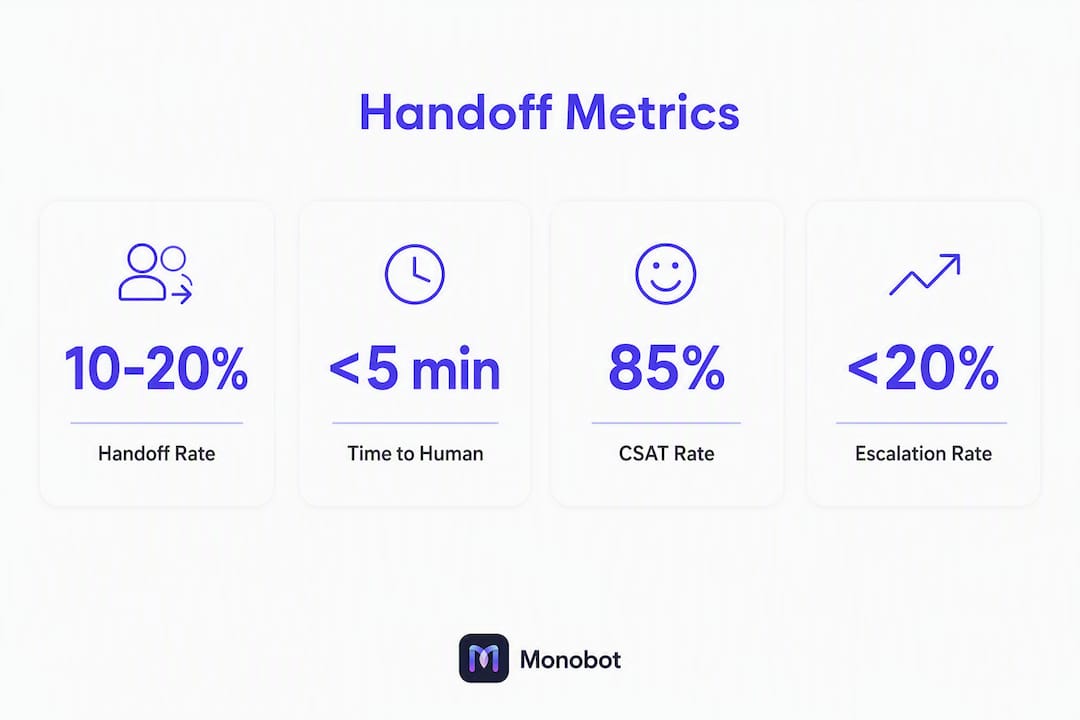
| Handoff rate | % of AI sessions escalated to human | 10–20% (above 20% risks reviewer fatigue) |
| Time-to-human | Seconds from trigger to agent pickup | Under 60 seconds for voice; under 90 for chat |
| First-contact resolution after handoff | % of escalated sessions resolved without repeat contact | Above three-quarters |
| Repeat contact rate | % of customers who contact again within 48 hours | Below one-fifth |
| CSAT post-handoff | Customer satisfaction score after escalated sessions | Above four out of five |
| Reviewer override rate | % of AI-suggested next steps overridden by agents | Track trend; rising rate signals briefing quality issues |
| Reviewer load | Escalations per agent per hour | Monitor for fatigue signals at high escalation rates |
| Successful reentry rate | % of handoffs where agent posts resolution and AI resumes | Above nine-tenths |
Run a daily ops dashboard showing handoff rate, time-to-human, and CSAT post-handoff. Set alerts for handoff rate exceeding 20% (reviewer fatigue risk) and time-to-human exceeding SLA. Review override rate weekly — a rising trend means your briefing packet is not giving agents what they need, or your trigger rules are firing on cases the AI could have handled.
For voice analytics and call-level signal extraction, automated scoring of escalated calls accelerates QA cycles and surfaces trigger calibration opportunities faster than manual review alone.
Common pitfalls and how to avoid them
- Everything dump: sending the full transcript instead of a structured packet. Fix: enforce a schema-validated briefing with a maximum field count and character limits per field.
- Lost working state: the orchestrator does not checkpoint, so the human starts from zero. Fix: implement durable checkpointing at every workflow step before you go live.
- No reentry path: the human resolves the issue but the AI cannot resume. Fix: design the reentry path as a first-class feature — the human posts a resolution event, the orchestrator injects it as authoritative state, and the agent resumes.
- Reviewer fatigue: escalation rate climbs above 20%, agents start approving without reading. Fix: monitor escalation rate daily and recalibrate triggers when the rate trends upward.
- Over-escalation: too many low-complexity issues reach human agents. Fix: run paired reviews to identify unnecessary escalations and tighten confidence thresholds on those intent categories.
- Poor routing: escalations land with the wrong agent or team. Fix: configure intent-based routing rules and test them with your top five escalation scenarios before launch.
- Context bleed: prior tool-call outputs appear as raw API responses in the briefing, confusing the agent. Fix: use input filters and narrative recasting — present tool results as “context received” rather than raw outputs.
- Stale goals after human action: the AI resumes with the original goal even though the human already resolved it. Fix: the reentry event must update the goal state before the agent resumes.
One compliance note: meaningful human intervention, as defined by policy guidance on oversight, requires that humans have the capability, authority, and information to influence outcomes. Design your oversight layer to meet that standard, not just to satisfy an audit checkbox.
How Monobot supports effective AI-to-human handoffs in real deployments
Monobot is built to handle the full handoff lifecycle, from trigger detection through structured briefing generation to reentry signaling, without requiring custom engineering for each component.
- Structured brief generation: Monobot’s Automation Flows generate a schema-validated briefing packet at the point of escalation, pulling decisions, tool outputs, and suggested next steps into a compact agent-facing format.
- Live Transcription: for voice channels, Monobot’s live transcription feeds directly into the briefing packet, giving agents a real-time record of the conversation before they take the call.
- Orchestration hooks:
on_handoffcallbacks and reentry signaling are configurable within Monobot’s workflow layer, so the agent can resume the workflow after the human posts their resolution. - Agent workspace integrations: Monobot connects to CRM platforms and ticketing systems, so the human agent’s workspace reflects the current state of the customer record without manual lookup.
- Real-time agent assistance: during the escalated interaction, Monobot surfaces suggested responses and knowledge base articles to the human agent, reducing handle time.
- Interaction dashboards: handoff rate, time-to-human, CSAT post-handoff, and override rate are tracked in Monobot’s analytics dashboard, with alerting for escalation rate thresholds.
Suggested pilot steps using Monobot: select an industry template (healthcare, retail, banking, or logistics), connect your CRM via the native integration, configure the handoff packet schema in Automation Flows, staff a cohort of five to ten agents, and run two to four weeks of calibration cycles using the paired-review process above.
Pro Tip: Use Monobot’s sentiment analysis signal as one input in your hybrid trigger rule from day one. It fires faster than confidence-score degradation on emotionally charged interactions, and it catches escalation-risk conversations that a pure confidence threshold would miss.
For IT helpdesk deployments and HR automation scenarios, Monobot’s industry templates include pre-configured escalation paths and briefing schemas, which cuts pilot setup time considerably.
Key Takeaways
A correct AI-to-human handoff transfers working state, structured context, and decision authority — not just a transcript — so the human agent can act immediately without reconstructing what the AI already knew.
| Point | Details |
|---|---|
| Transfer state, not transcripts | Serialize pending goals, tool outputs, and decisions into a schema-validated packet before escalation fires. |
| Keep escalation rate low to avoid reviewer fatigue and approval-latency risks; calibrate triggers with regular paired reviews. | |
| Design reentry as a first-class feature | The human’s resolution must post back as authoritative state so the AI agent can resume without manual reconciliation. |
| Measure the right KPIs from day one | Track handoff rate, time-to-human, first-contact resolution after handoff, and CSAT post-handoff on a daily ops dashboard. |
| Monobot as your pilot platform | Monobot’s Automation Flows, Live Transcription, and agent workspace integrations cover the full handoff lifecycle with no custom engineering required. |
The part most teams get wrong about handoff design
The conventional wisdom on AI handoffs focuses almost entirely on the trigger: when should the AI escalate? That is the wrong place to spend most of your design effort. Triggers are calibratable in weeks. The harder problem is what happens after the trigger fires.
Most teams ship a handoff that sends a transcript and calls it done. The agent receives a wall of text, spends three minutes reconstructing context, and the customer repeats themselves anyway. The AI handled the easy part; the human inherited the mess. That is not a handoff. That is a context dump with a routing label on it.
The insight worth internalizing is this: the structured packet is not a nice-to-have summary. It is the product. Every field in that packet represents a decision about what the human needs to act confidently. Getting that schema right, and keeping it tight, is the highest-leverage design work in the entire system. A 60-word packet with four labeled fields outperforms a 400-word summary every time.
The second thing teams underestimate is the reentry path. Most pilots never build it. The human resolves the issue, closes the ticket, and the AI workflow sits orphaned. That means every escalated session becomes a dead end for automation. Build reentry from the start, even if your first version is a simple resolution event that updates the goal state. The compounding value of a resumable workflow shows up in your automation rate within the first quarter.
One last point on governance: continuous training for both your AI models and your human agents is not optional. Agents who receive AI-generated briefings need to evaluate them critically, not accept them as ground truth. Trust calibration research shows that certain explanation styles can cause overtrust in less experienced users. Build that skepticism into your agent playbooks from day one.
Monobot makes your first handoff pilot straightforward
Contact centers that automate routine interactions but struggle with escalation quality are leaving the most valuable part of the customer relationship to chance. Monobot closes that gap by handling the full handoff lifecycle, from trigger detection and structured brief generation to live transcription, reentry signaling, and KPI dashboards, without requiring a custom engineering project for each component.

The AI Agent Builder lets you configure escalation triggers, briefing packet schemas, and routing rules in a no-code environment. Industry templates for healthcare, retail, banking, logistics, HR, and IT come with pre-built escalation paths so your pilot starts with a working baseline rather than a blank canvas. Connect your CRM, staff a small agent cohort, and run your first calibration cycle within weeks, not months.
Book a demo at monobot.ai to walk through a pilot scoped to your top escalation scenarios.
Useful sources
- Designing Meaningful Human Oversight in AI (Springer Nature / AI and Ethics) — academic framework for layered-agency oversight models; useful for architects designing evaluator interfaces and provenance logging.
- Calibrating Trust in AI-Assisted Decision Making (UC Berkeley) — research on how explanation design affects trust calibration; directly relevant to agent training and briefing UX design.
- Three Challenges for AI-Assisted Decision-Making (PMC / NIH) — peer-reviewed analysis of human-AI complementarity conditions; useful for scoping which escalation scenarios benefit most from human judgment.
- Customer support automation guide (BizDev Strategy) — strategic overview of automation ROI and change management for mid-market support leaders.
FAQ
What is an AI human handoff in customer service?
An AI human handoff is the transfer of a customer interaction from an AI agent to a human agent, including the working state, pending goals, and a structured briefing so the human can act immediately without reconstructing context.
When should an AI escalate to a human agent?
Escalate when the AI’s confidence falls below a defined threshold, when the customer explicitly requests a human, when sentiment signals frustration, when the interaction loops without resolution, or when the task involves high stakes such as billing disputes or regulated decisions. Multi-signal hybrid rules outperform single-threshold triggers in production.
What should a handoff packet include?
The packet should include the customer’s current goal, decisions the AI made, actions already attempted with their outcomes, tool-call results, relevant artifact references (order IDs, ticket numbers), and a suggested next step for the human agent.
How do you prevent reviewer fatigue in a human oversight model?
Keep your escalation rate below roughly 20% by calibrating triggers with weekly paired reviews. Reviewer fatigue and approval-latency risks increase above this threshold. Monitor escalation rate daily and tighten thresholds on intent categories where the AI consistently resolves issues without human input.
How does Monobot handle the AI-to-human handoff workflow?
Monobot’s Automation Flows generate a schema-validated briefing packet at escalation, live transcription feeds voice context directly to the agent, and reentry signaling lets the human post a resolution back so the AI workflow resumes. The AI Agent Builder lets you configure all of this without custom code.