



AI knowledge base automation turns scattered documentation and interaction logs into a continuously updated decision layer that powers real-time voice and chat assistants to retrieve answers and execute tasks. The practical payoff: your assistants stop guessing and start acting on governed, current knowledge.
- AI automation handles the full content lifecycle — tagging, categorizing, gap detection, and continuous updates from agent-customer interactions — so your KB stays accurate without manual intervention.
- Human-in-the-loop governance is non-negotiable. SME validation gates every AI-suggested update before it reaches production, protecting accuracy and compliance.
- The headline metric to track is containment rate — the percentage of interactions fully resolved by the assistant without human escalation; Monobot’s platform targets automating up to 80% of inbound calls and chats at steady state.
Table of Contents
- What does AI knowledge base automation actually involve?
- How does an automated KB power live voice and chat agents?
- How do you implement AI knowledge base automation step by step?
- What governance and human-in-the-loop processes do you need?
- What KPIs should you track, and what ROI is realistic?
- What are the most common implementation pitfalls?
- How does Monobot deliver this for voice and chat?
- Key Takeaways
- What practitioners get wrong about KB automation
- Ready to see Monobot handle your knowledge base in a live demo?
- Useful sources
- FAQ
What does AI knowledge base automation actually involve?
Intelligent knowledge automation is the discipline of using machine learning and LLMs to manage the full lifecycle of a knowledge base: ingest, structure, retrieve, act, and update. The industry term you’ll see in architecture docs is retrieval-augmented generation (RAG), which is the dominant pattern for connecting live assistants to governed knowledge without migrating everything into a single monolithic store.
The five core components every deployment needs:
| Component | Function |
|---|---|
| Ingestion & connectors | Pull content from Confluence, SharePoint, Notion, Drive, CRM, and ticketing systems via API |
| Normalization & taxonomy | Standardize formats, apply metadata tags, and enforce a content hierarchy |
| Vector embeddings + semantic search (RAG) | Convert text to embeddings; retrieve by meaning, not keyword match |
| Orchestration / action layer | Translate retrieved knowledge into API calls, ticket updates, or approval triggers |
| Monitoring & feedback loop | Track resolution rates, flag stale content, and queue draft updates for SME review |
Practitioners avoid migrating all content into a single platform. Instead, they use knowledge orchestration and in-place indexing — RAG platforms that index data where it lives, preserving source permissions and eliminating stale-migration risk.
Pro Tip: Skip the “big-bang migration.” Index your Confluence and SharePoint content in place first. You’ll preserve access controls, cut project risk in half, and have a working retrieval layer in weeks rather than months.
GenAI and LLMs also let you convert unstructured documents — PDFs, call transcripts, email threads — into structured rule objects that assistants can act on directly.
How does an automated KB power live voice and chat agents?
At runtime, your assistant doesn’t search a static FAQ. It executes a retrieval loop in milliseconds. Here’s the sequence:
- Identify intent — the STT or NLP layer parses the caller’s or user’s query and extracts intent and entities.
- Select knowledge asset — the RAG layer retrieves the highest-confidence chunk from the indexed KB.
- Generate and validate response — the LLM synthesizes an answer; a confidence score is checked against your threshold.
- Action or route — if confidence clears the threshold and an action is mapped, the assistant executes it (CRM update, ticket creation, appointment write). If not, it escalates to a human agent.
Three scenarios that show this in practice:
- Appointment booking: the assistant retrieves availability rules, confirms the slot with the caller, and writes the appointment directly to the scheduling system — no agent required.
- Order-status lookup: the assistant queries the OMS via an action trigger, reads the current status, and reads it back to the customer, then logs the interaction.
- Tier-1 troubleshooting: the assistant walks the customer through a decision-tree resolution path. If unresolved, it opens a ticket in your ITSM with full context pre-populated.
Agents embedded in the flow of work — inside your CRM, IVR, or chat interface — see materially higher adoption than agents sitting behind a separate portal. Integration placement is a design decision, not an afterthought. For concrete interaction flows, the AI-handled inquiries examples library shows how these patterns play out across industries.
How do you implement AI knowledge base automation step by step?
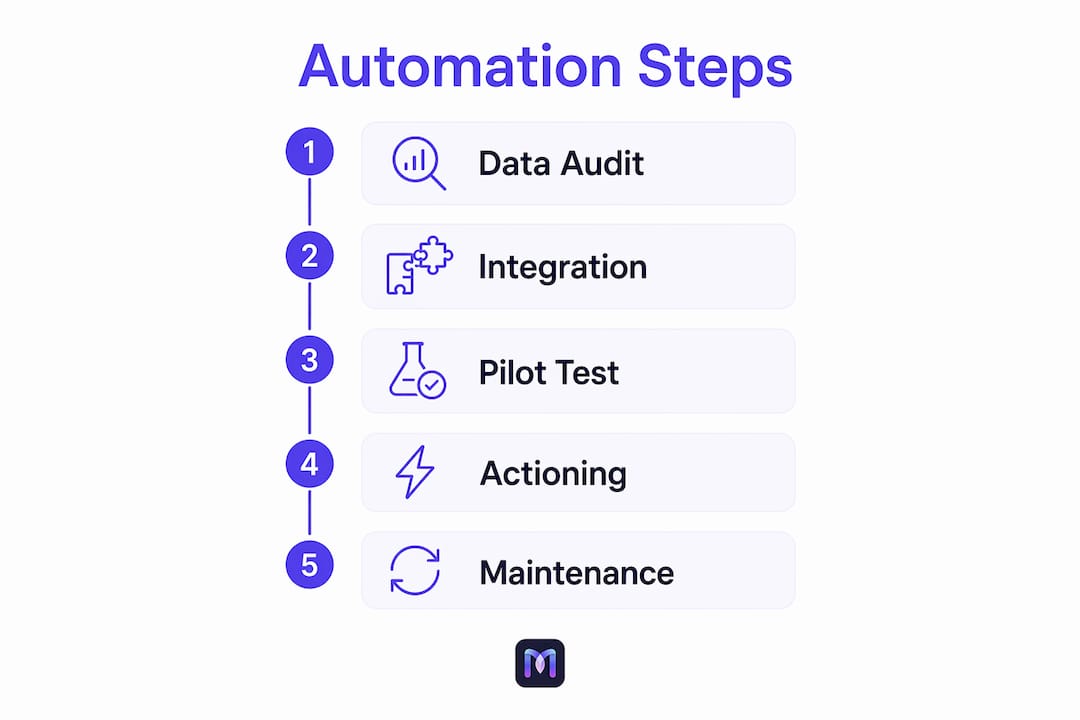
A phased rollout reduces risk and delivers early wins before you tackle full actioning.

| Phase | Activities | Timeline |
|---|---|---|
| 1. Discovery & data audit | Map all knowledge sources; assess owner, sensitivity, freshness, format, and access method | Weeks 1–2 |
| 2. MVP: retrieval only | Stand up RAG layer; connect top 2–3 sources; test semantic search accuracy | Weeks 3–6 |
| 3. Integrate assistants | Connect voice (IVR) and chat channels; validate latency and confidence thresholds | Weeks 7–Q4 |
| 4. Extend to actioning | Add CRM, ticketing (ITSM), and scheduling integrations; enable action triggers | Weeks 11 and beyond |
| Ongoing monitoring and continuous improvement | Instrument analytics; activate maintenance loop; schedule SME review cycles | Ongoing |
Integration priorities: CRM first (context and personalization), then ticketing/ITSM (actioning and escalation), then IVR (voice channel), then analytics (performance visibility).
For your data audit, capture six fields per source: source name, content owner, sensitivity classification, last-updated date, file format, and access method. Any source that fails the freshness or access check gets flagged before ingestion, not after.
Pro Tip: Run a retrieval-only pilot on your top 20 FAQ topics before connecting any action triggers. You’ll catch taxonomy gaps and low-confidence retrievals in a controlled environment — before a live caller hits them.
The knowledge base configuration tutorial walks through this phased approach with hands-on workspace examples.
What governance and human-in-the-loop processes do you need?
Academic and industry analysis consistently shows that the main barriers to AI-driven knowledge management are organizational — resistance to change, skill gaps, and governance gaps — as much as technical ones. Getting the process right matters as much as getting the technology right.
Your governance checklist:
- SME approval flows for every KB update the AI proposes
- Version control with full audit trail on all content changes
- PII masking and data-residency controls at the ingestion layer
- Confidence thresholds that gate auto-actioning (below threshold = human review)
- Bias review cadence for high-stakes response categories
Roles and responsibilities:
| Role | Responsibility |
|---|---|
| Subject Matter Expert (SME) | Reviews and approves AI-drafted KB updates |
| KB Owner | Manages taxonomy, freshness SLAs, and content lifecycle |
| ML Engineer | Tunes embeddings, confidence thresholds, and retrieval quality |
| SRE / DevOps | Monitors uptime, latency, and integration health |
| CS Ops | Tracks containment, AHT, and escalation patterns; flags gaps |
AI can flag outdated or conflicting policies and route recommended updates to the correct owners automatically — but governed execution means agents act only on approved logic. That boundary is what keeps your assistants trustworthy.
Pro Tip: Build SME review into a weekly 30-minute sprint, not a quarterly audit. The AI surfaces draft updates; SMEs approve or reject in a shared workspace. Short cycles keep the KB accurate and prevent the “stale KB” failure mode.
What KPIs should you track, and what ROI is realistic?
AI knowledge management improves agent efficiency by surfacing the right article or action in context, enabling assistants to resolve more cases with real-time help. The metrics that prove it:
- Containment / deflection rate — interactions fully resolved without human escalation
- Automation rate — percentage of tasks completed end-to-end by the assistant
- First-contact resolution (FCR) — issues resolved on the first interaction
- Average handle time (AHT) — total time per interaction, voice or chat
- Fallback / hand-off rate — how often the assistant escalates; a proxy for KB gaps
- Confidence / accuracy score — percentage of retrievals above your threshold
Realistic KPI curve: Early rollout (months 1–3) typically focuses on containment and fallback rates as the KB matures. Steady-state deployments (months 6–12) see meaningful AHT reductions and FCR improvements as actioning layers come online and the maintenance loop closes gaps. Monobot’s platform targets automating up to 80% of inbound calls and chats at steady state.
Faster ROI comes from two factors: high-quality training data at launch and tight CRM/ticketing integration that enables actioning from day one. Deployments that skip the data audit phase typically spend months 3–6 correcting retrieval errors instead of expanding coverage.
What are the most common implementation pitfalls?
Most KB automation projects don’t fail on the technology. They fail on data quality, missing integrations, and organizational resistance.
Problem → remedy pairs:
- Stale content: Activate the maintenance loop — flag low-resolution queries, auto-draft updates from high-performing interactions, route to SMEs for approval.
- Poor taxonomy: Define your metadata schema before ingestion, not after. Retrofitting tags on 10,000 documents is expensive.
- Missing IVR/voice context: Pass caller ID and CRM context into every voice query so the assistant personalizes retrieval, not just retrieves generically.
- Over-trusting generated answers: Set confidence thresholds conservatively at launch. Raise them only after you’ve validated retrieval accuracy across your top query categories.
- Governance gaps: Every auto-actioning trigger needs an SME-signed knowledge object behind it. No approved logic, no action.
The signal most teams miss: “search but no click” queries — the user searched, got results, and didn’t use any of them. That pattern reveals KB gaps faster than any survey. Instrument it from day one and feed it into your automated gap analysis.
For a deeper look at how AI scales customer interactions and adapts the KB over time, the Monobot blog covers maintenance loop patterns in detail.
How does Monobot deliver this for voice and chat?
Monobot maps directly to the architecture above. Its AI agent builder lets you configure voice and chat agents without writing code, connecting them to your KB, CRM, and ticketing systems through pre-built integrations.
Key features aligned to the components:
- Workspace for KB configuration — structured content management with taxonomy controls and SME review workflows
- Real-time analytics dashboard — containment, AHT, fallback rate, and confidence scores in one view
- Action triggers and integrations — CRM updates, ITSM ticket creation, appointment writes, and IVR routing
- Industry templates — pre-built flows for IT helpdesk, HR automation, healthcare, retail, and logistics
Monobot targets automating up to 80% of inbound calls and chats, reflecting the containment rate seen in steady-state deployments.
Three concrete use cases:
- IT helpdesk: the assistant handles password resets, software access requests, and status checks — opening and updating tickets in your ITSM automatically.
See the IT helpdesk automation use case for workflow details. - HR automation: the assistant answers policy questions, routes leave requests, and updates employee records via the HR automation workflow.
- Order-status calls: the assistant queries the OMS, reads back status, and logs the interaction — zero agent involvement for standard lookups.
When you evaluate Monobot in a demo, ask to see: a live agent flow with KB retrieval, a CRM action trigger in action, containment metrics from a comparable deployment, and the governance workspace where SMEs approve updates.
Key Takeaways
AI knowledge base automation delivers real-time retrieval and workflow actioning for voice and chat assistants only when governance, data quality, and integration depth are built in from the start.
| Point | Details |
|---|---|
| Start with a data audit | Map every knowledge source by owner, freshness, and access method before ingesting anything. |
| Use RAG, not migration | Index content in place to preserve permissions and avoid stale-data risk. |
| Gate actioning with governance | Every auto-action needs an SME-approved knowledge object; confidence thresholds protect accuracy. |
| Track containment from day one | Containment rate is your primary signal; fallback rate reveals KB gaps to close. |
| Monobot as your deployment layer | Monobot’s agent builder, workspace, and action triggers cover the full architecture — voice, chat, CRM, and ITSM — with up to 80% containment rate for inbound interactions at steady state. |
What practitioners get wrong about KB automation
The conventional wisdom says “get your data in order first, then automate.” That’s half right. The teams that move fastest don’t wait for a perfect KB — they stand up a retrieval-only pilot on their best 20 topics, measure what breaks, and let the maintenance loop surface the gaps. Waiting for perfect data is how projects stall for six months before a single assistant goes live.
The harder truth is that organizational resistance and skill gaps kill more KB automation projects than bad technology does. SMEs who feel the AI is replacing their judgment will slow-walk approvals. The fix is framing: the AI drafts, the SME decides. That framing keeps experts engaged and keeps the KB accurate. Build it into your governance model on day one, not as an afterthought when adoption stalls.
One more thing worth saying plainly: the KB is not a one-time project. The maintenance loop — flagging low-resolution queries, drafting updates, routing to SMEs — is the product. Teams that treat it as ongoing operations see compounding accuracy gains. Teams that treat it as a launch deliverable watch their containment rate erode within 90 days.
Ready to see Monobot handle your knowledge base in a live demo?
Cutting agent handle time and achieving up to 80% containment rate requires more than a good KB — it requires a platform that connects retrieval to action across every channel your customers use. Monobot delivers that out of the box: voice agents, chat assistants, CRM and ITSM integrations, and a governance workspace where your SMEs stay in control.

When you book a demo, come with specifics: your top 10 query categories, your current CRM and ticketing stack, and your containment baseline. Ask to see a live agent flow pulling from a configured KB, an action trigger updating a CRM record in real time, and the analytics dashboard showing confidence and fallback rates. That’s the demo that tells you whether the platform is production-ready for your environment.
Build your first AI agent on Monobot, or explore the full platform at monobot.ai to schedule a scoped evaluation.
For teams also evaluating implementation partners or workforce readiness, Cloud 9’s AI knowledge assistant services offer agency-level support for internal KB and chat deployments.
Useful sources
- AI automation handles the full content lifecycle — Decagon.ai: covers tagging, gap detection, maintenance loops, and continuous KB updates. Use this to validate your maintenance loop design.
- AI knowledge management and agentic process automation — Automation Anywhere: explains the shift from retrieval to operational execution and governed actioning. Essential for scoping your action layer.
- Artificial intelligence in knowledge management: implementation challenges — ScienceDirect: peer-reviewed analysis of organizational barriers. Use it to build your change management case.
- Knowledge orchestration and in-place indexing — Arahi.ai: practitioner guidance on RAG vs. migration. Reference this when making your architecture decision.
- What Is Knowledge Management AI? — Salesforce: covers KPI framing and agent efficiency gains. Useful for benchmarking containment and AHT targets.
- Embedding agents into the flow of work — IBL.ai: adoption research on in-workflow agent placement. Cite this when justifying CRM and IVR integration priorities.
- How to build a high-accuracy knowledge base for AI voice — Monobot: step-by-step playbook for configuring KB accuracy for voice and chat agents.
FAQ
What is AI knowledge base automation?
AI knowledge base automation uses machine learning and LLMs to manage the full KB lifecycle — ingesting content, tagging and structuring it, retrieving answers via semantic search (RAG), and continuously updating based on interaction data — so voice and chat assistants always act on current, governed knowledge.
How does RAG differ from a traditional keyword search KB?
RAG converts content into vector embeddings and retrieves by meaning, not exact keyword match, so an assistant can answer “my order hasn’t arrived” even if the KB article uses the phrase “shipment delay.” Traditional keyword search fails on phrasing variations; RAG handles them natively.
What integrations are required for voice and chat assistants?
At minimum: CRM (for context and personalization), ticketing/ITSM (for actioning and escalation), and your IVR or chat platform (for channel delivery). Analytics integration is needed to track containment, AHT, and fallback rates from day one.
How long does a typical KB automation deployment take?
A retrieval-only pilot covering your top query categories can go live in 3–6 weeks. Full actioning with CRM and ITSM integration typically takes 3–4 months, depending on data quality and integration complexity.
Can Monobot handle both voice and chat from a single KB?
Yes. Monobot’s platform supports voice agents and chat assistants from a shared KB configuration, with action triggers that work across both channels — so a policy update in the workspace applies to IVR and chat simultaneously.