



TL;DR:
- Robotic process automation, AI, and intelligent document processing are used to replace manual data entry and customer interactions in BPO workflows. A hybrid model combining bots with human agents maintains SLA consistency and improves accuracy, especially during volume spikes. Proper governance, client-specific data controls, and continuous performance monitoring are essential for successful automation deployment.
Automating BPO data entry and customer interactions is defined as using robotic process automation (RPA), AI, and intelligent document processing to replace manual, repetitive tasks across back-office and front-office BPO workflows. The industry standard term for this practice is “intelligent process automation,” which combines RPA’s rule-based execution with AI’s ability to handle unstructured inputs. RPA bots reduce processing time by 60–80% in large-scale BPO environments while operating 24/7 with zero transcription errors. That efficiency gain is the core reason BPO executives are moving automation from pilot projects to production at scale. The hybrid model, which pairs bots with human agents for exception handling, is the proven path to SLA consistency and audit readiness.
What tools and technologies automate BPO data entry and customer interactions?
The foundational layer of BPO data automation is RPA. RPA handles structured, rule-based tasks such as form population, data validation, and system updates with near-zero error rates. Attended bots sit alongside agents during live calls and pre-populate customer records in real time, cutting average handle time without requiring agents to switch between systems.
AI adds a second layer that RPA alone cannot provide. AI-based customer interaction automation includes intent detection, natural language processing (NLP), call routing, agent assist features, and real-time sentiment monitoring. These capabilities let a platform classify an inbound inquiry, route it to the right queue, and surface a knowledge base answer to the agent before the customer finishes speaking.
Intelligent document processing (IDP) and optical character recognition (OCR) handle unstructured inputs. Scanned invoices, handwritten forms, and PDFs that would stall a pure RPA workflow pass through IDP engines that extract, classify, and validate fields before writing data to a CRM or ERP system. The key technologies BPO automation stacks rely on include:
- RPA bots for structured data entry, form processing, and system updates
- Attended bots for real-time agent assist during live customer interactions
- NLP and intent detection for routing and automated response generation
- OCR and IDP for unstructured document capture and field extraction
- CRM and ERP integrations for writing validated data directly to systems of record
- Real-time analytics dashboards for monitoring throughput, error rates, and SLA status
Integration is the most underestimated requirement. A BPO serving five clients across healthcare, retail, and logistics needs each automation workflow to write to client-specific schemas without cross-contamination. Platforms that lack native CRM and ERP connectors force expensive custom development that slows deployment timelines.
Pro Tip: Before selecting any automation platform, map every system your bots will need to read from or write to. A tool that connects to Salesforce but not your client’s legacy ERP creates a manual handoff that defeats the purpose of automation.

How to design a hybrid automation workflow for BPO operations
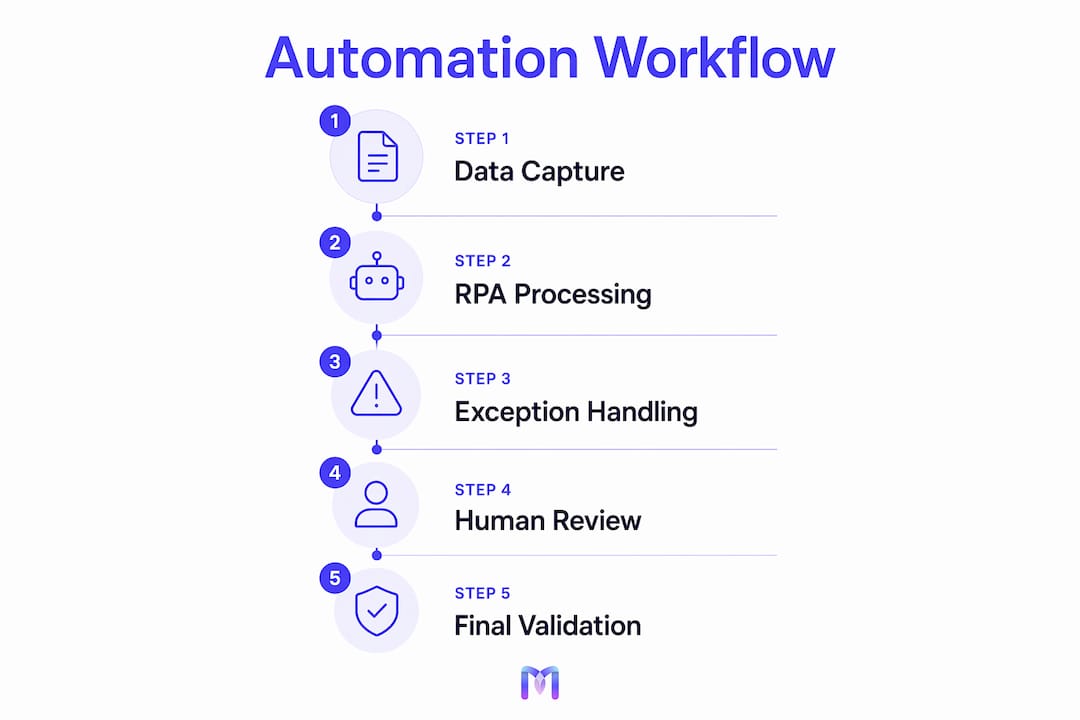
The hybrid model is the most effective automation approach for BPO environments. Hybrid workflows maintain stable throughput by assigning low-risk, high-volume tasks to bots and routing exceptions to human agents with full context already loaded. This design keeps SLA clocks running even during volume spikes that would overwhelm a fully manual team.
Designing this workflow requires a structured implementation sequence:
- Process audit. List every data entry and customer interaction task by volume, error rate, and rule complexity. Tasks with clear decision trees are automation candidates. Tasks requiring judgment, empathy, or regulatory interpretation stay with agents.
- Field dictionary and validation rules. Define every data field the bot will touch, its accepted formats, and its validation logic. This step prevents the bot from writing malformed data to downstream systems.
- Exception playbook. Document every condition that should pause automation and trigger a human review. Include SLA impact thresholds, confidence score cutoffs for AI decisions, and escalation paths.
- Approval gating. Build checkpoints where human agents confirm bot output before it commits to a system of record. Use these gates for high-risk fields such as financial amounts, medical codes, or compliance-sensitive data.
- Audit trail configuration. Configure automated logging for every bot action, timestamp, and agent override. Audit-ready logs are a contractual requirement for most enterprise BPO clients and a regulatory requirement in healthcare and finance.
- Pilot and load test. Run the workflow on a representative sample before full deployment. Measure error rates, exception volume, and SLA adherence under realistic load.
- Agent training. Retrain agents on exception handling, override protocols, and the new performance metrics that replace raw task volume counts.
Quality control within the workflow depends on SLA clock integration. Every exception that leaves the automated queue and enters a human review queue should carry its original SLA timestamp. Agents need to see time remaining, not just the task itself.
Pro Tip: Set your exception queue threshold at a confidence score, not just an error flag. If your AI assigns a confidence score below 85% to a data extraction, route it for human review before it writes to the database. Catching low-confidence outputs early costs far less than correcting downstream errors.
What challenges arise when automating BPO data entry and customer interactions?
The most common failure mode in BPO automation is accelerating errors rather than eliminating them. Without clear validation rules and exception playbooks, a bot that processes 10,000 records per hour propagates a formatting error 10,000 times before anyone notices. The fix is governance before deployment, not after.
Multi-client data segregation is the second major challenge. Enterprise-grade automation must enforce strict client isolation and client-specific compliance controls to prevent data breaches and audit failures. A BPO running a single shared automation platform for multiple clients needs separate data schemas, separate access controls, and separate reporting pipelines for each client. Platforms that treat all client data as a single pool create legal and contractual exposure.
Common challenges and their solutions include:
- Error propagation at scale. Solve with field-level validation rules and confidence score thresholds before any bot writes to a production system.
- Multi-client data contamination. Solve with client-specific schemas and strict role-based access controls enforced at the platform level.
- Agent resistance and role confusion. Solve by redefining agent KPIs around resolution rate and judgment accuracy rather than task volume.
- Ambiguous or low-confidence inputs. Solve with a tiered exception queue that routes by confidence score, not just binary pass/fail.
- SLA drift during exception surges. Solve with dynamic capacity rules that temporarily expand the human review team when exception volume exceeds a defined threshold.
The workforce transformation challenge is real but manageable. Automation shifts BPO roles from task volume to resolution rate and judgment accuracy. Agents who previously spent 80% of their time on data entry now spend that time on complex customer issues that require empathy and contextual reasoning. That shift requires deliberate retraining, not just a new job description.
“The BPOs that fail at automation treat it as a cost-cutting exercise. The ones that succeed treat it as a control function. Accuracy, audit readiness, and client trust are the real outputs. Cost reduction follows from those, not the other way around.”
How to measure performance and optimize automated BPO workflows
Measurement starts before you go live. Establish baseline metrics for processing time, error rate, SLA adherence, and first-contact resolution rate before automation touches a single record. Without a baseline, you cannot prove ROI or identify where the workflow needs adjustment.
Data-driven BPO integrates real-time performance intelligence and machine learning to move beyond simple throughput counting. Real-time dashboards should surface exception queue depth, bot error rates by task type, SLA status by client, and agent override frequency. High override frequency on a specific task type signals that the validation rules for that task need refinement.
The table below shows a practical KPI framework for tracking automation impact:
| Metric | What it measures | Target direction |
|---|---|---|
| Processing time per record | Bot speed vs. manual baseline | Decrease |
| Error rate per 1,000 records | Data quality post-automation | Decrease |
| SLA adherence rate | Percentage of tasks completed on time | Increase |
| Exception rate | Volume of records routed to human review | Decrease over time |
| First-contact resolution rate | Customer interactions resolved without escalation | Increase |
| Agent override frequency | How often agents correct bot output | Decrease over time |
Feedback loops are the engine of continuous improvement. Human agents who review exceptions generate the most valuable training data for your AI models. When an agent corrects a bot’s field extraction or overrides a routing decision, that correction should feed back into the model’s training pipeline. Focusing agents on complex judgments and capturing their decisions as labeled data improves automation accuracy over time without requiring external data labeling.
Customer satisfaction scores close the loop on the front-office side. A workflow that processes data faster but routes customers to the wrong queue will show declining CSAT scores within weeks. Pair operational metrics with customer feedback to catch front-office degradation before it affects client contracts.
Pro Tip: Use your analytics dashboard to identify the three task types with the highest exception rates each month. Treat those as your automation improvement backlog. Fixing the top three exception drivers each quarter compounds accuracy gains faster than broad platform upgrades.
Key Takeaways
The hybrid model combining RPA, AI, and human-in-the-loop review is the most effective method to automate BPO data entry and customer interactions while maintaining SLA consistency and audit readiness.
| Point | Details |
|---|---|
| Governance before deployment | Define validation rules, field dictionaries, and exception playbooks before any bot touches production data. |
| Hybrid model is the standard | Assign low-risk tasks to bots and route exceptions to human agents with full context loaded. |
| Multi-client isolation is non-negotiable | Enforce client-specific schemas and access controls to prevent data breaches and compliance failures. |
| Shift agent metrics post-automation | Replace task volume KPIs with resolution rate and judgment accuracy to align workforce goals with automation outcomes. |
| Feedback loops drive accuracy | Capture agent overrides as training data to continuously improve AI model performance over time. |
Why automation in BPO is about control, not just cost
I’ve watched BPO leaders make the same mistake repeatedly. They approve an automation project with a cost-reduction target as the primary success metric, and within six months they’re dealing with a data quality crisis that costs more to fix than the automation saved. The executives who get this right frame automation as a control function from day one.
The shift toward outcome-based BPO services is real, and it changes what your clients expect from you. They don’t want to pay for headcount. They want guaranteed resolution rates, clean data, and audit trails they can show their own regulators. Automation is the only way to deliver those guarantees at scale without proportional cost increases.
The workforce angle is also more nuanced than most coverage suggests. Agents who move from data entry to exception handling and complex resolution work almost universally report higher job satisfaction. The work is harder, but it’s more meaningful. The BPOs that invest in retraining rather than just redeployment see lower attrition and better client outcomes. That’s a competitive advantage that doesn’t show up in a cost-per-transaction analysis.
My honest recommendation: start with the process audit, not the platform selection. The platform decision is easier once you know exactly which tasks you’re automating, what exceptions look like, and which client-specific compliance rules apply. Buying a platform first and then trying to fit your processes into it is the second most common reason automation projects stall. The first is skipping the governance work entirely.
— Alex
How Monobot supports BPO automation for data entry and customer interactions
BPO teams that need to deploy AI voice and chat agents without writing code can build and configure them directly in Monobot’s AI agent builder. The platform handles appointment scheduling, order status updates, lead qualification, and routine inquiry resolution out of the box, with industry templates for healthcare, banking, retail, and logistics.

Monobot’s integration hub connects AI agents to CRM, ERP, and ticketing systems, so validated data writes directly to your systems of record without manual handoffs. The real-time analytics dashboard surfaces exception rates, resolution rates, and SLA status by client, giving BPO managers the visibility they need to catch workflow issues before they affect contracts. Monobot reports automating up to 80% of inbound calls and chats, which translates directly to reduced headcount pressure during volume spikes.
FAQ
What is the difference between RPA and AI in BPO automation?
RPA executes structured, rule-based tasks such as data entry and form processing with near-zero errors. AI adds intent detection, NLP, and predictive decisioning to handle unstructured inputs and customer interactions that RPA alone cannot process.
Why is the hybrid model recommended for BPO data entry automation?
The hybrid model assigns low-risk, high-volume tasks to bots and routes exceptions to human agents, maintaining SLA consistency during volume spikes while preserving data quality through human oversight.
How do BPOs prevent data breaches in multi-client automation environments?
Enterprise-grade platforms enforce client-specific data schemas and strict role-based access controls to isolate each client’s data, preventing cross-contamination and meeting contractual compliance requirements.
What KPIs should BPO managers track after implementing automation?
Track processing time per record, error rate per 1,000 records, SLA adherence rate, exception rate, first-contact resolution rate, and agent override frequency to measure automation impact and identify improvement areas.
How does automation affect BPO agent roles?
Automation shifts agents from high-volume data entry to exception handling and complex resolution work, requiring retraining and a shift in performance metrics from task volume to resolution rate and judgment accuracy.