



TL;DR:
- An AI CX platform automates routine inquiries and surfaces insights to improve customer experiences at scale. Monobot offers a no-code, quick-deploy solution that automates up to 80% of inbound contacts and reduces operational costs by 30%. Starting with high-volume, simple use cases and enforcing strict security controls ensures measurable ROI and smooth implementation.
For enterprise CX teams, an AI-powered CX platform should act as an agentic layer that automates routine work, surfaces contextual insights, and hands off complex cases to humans with full context intact. Monobot is a leading option for enterprises ready to make that shift, combining voice and chat agents, real-time analytics, and no-code customization in a single platform that deploys in days, not quarters.
Two numbers frame the business case quickly. Monobot automates up to 80% of inbound calls and chats, and AI integration can reduce operational costs by up to 30% by automating routine, high-volume inquiries. Those aren’t aspirational targets; they’re the floor for what a well-scoped pilot should demonstrate within the first 90 days.
- Recommended first step: Identify your single highest-volume, lowest-complexity use case (order status, appointment scheduling, or IT password reset are common starting points).
- Pilot scope: One channel, one use case, 60 days, with clear success metrics defined before go-live.
- Next step: Request a scoped demo or POC with Monobot to validate automation rate and integration fit against your actual data.
Pro Tip: Don’t start your pilot with a complex, multi-intent flow. Pick the use case where most contacts follow the same script. That’s where you’ll see the fastest automation lift and the cleanest before/after metrics to take to your CFO.
Table of Contents
- What does an enterprise-grade AI-powered CX platform actually deliver?
- Which platform features matter most, and how do you test them?
- Where do AI CX platforms drive the most measurable impact?
- What metrics should you expect, and how do you build an ROI timeline?
- What security and compliance controls should you require from vendors?
- What does implementation actually look like, and what slows it down?
- How are AI CX platforms priced, and what drives your bill?
- How do you evaluate vendors and run a structured selection process?
- Why do agentic AI systems and structured analytics outperform single-model bots?
- What do real deployments look like in terms of outcomes?
- Key Takeaways
- The case for agentic AI in enterprise CX: what most buyers underestimate
- Monobot’s enterprise pilot program: what’s included and how to start
- Sources and further reading
- FAQ
What does an enterprise-grade AI-powered CX platform actually deliver?
The core promise is not just automation. An enterprise-grade intelligent CX solution delivers automation plus contextual intelligence plus a governed human handoff, and it does all three at scale without fragmenting the customer experience across channels.
Simple chatbots handle scripted FAQs. Enterprise platforms handle multi-turn conversations, pull live data from your CRM or order management system, detect sentiment shifts, and route to a human agent when the interaction exceeds the bot’s confidence threshold, all within the same session. That distinction drives the gap in measurable outcomes.
Baseline capabilities every enterprise must require:
- Omnichannel parity: Voice and chat agents that share the same knowledge base, intent models, and escalation logic. Omnichannel platforms that unify chat, voice, email, and social prevent the fragmented experiences that erode CSAT at scale.
- Knowledge management: A centralized, version-controlled knowledge base that agents query in real time, not a static FAQ list.
- Orchestration layer: Ability to chain multiple tasks (authenticate user, retrieve order, update record, confirm action) within a single conversation turn.
- Real-time analytics: Interaction dashboards that surface automation rate, containment rate, CSAT, and sentiment trends without requiring a data team to pull reports.
- Governance controls: Human-in-loop thresholds, escalation triggers, audit logs, and role-based access so compliance teams can sign off on deployment.
- Pre-built industry templates: Healthcare, banking, retail, logistics, and IT helpdesk flows that reduce time-to-value and encode regulatory considerations from day one.
Statistic to anchor your business case: AI integration can reduce operational costs by up to 30% from automating routine inquiries. Pair that with Monobot’s high automation target, and the ROI math becomes straightforward for most contact center leaders.
Pro Tip: Before your first vendor call, pull 90 days of contact reason data from your ticketing system. Rank the top 10 contact types by volume. That list is your pilot roadmap, and it’s the single most persuasive document you can bring into a vendor conversation.
Which platform features matter most, and how do you test them?
The most consequential capabilities to evaluate are agentic AI agents, natural language understanding (NLU) accuracy, voice quality (STT/TTS latency), knowledge graph integration, conversation orchestration, and analytics depth. Everything else is table stakes or nice-to-have.

Multi-agent architectures are replacing single-model chatbot deployments as the default for enterprise customer service, because specialized agents, each handling one task (intent classification, data retrieval, response drafting), coordinate more accurately than one general-purpose model trying to do everything. That architecture also makes governance easier: you can audit, retrain, or replace one agent without rebuilding the entire flow.
Feature checklist for evaluation:
- Agentic AI agents: Can the platform compose multiple specialized agents coordinated by a supervisory layer? Minimum criterion: multi-turn context retention across at least 10 turns without losing session state.
- NLU accuracy: Does the platform report intent accuracy on your domain data, not just benchmark datasets? Require a live test on 500 real customer utterances from your environment.
- Voice quality (STT/TTS): Measure end-to-end latency from speech input to spoken response. For voice agents, anything above 1.5 seconds of perceived latency degrades the customer experience measurably.
- Knowledge graph / knowledge base: Can feedback and interaction data be connected to business entities like accounts, products, and revenue impact? Volume-only analysis misses the issues that actually move NPS.
- Orchestration: Does the platform support conditional branching, API calls mid-conversation, and fallback logic without requiring custom code?
- Analytics and AI-driven customer insights: Does the platform surface containment rate, CSAT, sentiment trends, and escalation reasons in a live dashboard? Can non-technical users query interaction data in plain language?
- Sentiment-triggered escalation: Real-time sentiment analysis that flags at-risk customers and routes to human agents when frustration thresholds are crossed is a non-negotiable for regulated industries.
How to run a POC test (numbered steps):
- Define your test dataset. Pull 1,000 real customer interactions from the target use case. Anonymize PII. Label intent and expected resolution for each.
- Set success metrics upfront. Agree on automation rate target (e.g., 65%), intent accuracy floor (e.g., 90%), CSAT delta (e.g., +5 points), and average handle time reduction (e.g., 20%).
- Configure human-in-loop thresholds. Set confidence score cutoffs below which the platform escalates to a human. Start conservative (escalate anything below 80% confidence) and tighten as the model learns.
- Run a shadow deployment first. Let the AI agent process real traffic in parallel with human agents for two weeks. Compare resolutions without exposing customers to the bot yet.
- Build an error taxonomy. Categorize failures: wrong intent, missing data, hallucination, escalation failure. Each category has a different fix, and your error taxonomy becomes your retraining roadmap.
- Measure at 30 and 60 days. Automation rate and CSAT are lagging indicators. Watch containment rate and escalation rate daily in the first two weeks; they’re your early warning system.
Where do AI CX platforms drive the most measurable impact?
Start with high-volume, low-complexity use cases. That’s where the ROI is fastest, the risk is lowest, and the automation rate is highest. Once you’ve proven the model on simple flows, you have the organizational credibility and the data to expand into more complex, regulated interactions.
Prioritized use cases with outcome expectations:
- Appointment scheduling (healthcare, financial services, field services): Automates booking, rescheduling, and cancellation flows. Typical outcome: significant reduction in scheduling-related call volume.
- Order status and tracking (retail, logistics, e-commerce): Handles “where is my order” at scale without agent involvement. Typical outcome: high automation rate on order inquiry contacts.
- IT helpdesk (password reset, access provisioning, ticket status): High-volume, highly scripted flows that are ideal for AI virtual assistants. Typical outcome: moderate to high ticket deflection on Tier 1 issues.
- Lead qualification (financial services, insurance, real estate): AI agents qualify inbound leads against defined criteria and hand off warm leads to sales reps with full context. Typical outcome: reduced cost per qualified lead and faster response time.
- Account inquiries and balance checks (banking, utilities): Authenticated self-service for balance, payment history, and account status. Requires secure authentication integration.
- Claims intake and status (insurance, healthcare): Structured data collection and status updates. HIPAA-sensitive flows require specific data handling controls (covered in the security section below).
Industry template considerations:
- Healthcare: HIPAA-compliant data handling is a gating requirement. Appointment scheduling and prescription refill status are the highest-ROI starting points. Avoid storing PHI in conversation logs without explicit data governance controls in place.
- Financial services: PCI DSS implications for any flow that touches payment card data. Authentication flows must meet your security team’s standards before go-live.
- Retail and logistics: Seasonal volume spikes are the primary scaling test. Verify the platform’s auto-scaling behavior under 5x normal traffic before peak season.
- IT helpdesk: Integration with your ITSM platform (ServiceNow, Jira Service Management) is the critical dependency. Confirm the integration depth before committing to a pilot scope.
Monobot ships industry-specific templates for all of these verticals, which cuts the configuration time significantly compared to building flows from scratch.
What metrics should you expect, and how do you build an ROI timeline?
The KPIs that most reliably capture value from machine learning in customer service are automation rate, CSAT, average handle time (AHT), cost per contact, and NPS lift. Track all five, but weight automation rate and cost per contact most heavily in the first six months because they’re the most direct proof of platform value.

| Metric | Pre-AI Baseline (Typical) | Pilot Target | Scaled Target (3–9 Months) | Mature Target (9–18 Months) |
|---|---|---|---|---|
| Automation rate | 5–15% | 40–60% | 60%+ | 80%+ |
| CSAT score | 72% | +3–5 points | +5–8 points | +8–12 points |
| Average handle time | 6–9 min | 10–15% reduction | 20–30% reduction | 30–40% reduction |
| Cost per contact | $8–$15 | 10–20% reduction | 20–30% reduction | 30–40% reduction |
| First contact resolution | 65% | +5 points | +8–12 points | +12–18 points |
ROI example (mid-size contact center, 50,000 contacts/month):
Assume a pre-AI cost per contact of $10 and 50,000 monthly contacts. At a 30% cost reduction (the Databricks-cited figure), monthly savings reach $150,000, or $1.8M annually. That math assumes a 60%+ automation rate and a fully integrated deployment, which typically takes 6–9 months from pilot start to full production.
Recommended measurement cadence:
- Weeks 1–2: Monitor containment rate and escalation rate daily. These are your leading indicators.
- Month 1: Report automation rate and AHT reduction. Share with stakeholders to maintain momentum.
- Month 3: First full CSAT comparison (pre vs. post). This is your go/no-go checkpoint for scaling.
- Month 9: Full cost-per-contact analysis with fully loaded costs (platform fee + professional services + internal IT time).
AI-enabled customer insights are also transforming how CX leaders interpret these metrics. Rather than reading flat reports, platforms that surface plain-language analytics let your team ask “why did CSAT drop last Tuesday?” and get a traceable, cited answer rather than a raw data dump.
What security and compliance controls should you require from vendors?
Security is a gating factor, not a post-deployment consideration. For U.S. enterprises, the compliance requirements vary by industry, but the baseline controls below apply to every deployment. Require written confirmation on each item before signing a contract.
Enterprise security and compliance checklist:
- Encryption in transit and at rest: TLS 1.2+ for all data in transit; AES-256 for data at rest. Confirm this applies to conversation logs, voice recordings, and analytics data.
- SOC 2 Type II certification: Require the current audit report, not just a self-attestation. SOC 2 Type II covers a 6–12 month observation period and is the minimum bar for enterprise procurement.
- HIPAA considerations: For healthcare deployments, require a signed Business Associate Agreement (BAA) before any PHI touches the platform. Confirm that conversation logs containing PHI are encrypted, access-controlled, and subject to retention limits.
- PCI DSS implications: Any flow that collects or transmits payment card data must be PCI DSS compliant. The safest architecture routes payment capture to a certified payment processor and keeps the AI agent out of the card data environment entirely.
- Data residency: Confirm where conversation data is stored and processed. U.S.-based enterprises in regulated industries often require data to remain within U.S. borders. Get this in writing.
- Role-based access controls (RBAC): Administrators, supervisors, and agents should have differentiated access to conversation logs, analytics, and configuration settings.
- Audit logs: Every configuration change, escalation override, and data access event should be logged with a timestamp and user ID. This is your compliance paper trail.
- Model governance and human-in-loop thresholds: Document the confidence score thresholds at which the AI escalates to a human. These thresholds should be configurable and auditable.
- Analyst-in-the-loop for AI insights: AI-assisted insights should be analyst-approved with transparent controls. Platforms that surface proposed insights for human review before acting on them increase trust and adoption.
Pro Tip: Embed your security and compliance review into the pilot itself, not after it. Run a tabletop exercise with your InfoSec team during week two of the POC. Identify any data flow that wasn’t in the original architecture diagram. It’s far cheaper to fix a data residency gap during a pilot than after a production deployment.
What does implementation actually look like, and what slows it down?
A well-scoped pilot with a pre-built template and a clean CRM integration typically goes live in 2–4 weeks. A full enterprise rollout across multiple channels and use cases typically takes 3–9 months, depending on integration complexity and organizational readiness.
Integration priorities and typical timelines:
- CRM (Salesforce, HubSpot, Microsoft Dynamics): The highest-priority integration. The AI agent needs to read and write customer records to deliver personalized customer interactions. Timeline: 1–3 weeks with API access.
- Ticketing (Zendesk, ServiceNow, Jira): Required for IT helpdesk and customer service deflection use cases. Timeline: 1–2 weeks with standard connectors.
- Telephony (Twilio, Genesys, Cisco): Voice deployments require telephony integration. This is often the longest lead-time item. Timeline: 2–6 weeks depending on your telephony stack.
- SSO / identity (Okta, Azure AD): Required for authenticated self-service flows. Timeline: 1–2 weeks with IT cooperation.
- Knowledge sources (Confluence, SharePoint, internal wikis): The AI agent’s knowledge base quality directly determines NLU accuracy. Timeline: 1–2 weeks for initial ingestion; ongoing for maintenance.
Common blockers and how to address them:
- Data quality issues: Dirty CRM data (duplicate records, missing fields, inconsistent formats) breaks personalization logic. Run a data quality audit before the pilot starts, not during it.
- SSO and IT approvals: Enterprise IT approval cycles for new integrations can take 4–8 weeks. Start the SSO request on day one of the project, not week three.
- Telephony complexity: Legacy PBX systems and SIP trunk configurations are the most common source of voice deployment delays. Involve your telephony team in the vendor selection call.
- Change management: Agents who fear job displacement resist adoption. Frame the AI as a tool that handles the repetitive work so agents can focus on complex, high-value interactions. AI chatbots work best as a frontline layer that complements human agents, not replaces them.
- Scope creep: Stakeholders add use cases mid-pilot. Freeze the scope at kickoff and document it. New use cases go on a Phase 2 backlog.
Monobot’s AI for customer experience approach includes pre-built connectors for major CRM, ticketing, and telephony platforms, which compresses the integration timeline significantly for standard stacks.
How are AI CX platforms priced, and what drives your bill?
Your bill is driven by usage metrics and feature tiering, not just seat count. Most enterprise platforms use one of four pricing models, and each has different implications for how your costs scale with volume.
| Pricing Model | How It Works | Best For | Watch Out For |
|---|---|---|---|
| Per conversation | Fixed fee per resolved or attempted conversation | Predictable, high-volume use cases | Costs spike during seasonal peaks; define “conversation” carefully |
| Per minute (voice) | Billed by voice minutes consumed | Voice-heavy deployments | LLM inference + TTS/STT costs can stack; model latency affects minutes |
| Per seat | Monthly fee per agent or admin user | Teams with stable headcount | Doesn’t scale with automation gains; penalizes success |
| Enterprise flat fee | Annual contract with usage bands | Large-scale, multi-channel deployments | Requires accurate volume forecasting; overage fees can be steep |
Budgeting guidance:
- Forecast conversation volume accurately. Pull 12 months of contact data, apply your target automation rate, and project the number of AI-handled conversations per month. That’s your primary cost driver.
- Account for model inference costs. Voice deployments consume STT (speech-to-text) and TTS (text-to-speech) compute in addition to LLM inference. These costs are real and often underestimated in initial budgets.
- Include professional services. Implementation, integration, and training services are typically priced separately. Budget 20–40% of the first-year platform fee for professional services on a complex enterprise deployment.
- Build in an overage buffer. If you’re on a per-conversation model, budget for 20% more volume than your forecast. Seasonal spikes are predictable; running out of conversation budget mid-month is not.
Pro Tip: Ask every vendor for a fully loaded cost example: platform fee + inference costs + professional services + internal IT time, for your projected volume. The headline per-conversation rate rarely tells the whole story. The vendor who gives you the most transparent answer to that question is usually the one worth trusting with a production deployment.
Enterprise automation trends are also shifting pricing expectations: as AI agents handle more complex, multi-step interactions, per-conversation pricing increasingly favors buyers over per-minute models.
How do you evaluate vendors and run a structured selection process?
Use a weighted scoring approach aligned to your business priorities. Security and compliance should carry the highest weight for regulated industries; automation rate and integration depth carry the most weight for cost-reduction mandates. Define your weights before you talk to vendors so the scores aren’t influenced by a compelling demo.
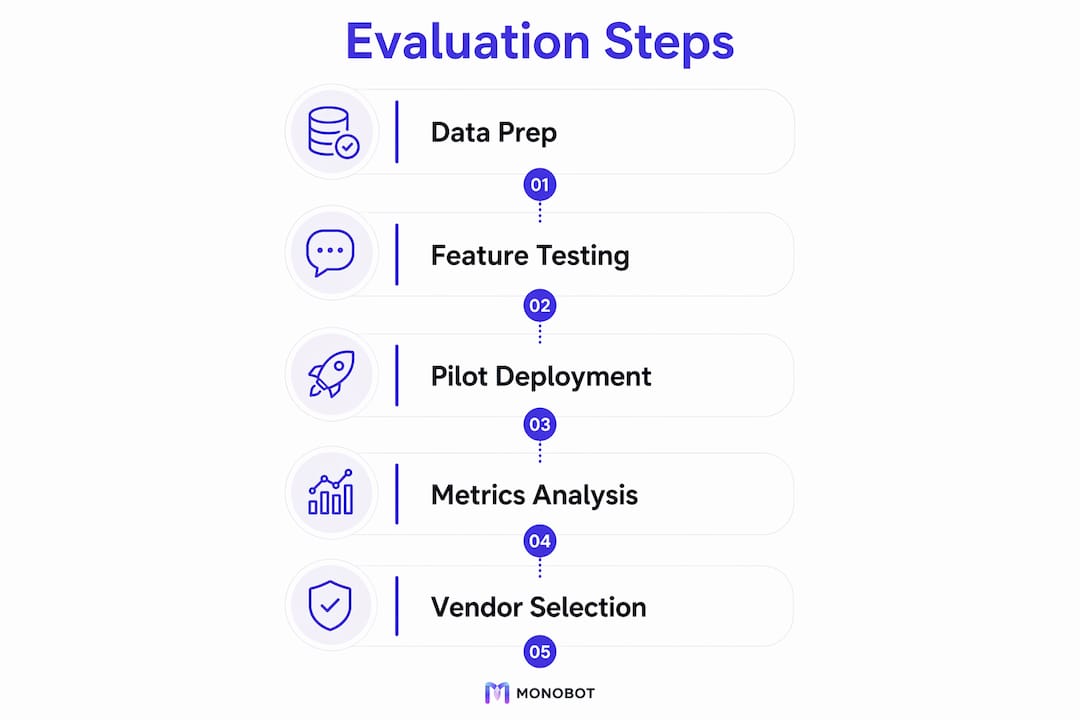
Numbered evaluation steps:
- Define your weighted criteria. Assign weights across: security/compliance (25%), integration depth (20%), automation rate in POC (20%), analytics and reporting (15%), vendor support and SLAs (10%), pricing model fit (10%).
- Build a shortlist of 3–5 vendors based on analyst reports, peer references, and the capabilities checklist from Section 3 above. Include Monobot.
- Send a structured RFI. Ask for: SOC 2 Type II report, reference customers in your industry, integration documentation for your CRM and telephony stack, and a sample POC proposal.
- Run a live POC on your data. Score each vendor against your pre-defined success metrics. Shadow deployment first; live traffic second.
- Score and rank. Apply your weighted criteria to each vendor’s POC results. The vendor with the highest weighted score against your actual data wins, not the one with the best slide deck.
Vendor questions to ask during calls and POCs:
- What is your SOC 2 Type II audit date, and can we see the full report?
- How do you handle data residency for U.S. enterprise customers?
- What is your NLU accuracy on domain-specific data (not benchmark datasets)?
- How are human-in-loop thresholds configured and audited?
- What does your professional services engagement look like for a 60-day pilot?
- How do you handle model updates, and what is the re-testing requirement after an update?
- What is your SLA for platform uptime and for escalation routing failures?
Simple scoring template:
| Evaluation Dimension | Weight | Vendor Score (1–5) | Weighted Score |
|---|---|---|---|
| Security and compliance | 25% | — | — |
| Integration depth | 20% | — | — |
| Automation rate (POC) | 20% | — | — |
| Analytics and reporting | 15% | — | — |
| Vendor support and SLAs | 10% | — | — |
| Pricing model fit | 10% | — | — |
Fill in the vendor score column after each POC. Multiply by weight. Sum the weighted scores. The highest total wins. For how to choose an AI virtual assistant, this framework applies directly to shortlisting decisions.
Why do agentic AI systems and structured analytics outperform single-model bots?
Multi-agent architectures are the primary differentiator for enterprise-grade impact, and knowledge-graph-driven analytics are the primary differentiator for enterprise-grade insight. Both claims are grounded in how the underlying systems actually work, not marketing positioning.
A single general-purpose LLM handling an enterprise customer service interaction has to simultaneously classify intent, retrieve account data, draft a response, check compliance constraints, and decide whether to escalate. Each of those tasks has different accuracy requirements and different failure modes. Composing specialized agents, each optimized for one task and coordinated by a supervisory layer, raises accuracy on each subtask and makes the system auditable at the component level.
The analytics parallel is equally direct. Volume-based analysis tells you that “shipping delays” generated 2,000 tickets last month. Knowledge-graph-driven analysis tells you that shipping delay complaints are concentrated among your top 200 revenue accounts and are correlated with a 12-point NPS drop in that segment. Those are different decisions. The second one is worth acting on immediately; the first one might be noise.
AI-enabled customer insights are also transforming how CRM and marketing teams interpret interaction data, moving from descriptive reporting to causal narratives that executives can act on without a data analyst intermediary.
Pro Tip: During your POC, ask the vendor to demonstrate a full-corpus analysis on your last 90 days of interaction data. The output should be cited and traceable, meaning you can click through from a theme to the specific tickets or calls that generated it. If the platform can’t show you the source evidence, the insight isn’t auditable, and it won’t survive your compliance team’s review.
Research signal: Enterprise customer intelligence tools that perform full-corpus analysis (not sampling) and generate cited, verifiable answers across tickets, calls, and reviews give CX leaders a fundamentally different level of confidence in their decisions compared to sampled or aggregated reporting.
What do real deployments look like in terms of outcomes?
Across enterprise deployments, the pattern is consistent: automation rate climbs fastest in the first 60 days on narrow, high-volume use cases, CSAT follows within 90 days as wait times drop, and cost-per-contact reduction becomes measurable at the 6-month mark once the platform is handling a significant share of total volume.
Outcome snapshots by use case:
- High-volume order inquiry automation: Enterprises deploying AI agents on order status flows typically see 60–80% of those inquiries resolved without human involvement within 60 days of go-live. The primary driver is the elimination of “where is my order” contacts that require no judgment, only data retrieval.
- IT helpdesk Tier 1 deflection: Password resets, access requests, and ticket status checks are the highest-deflection IT flows. Deployments focused on these three use cases typically achieve 40–60% ticket deflection, with agents reporting significantly reduced repetitive workload.
- Appointment scheduling in healthcare: Scheduling automation reduces inbound call volume for scheduling teams and cuts average wait time for patients. CSAT improvements in this use case tend to be the fastest to appear because the customer experience improvement is immediate and tangible.
What to request from vendors when reviewing their case studies:
- Before/after automation rate with the same contact volume baseline
- CSAT delta measured at 30, 60, and 90 days post-deployment
- Cost-per-contact reduction with fully loaded cost assumptions stated
- The specific use cases and channels included in the deployment
- Whether the results were achieved on a greenfield deployment or a migration from a prior platform
Monobot’s examples of AI-handled inquiries cover the specific flows and automation patterns that drive these outcomes across verticals.
Metric anchor: Monobot targets up to 80% automation for inbound calls and chats. For a contact center handling 50,000 monthly contacts, that translates to 40,000 contacts resolved without agent involvement, at a fraction of the cost per interaction.
Key Takeaways
An AI-powered CX platform delivers measurable ROI only when the pilot is scoped to a single high-volume use case, success metrics are defined before go-live, and security controls are treated as deployment prerequisites, not afterthoughts.
| Point | Details |
|---|---|
| Start narrow, prove fast | Pick one high-volume, low-complexity use case for your pilot; 60 days is enough to validate automation rate and CSAT impact. |
| Security gates deployment | Require SOC 2 Type II, data residency confirmation, and a BAA (for healthcare) before any production traffic touches the platform. |
| Agentic architecture wins | Multi-agent systems with specialized agents outperform single-model bots on accuracy, governance, and auditability at enterprise scale. |
| ROI is measurable at 6 months | Cost-per-contact reduction of up to 30% is achievable at scale; track containment rate weekly as your leading indicator. |
| Monobot for enterprise pilots | Monobot automates up to 80% of inbound calls and chats, ships industry templates for healthcare, banking, retail, logistics, and IT, and deploys in days with no-code customization. |
The case for agentic AI in enterprise CX: what most buyers underestimate
The conventional wisdom in enterprise CX procurement is that the platform with the most integrations and the longest customer list wins. That framing misses the most important variable: whether the platform’s underlying architecture can actually improve over time in your environment, on your data, with your specific contact patterns.
Most enterprise buyers evaluate AI platforms the way they evaluate SaaS tools: features, price, references. What they underestimate is the compounding effect of architecture. A platform built on a single general-purpose model hits a performance ceiling relatively quickly. A platform built on composable, specialized agents can be retrained, replaced, or extended at the component level without rebuilding the entire system. That’s not a theoretical advantage; it’s the difference between a platform that’s still improving at month 18 and one that plateaued at month 6.
The analytics dimension is equally undervalued. Most CX leaders are still running on volume-based reporting: ticket counts, CSAT averages, handle time means. The shift to impact-weighted analytics, where themes are connected to revenue, NPS, and account-level data, changes the decisions you can make. You stop optimizing for ticket deflection and start optimizing for revenue retention. Those are different conversations with your CFO.
Monobot’s approach to the future of AI in customer service is built around exactly this architecture: composable agents, real-time analytics, and governance controls that let enterprises scale without losing auditability. The buyers who get the most out of it are the ones who come in with a clear use case, a defined success metric, and a security team that’s already reviewed the compliance checklist.
The buyers who struggle are the ones who start with the platform and then look for a use case to fit it. That’s backwards. Start with the problem, and the platform selection becomes much cleaner.
Monobot’s enterprise pilot program: what’s included and how to start
Contact center leaders who’ve spent months evaluating platforms often say the same thing after their first Monobot pilot: the speed from kickoff to live traffic is what surprised them most.

A scoped Monobot pilot covers one high-volume use case, one channel (voice or chat), and a 60-day timeline with defined success metrics agreed at kickoff. What’s included: industry-specific templates from Monobot’s AI agent builder, integration assistance for your CRM and ticketing platform, access to the analytics dashboard for real-time containment and CSAT tracking, and a governance review covering data residency, encryption, and human-in-loop thresholds.
Security and compliance are built into the pilot, not bolted on after. Monobot supports HIPAA-ready flows for healthcare deployments and provides the documentation your InfoSec team needs to complete their review during the pilot period, not after go-live.
The pilot is designed to produce a clear go/no-go decision at day 60, with automation rate, CSAT delta, and cost-per-contact data your CFO can read without a translator. To scope your pilot and request a demo, visit monobot.ai.
Sources and further reading
The claims in this article are grounded in published research and platform documentation. Use these sources when vetting vendor claims, building your RFP, or presenting the business case internally.
- Databricks: AI customer service strategy, agents, and solutions guide. The primary source for agentic architecture claims, omnichannel platform requirements, sentiment-triggered escalation, and the 30% cost reduction figure. Essential reading for any enterprise buyer evaluating platform architecture.
- Enterpret: AI Insights platform documentation. Source for knowledge-graph-driven analytics, full-corpus analysis, and impact-weighted feedback prioritization. Useful for evaluating analytics depth in vendor POCs.
- Adobe Customer Journey Analytics: AI-Powered Enhanced Insights. Source for analyst-in-the-loop governance models and plain-language analytics. Relevant for buyers who need to justify AI insight tools to compliance teams.
- IEEE: AI-Enabled Customer Insights paper. Peer-reviewed academic grounding for AI-driven customer insights in CRM and marketing contexts. Useful for building the research-backed section of an internal business case.
- Monobot library resources: The following Monobot articles provide deeper technical and operational guidance on specific topics covered here:
- How AI is revolutionizing customer experience
- AI for customer experience and call centers
- How AI scales customer interactions
- AI-powered chatbot for smarter customer support
- Monobot templates library for industry-specific pilot starting points and pre-built flows
This article is general information for enterprise evaluation purposes. For legal, regulatory, or compliance decisions specific to your organization, consult your legal counsel, compliance officer, or a qualified professional.
FAQ
What is an AI-powered CX platform?
An AI-powered CX platform is a software system that uses artificial intelligence, including large language models, NLU, and machine learning, to automate customer interactions across voice and chat channels, surface AI-driven customer insights, and route complex cases to human agents with full context.
What is agentic AI in customer experience?
Agentic AI refers to systems composed of multiple specialized AI agents (for intent classification, data retrieval, response drafting) coordinated by a supervisory layer, rather than a single general-purpose model. Multi-agent architectures handle enterprise CX more accurately and are easier to govern and retrain than single-model deployments.
How much can an AI CX platform reduce operational costs?
AI integration can reduce operational costs by up to 30% by automating routine, high-volume inquiries. Monobot targets up to 80% automation of inbound calls and chats, which translates to significant cost-per-contact reduction at scale, typically measurable at the 6-month mark of a full deployment.
How long does it take to deploy an AI CX platform?
A scoped pilot on one use case with pre-built templates typically goes live in 2–4 weeks. A full enterprise rollout across multiple channels and use cases takes 3–9 months, with telephony integration and SSO approvals being the most common sources of delay.
What security certifications should I require from an AI CX vendor?
At minimum, require SOC 2 Type II certification (with the current audit report), confirmation of data residency within U.S. borders for regulated industries, AES-256 encryption at rest, TLS 1.2+ in transit, and a signed BAA for any healthcare deployment involving PHI.