



The single most effective step you can take right now is automating after-call work with AI, before you touch a script, a routing tree, or a training module. ACW automation, meaning AI-generated call summaries and auto-populated CRM fields, requires no change in live-call behavior and produces measurable results within weeks, not quarters. That makes it the lowest-resistance lever in your entire toolkit for average handle time reduction.
Once ACW is under control, four other levers matter most, roughly in this order: real-time agent assist to eliminate information hunting mid-call, skills-based routing to stop misdirected transfers, centralized knowledge access so agents stop tabbing between six systems, and targeted coaching built from transcript analysis rather than gut feel.
Statistic Callout: AI call summarization can cut after-call work by 40 to 60 percent, and industry reports show that stacking ACW automation with screen-pop context and coaching drives combined AHT reductions of 15 to 30 percent within six months, with ACW-first pilots showing gains as fast as 90 days.
Your immediate next step: pick your single highest-volume call type, deploy ACW automation and preloaded context on that segment only, and measure for two to three weeks before scaling.
- ACW automation (AI summaries, auto-fill fields): fastest, lowest-risk win
- Real-time agent assist: cuts search time mid-call
- Skills-based routing: reduces misdirected transfers
- Centralized knowledge base: shortens the “let me check” pause
- Transcript-driven coaching: targets specific behavior gaps, not generic speed pressure
Key Takeaways
Reducing average handle time works best when you automate after-call work first, layer in real-time agent assist and routing fixes second, and protect customer experience with guardrail metrics throughout.
| Point | Details |
|---|---|
| Start with ACW automation | AI summarization and auto-fill can cut after-call work by 40 to 60 percent within weeks. |
| Use segmented benchmarks | Set AHT targets by call type instead of one global number to avoid unfair comparisons. |
| Diagnose before you fix | Map time by call phase across a sample of calls to find where friction actually lives. |
| Stack tactics for compounding gains | Combining ACW automation, screen-pop context, and coaching can drive 15 to 30 percent reductions in six months. |
| Pair AHT with guardrails | Track CSAT, FCR, and repeat contact rate so speed gains don’t erode customer experience. |
Table of Contents
- What Is Average Handle Time and How Do You Calculate It?
- What Causes High Handle Time in Most Contact Centers?
- Which Tactics Actually Move the Needle on AHT?
- How Do You Run a 30-60-90 Day Pilot to Reduce AHT?
- What Metrics Should You Track Alongside AHT?
- How AI-First Interventions Work in a Live Contact Center
- Why Most AHT Advice Gets the Order of Operations Wrong
- Sources
- FAQ
What Is Average Handle Time and How Do You Calculate It?
Average handle time is the total time an agent spends on a customer contact, from the moment the call connects through after-call work, divided by the number of contacts handled. The formula: AHT = (Total Talk Time + Total Hold Time + Total After-Call Work) ÷ Total Number of Calls Handled.
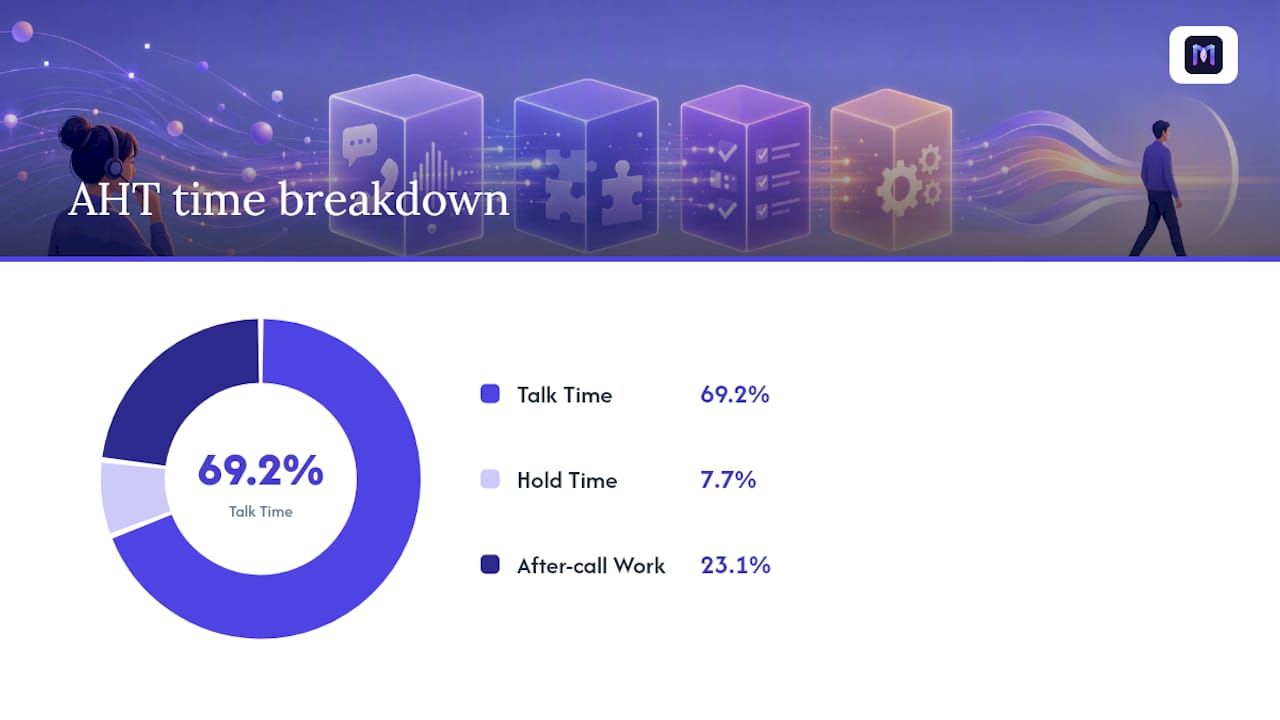
Here’s a worked example. Say your team logs 500 calls in a day, with combined talk time of 45,000 seconds, hold time of 5,000 seconds, and ACW of 15,000 seconds. Add those up: 65,000 seconds. Divide by 500 calls, and your AHT is 130 seconds, or about 2 minutes and 10 seconds per contact.
Benchmarks vary sharply by call type, and treating them as one number is the single most common mistake in AHT programs:
- General customer service: roughly 4 to 6 minutes per call, though simple billing or status inquiries often resolve faster.
- Banking, financial services, and insurance (BFSI): often 6 to 9 minutes, driven by verification and compliance scripting.
- Technical support: frequently 8 to 12 minutes or longer, especially for multi-step troubleshooting.
- Retail and e-commerce: typically 3 to 5 minutes for order status, returns, and simple inquiries.
Broader industry data also shows average call duration has been drifting down as more traffic shifts to mobile apps, from 8.4 minutes in 2015 to 6.8 minutes in 2025, a signal that channel mix itself shapes what “normal” looks like. Segmented benchmarks beat a single global target because a technical support queue held to a retail standard will always look broken, even when it’s performing well for its category.
What Causes High Handle Time in Most Contact Centers?
Handle time rarely balloons because agents talk too slowly. It balloons because the systems and processes around them create friction, and pushing agents to move faster without fixing that friction just trades speed for errors and burnout.
The usual suspects, in roughly descending order of impact:
- After-call work (ACW): manual note-taking, ticket tagging, and CRM updates that pile up after the customer hangs up.
- System latency and multi-system hops: agents toggling between four or five platforms to pull one customer’s history.
- Poor knowledge base structure: answers buried in long documents instead of organized as scannable, step-level cards.
- Misrouting and transfers: calls landing with the wrong team, forcing a second (or third) explanation from the customer.
- Verification friction: identity checks applied uniformly regardless of actual risk level.
- Policy complexity: exceptions, tiers, and edge cases that force agents to escalate or guess.
- Agent confidence gaps: newer agents who hesitate or double-check because they don’t trust the system or their own judgment.
A simple diagnostic works better than intuition here: pull a sample of 50 to 100 recorded calls per call type and tag time by phase (greeting, verification, diagnosis, resolution, ACW). Patterns show up fast. If verification eats 90 seconds on every call regardless of risk, that’s a policy fix, not a training fix — as detailed in this practical guide for IT managers on helpdesk support. Root-cause work like this is what let one cybersecurity software provider cut AHT by 36 percent by fixing routing, scripts, and tooling rather than pressuring agents to hurry.
Pro Tip: Before you touch a script or coaching plan, check whether your KB search returns an answer in under 10 seconds for your top 20 call reasons. If it doesn’t, that’s usually where your time is actually leaking, not in agent behavior.
Which Tactics Actually Move the Needle on AHT?
Not every AHT fix deserves equal attention or equal budget. Grouping tactics by effort and payoff tells you where to spend your first quarter, not your first year.
Tier 1: Fast, low-resistance wins
- ACW automation (AI summaries and auto-fill): frees up 15 to 45 seconds per call and scales linearly with volume, which makes the cost savings predictable. Minimum viability checklist: CRM API access, a defined tagging taxonomy, and a two-week pilot on one queue.
- Screen-pop and preloaded context: surfaces account history, prior tickets, and product details the instant a call connects, cutting the early “let me pull up your account” phase. Works best when system hops are already reduced to two platforms or fewer, with UI load times under 500 to 700 milliseconds.
- Conditional verification logic: risk-scores the caller and skips unnecessary identity steps for low-risk contacts, trimming the opening segment by 20 to 40 seconds. Requires a fraud or risk model, even a basic one, and legal sign-off on the reduced checks.
Tier 2: Moderate effort, strong payoff
- Real-time agent assist: surfaces suggested responses and next-best-actions mid-call, cutting AHT by up to 20 percent by eliminating information hunting and unnecessary transfers. Needs integration with your knowledge base and call transcription pipeline.
- Knowledge base refactoring: reorganize content into step-level cards using tags built from the verb-based queries agents actually search for, not the categories a content team assumes matter. This is a data project as much as a content one.
- Skills-based and proficiency routing: matches calls to agents with the right expertise on the first attempt instead of the first available agent. Requires accurate skill tagging and enough queue volume to make routing rules statistically meaningful.
Tier 3: Longer horizon, still worthwhile
- Scripting templates: standardize the call flow without overscripting, which preserves natural conversation while cutting wasted words.
- Coaching cadence built on transcript insight: target specific, observed behaviors rather than generic “talk faster” feedback.
- IVR redesign: shorten menu depth and route more accurately at the very first touchpoint.
- Transfer-reduction projects: address the root policy or system gaps that force agents to hand off calls in the first place.
Tier 3 tactics take longer to show results, often a full quarter or more, because they touch process and culture rather than software. That doesn’t make them optional. They’re what keeps Tier 1 gains from eroding six months later.
How Do You Run a 30-60-90 Day Pilot to Reduce AHT?
A pilot works best when it’s scoped tightly and measured honestly, not rolled out everywhere at once and judged on gut feel three weeks later.
Days 1 to 30: baseline and quick wins
- Measure current AHT, broken out by call type and by phase (talk, hold, ACW).
- Select one or two high-volume call types for the pilot, ideally ones with heavy ACW.
- Deploy ACW automation and screen-pop context for those call types only.
- Make quick knowledge base edits for the top 10 to 20 call reasons in that segment.
Days 31 to 60: layer in real-time support
- Deploy real-time agent assist for the pilot group.
- Refine routing rules based on the first month’s misroute data.
- Launch a coaching feedback loop built directly from transcript insights, not supervisor spot-checks.
Days 61 to 90: scale and formalize
- Expand successful interventions to additional call types.
- Set segmented, category-specific AHT benchmarks instead of one blanket target.
- Implement guardrail monitoring so quality doesn’t quietly slip while AHT falls.
- Calculate ROI in FTE hours freed up and dollar cost savings, using the pilot’s actual numbers.
Set your acceptance criteria before you start, not after you see the results. A pilot earns the right to scale when it produces a statistically meaningful AHT drop and shows no negative trend in your guardrail metrics. If AHT falls but CSAT or first-call resolution slides, that’s not a win. It’s a cost shifted somewhere less visible.
What Metrics Should You Track Alongside AHT?
AHT means nothing on its own. A call center can post a great AHT number while quietly training agents to rush customers off the phone, which shows up later as repeat contacts and falling CSAT. Guardrail metrics catch that before it becomes a pattern.
- CSAT: the most direct signal that speed isn’t coming at the customer’s expense.
- First-call resolution (FCR): if AHT drops but FCR drops with it, you’re deferring work, not eliminating it.
- Repeat contact rate: a rising rate here usually means the first call didn’t actually solve the problem.
- Escalation rate: watch for spikes that suggest agents are punting harder issues instead of resolving them.
- Quality audit scores: structured call reviews catch compliance or tone issues that raw metrics miss.
For pilot sample sizes, a rough heuristic works for most operations: aim for at least 300 to 500 calls per variant before drawing conclusions, and run the comparison for a full one to two week cycle to smooth out day-of-week volume swings.
| Metric | What It Signals |
|---|---|
| AHT | Time efficiency per contact |
| CSAT | Customer experience quality |
| FCR | Whether the issue was actually solved |
| Repeat contact rate | Hidden rework from rushed calls |
| Escalation rate | Whether agents are punting harder cases |
Translating time savings into dollars is straightforward once you have clean AHT data: multiply the average seconds saved per call by monthly call volume, convert to hours, and divide by average agent hours per FTE. A 30 second reduction across 50,000 monthly calls frees up roughly 417 agent hours, which finance and operations teams can translate directly into staffing or cost-avoidance terms.
How AI-First Interventions Work in a Live Contact Center
Real-time agent assist and ACW automation aren’t abstract concepts. In practice, they look like this: a call connects, and the agent’s screen already shows the customer’s account history and recent tickets, no manual lookup required. As the conversation unfolds, live prompts suggest relevant knowledge base articles or next-best-actions based on what the customer is actually saying. When the call ends, an AI-generated summary populates the CRM automatically, tagging the interaction and drafting notes the agent only needs to review, not write from scratch.

Monobot’s platform builds this workflow around real-time agent assistance paired with automated call summarization, plus a structured handoff playbook for when a bot escalates to a human agent mid-conversation.
Set your expectations conservatively and let results build credibility over time:
- ACW cut by roughly 40 to 60 percent when summarization and auto-fill are deployed correctly.
- Stacked interventions (ACW plus real-time assist plus routing fixes) typically produce a 15 to 30 percent AHT improvement.
- Start with your top one to three call types by volume, not a full rollout, so you can validate results before scaling.
Pro Tip: Run your first AI-assist pilot on a call type with high ACW but low complexity. You’ll see faster, cleaner results than starting with your hardest technical queue.
Why Most AHT Advice Gets the Order of Operations Wrong
Most guidance on lowering handle time buries the highest-leverage fix, ACW automation, under a pile of coaching tips and scripting advice that take months to show results and depend on getting agent behavior change right. That’s backwards. ACW automation doesn’t ask agents to change how they talk to customers at all, which is exactly why it works faster and with less internal resistance than almost anything else on the list.
The conventional advice also treats AHT as something you fix once. It’s not. It drifts as call mix shifts, as products change, and as new agents onboard, which is why the segmented benchmark work matters more than any single tactic. A center that sets one AHT target for every call type is building a metric that will eventually mislead its own managers.
If you’re prioritizing, start with the boring, systemic fixes: ACW automation, context preloading, and knowledge base structure. Save the culture-heavy coaching work for after you’ve proven the systems aren’t the bottleneck. Fix the pipes before you retrain the people standing next to them.
— Alex
Sources
- BOSS Revolution Calling Data: Voice communication is changing, and mobile apps are leading the charge
- How to Reduce Average Handle Time: 12 Strategies (2026) — FreJun
- Smallest
FAQ
What Is a Good AHT for a Call Center?
There’s no single good number. It depends heavily on call type: general customer service typically runs 4 to 6 minutes, retail inquiries closer to 3 to 5 minutes, and technical support commonly 8 to 12 minutes or more.
What Is the 80/20 Rule in Call Centers?
In most call centers, the 80/20 rule refers to service level targets about answering a large percentage of calls within a short time, though some teams apply the same logic to identify the small share of call reasons driving most of their handle time.
What Is the Relationship Between KPIs and AHT?
AHT is one of several key performance indicators (KPIs) contact centers track, alongside CSAT, first-call resolution, and service level, and it should never be optimized in isolation from the others.
How Do I Calculate My Average Handle Time?
Add total talk time, hold time, and after-call work, then divide by the number of calls handled. For example, 65,000 total seconds across 500 calls equals an AHT of 130 seconds, or about 2 minutes and 10 seconds.