


Chatbot training data is a curated set of conversation examples and annotations, typically formatted as messages or prompt-completion pairs in JSONL, used for fine-tuning or retrieval workflows. If you’re starting from zero, the fastest path is to pick a proven public dataset like the Bitext customer support corpus or export your own logs, then validate every line against the JSONL messages schema before you spend a single GPU cycle on training.
TL;DR:
- Use public datasets like LMSYS-Chat-1M or Bitext for broad fluency and specific intent recognition, but ensure data is clean, consistent, and representative of actual queries.
- For fine-tuning, prepare JSONL files with the messages schema, validate every record, and include proper role labels, system instructions, and tool-call formatting to prevent hallucinations.
- When converting real logs into training data, anonymize PII through hashing, token masking, or template replacement, and maintain a clear audit trail for compliance and data security.
- Deduplicate, normalize formatting, and carefully split datasets into training, validation, and test sets, counting tokens upfront to avoid costly errors and ensuring high-quality, balanced data.
- Focus on schema validation, metadata tagging, and proper chunking of knowledge base documents, as these hygiene practices outweigh raw dataset selection in building a reliable, production-ready chatbot.
Table of Contents
- What Counts as Good Chatbot Training Data?
- Where Can You Find Chatbot Training Data?
- What Data Format Should You Use for Chat Models?
- How Do You Turn Real Conversation Logs Into Training Data?
- How Do You Clean and Deduplicate Chatbot Data?
- How Should You Chunk Documents for a Chatbot Knowledge Base?
- How Do You Annotate and Augment Chatbot Training Data?
- How Do You Validate a Chatbot Before Launch?
- What Tools and Workflows Do Developers Actually Use?
- What Should Enterprise Teams Know Before Scaling Production Data?
- What Ethical Issues Matter Beyond Removing PII?
- How Do You Build Datasets for a Specific Industry?
- How Do You Handle Multilingual Chatbot Training Data?
- How Often Should You Update Chatbot Training Data?
- An Editorial Take on Building Chatbot Training Data
- Move From Prototype Data to a Production Chatbot Faster
- Authoritative Dataset and Docs to Read Next
- Sources
- FAQ
What Counts as Good Chatbot Training Data?
Not every conversation transcript qualifies as usable training data. Good chatbot training data has three properties: it’s structurally consistent (every record follows the same schema), it’s representative of the queries your bot will actually face, and it’s clean enough that a model won’t learn noise as signal.
Developers often conflate “training data” with “data the chatbot ever sees.” That’s wrong. Training datasets for chatbots fall into two functionally different categories, and confusing them wastes engineering time.
Fine-tuning data teaches a model new response patterns through weight updates. This is what you feed into a JSONL file for a fine-tuning job. Retrieval data (the knowledge base behind a RAG pipeline) doesn’t change model weights at all. It supplies context at inference time. A support bot that needs to quote your current return policy should almost never be fine-tuned on that policy. It should retrieve it, because policies change and retraining is slow.
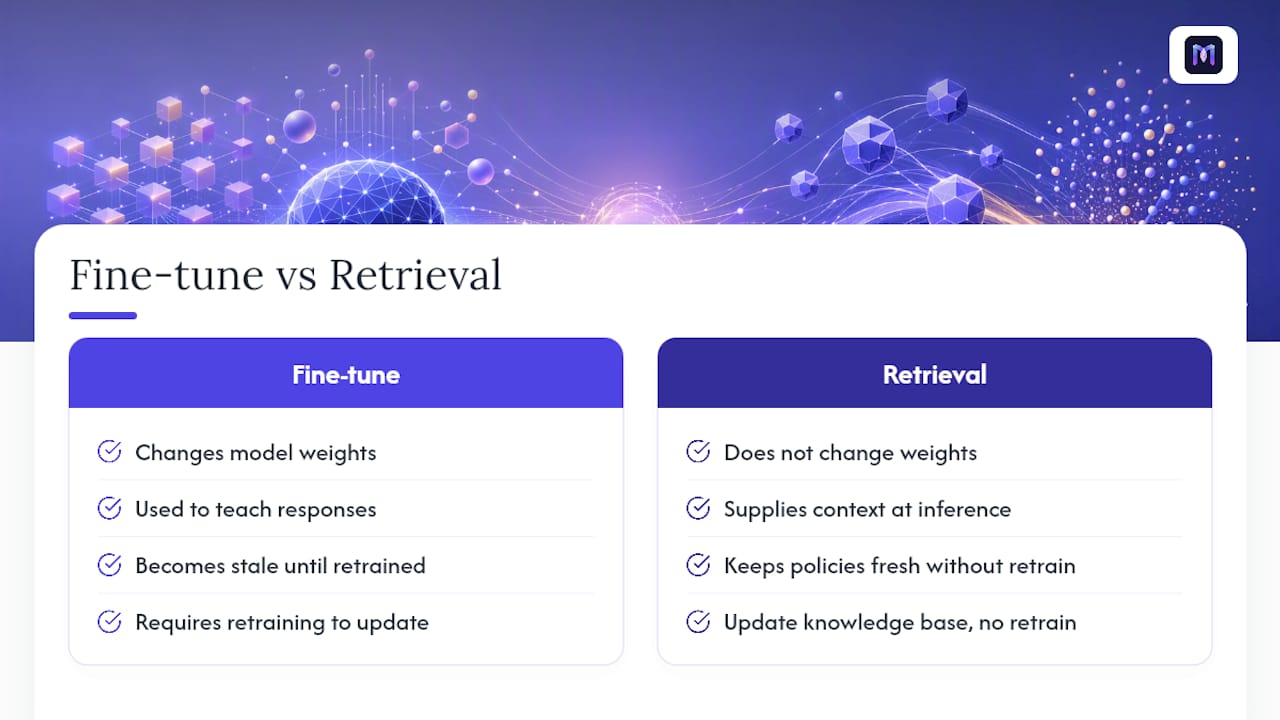
This distinction shapes everything downstream: how you chunk documents, what metadata you attach, and which format you choose. Get the category wrong at the start, and you’ll be reformatting the same corpus three times before launch.
Where Can You Find Chatbot Training Data?
You don’t need to build a corpus from scratch. Several public datasets cover the two most common developer needs: broad conversational fluency and narrow, task-specific intent recognition. Here’s the practical shortlist, ranked by what you’ll actually reach for first.
- LMSYS-Chat-1M: roughly one million real-world conversations collected from live chatbot deployments, useful for training or evaluating instruction-following behavior across a wide range of topics. It’s large enough to support general-purpose fine-tuning, but its breadth means you’ll need to filter heavily for any single-domain use case like healthcare intake or logistics tracking.
- WildChat-4.8M: a filtered collection of ChatGPT-derived conversations, with the non-toxic subset containing about 3.2 million exchanges. Hugging Face documents metadata fields like hashed IP, country, and timestamp alongside each record, which matters if you’re building geography-aware routing or want to audit conversation origin. The moderation filtering strips flagged inputs, but you still need your own toxicity pass, since “non-toxic” per the source model’s filter isn’t the same as “appropriate for your brand.”
- Bitext Customer Service Tagged Training Dataset: this is the one most developers building support bots should start with. It provides 26,872 question and answer pairs across 10 categories and 27 intents, totaling roughly 3.57 million tokens. Every pair carries an intent label and entity tags, so it doubles as both a fine-tuning corpus and an annotation template. License terms are permissive for research and commercial fine-tuning experiments, but always check the current Kaggle listing before shipping to production.
- Kaggle simple dialogues datasets: smaller, often a few thousand exchanges, and built for quick prototyping rather than production training. These are the right choice when you need to sanity-check a preprocessing pipeline before committing to a 3-million-token corpus.
- GitHub AI-Chatbot-Conversation-Dataset sample: a compact sample repository developers use to test schema conversion scripts and CI validation gates without downloading gigabytes of data first. Treat it as a smoke test, not a training source.
A word on license and PII risk: public datasets vary wildly in how they handle personally identifiable information. WildChat’s documentation notes the presence of hashed IPs and country-level location data, which counts as quasi-identifying metadata even though it’s not a name or email address. Before you ingest any external corpus, read its license file and data card in full. Some allow commercial fine-tuning outright; others restrict redistribution or require attribution. Don’t assume permissiveness because a dataset is hosted on a public platform.
Pro Tip: Mix scale and specificity. Use a large general corpus like LMSYS-Chat-1M for base conversational fluency, then fine-tune again on a smaller, intent-tagged set like Bitext to sharpen domain performance. Training on breadth alone tends to produce a chatbot that’s fluent but generic.
What Data Format Should You Use for Chat Models?
Two schemas dominate chatbot machine learning inputs, and picking the wrong one for your training method is the single most common rookie mistake.
The messages schema is the standard for chat-completion fine-tuning. Each training example is a JSON object containing a messages array, where every entry has a role (system, user, or assistant) and a content field. NVIDIA’s NeMo documentation specifies that each record must be a single line of valid JSON, encoded in UTF-8, with the final message in the array always assigned the assistant role. Skip that rule and your fine-tuning job will either error out or, worse, silently learn to predict user turns instead of assistant responses.
The prompt-completion schema is older and simpler: a flat prompt string paired with a completion string. It still shows up in legacy fine-tuning pipelines and some open-source frameworks, but most modern chat model providers have moved to the messages format because it natively supports multi-turn context and system instructions.
Here’s a minimal, valid messages-schema record:
{"messages": [{"role": "system", "content": "You are a support agent for a logistics company."}, {"role": "user", "content": "Where is my order #4521?"}, {"role": "assistant", "content": "Let me check that for you. Can you confirm the shipping zip code?"}]}
Tool-calling adds a third layer. If your assistant needs to trigger a function (checking order status, booking an appointment), represent that as a structured tool_calls field on the assistant message, with the tool’s response captured in a subsequent message using a tool role. Getting this wrong is one of the fastest ways to produce a model that hallucinates function outputs instead of actually calling them.
Before you submit any file for fine-tuning, run this checklist:
- Confirm every line is valid, self-contained JSON (no trailing commas, no multi-line objects).
- Verify every
messagesarray ends with anassistantturn. - Check that no
contentfield is null, empty, or whitespace-only. - Count tokens per example using your target model’s tokenizer, and flag anything that exceeds the context window.
- Spot-check a random 2% sample by hand for role mislabeling.
The OpenAI Cookbook’s chat fine-tuning notebook automates most of this: loading JSONL, validating roles, computing token counts, and flagging missing system, user, or assistant turns before you ever submit a training job.
Pro Tip: Run the validation script against a 50-example sample before processing your full dataset. Catching a schema error at 50 records costs you two minutes; catching it after uploading 50,000 records costs you a failed job and a re-export.
How Do You Turn Real Conversation Logs Into Training Data?
Your own support transcripts are usually a better training signal than any public dataset, because they reflect exactly how your users phrase real problems. They’re also a liability if you handle them carelessly.
Start by deciding what to export and what to strip. Export the conversational turns, timestamps, and any resolution outcome (ticket closed, escalated, abandoned). Redact names, emails, phone numbers, account numbers, and free-text fields where users might paste sensitive details unprompted, since support chats are notorious for including things customers never intended to submit, like a credit card number typed into a “describe your issue” box.
Three anonymization patterns cover most cases:
- Hashing: replace identifiers like user IDs with a one-way hash so you can still track conversation continuity without exposing the original value.
- Token masking: swap detected PII (names, addresses, account numbers) with placeholder tokens like
[NAME]or[ACCOUNT_ID], preserving sentence structure for training purposes. - Template replacement: for highly structured fields (order numbers, dates), replace the actual value with a synthetic but format-correct equivalent, so the model still learns the pattern without memorizing real customer data.
Keep a consent and audit record alongside the exported data. This means documenting which terms of service or privacy policy version covered the original conversations, when the export happened, who approved it, and what anonymization pass was applied. If a regulator or customer ever asks how their data was used, you need that paper trail ready, not reconstructed from memory. This is one of the areas where enterprise platforms differ sharply from DIY pipelines; the enterprise guidance on data security in AI chatbots covers access control patterns worth mirroring even if you’re not using a managed platform.
Once redacted, normalize the logs into your target schema. A raw support transcript with agent notes, timestamps, and system messages needs restructuring into clean user and assistant turns, with any internal agent annotations either dropped or moved into a separate metadata field rather than left in the conversational content.

Pro Tip: Build your redaction pipeline as a testable script with its own unit tests, not a one-off notebook cell. PII patterns evolve (new ID formats, new address styles), and a script you can rerun and extend beats a manual pass you’ll forget to repeat next quarter.
How Do You Clean and Deduplicate Chatbot Data?
Raw data from multiple sources almost always contains duplicates, inconsistent formatting, and encoding artifacts that will quietly degrade model performance if you don’t catch them before training.
Follow this sequence:
- Deduplicate across sources first, not within a single file. When you combine a public dataset with your own logs, exact and near-duplicate detection (using hashing or embedding similarity) prevents the same question-answer pair from appearing dozens of times and skewing the model toward overfitting on that phrasing.
- Resolve conflicts explicitly. If two sources answer the same question differently (an old policy versus a current one), don’t just keep both. Decide which is authoritative and discard or flag the other, since data drift across multiple content locations is one of the most common causes of a chatbot contradicting itself mid-conversation.
- Normalize punctuation and formatting. Standardize quotation marks, hyphenation, date formats, and measurement units. A model trained on both “5pm” and “5:00 PM” as separate token sequences learns a slightly noisier representation of the same concept.
- Count tokens before you commit to a training run. Token count directly determines both fine-tuning cost and whether individual examples get truncated mid-conversation, which silently corrupts the assistant’s final turn.
- Check character encoding. Non-UTF-8 characters, especially from scraped or legacy-system exports, cause parsing failures that are painful to debug after the fact. NeMo’s schema guidance explicitly recommends UTF-8 encoding for exactly this reason.
Token counting deserves its own line item in your project plan, not an afterthought. The OpenAI Cookbook’s estimation approach lets you calculate total tokens before submitting a fine-tuning job, which means you can decide whether to run more epochs on a smaller set or add more examples for a similar total cost. Budgeting this upfront avoids the expensive surprise of a job that costs three times your estimate because nobody counted tokens on the raw export.
How Should You Chunk Documents for a Chatbot Knowledge Base?
If you’re building a retrieval-based system rather than fine-tuning a model directly, chunking strategy matters as much as the data itself. Chunk too small, and you split an answer across two retrieved passages, leaving the model with half the context it needs. Chunk too large, and you dilute relevance, pulling in unrelated content alongside the answer.
Practitioner guidance converges on a working range: chunks between 1,000 and 1,250 tokens tend to preserve complete answers rather than fragmenting them. The reasoning is simple.
Overlap between chunks (typically 10 to 15% of chunk length) prevents a sentence from being cut exactly at a chunk boundary and losing context on both sides. Use overlap when your source documents contain dense, interdependent paragraphs; skip it for content that’s already broken into short, self-contained sections like FAQ entries.
Metadata is where most retrieval systems quietly fail. Every chunk should carry:
- Source document identifier, so you can trace an answer back to its origin for audits or updates.
- Last-updated date, critical for time-sensitive content like pricing or policy.
- Product or service tag, so a query about your enterprise plan doesn’t retrieve free-tier documentation.
- Access level, distinguishing internal-only content from customer-facing material.
- Language, especially once you support more than one locale.
Metadata isn’t decorative labeling. It needs to function as an active retrieval filter, not a filed field nobody queries. A practitioner analysis of RAG chatbot preparation points to a specific failure mode: without product-tier filtering, a retrieval system will happily serve an enterprise-only policy to a free-plan user, because nothing in the pipeline checked the tag before returning the passage. Building metadata into your retrieval filters, not just your database schema, is what turns a demo-quality knowledge base into a production-ready one.
Pro Tip: Test chunking decisions against real long-form answers from your own content, not synthetic benchmarks. A chunk size that works well for a competitor’s FAQ might fragment your own multi-step troubleshooting guides differently, depending on how your writers structure paragraphs.
How Do You Annotate and Augment Chatbot Training Data?
Annotation quality determines how precisely your chatbot understands what a user wants, and it’s the step developers most often rush.
Start with intent and slot schema design. An intent label captures what the user wants (“check_order_status”, “cancel_subscription”), while slot or entity tags capture the specific values within that request (an order number, a date, a product name). The Bitext dataset’s structure, 27 distinct intents across 10 categories, is a useful reference point for how granular a production label scheme should get. Too coarse, and your bot can’t distinguish “cancel my order” from “cancel my subscription.” Too granular, and you’ll spend more time maintaining the taxonomy than improving the model.
Label quality needs active checking, not a one-time review. Run inter-annotator agreement checks when multiple people label the same data, and flag examples where annotators disagree for a second pass. Spot-check a random sample of automated or crowd-sourced labels weekly rather than trusting a single QA pass at project start.
Synthetic augmentation fills gaps in sparse intents, where you might have only a handful of real examples for a rare but important query type. Paraphrase generation and instruction-synthesis techniques can multiply a seed set safely, but only when each synthetic example carries provenance metadata tracing it back to its source and gets validated against a human-reviewed seed.
- Tag every synthetic example with its generation method and source seed.
- Cap synthetic data at a known ratio relative to real examples, and track that ratio over time.
- Run toxicity and moderation filtering on any augmented or scraped data before it enters your training set, since paraphrasing tools occasionally generate unintended offensive variants.
- Review augmented slot values for realism; a synthetic “order number” that doesn’t match your actual ID format teaches the model a pattern that won’t work in production.
How Do You Validate a Chatbot Before Launch?
A model that performs well on training data can still fail badly in production, which is why validation deserves its own dedicated pipeline, separate from the training process itself.
Build a golden dataset first: a curated set of representative queries paired with both the expected answer and, for retrieval systems, the exact source document that should have been retrieved. This separation matters. A validation approach that tests retrieval and generation independently lets you diagnose whether a bad answer came from retrieving the wrong document or from the model misinterpreting a correctly retrieved one. Conflating the two makes debugging guesswork.
Run these validation steps before every production deployment:
- Score retrieval accuracy separately by checking whether the golden source document appears in the top-k retrieved results.
- Score generation quality using an LLM-as-judge approach or human review against the golden answer, checking for context faithfulness (does the answer actually reflect the retrieved content, or does it hallucinate beyond it).
- Run your full regression testing suite against previously fixed bugs to confirm they haven’t resurfaced.
- Estimate total token cost for your expected query volume, using per-query token counts from your golden set as a baseline.
- Set a minimum sample size for your golden dataset. Fewer than 50 representative queries per major intent category tends to leave too much statistical noise to trust the results.
Token-cost estimation deserves attention here too. Knowing your average tokens per query and per response lets you project monthly inference costs before you scale from a pilot to full deployment, avoiding the common surprise of a bill that’s three times the pilot estimate once real user volume hits.
What Tools and Workflows Do Developers Actually Use?
You don’t need an exotic toolchain to build a solid data pipeline. Most of the work happens with libraries developers already know.
- NLTK handles tokenization, sentence segmentation, and basic text normalization when you’re preprocessing raw conversation logs.
- NumPy and scikit-learn support statistical checks like class balance across intent labels and basic clustering to spot duplicate or near-duplicate examples.
- Tokenizer libraries matching your target model (tiktoken for OpenAI-compatible models, for instance) give you accurate token counts instead of rough character-based estimates.
- JSON validators (jsonschema in Python, or simple line-by-line parsers) catch malformed JSONL before it reaches a training job.
Build format validation and token-count checks as CI gates on every dataset commit, not as a manual pre-launch step. A CI pipeline that rejects a pull request with malformed JSONL or a missing assistant turn catches errors when they’re cheap to fix, not after a training job fails three hours in.
For dataset versioning, tools like DVC or Git LFS track large data files alongside your code without bloating your repository, which matters once your training set grows past a few hundred megabytes. Split your data deliberately into training, validation, and test sets, holding out at least 10 to 15% for evaluation, and never let examples leak between splits, especially when you’ve deduplicated across multiple source datasets.
What Should Enterprise Teams Know Before Scaling Production Data?
Moving from a prototype chatbot to a production deployment changes your data requirements. Volume goes up, but so does the cost of a mistake, since a production bot handling real customer interactions at scale can’t afford a schema error or a PII leak the way a prototype can.
Monobot’s platform is built around this transition. Its industry-specific templates for healthcare, banking, retail, and logistics come pre-loaded with intent and slot structures relevant to each vertical, which cuts significant annotation time compared to building a labeling scheme from scratch. Teams moving from a DIY pipeline often underestimate how much of their annotation effort is really just recreating a taxonomy that already exists for their industry.
A few practices worth adopting regardless of platform:
- Maintain role-based access controls over your training data repository, restricting who can view raw conversation logs versus anonymized training exports.
- Keep an audit trail of every dataset version used in a production training run, tied to the model version it produced.
- Use real-time analytics dashboards to catch data drift early, when new query patterns start appearing that your current training set doesn’t cover well.
- Treat your knowledge base and fine-tuning corpus as living systems with owners, not one-time deliverables.
Monobot’s no-code deployment layer and analytics dashboards are designed to surface exactly these drift signals in production, flagging where live conversations diverge from what your training data anticipated. That feedback loop, closing the gap between deployed performance and training assumptions, is often the difference between a chatbot that degrades quietly over months and one that keeps improving.
What Ethical Issues Matter Beyond Removing PII?
Stripping personal data is necessary but nowhere near sufficient for responsible training data practices. Bias and fairness issues persist even in fully anonymized datasets, because bias lives in patterns, not identities.
If your support logs disproportionately reflect complaints from one demographic, region, or product tier, a model trained on that data will handle other groups’ queries less accurately, even without knowing anything about who’s asking. This shows up subtly: a chatbot fine-tuned mostly on English-language, US-centric support tickets often responds with less nuance to phrasing common in other English dialects or non-native speaker patterns, not because it “knows” the speaker’s background, but because that phrasing was underrepresented in training.
Auditing for this requires deliberately checking your dataset’s composition, not just its size. Break down your training examples by whatever proxy signals are available (language variant, product line, region tag) and look for categories that are thin. If one intent category has 3,000 examples and another has 40, your model’s confidence and accuracy on the second will lag, and that gap often maps onto real users who deserve equally competent service.
Fairness also applies to how you handle disagreement in labeled data. If human annotators consistently mislabel certain phrasings as low-priority or hostile based on tone rather than content, that bias trains directly into your intent classifier. Regular audits of your labeling guidelines, not just your final dataset, catch this before it compounds across thousands of examples.
How Do You Build Datasets for a Specific Industry?
Generic conversational datasets get a chatbot to “sound reasonable.” Domain-specific datasets get it to “sound like it actually knows this business,” and the gap between the two is often where deployments succeed or fail.
The core challenge is that domain vocabulary and intent structures don’t transfer well across industries. A healthcare intake bot needs to distinguish “reschedule appointment” from “cancel appointment” with zero ambiguity, because the operational consequences differ completely. A logistics bot needs entity extraction tuned to tracking number formats, carrier names, and delivery-window phrasing that a general dataset like LMSYS-Chat-1M simply won’t contain in useful density.
Building domain-specific training data usually means combining a general base corpus with a smaller, heavily curated domain layer. This is exactly why annotated datasets like Bitext’s, structured around real customer-service intents, work better as a fine-tuning layer on top of general conversational fluency than as a sole training source. You get baseline language competence from scale, and domain precision from targeted examples.
The challenge compounds when your domain has regulatory weight. Healthcare and banking data carry compliance obligations (HIPAA, financial privacy rules) that shape not just what you can collect, but how long you can retain it and who can access it during annotation. Real-world examples of AI-handled inquiries across different verticals show how the same underlying schema gets adapted differently depending on what a given industry’s queries actually look like.
How Do You Handle Multilingual Chatbot Training Data?
Language diversity in training data isn’t solved by translation alone. A chatbot that simply translates English training examples into Spanish will often miss idiomatic phrasing, regional terminology, and culturally specific ways of expressing the same request.
The more reliable approach collects native-language examples for each supported language rather than relying purely on machine translation of a single source corpus. If you’re supporting five languages, you ideally want representative conversation data in each, not one English dataset run through a translation layer five times. Translation-only approaches tend to produce a bot that’s grammatically correct but subtly stiff, missing the natural phrasing patterns native speakers actually use when asking for help.
Where native data is scarce for a given language, a hybrid strategy works better than pure translation: use machine-translated examples as a baseline layer, then supplement with even a modest set of native-speaker-reviewed examples for your highest-volume intents. Prioritize this effort by query volume per language, not by an even split across all supported languages, since your top three most-used languages probably cover the vast majority of real traffic.
Metadata plays a role here too. Tagging each training example with its source language lets you evaluate performance per language independently, rather than getting one blended accuracy score that hides the fact that your German-language responses lag significantly behind English ones. Track this metric explicitly, because multilingual quality gaps tend to stay invisible until a native speaker actually complains.
How Often Should You Update Chatbot Training Data?
Training data isn’t a one-time deliverable. Products change, policies update, and user language shifts, and a dataset frozen at launch degrades in relevance every month it goes untouched.
The practical cadence depends on your domain’s rate of change. A retail bot needs updates whenever pricing, promotions, or inventory policy shifts, which for many businesses means monthly or even weekly refreshes to the retrieval layer. A fine-tuned model handling core conversational behavior needs less frequent retraining, perhaps quarterly, unless your analytics reveal a specific failure pattern that warrants an earlier fix.
Analytics dashboards showing where real conversations diverge from training expectations are your best signal for when to update. If a new question pattern starts appearing repeatedly that your golden dataset doesn’t cover, that’s a direct signal to add examples covering it, not a signal to wait for the next scheduled review.
Version your datasets the same way you version code. Keep a changelog noting what was added, removed, or corrected, and tie each training run to a specific dataset version so you can roll back cleanly if an update degrades performance instead of improving it. Treat your knowledge base with the same discipline. Stale metadata (an “updated” tag from eight months ago on a policy that changed last week) causes the exact retrieval failures a well-maintained system is supposed to prevent.
An Editorial Take on Building Chatbot Training Data
Most advice on chatbot training data treats dataset selection as the hard part. It isn’t. Downloading LMSYS-Chat-1M or the Bitext corpus takes ten minutes. The genuinely hard part, the one that separates a demo from a production system, is the unglamorous middle: chunking discipline, metadata that actually functions as a filter, and validation that tests retrieval and generation as separate failure modes.
The conventional advice oversells fine-tuning and undersells retrieval hygiene. Teams spend weeks curating a fine-tuning corpus for knowledge that changes monthly, when that knowledge belongs in a well-tagged retrieval layer instead. Fine-tune for tone and behavior. Retrieve for facts.
If you’re starting today, prioritize in this order: get your schema validation airtight first, since a malformed JSONL file wastes more engineering time than any dataset choice ever will. Then build metadata tagging into your retrieval filters, not just your database. Dataset selection comes third. A mediocre dataset with disciplined chunking and metadata will outperform a perfect dataset with sloppy retrieval, every time.
— Alex
Move From Prototype Data to a Production Chatbot Faster
Everything covered here, schema validation, chunking, metadata, annotation, still leaves you with the work of actually deploying and maintaining a chatbot that uses that data reliably. Monobot is built for exactly that transition: industry-specific templates for healthcare, banking, retail, and logistics come pre-structured with intents and slot schemas, so you’re adapting existing annotation work instead of building a taxonomy from a blank page.

Contact center teams, BPOs, and customer support operations use Monobot’s no-code deployment to launch a working assistant in minutes rather than weeks, with real-time analytics surfacing exactly where live conversations drift from what your training data anticipated. Plans start with Starter at $200 per month, scaling up through Growth and Business tiers as your interaction volume grows, with enterprise pricing available for teams needing HIPAA-compliant deployments or custom integrations. If you’re ready to see how your existing dataset performs inside a production-grade platform, check the pricing and plan details and get started with a template built for your industry.
Authoritative Dataset and Docs to Read Next
The Bitext customer support dataset on Kaggle provides the labeled intent corpus referenced throughout this guide, including license terms and full schema details. LMSYS-Chat-1M documents the million-conversation general corpus and its collection methodology. WildChat-4.8M on Hugging Face includes dataset cards covering moderation filtering and metadata fields. NVIDIA NeMo’s formatting documentation lays out exact schema rules for messages and prompt-completion formats. The OpenAI Cookbook’s chat fine-tuning notebook offers runnable validation and token-counting scripts.
Sources
- Bitext – gen AI chatbot customer support dataset (Kaggle)
- Chat fine-tuning data prep (OpenAI Cookbook)
- Format training dataset | NVIDIA NeMo Platform
- allenai/WildChat-4.8M (Hugging Face)
FAQ
Can You Train a Chatbot With Your Own Data?
Yes. Exporting your own conversation logs, redacting PII, and normalizing them into the JSONL messages schema is often more effective than relying solely on public datasets, since your logs reflect exactly how your users phrase requests.
What Are Some Examples of Chatbot Training Data?
Examples include a labeled question and answer pair with an intent tag (“cancel_order”), a multi-turn support transcript formatted as a JSONL messages array, or a knowledge base document chunked into 1,000 to 1,250-token passages with source and date metadata attached.
Can AI Generate Its Own Chatbot Training Data?
Yes, through synthetic augmentation methods like paraphrasing and instruction-synthesis, but only reliably when each synthetic example carries provenance metadata and gets validated against a human-reviewed seed set. Unvalidated synthetic data risks drifting away from how real users actually phrase requests.
How Much Data Do You Need to Train a Chatbot?
There’s no fixed number, but a golden evaluation set of at least 50 representative examples per major intent category is a reasonable minimum for reliable validation, while training corpus size depends heavily on whether you’re fine-tuning (thousands to millions of examples) or building a retrieval layer (driven by document count, not example count).