


AI-enhanced skill-based routing matches customers to agents by pairing detected intent with proficiency-ranked skills instead of binary flags, cutting transfers and lifting first-call resolution. It works best once you have a documented skills taxonomy, clean CRM and interaction data, and a retraining loop that updates agent capabilities as they change. Some platforms build this matching directly into voice and chat deployment. The routing logic ships with the agent rather than as a bolt-on integration project.
TL;DR:
- Effective AI skill-based routing requires a documented skills taxonomy with proficiency levels and integrated real-time data from CRM, interaction history, and agent availability.
- Routing logic must prioritize intent inference from voice, chat, and account signals, then rank agents by proficiency, workload, and context to improve match quality.
- Proper implementation involves staged testing with simulations, continuous monitoring of KPIs, and automatic updates of agent skills to prevent performance degradation over time.
- Most failures stem from overly granular skill categories, outdated mappings, poor data quality, and weak fallback rules, which can be addressed with disciplined design and automation.
- Monobot’s platform integrates predefined skill taxonomy, CRM connections, and analytics, enabling quick deployment of AI routing and ongoing performance tracking without lengthy custom development.
Table of Contents
- What Makes Skill-Based Routing AI Different From ACD?
- What Data and Components Does AI Routing Need?
- How Do You Roll Out AI Skill-Based Routing?
- Which Routing Strategy Fits Your Contact Center?
- Which KPIs Prove Your Routing Is Working?
- What Are the Most Common Routing Mistakes?
- How Does Monobot Handle AI-Enhanced Routing?
- How Do You Handle Privacy and Ethics in AI Routing?
- What’s Next for AI-Driven Skill Matching?
- When Should You Actually Invest in This?
- Ready to Pilot AI Skill-Based Routing?
- Sources
- FAQ
What Makes Skill-Based Routing AI Different From ACD?
Traditional automatic call distribution sends contacts to the next available agent, full stop. Skills-based routing improved on that by tagging agents with categories like “Spanish” or “billing” and matching contacts against those tags. Skill-based routing AI goes further: it infers what the customer actually needs before it ever checks who is free.
That inference is the real shift. Voice systems use IVR natural language understanding to parse spoken requests, chat systems read conversation context and page history, and both can pull account signals like tier or open-ticket status to attach the right skill set automatically. Modern intent-based routing extracts this from spoken language, digital behavior, and account context before an agent is ever selected.
The other structural change is how systems score agents once skills are attached. Legacy skills-based routing often treated skill as a yes/no flag: either the agent has “returns” tagged or they don’t. AI-driven systems rank agents by proficiency level, availability, and current workload simultaneously, so a contact goes to the best qualified free agent rather than the first agent who happens to have the tag. Routing engines that evaluate proficiency alongside load consistently outperform binary-flag systems on match quality.
Here’s how the three approaches stack up in practice:
- ACD/queue routing: first available agent, no skill consideration, fastest but least accurate.
- Traditional skills-based routing: binary skill tags, better fit but ignores proficiency or intent nuance.
- AI intent-based routing: proficiency-weighted matching driven by inferred intent, account context, and real-time load.
Fallback logic still matters here. When no agent matches every required skill, AI systems typically relax lower-priority requirements first, or route to a preferred agent with a short timeout before falling back to the broader pool. Getting that priority order right is what keeps average handle time from spiking when specialists are busy.
What Data and Components Does AI Routing Need?
Before any AI routing engine can make a smart decision, it needs a taxonomy and a data pipeline behind it. Skipping either step is the single most common reason pilots underperform.
- Build a skills taxonomy with proficiency tiers. A workable structure uses three layers: core skills like language or product line, task-level skills like billing or returns, and authorization flags like refund approval. Score each on a 1 to 4 proficiency scale rather than a simple yes/no, which is a pragmatic pattern that balances precision against pool size.
- Connect historical and live data sources. CRM records, past interaction transcripts, IVR inputs, and digital channel context all feed the model that infers intent and picks a skill match.
- Layer in real-time signals. Current agent availability, live queue load, and sentiment detected mid-conversation should all factor into the final routing decision, not just the initial skill match.
- Wire up integration endpoints. The routing engine needs live connections to your ACD or contact center platform, your CRM, your workforce management (WFM) system for scheduling and adherence, and your analytics platform for reporting.
Skipping the CRM integration is the fastest way to end up with a routing engine that “knows” nothing about the customer beyond what they type into the IVR. That single gap explains a large share of failed rollouts.
How Do You Roll Out AI Skill-Based Routing?
Treat implementation as a sequence, not a single deployment event. Teams that skip steps, especially testing, tend to discover data problems in production instead of in a sandbox.
- Define and prioritize your skills. Keep the taxonomy coarse enough to preserve agent pool depth. Splitting skills too finely fragments your workforce and creates dead-end queues with no qualified agent free.
- Integrate CRM and interaction data. Feeding the model with historical interactions and account records is the step most implementation guides treat as foundational, and for good reason: the model is only as good as what it can see.
- Configure routing logic and overrides. Set your priority rules now, including VIP or high-value-account overrides that should jump the queue regardless of proficiency match.
- Deploy with monitoring active from day one. Track CSAT, average handle time (AHT), and first-call resolution (FCR) from the first live contact, not after a “settling in” period.
- Automate the skill-update loop. Agent proficiencies should update automatically as agents finish training or hit performance thresholds, keeping the model current without manual re-tagging.
Pro Tip: Run your simulator against last quarter’s actual contact logs, not synthetic test cases. Real historical data surfaces edge cases your team never thought to script.
The skill-update loop deserves special attention because it’s the step most teams treat as optional and later regret. Static skill mappings decay the moment an agent gets certified on a new product line or moves teams, and a stale mapping quietly degrades match quality for months before anyone notices the CSAT dip.

Which Routing Strategy Fits Your Contact Center?
No single routing method works for every queue. The right choice depends on contact volume, how specialized the work is, and whether continuity with a specific agent matters to the outcome.
- Standard, proficiency-weighted routing fits specialized queues like technical support tiers, where the difference between a proficiency-4 agent and a proficiency-1 agent directly affects resolution time.
- Advanced routing with preferred-agent logic works when account continuity matters, such as high-value B2B accounts that benefit from talking to the same rep who handled their last three tickets. Skill relaxation rules kick in automatically if that agent isn’t available within a set timeout.
- Load-balanced routing is the right call for high-volume, largely homogenous contacts, like general order-status chats where any qualified agent delivers the same experience.
- Priority-based routing with fallback rules reduces abandonment by letting urgent or SLA-bound contacts jump ahead, then relaxing skill requirements progressively rather than leaving a customer stuck in a queue with no available specialist.
Most mature routing engines support all four as configurable modes within the same platform, which means the strategy choice is really a per-queue configuration decision rather than a platform-level commitment. Retail order support might run load-balanced while a claims-adjustment queue runs standard proficiency-weighted routing on the same system.
Which KPIs Prove Your Routing Is Working?
Four metrics tell you almost everything: CSAT, AHT, FCR, and transfer rate. Track SLA attainment and abandonment alongside them, but those four are the ones that reveal whether your skill mappings are actually accurate.
A rising transfer rate is usually the first sign that skills are mis-mapped or proficiency scores have gone stale. If agents keep having to bounce contacts to someone else, the routing engine picked wrong, or the taxonomy no longer reflects who actually knows what.
By the numbers: Nearly half of customer service reps avoid adopting new tools unless change management and training come first. That statistic matters here because a routing engine only performs as well as the agents trust it. If agents override or resist the queue assignments the AI hands them, your KPI dashboards will show noise instead of signal.
Log both sides of every routing decision: the inputs (detected intent, attached skills, account flags) and the outcomes (agent selected, whether it transferred, resolution status, CSAT score). That input/output logging is what makes supervised retraining and root-cause analysis possible later. Without it, you’re guessing why a KPI moved.
Retraining should trigger on events, not just a calendar. Training completions, performance threshold crossings, and manager-confirmed skill upgrades should all push updates into the model automatically. Run changes as small, time-boxed experiments, routing a portion of traffic to the new configuration for a suitable period against a control group, rather than flipping the whole queue at once.
What Are the Most Common Routing Mistakes?
Most AI skill-based routing failures trace back to a handful of repeatable mistakes, and nearly all of them are avoidable with basic discipline in the design phase.
- Over-granular skill taxonomies. Splitting “billing” into six sub-skills sounds precise but fragments your agent pool until nobody qualifies for anything. Literature on SBR design consistently warns that added complexity backfires when skills are mis-specified.
- Stale skill mappings. Manual tagging falls behind reality within weeks. Automate updates from training and performance systems instead.
- Weak fallback logic. Without capacity-based relaxation rules, a specialist queue with one agent out sick can spike wait times across the entire center.
- Poor CRM data quality. Misrouting often traces back to bad account data, not bad routing logic.
- Sloppy experiment design. Comparing a new routing config against last month’s numbers instead of a live control group produces misleading KPI swings that look like wins or losses when they’re actually seasonal noise.
Pro Tip: Before blaming the routing engine for a bad KPI week, check whether a training cohort just graduated. A wave of newly proficient agents can temporarily spike transfer rates until the model catches up.
How Does Monobot Handle AI-Enhanced Routing?
Monobot builds the skill-based routing checklist into the platform rather than treating it as a separate integration project. The taxonomy, proficiency ranking, and data connections you’d otherwise assemble from scratch come configured as part of deployment.
- Skills taxonomy and proficiency tagging are set up during agent configuration, so voice and chat agents route by matched capability from day one.
- CRM and workforce management integrations feed live account and interaction context into routing decisions, addressing the data-quality gap that derails most homegrown builds.
- Real-time analytics dashboards surface CSAT, resolution, and transfer trends so operations leads can spot a skill-mapping problem before it becomes a KPI crisis.
- No-code configuration and industry templates across healthcare, banking, retail, and logistics let teams pilot a routing configuration in minutes rather than months of engineering work.
Combined with real-time agent workspace assistance, the platform closes the loop between routing logic and the human agents who actually handle the contact.
How Do You Handle Privacy and Ethics in AI Routing?
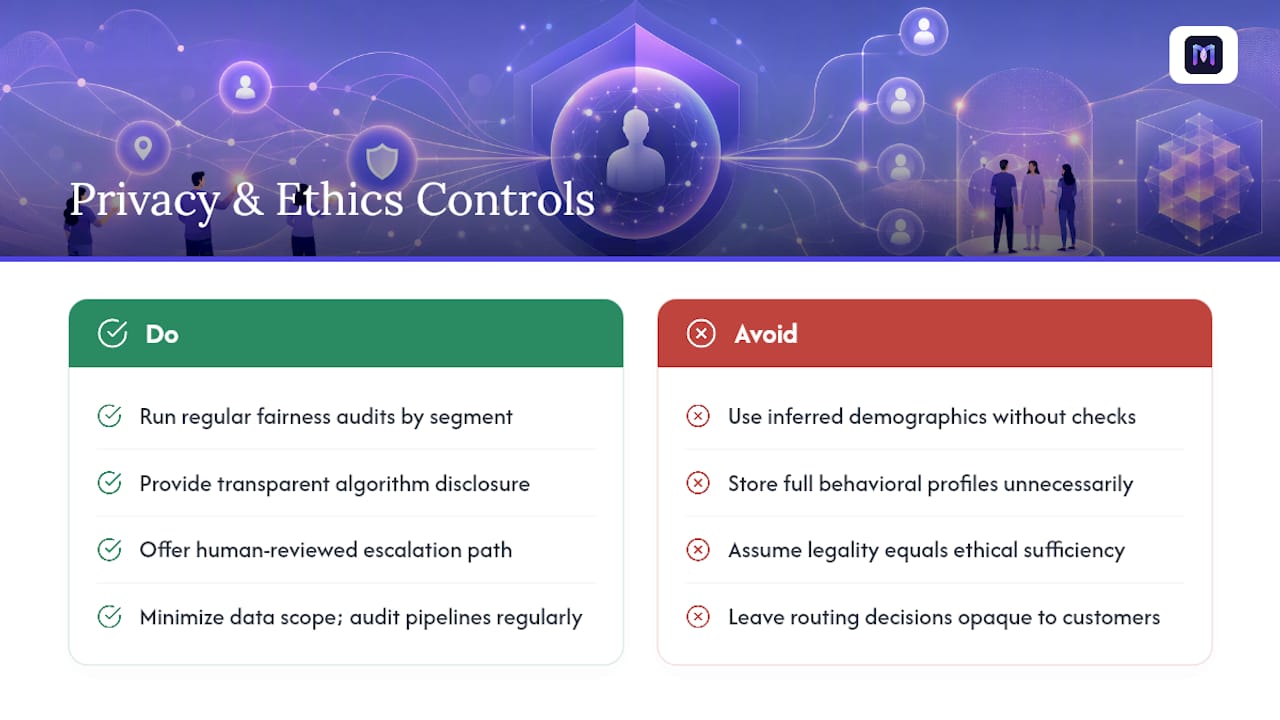
AI skill-based routing runs on personal and behavioral data: account history, sentiment signals, past complaints, sometimes inferred demographic proxies like accent or language preference. That data footprint carries real obligations, and the two biggest risks are quiet ones: opaque profiling and unintentional bias.
Sentiment detection and intent inference both rely on models trained on prior interactions, which means historical bias in that data becomes routing bias if nobody checks for it. An agent pool that historically skewed toward routing certain accents or dialects to lower-tier queues will keep doing that unless someone audits the pattern directly. Regular fairness audits on routing outcomes, broken out by relevant customer segments, catch this before it becomes a pattern regulators or customers notice first.
Transparency matters just as much as fairness. Customers generally don’t know an algorithm decided which agent picked up their call, and most contact centers don’t disclose it. That’s legally fine in most jurisdictions today, but the ethical bar is higher than the legal minimum: customers should be able to request a human-reviewed escalation path if they believe routing mishandled their case.
Data minimization is the practical safeguard. Routing models need enough context to match skill to intent, not a complete behavioral profile. Pulling in more account history than the routing decision actually requires expands your data exposure risk without improving match quality. Keep the data pipeline scoped to what the routing logic actually consumes, and audit that scope periodically as new integrations get added.
What’s Next for AI-Driven Skill Matching?
Routing is moving from reactive matching toward predictive assignment: models that anticipate contact volume and skill demand hours ahead based on historical patterns, then pre-position agent schedules through WFM integration before the volume spike hits. That shifts skill-based routing from a point-of-contact decision into a staffing and scheduling input.
Multimodal intent detection is the other clear direction. Today’s systems lean heavily on voice NLU and chat text. Emerging approaches blend voice tone, typing cadence, and even prior-channel behavior (did this customer already try chat and abandon it?) into a single intent signal that’s harder to game and more accurate than any single input.
Expect tighter integration between conversation intelligence and the skill-update loop, too. Instead of waiting for a manager to confirm an agent’s new certification, systems will infer proficiency gains directly from resolution outcomes on similar contacts, closing the training-to-routing lag from weeks to days.
The practical upshot for contact center leads: the taxonomy and data discipline you build today doesn’t become obsolete as these capabilities mature. It becomes the foundation predictive and multimodal routing builds on top of.
When Should You Actually Invest in This?
AI skill-based routing earns its cost when contact volume is high enough and skill needs are fragmented enough that manual queue management is already breaking down. Below a few hundred contacts a day with two or three simple skill categories, the added complexity rarely pays for itself.
The real prerequisite isn’t the AI model, it’s data readiness. If your CRM records are inconsistent or your agent skill list lives in a spreadsheet nobody updates, fix that first. A four to six week pilot on one queue, measured against a control group, tells you more than any vendor pitch deck. Start narrow, prove the CSAT and transfer-rate improvement, then expand.
— Alex
Ready to Pilot AI Skill-Based Routing?
Monobot maps directly onto the checklist covered above: skills taxonomy configuration, CRM and WFM integration, proficiency-weighted matching, and analytics that show whether your routing changes actually move CSAT and resolution speed. Instead of stitching together a routing engine, a CRM connector, and a separate analytics tool, you configure it inside one platform and deploy voice or chat agents in minutes rather than a multi-quarter integration project.

If you’re weighing whether to build this in house or evaluate a platform that already has the pieces wired together, start with the AI voice agent builder to see how skill configuration and routing logic come together in practice. Run a scoped pilot on one queue, track CSAT and transfer rate for two to four weeks using the analytics dashboard, and compare the results against your current setup before committing to a full rollout.
Sources
- Microsoft Dynamics guidance: CS AI & case deflection (skills and integration guidance)
- Technical lecture: skills-based routing (concepts and pitfalls)
FAQ
What Is Skill-Based Routing?
Skill-based routing matches an incoming contact to an agent whose tagged skills fit what the customer needs, rather than sending it to whichever agent is simply next in line.
What Is AI-Based Routing and How Does It Work?
AI-based routing infers customer intent from voice NLU, chat context, or account history, then matches that intent against agents ranked by proficiency level, availability, and current workload rather than a simple skill flag.
What Are the Key Differences Between Queue-Based and Skill-Based Routing?
Queue-based (ACD) routing sends contacts to the next available agent with no regard for expertise, while skill-based routing filters by tagged capability first. AI-enhanced skill-based routing adds a further layer, scoring proficiency and inferred intent rather than treating skills as binary yes/no tags.
What Is Skill-Based Routing in Salesforce?
In Salesforce Service Cloud, skill-based routing assigns cases or omnichannel work items to agents based on configured skill records and proficiency, similar in concept to the AI-enhanced models described here, though the intent-inference layer depends on which AI tools are integrated alongside it.
How Long Does It Take to Implement AI Skill-Based Routing?
A scoped pilot on a single queue generally runs several weeks, covering taxonomy setup, data integration, simulator testing, and a live comparison against a control group before wider rollout.