


Real-time call transcription converts spoken calls and meetings into searchable text as they happen, powering live captions, agent assist, and instant records the moment a call ends. It works by streaming audio into a speech recognition engine that returns text in short segments instead of waiting for the call to finish. The real decision isn’t whether to adopt it. It’s how much accuracy you’re willing to trade for speed, and which vendor’s latency and diarization actually hold up on your call audio.
TL;DR:
- Achieving acceptable accuracy depends heavily on customizable vocabulary, domain adaptation, and proper audio preprocessing for telephony lines.
- Latency should be matched to intended use, prioritizing diarization and real-time responsiveness over raw accuracy percentages.
- Proper engineering includes securing endpoints, setting retention and consent policies, and ensuring integration with CRM and monitoring tools before deployment.
- Handling live transcription errors involves visually distinguishing interim results and only using final segments for downstream systems to avoid misinformation.
- Monobot offers an all-in-one platform with built-in live transcription and agent assist, simplifying deployment for contact centers compared to assembling multiple vendors.
Table of Contents
- What Live Transcription Actually Delivers
- What Are the Core Technical Components?
- How Accurate Is Real-Time Transcription, and How Do You Improve It?
- Implementation Checklist Before You Go Live
- Where Real-Time Transcription Pays Off Fastest
- Monobot’s Approach to Live Transcription
- How to Design a Transcription Pilot
- How Do You Handle Errors During Live Transcription?
- Can Real-Time Transcription Handle Multiple Languages?
- Training and Support Your Team Actually Needs
- What Goes Wrong, and How Do You Fix It?
- The Real Trade-Off Nobody Talks About Enough
- Get Real-Time Transcription Running Without Building It From Scratch
- Sources
- FAQ
What Live Transcription Actually Delivers
Speech to text call center deployments give teams more than a text dump of what was said. Done right, live transcription becomes the backbone of agent assist, compliance monitoring, and searchable institutional memory.
The core capabilities that matter in production:
- Live captions and searchable transcripts that update in real time, letting supervisors read along or search a call the moment it starts.
- Agent assist prompts that surface the right script, policy, or answer based on what the customer just said.
- Automated call summaries generated the instant the call ends, cutting the manual note-taking that eats into agent capacity.
- Real-time alerts triggered by specific keywords or phrases, like a customer mentioning cancellation or a compliance term.
- Accessibility support, giving hearing-impaired agents or customers a readable stream of the conversation.
Not every use case needs the “real time” part. Post-call transcription is cheaper and simpler if you only need searchable archives or quarterly QA sampling. Real-time processing earns its cost when someone or something needs to act during the call: an agent needs a prompt, a supervisor needs an alert, or a caption needs to appear on screen now.
What Are the Core Technical Components?
Real-time audio transcription runs on three layers: the audio transport, the speech recognition engine, and the event pipeline that turns transcript text into something usable. Getting any one of these wrong shows up immediately as lag, garbled text, or missed speaker turns.
- Streaming ASR (automatic speech recognition): unlike batch transcription, streaming models process audio in small chunks and emit partial (“interim”) results before locking in a final transcript segment. Google’s Agent Assist documentation describes this interim-versus-final pattern explicitly, since downstream systems need to know which transcript state they’re reading before they act on it.
- Transport protocol: WebSocket connections are the common choice for browser-based and app integrations because they’re simple to implement and widely supported. gRPC streaming offers lower overhead for high-throughput backend systems. Telephony environments often rely on SIPREC to fork call audio to a transcription engine without disrupting the call itself, and Twilio’s realtime transcription API documents a dedicated subresource for starting and stopping transcription on calls already in progress.
- Latency budget: total delay comes from three sources stacked together: network transit, audio encoding/decoding, and model inference time. A well-tuned pipeline can return partial transcripts in a few hundred milliseconds, though the number varies by model size and network path.
Pro Tip: Wire your event pipeline to consume is_final transcript events separately from interim ones. Routing interim text into analytics or CRM fields creates duplicate or contradictory records once the final version arrives.
Scaling adds its own wrinkle. Every concurrent call needs its own streaming session, so concurrency limits and connection pooling become capacity planning issues, not just code details.
How Accurate Is Real-Time Transcription, and How Do You Improve It?
Diarization, or telling speakers apart in real time, is one of the biggest accuracy levers most teams underuse. OpenAI’s realtime transcription guide flags speaker diarization and attribution as essential for any downstream analytics that depend on knowing who said what, not just what was said. Attribution gets noticeably easier when each participant has a separate audio channel instead of a single mixed feed, since the model no longer has to guess speaker boundaries from acoustic cues alone.
Four practical levers move accuracy the most:
- Custom vocabulary and phrase sets for product names, alphanumeric case IDs, and internal jargon that generic models routinely mangle.
- Domain-specific model adaptation, training or fine-tuning on your own call corpus rather than relying on an out-of-the-box model.
- Audio preprocessing for telephony, since most call center audio runs at narrowband 8 kHz, a constraint that Microsoft’s Azure Speech documentation flags directly, alongside codec and sample-rate handling.
- Continuous monitoring using word error rate (WER) sampled against human-reviewed transcripts, not a one-time accuracy test at launch.
Demand for this kind of speech-based natural language processing keeps climbing, with Statista’s market research tracking sustained global growth in voice AI adoption. That growth means more vendors, but also more variance in how well each one handles your specific audio.
Implementation Checklist Before You Go Live
Live transcription touches legal, security, and engineering all at once. A few things to lock down before rollout, and a few to test before trusting the system in production.
Decisions to make first:
- Define retention windows and consent language for recordings and transcripts, and confirm they meet the recording laws in every jurisdiction you operate in.
- Turn on PII detection and in-stream redaction. AWS’s Call Analytics streaming feature supports real-time PII identification and redaction before text ever reaches storage.
- Test redaction effectiveness against real call samples containing account numbers, card details, and health information.
- Set up authentication, failover, and monitoring for your streaming endpoints, since a dropped connection mid-call is worse than a slow one.
Integration touchpoints to wire up before launch:
- CRM push, so transcripts and summaries land on the right customer record automatically.
- QA sampling tools that pull flagged calls for review.
- Searchable transcript storage indexed for keyword lookup.
- Real-time alerting tied to compliance or escalation keywords rather than raw transcript floods.
Where Real-Time Transcription Pays Off Fastest
Four use cases consistently deliver the clearest return once live transcription is running.
- Agent assist: live suggestions surface the next best response, and compliance alerts fire the moment a required disclosure gets skipped.
- Meetings: live captions and automated summaries turn every internal call into a searchable, skimmable record instead of a scattered set of notes.
- Accessibility: real-time captions give hearing-impaired participants equal access to a conversation as it unfolds, and the same transcripts double as training material later.
- Compliance and QA: keyword-based category events, the kind AWS Call Analytics uses for real-time alerts, catch escalation risks as they happen rather than during a post-call review days later.
Each of these maps to a measurable outcome: shorter handle time, fewer missed disclosures, or faster onboarding for new agents reviewing real call examples.
Monobot’s Approach to Live Transcription
Monobot builds real-time speech-to-text directly into its AI platform, paired with an AI Copilot that surfaces live suggestions to human agents while a call is still happening. That combination matters because transcription alone only captures the conversation. Pairing it with a copilot turns that stream of text into action while the agent is still on the line.
What teams typically get out of the box:
- Industry-specific templates for healthcare, banking, retail, and logistics that shortcut the vocabulary and workflow setup most teams build from scratch.
- Fast deployment without custom engineering for the streaming pipeline itself.
- Integrations that push transcripts and summaries into existing CRM and support tools.
- Real-time analytics dashboards for monitoring accuracy, call volume, and flagged conversations as they come in.
For teams that don’t want to stitch together a separate ASR vendor, a transport layer, and a redaction pipeline by hand, this bundled approach removes several integration decisions at once.
How to Design a Transcription Pilot
Skip the company-wide rollout. Start with one channel and a defined pass/fail bar.
- Pick a representative sample of calls or meetings, matching the real mix of accents, background noise, and call types you’ll see in production.
- Set explicit targets before you start: a WER threshold, a latency ceiling in milliseconds, and a diarization accuracy goal.
- Run integration smoke tests: does the transcript actually push to the CRM, do alerts fire correctly, and is the transcript searchable within minutes of the call ending?
- Compare pilot results against your targets and make a clear go or no-go call before expanding to more channels.
Pro Tip: Use the same codecs, noise levels, and languages in your pilot audio that you expect in production. A pilot built on clean studio audio tells you almost nothing about how the model performs on a noisy warehouse floor line.
How Do You Handle Errors During Live Transcription?
Live transcription is never final until it says so. Streaming ASR engines emit interim results first, then correct themselves as more audio context arrives, which is why the interim/final distinction matters so much for anything reading the transcript in real time.
The practical fix is architectural, not manual. Interim transcripts should be visually distinct in any UI, shown in gray or italicized text, for example, so agents and supervisors understand the words on screen might still shift. Only final segments should feed downstream systems like CRM records or compliance logs. Some platforms also let supervisors flag a misheard segment during the call, which retrains custom vocabulary lists over time rather than fixing that one instance.
For agent-facing interfaces specifically, the display needs a light touch. A transcript that jumps and rewrites itself constantly is distracting during a live customer conversation. Good implementations lock in text after a short confidence delay rather than rewriting every partial guess on screen in real time.
Can Real-Time Transcription Handle Multiple Languages?
Multilingual call handling is one of the harder real-time transcription problems, and it’s rarely solved by simply pointing a model at audio and hoping it detects the language correctly. Two approaches dominate: pre-selecting a language based on caller data (like a phone number’s country code or a customer’s stored language preference), or running real-time language identification that samples the first few seconds of audio before locking in a model.
Language identification adds latency, since the system needs enough audio to make a confident call before transcription can even begin. That tradeoff matters most for global support lines and call centers serving multilingual customer bases, where guessing wrong means garbled transcripts for the rest of the call.
Code-switching, when a caller moves between two languages mid-sentence, remains a genuine limitation for most production systems today. Teams handling high-volume multilingual traffic often route by expected language first, using stored customer preferences or IVR menu selections, and treat real-time detection as a fallback rather than the primary method.
Training and Support Your Team Actually Needs
Rolling out live transcription fails more often from unclear expectations than from bad technology. Agents need to understand what the system is showing them: which text is confirmed, which suggestions come from an AI Copilot versus a fixed script, and what to do when a transcript clearly gets something wrong.
Administrators need a different layer of training entirely. They need to know how to update custom vocabulary lists as new products or terms come into use, how to read accuracy dashboards, and how to escalate a systemic accuracy problem instead of treating it as a one-off. Most platforms that offer real-time transcription pair it with some form of dashboard, and knowing how to read analytics and reporting tools becomes part of the administrator’s actual job, not an afterthought.
A short reference guide beats a one-time training session. Agents forget details fast, and a live call is the wrong moment to read documentation.
What Goes Wrong, and How Do You Fix It?
Most live transcription problems trace back to one of four sources: audio quality, network instability, model mismatch, or unrealistic expectations.
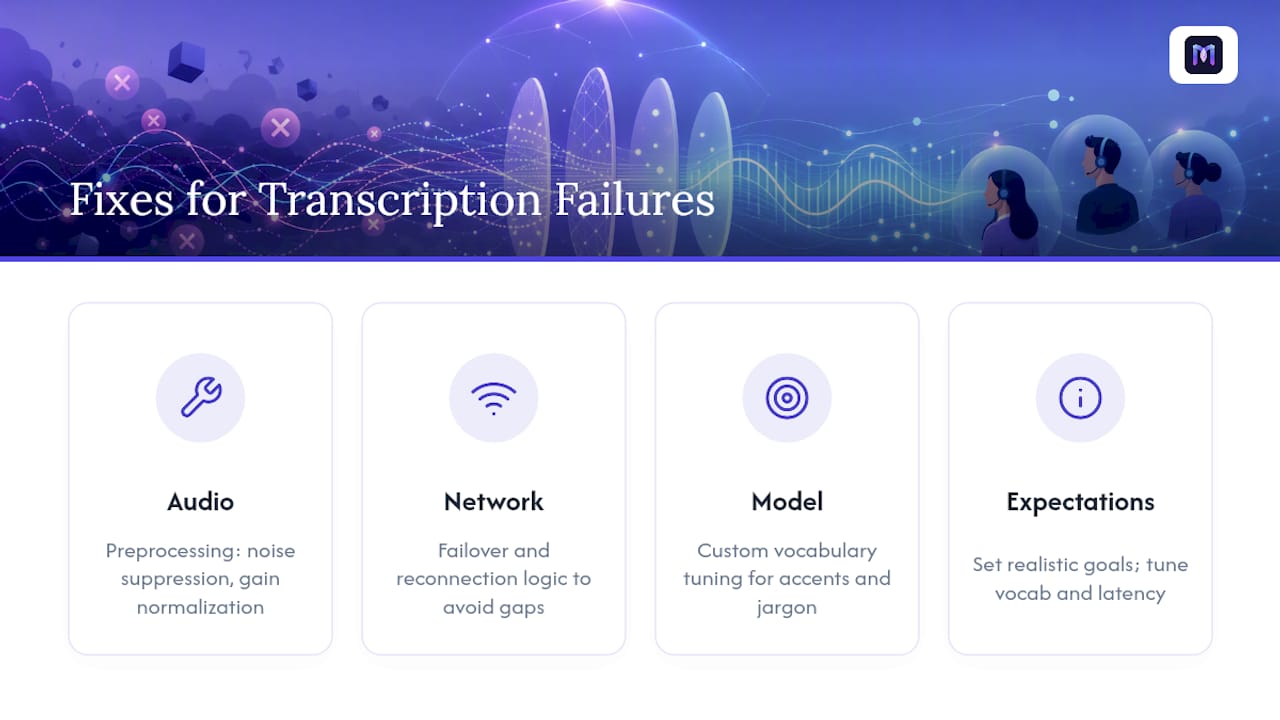
Poor audio quality, background noise, cross-talk, or a bad microphone, degrades accuracy faster than almost anything else. The fix is usually preprocessing (noise suppression, gain normalization) rather than a better model. Network instability shows up as dropped streaming connections or transcript gaps mid-call; failover and reconnection logic matter more here than raw model quality. Model mismatch happens when a general-purpose ASR model gets thrown at heavily accented speech or dense industry jargon without any custom vocabulary tuning, producing steady low-grade errors that never quite trigger an obvious failure. And unrealistic expectations, expecting perfect transcription from day one, cause teams to abandon otherwise workable systems before they’ve tuned vocabulary or adjusted latency targets to match their actual call mix.
The fastest diagnostic is usually a WER sample split by call type. If narrowband telephony calls score dramatically worse than clean recorded meetings, the fix is audio preprocessing. If accuracy is even across audio types but specific terms keep failing, the fix is vocabulary, not infrastructure.
The Real Trade-Off Nobody Talks About Enough
Most vendors sell real-time call transcription on accuracy percentages, and most buyers evaluate it that way too. That’s the wrong first question. The right one is: what’s your actual latency budget, and does your diarization hold up on multi-speaker calls with real background noise, not a demo recorded in a quiet office?
Conventional advice treats accuracy and speed as if they’re independent knobs you tune separately. They aren’t. Push for lower latency and you’re often trading away the model’s ability to revise interim guesses, which is exactly the mechanism that improves accuracy over the course of a sentence. Teams that skip a proper pilot, one built on their actual call audio, not a clean demo, consistently discover this gap only after they’ve already committed to a vendor.
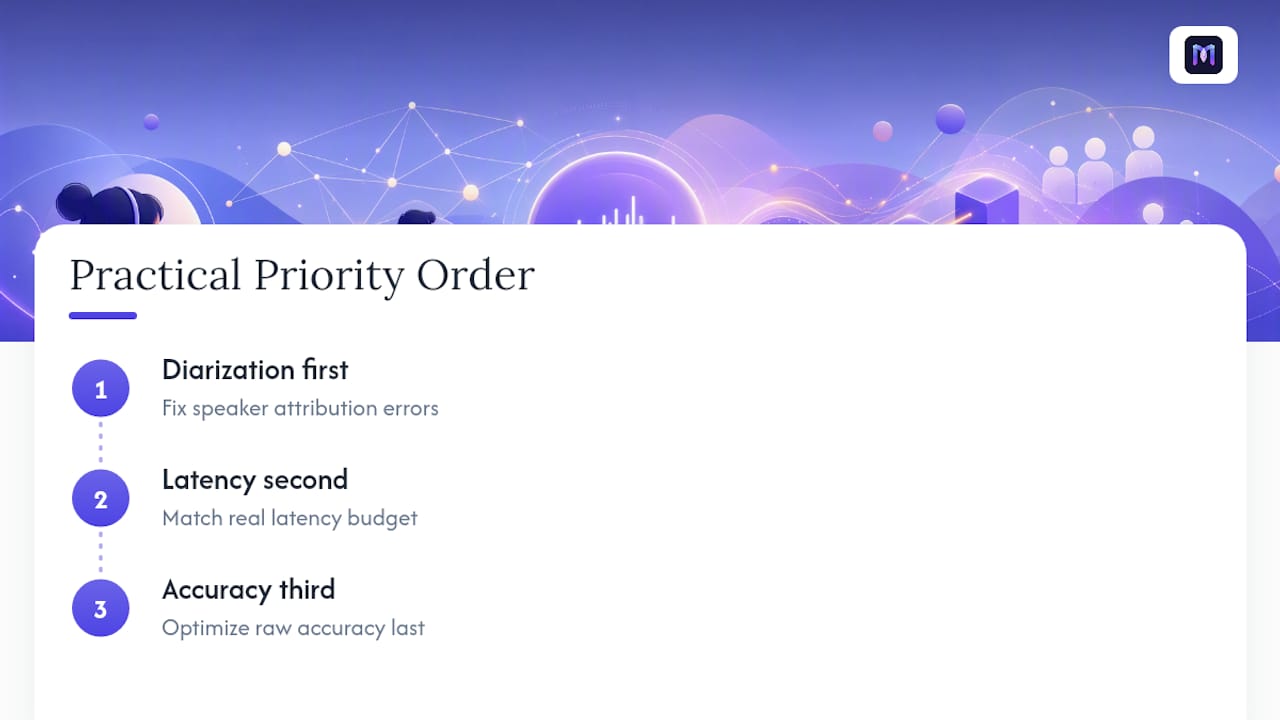
The practical priority order is: get diarization right first, since attribution errors corrupt every downstream analytic. Get latency realistic second, matched to whether you need sub-second agent prompts or can tolerate a few seconds for a meeting summary. Only then optimize raw accuracy percentages. Platforms that bundle transcription with agent assist, like Monobot’s approach, skip a layer of integration risk most teams underestimate until they’re three vendors deep into stitching a pipeline together themselves.
— Alex
Get Real-Time Transcription Running Without Building It From Scratch
Monobot is the alternative to assembling your own streaming ASR pipeline, transport layer, and redaction logic from separate vendors: one platform, with live transcription built in alongside an AI Copilot that turns that transcript into real-time agent suggestions while the call is still happening.

It suits contact center leads and operations teams who want transcription-driven workflows, agent assist, compliance alerts, searchable records, without hiring a team to manage streaming infrastructure. Industry templates for healthcare, banking, retail, and logistics shortcut the vocabulary and workflow setup this article just walked through, and real-time analytics dashboards give administrators the accuracy and volume monitoring your pilot plan needs from day one. Explore the AI voice agent builder to see how transcription connects to a working agent, or start with a template built for your industry and get a pilot running this week.
Sources
FAQ
How Do You Transcribe a Phone Call in Real Time?
Audio from the call streams to a speech recognition engine over a protocol like WebSocket or gRPC, which returns interim and then final text segments as the conversation happens. Telephony systems typically use SIPREC or a provider API, such as Twilio’s transcription subresource, to fork call audio into that streaming pipeline without interrupting the call.
Is Google Live Transcribe Free?
Google’s Live Transcribe is a free accessibility app built into Android devices for real-time captioning of nearby speech. It’s designed for personal accessibility use, not for enterprise call center deployments that need diarization, CRM integration, or PII redaction.
Is There a Free App for Live Transcription?
Several free apps offer basic real-time captioning for personal or accessibility use, including Google’s Live Transcribe on Android. Business deployments handling customer calls generally need a paid platform that supports custom vocabulary, speaker diarization, and compliance features that free consumer apps don’t include.
How Does Real-Time Transcription Actually Work?
A streaming ASR engine processes audio in small chunks as it arrives, emitting partial transcripts almost immediately and then locking in a final, corrected version of each segment. Platforms like Monobot pair that live transcript stream with agent assist, so the text triggers suggestions or alerts while the call is still in progress rather than after it ends.