



Good chatbot failover design answers one question before launch: when the bot cannot serve a customer, what happens next, and who or what takes over? The answer is a ladder of fallbacks, from a safe retry to a second model, then a limited answer, then a person, with the conversation context and every half-finished action carried along. Teams that build the ladder around one platform for voice, chat, human assistance and analytics have fewer seams to manage when something breaks.
This guide is for customer service managers, contact center operators and IT teams who run, or are about to run, automated agents on real customer traffic.
TL;DR
- Failover is a workflow decision, not a platform switch. Decide per workflow which failures trigger it and what the alternate must preserve.
- Retry only errors that can change on a second try. Use a bounded retry budget, then a tested secondary model, then a safe static answer, then a human.
- Your application, not the model provider, owns conversation context and duplicate-action protection.
- A person with a visible phone number or callback path is the most dependable last rung.
- A failover is proven only by drills: synthetic traffic, a read-only first drill, and retests whenever routes or model versions change.
Table of Contents
- What failover means for a customer-facing bot
- Decide which failures trigger failover
- Build the fallback ladder
- Tell the customer what happened
- Preserve context and protect customers from duplicate actions
- Test failover before customers do
- A failover checklist you can adopt this week
- Where a single platform helps
- Monobot plans for teams building this
- Our perspective
- FAQ
- Sources
What failover means for a customer-facing bot
Failover means retrying a request through another approved route when the primary cannot serve it. OpenAI’s failover design guide frames it exactly that way, and adds a condition that matters for support teams: the request must be safe to repeat, and the alternative must meet the requirements of the workflow.
For a contact center, “the route” is wider than the language model. A customer conversation depends on:
- the model or provider that generates answers;
- speech-to-text and text-to-speech on voice channels;
- retrieval from your knowledge base;
- integrations to your CRM, scheduling or order systems;
- the handoff path to live agents.
A failure in any of these degrades service. Your failover design should name each dependency and say what the customer experiences when it fails.
Decide which failures trigger failover
Not every error deserves a reroute. Sending a broken request to a second provider just produces a second broken response, and it can add cost and load.
Good triggers. The OpenAI guide lists transient service or connection failures, timeouts, and sustained throttling or slow responses as possible triggers. Gloo’s provider failover documentation adds provider outages, lost connections, server errors, empty responses, and capacity or rate-limit failures on the provider side.
Bad triggers. Gloo does not ordinarily fail over invalid requests, unsupported models, unauthorized credentials, or exhausted credits and spending limits, because repeating them elsewhere would not fix the cause. OpenAI’s guide says the same about malformed requests, authorization errors, policy refusals and exhausted quota or spend limits.
Put this in a short table your team signs off on before launch:
| Signal | Failover? | Why |
|---|---|---|
| Timeout or dropped connection | Yes, after a bounded retry | Transient, a second route may succeed |
| Sustained slow responses | Yes, via a circuit breaker | Customers abandon long silences, especially on voice |
| Provider server error or empty response | Yes | Primary cannot serve the request |
| Malformed request or bad credentials | No | A defect in your integration, fix it |
| Policy refusal | No | Rerouting would sidestep a deliberate block |
| Quota or spend limit exhausted | No | A billing and capacity issue, alert the owner |
The slow-but-not-failing case is the one teams forget. A route that answers in twelve seconds never throws an error, yet on a phone call it is a failure. Set latency thresholds per channel.
Build the fallback ladder
The most useful pattern in the published guidance is a ladder ordered from closest to the original behavior to furthest. Compile N Run’s reliability documentation describes six rungs: retry the same model with backoff, try another model from the same provider, run the same model on another platform, use another provider’s model with re-tested prompts, give a degraded answer such as a cached response, search results or a templated reply, and finally open a human ticket or hand off to an agent.
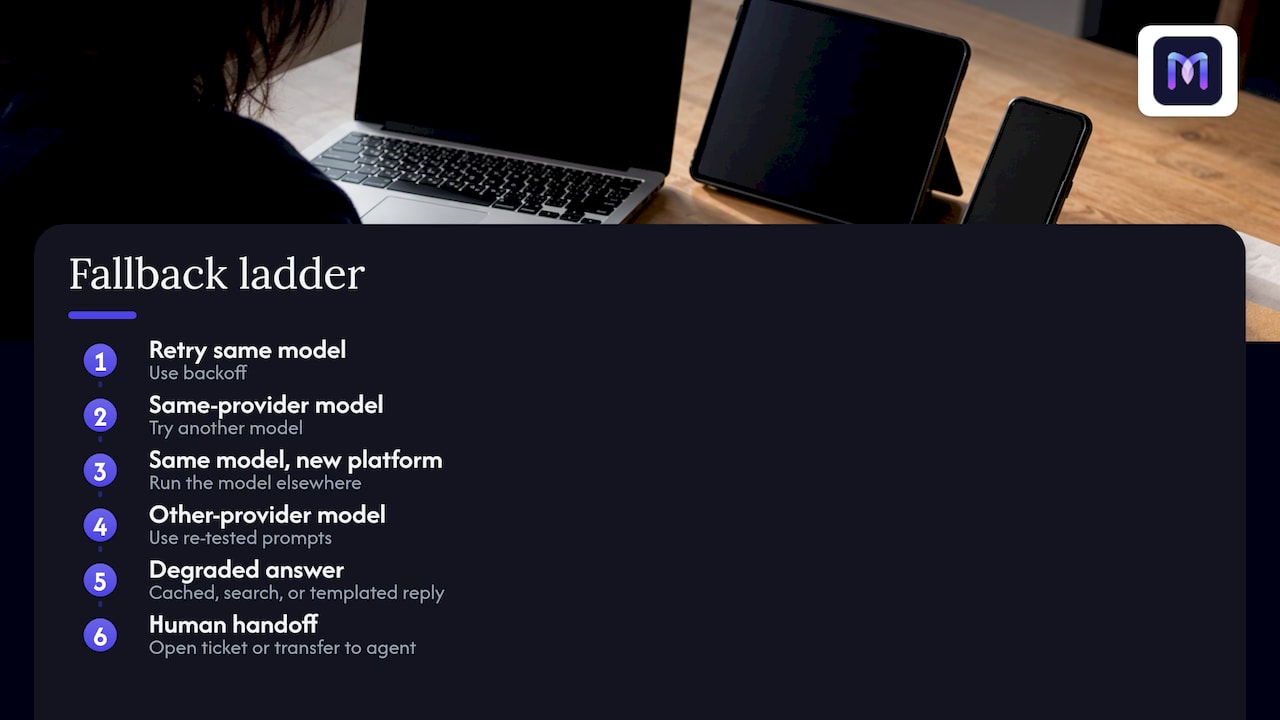
Conversational AI Design gives a compact version of the same progression: safe retry and clarification, then simpler modes or static answers, then a human, callback or ticket. Its key rule is to advance after repeated failure instead of looping on the same behavior.
Rung 1: retry, with limits
Retry transient errors with bounded exponential backoff and jitter, and never retry errors that will not change. OpenAI’s guide recommends one layer controlling retries across the application, SDK and gateway, with a shared retry budget. Without that, three layers each retrying three times turn one failure into nine requests, and a struggling provider gets worse.
Rung 2: a second model or route
A second model only helps if it is genuinely independent. OpenAI’s guide warns that a shared gateway, retrieval service or identity dependency can undermine apparent redundancy. Two models behind the same gateway, in the same region, share one point of failure.
Also treat the second model as a separate product. Prompts tuned for one model can behave differently on another, so test the secondary route against your real conversation scenarios before an outage, not during one. This is one reason multi-model routing deserves deliberate design; our piece on why using multiple LLMs matters explains how model choice maps to task.
Rung 3: a limited answer
When no model is available, the bot can still be useful. A practical approach from Cybergiz’s pause and fallback template maps each bot capability to its own fallback: public FAQ questions go to a static help-center article or contact form, billing questions to the billing queue, and tool actions to manual handling by an authorized owner. Its guidance is that the fallback should be boring, slower and safer, and that you should pause only the affected capability when possible. A bot that cannot book appointments may still answer store-hours questions.
Rung 4: a person
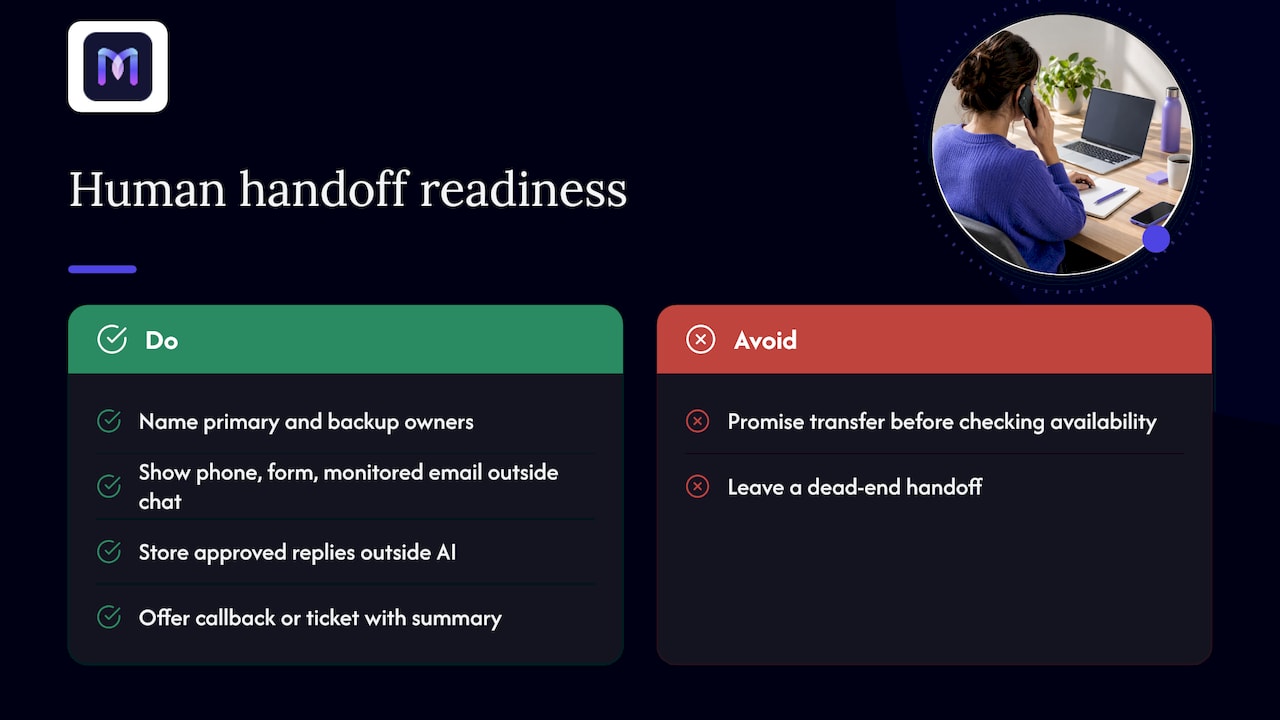
The most reliable fallback is a human. StoopCraft’s outage plan for local businesses recommends a primary and backup owner for incoming inquiries, a phone number, contact form and monitored email that are visible without opening the chat, and short approved reply templates stored outside the AI service. Contact centers can scale that idea: a named on-call supervisor, a queue that can absorb bot overflow, and scripts agents can use immediately.
Before the bot promises a handoff, it should check that someone is there. Conversational AI Design advises that when no agent is available, the bot state hours or the expected wait and offer a callback or a ticket with a summary and a clear next step. A promised transfer that dead-ends is worse than an honest callback offer.
Tell the customer what happened
Silent failure is the fastest way to lose trust. The same guidance argues for visible, forward-moving fallbacks: say what failed, give a usable next step, and change strategy after a repeated error. A good degraded-mode message is short:
- what the bot cannot do right now (“I can’t access order details at the moment”);
- what it can still do (“I can answer general questions, or take your number for a callback”);
- the next step with a time frame.
On voice, add a hard rule: never leave dead air. If the response is late, play a short holding phrase once, then move down the ladder.
Preserve context and protect customers from duplicate actions
This is where failover designs most often break. Switching providers does not resume a conversation. OpenAI’s guide is explicit that your application owns recovery context, action reconciliation, checkpoints and duplicate-action protection.
Keep your own transcript
LLM API Reliability Notes recommends a provider-neutral canonical transcript owned by your gateway, with provider continuation identifiers stored only as route-specific metadata. On failover, rebuild the fallback request from the last committed transcript version. Different providers handle conversation state differently, so a design that depends on one provider’s session memory cannot move.
Stop double charges and double cancellations
If the bot called a tool (refund, cancel, send, book) and the connection dropped before confirmation, a replay may run it twice. The same source notes that a tool action can run twice if a transcript is replayed without durable action identifiers. Conversational AI Design recommends idempotency keys for retried writes, so charging, cancelling or sending is not performed twice. In practice:
- Give every write action a unique ID created before the call.
- Record the outcome (succeeded, failed, unknown) in your own store.
- On failover, check for unknown outcomes and reconcile them before the fallback route acts again.
Hand off more than a transcript
A live agent who receives a 40-message transcript has to read it while the customer waits. A peer-reviewed paper on context-preserving AI-to-human handoff architectures argues that a transcript alone rarely carries enough operational context. It proposes a structured package: interaction identification, the customer’s objective, a conversation summary, relevant entities, task and workflow state, tool execution context and the reason for escalation. Its design principles are relevance, completeness, accuracy, transparency and minimization.
A workable agent-facing card has five lines: who the customer is, what they want, what the bot already did, what is pending, and why it escalated. Our overview of agent assist and chatbots working together shows how real-time suggestions help the agent who picks up.
Test failover before customers do
A failover path you have never exercised is a guess. Cybergiz’s provider-outage failover checklist says a failover result is valid only for the named trigger, route and model versions, provider and region, and data and action scope. Its guidance for a first exercise:
- Use synthetic traffic, not live customers.
- Keep the first drill read-only or draft-only, so no real action can fire.
- Test provider errors, slow routes, data-scope preservation, stale cached answers, unauthorized tool actions and restoration.
- Retest whenever the trigger, route, model version or data and action scope changes.
StoopCraft adds a simple check any team can run in five minutes: submit a uniquely labeled inquiry through the fallback path and confirm it reaches a monitored inbox. Run it monthly and after any change to forms or routing.
What to measure
Track these continuously, not only during a drill:
- error rates and latency per route and channel;
- retry volume, to catch amplification;
- how often each fallback rung is used;
- duplicate-action and idempotency conflicts;
- time to detect, restrict, communicate and restore.
A fallback rate that creeps up without any incident is an early warning of a degrading dependency. Real-time dashboards make that visible; see our write-up on real-time analytics use cases for contact centers for the signals worth watching.
Don’t forget restoration. Define when traffic returns to the primary route: after a sustained healthy period, gradually, and with the circuit breaker half-open first. Flapping back and forth between routes confuses customers and agents alike.
A failover checklist you can adopt this week
- List every dependency of each customer workflow: model, speech, retrieval, integrations, handoff.
- For each, write the trigger, the fallback rung and the owner.
- Set one retry budget across all layers.
- Verify the second route is truly independent of the first.
- Create a canonical transcript and idempotency keys for write actions.
- Define the handoff card and the human availability check.
- Write the customer-facing degraded messages for chat and voice.
- Run a read-only drill, record the times, fix the gaps, repeat.
The architecture also depends on how your contact center is set up around the bot. This overview of chatbots in business and contact center resilience covers the surrounding service design for outages and demand spikes.
Where a single platform helps
Every extra vendor in the chain adds a seam: one for the voice agent, another for chat, another for agent assist, another for reporting. Failover has to cross each seam, and so does context. Monobot brings AI voice agents, chatbots, real-time agent assistance, integrations and analytics onto one platform, with no-code configuration, so your team defines the escalation rules and reviews the results in one place. Our guide to bot fallback strategies goes deeper on recovering conversations once a bot stumbles.
Monobot plans for teams building this
Monobot is a subscription platform with plans by usage and features: Starter at $200 per month, Growth at $500 per month and Business at $1,000 per month, plus Enterprise for larger deployments. Phone numbers are $2.50 per month each, and a HIPAA option is $1,000 per month for healthcare workflows. Bundled pricing means you plan your fallback budget against one subscription. See the Monobot pricing page for the full list of plans and fees.
If you want to map your escalation paths on ready-made flows, the industry templates are a practical starting point, and the Monobot platform shows how voice and chat agents fit together.
Our perspective
Most outage stories we read start the same way: the bot was treated as a feature, and the fallback as an afterthought. We see it the other way around. A customer-facing agent is part of your contact center, so its failure path deserves the same design care as your queue and staffing plan.
That is why we build around the full conversation, not only the model. Voice agents, chatbots, real-time assistance for human agents and analytics belong together, because the moment a bot hands over is the moment your human team needs the context, the summary and the data. Our platform is designed to automate up to 80% of routine inbound calls and chats, and the other 20% is exactly where a clean handoff earns the customer’s trust.
Our advice: start with the workflow, not the vendor. Decide what must never be lost (the customer’s goal, the pending action), decide who catches it, and then pick tools that keep those pieces in one place. No-code configuration helps here, since the people who know your escalation rules are your operations leads, not only your engineers.
Alex
FAQ
What is the difference between failover and a fallback?
Failover reroutes the same request to another approved route, such as a second model or provider, when the primary cannot serve it. A fallback is the broader set of lower-capability responses, such as a static answer, a callback offer or a human handoff. A good design uses failover first and fallbacks when no route can answer.
How many retries should a chatbot attempt before escalating?
Keep retries few and bounded, with exponential backoff and jitter, under a single retry budget shared by every layer. After repeated failure, move to the next rung instead of repeating the same call. On voice, the time limit matters more than the count, because customers will not wait through long silences.
Should every conversation fail over to a human?
No. Route by workflow: simple FAQ questions can fall back to static content or a contact form, while billing issues or sensitive account actions go to the right queue with a summary. Check that an agent is available first, and if not, offer a callback or ticket with a clear next step.
How often should we test failover?
Run a drill before launch and again whenever the trigger, route, model version, or data and action scope changes. Many teams add a short monthly check that a labeled test inquiry reaches a monitored inbox. Start with read-only drills so no real customer action can fire.
Sources
- Designing failover across OpenAI model providers
- Provider Failover (Gloo documentation)
- Reliability and Fallbacks (Compile N Run)
- Fallbacks and graceful degradation (Conversational AI Design)
- AI chatbot pause and fallback plan template (Cybergiz)
- AI chatbot provider outage and model failover checklist (Cybergiz)
- What local businesses should do when AI tools go down (StoopCraft)
- Carry a canonical conversation transcript across providers (LLM API Reliability Notes)
- Context-preserving AI-to-human handoff architectures (IJCET)
- The Role of Chatbots in Business Success Today