



CRM notes automation records or reads each conversation, turns it into a short summary, next steps and field values, and writes them to the right contact or deal without anyone typing. The part that decides whether it works is not the transcript. It is the routing: which record gets the note, which fields are written automatically, and which wait for a person. Monobot builds voice and chat agents and conversation analytics, so the same conversations your agents handle can feed your CRM in a structured form.
TL;DR
- Automation pays off where notes are skipped or retyped: G2’s 2026 research found that 67% of sellers using AI meeting capture still copy the output into the CRM by hand.
- Capture is the easy half. Matching a conversation to the correct contact, deal and owner is where most pipelines break.
- Auto-write low-risk items (summary, call log, recording link, tasks). Hold anything that changes the forecast, or that a customer will see, for human approval.
- Plan consent, permissions and retention before the first call is recorded.
- Measure with a before-and-after sample: minutes of wrap-up per interaction, share of records with complete fields, and a scored accuracy review.
Table of Contents
- What CRM notes automation actually does
- What the CRM should receive from a conversation
- Why the gap between AI notes and CRM updates is so wide
- How to set up CRM notes automation, step by step
- What to auto-write and what to hold for review
- Privacy, consent and access
- Checking accuracy and fixing sync errors
- Measuring time saved and quality
- Where CRM notes automation fits by team
- Monobot for CRM notes automation
- See it on your own conversations
- FAQ
- Sources
What CRM notes automation actually does
The manual routine is familiar. An agent or rep finishes a call, opens the CRM, finds the record, types what happened, sets a follow-up and moves on to the next call. Under volume, notes get shorter, vaguer or skipped entirely.
Automation replaces that routine with a pipeline:
- Capture. A voice call, chat or meeting is recorded or logged and converted to text. In a voice channel this is speech-to-text (STT); chat arrives as text already.
- Extract. A language model (LLM) reads the text and pulls out a summary, the customer’s request, decisions, objections, next steps with owners and dates, and any details your CRM has fields for, such as budget, timeline, order number or appointment time.
- Match. The system identifies who the conversation was with, usually by phone number or email, and finds the matching contact, company or deal.
- Write. The summary lands as a note or activity, fields are updated, and tasks are created.
- Review. Some outputs are checked by a person before they count.
For a customer service operation, the same pipeline covers things a sales team never logs: order status checks, appointment changes, complaint reasons and escalation outcomes. If you run a contact center or BPO, the value is not only a tidier CRM. It is a consistent record of every interaction, including the ones nobody had time to annotate.
What the CRM should receive from a conversation
Decide the output before you pick tools. A useful note has a fixed shape, so that anyone opening the record can read it in ten seconds.
| Output | Example | Typical destination |
|---|---|---|
| Short summary | Customer called about a delayed shipment; agent confirmed new delivery date | Note or activity description |
| Reason for contact | Order status, billing question, reschedule | Picklist or tag field |
| Outcome | Resolved, escalated, callback promised | Status field |
| Next step | Call back Thursday with refund confirmation | Task with owner and due date |
| Sentiment | Frustrated at start, satisfied at end | Custom field or analytics |
| Qualification details | Budget range, timeline, decision maker | Lead or deal fields |
| Link to recording or transcript | URL to the full conversation | Custom URL field |
Keep summaries short and consistent. A summary that is capped in length and follows the same template every time is easier to scan and easier to audit than free-form prose. Monobot’s guide to audit-safe call summarization covers how to structure summaries so that they can be checked later against the call.
Why the gap between AI notes and CRM updates is so wide
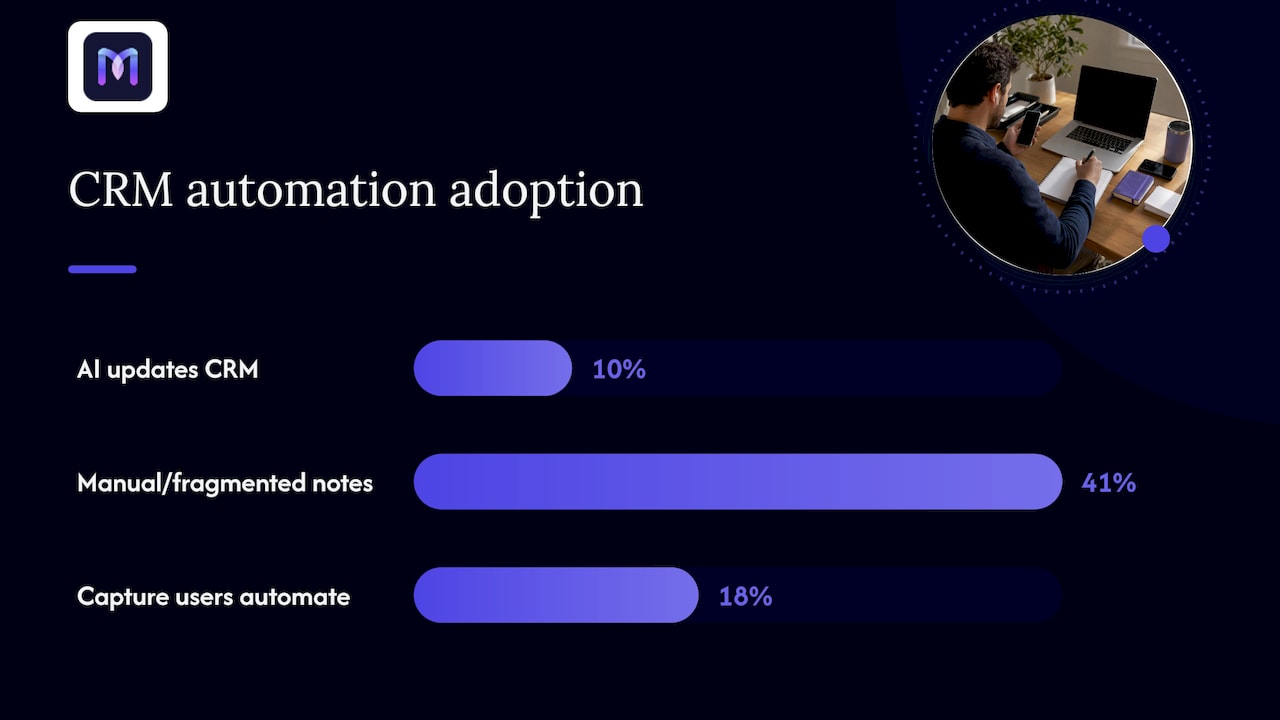
Most teams already have some AI in the loop. The G2 study, based on interviews with 113 active US and UK sellers, found that only 10% have AI updating the CRM for them, and 41% still rely on manual or fragmented note-taking after calls. Among sellers who use AI meeting capture, only 18% have automated the step from AI output into the CRM (G2 research, published November 2026).
That means the transcript exists, but a person still moves it. The bottleneck is the last mile: mapping, matching and permissions. It is also why a platform that sits where the conversation happens, and connects straight to your systems, has an edge over a stack of separate recorders and scripts.
The cost of leaving that step manual is measurable. A 2026 survey of 452 field sales professionals found the average rep loses about 23% of the work week, roughly 9 hours, to administrative tasks and data entry (Spotio, State of B2B Field Sales 2026). That survey covers field sales, not contact centers, so treat it as a sign of scale. Your own wrap-up time per interaction is the number that matters, and Section 7 below shows how to get it.
The same logic is visible well beyond sales, for example in examples of AI in eCommerce, where automated handling of customer interactions turns raw activity into structured data a business can act on.
How to set up CRM notes automation, step by step
1. Pick the conversations and the record types
Start with one high-volume interaction type, such as appointment scheduling, order status or inbound lead qualification. Write down which CRM object each should update: contact, account, case, deal or appointment. A narrow start gives you a clean sample to test.
With Monobot, the voice or chat agent is the one handling that interaction, so the conversation is captured at the source instead of being forwarded from another tool. Ready-to-use templates for healthcare, banking, retail, logistics and other industries give you a starting flow you can adapt without coding.
2. Define the fixed fields
List every field the automation may touch and give each a format. Dates in one format, amounts with currency, picklists limited to your existing values. Extraction quality improves when the model has to fill a defined field rather than invent a description. Ask a hard question of each field: if this value were wrong, who would notice, and how fast?
3. Set the matching rule
Matching is where most pipelines fail. The usual hierarchy is:
- Match on a verified identifier first: the phone number the call came from or the email address in the chat.
- Normalize formats before comparing (country codes, spaces, capitalization).
- If there are several matches, choose by the most recent open deal or case, and flag it.
- If there is no match, create a stub contact marked for review. Never drop the note silently, and never attach it to a guess.
The Capsule CRM guide for connecting a meeting recorder shows the same pattern in a small-business setting: find or create the contact by email, then add the note with the summary, next actions and a recording link (Capsule support). It also advises selecting the right external email and checking the created record before you publish the automation.
4. Connect the systems
A note pipeline needs a path into the CRM: a native integration, an API call or a webhook. Monobot’s Integration Hub connects the platform with third-party tools, so conversation outcomes can reach the systems your team already works in. Confirm the exact objects and fields for your CRM during setup, and start with one.
5. Choose a write mode for every field
This is the most important design decision. Do not treat all fields the same. The next section gives a rule you can apply.
6. Add review and fallbacks
Route low-confidence results to a person. Set a sensible fallback: if the model cannot extract a date and owner, it should create a general follow-up task, not a specific one with a guessed due date. Monobot also supports real-time assistance for human agents, so the agent who takes over a conversation sees context instead of starting cold.
7. Test, then measure
Run a pilot, sample the results and compare against a baseline. Details are below.
What to auto-write and what to hold for review
Not every field carries the same risk. A practical rule from RevOps guidance: anything that changes the forecast (stage, amount, close date, probability) and anything a customer will see (a follow-up email, a calendar invite, an external webhook) should wait for a human. Activity logs, summaries, recording links and tasks assigned to the rep themselves are safe to write automatically, because mistakes are cheap to fix (Mindlyft field map).
The same guidance suggests that a next step can be written automatically when both the date and the owner are explicit in the transcript. For stage, close date and amount, show the proposed value beside the sentence that produced it, so the reviewer can approve in one click.
In a customer service setting, translate that into your own tiers:
| Tier | Examples | Mode |
|---|---|---|
| Safe | Interaction log, summary, reason for contact, recording link, sentiment tag | Auto-write |
| Conditional | Callback task, appointment time, order reference | Auto-write when explicit in the conversation; otherwise propose |
| Sensitive | Refund amount, contract change, account status, anything customer-facing | Human approval |
This tiering lets you capture most of the time savings, because the safe tier covers the bulk of the typing, while protecting the data that drives reporting and customer trust.
Privacy, consent and access
A CRM full of call summaries is a data store, so treat it like one.
- Recording consent. In the United States, recording rules vary by state. Some states require only one party to a call to consent, while others, including California, Florida and Illinois, are generally treated as requiring every party’s consent. If you serve customers across states, apply the stricter standard in your greeting and confirm the details for your footprint with your counsel.
- Retention. Decide how long audio and transcripts live and whether the CRM keeps only the reviewed note. Veeva’s July 2026 guide for its Vault CRM voice notes describes audio that is transcribed locally and deleted when the user submits or discards the call report, with the reviewed report remaining in the CRM (Veeva Vault CRM guide). It is a useful model for deciding what you keep.
- Permissions. The same guide says the agents inherit the initiating user’s data permissions and sharing rules, and that call reports fall under the CRM’s audit trail and retention controls. Apply the principle to yours: automation should never see or write more than the person it works for.
- Regulated data. For healthcare conversations, Monobot offers a HIPAA add-on at $1,000 per month, listed on its pricing page. Involve your compliance officer before any protected health information flows into notes.
Checking accuracy and fixing sync errors
Treat the first month as a test of the pipeline, not of the model alone.
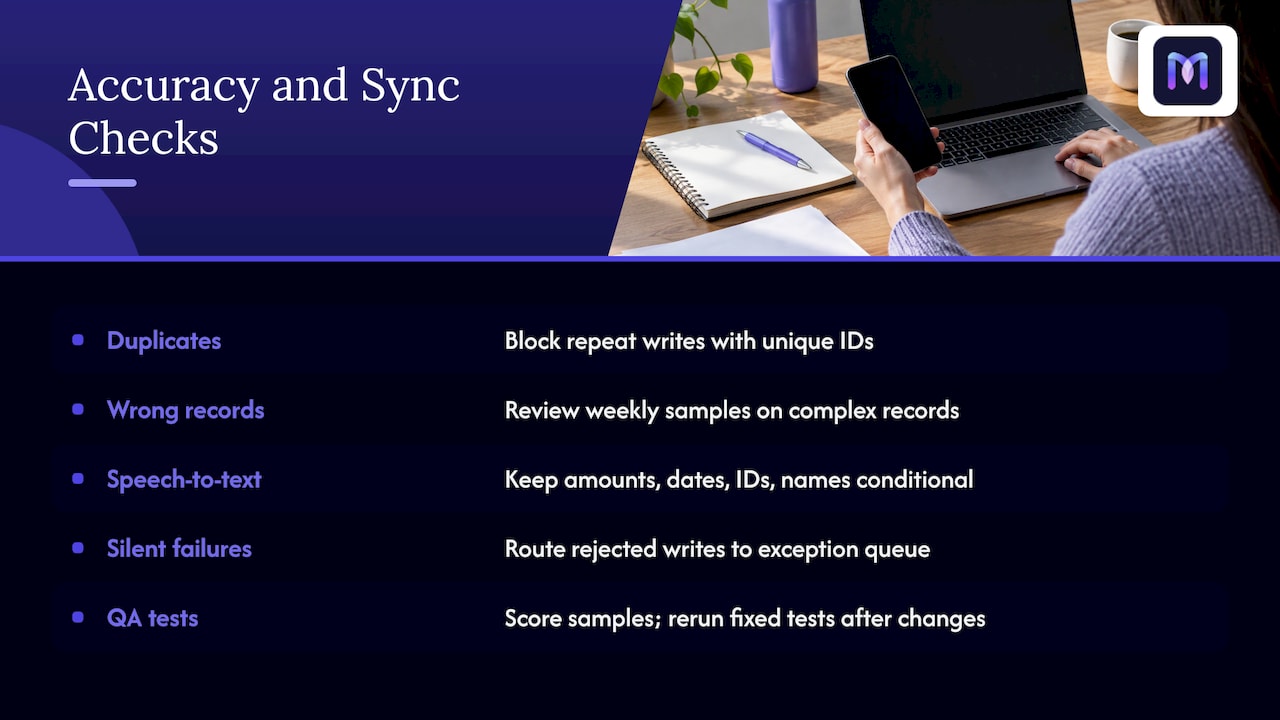
Duplicates. Use a unique interaction ID for each conversation and refuse to write twice with the same ID. Add a short time window to catch retries.
Wrong record. Review a weekly sample of notes attached to contacts with several open deals or cases. This is where mismatches hide.
Transcription errors on numbers. Amounts, dates, order numbers and spelled names are the most error-prone items in speech-to-text. Keep them in the conditional or sensitive tier until your sample shows they are reliable.
Silent failures. Monitor the integration. If the CRM rejects a write because of a required field or a permission, the note should land in an exception queue, not vanish.
For scoring, a human review of a random sample, with a simple rubric for completeness, correctness and tone of the summary, is the baseline. Veeva’s guide describes a more formal approach, with expert-verified reference data, automated tests, model-based grading and human evaluation, repeated at major releases. You can borrow the idea at small scale: keep a fixed set of test conversations and rerun them whenever you change prompts or fields. Monobot’s playbook on regression testing AI behavior walks through it, and the guide to QA scoring with AI shows how to score every conversation rather than a handful.
Measuring time saved and quality
Pick four numbers and capture them before launch:
- After-call work time. Average minutes between the end of an interaction and the agent being ready for the next one.
- Record completeness. Percentage of interactions with a summary, reason code and next step logged.
- Accuracy. Share of sampled notes that a reviewer marks correct on the fields that matter.
- Follow-up reliability. Share of promised callbacks or tasks completed on time.
Then compute a simple estimate. If your team handles 2,000 interactions a week and wrap-up drops by three minutes on each, that is 100 hours a week returned to handling customers. Use your own volumes and your own measured drop, not a vendor’s average. Monobot’s dashboard insights and its guide to AI call analytics for contact centers help you track these across all interactions, including sentiment and resolution.
Follow-ups are the usual second win. Once notes carry clear next steps, reminders and outreach can be triggered from them; see Monobot’s guide to AI-driven follow-up automation.
Where CRM notes automation fits by team
- Customer service and contact centers. Log reason, outcome and sentiment on every call and chat so supervisors can see patterns without listening to recordings. The customer support automation use case shows how voice agents handle routine contacts and hand off the rest.
- Sales and lead qualification. Capture budget, timeline and decision-maker details as fields, and create follow-up tasks automatically. See the sales and lead generation use case.
- IT and operations. Employee requests handled by an assistant can leave a ticket note with the issue and resolution, as in the IT helpdesk use case.
- BPO and resellers. Run the same note structure across many client accounts, with white-label options for branding the platform as your own.
Monobot for CRM notes automation
We built Monobot around a simple view: the best note is the one nobody has to write, because the system that handled the conversation already understands it.
Most teams we talk to are stuck in the middle. They have recordings and transcripts, but a person still decides where each piece goes. We think the answer is to keep capture, understanding and routing in one platform: voice and chat agents that handle routine work such as appointment scheduling, order status and lead qualification, with analytics, sentiment analysis and conversation intelligence on top, and real-time assistance when a human takes over.
We also think tiers matter more than raw accuracy. Auto-write what is cheap to correct, and keep a person in the loop for what moves revenue or reaches a customer. Our platform is designed for no-code setup, so operations teams can adjust fields and flows themselves instead of waiting on a development queue.
Our pricing is bundled, with no hidden fees, so you can plan the cost of automating up to 80% of routine inbound calls and chats before you start.
Alex
See it on your own conversations
Monobot plans are published: Starter at $200 per month, Growth at $500 per month and Business at $1,000 per month, with Enterprise available on request. Phone numbers are $2.50 per month each. Choose a plan on the pricing page, or start from the Monobot platform to see how a voice or chat agent can log each interaction into your workflow.
If you run a call center or BPO and want to deliver note automation to several clients, the white-label and OEM options are the place to begin.
FAQ
Does CRM notes automation replace the agent’s judgment?
No. It removes the typing, not the decisions. Agents and reps still handle the conversation, and a person reviews the fields that affect forecasts or customer-facing messages. The agent’s time shifts from writing to resolving.
Which fields are safe to fill automatically?
Summaries, interaction logs, reason for contact, recording links and internal tasks are low-risk because errors are cheap to fix. Stage, amount, close date and anything sent to a customer should be proposed for approval first.
How long does it take to get started?
The agent and its templates can be deployed without coding, often within minutes. The longer part is your own design work: defining fields, matching rules and review tiers. Start with one interaction type and expand once your sample shows clean results.
Do I need consent to record calls for notes?
Yes, you should plan for it. US states differ, and several require all parties to agree, so many teams announce recording at the start of every call. Have your legal counsel confirm the rules for the states you serve.
Sources
- Why Sellers Still Copy AI Notes Into the CRM (G2)
- The State of B2B Field Sales 2026 (Spotio)
- Automate Your Meeting Records: How to Store Otter.ai Notes in Capsule
- CRM Updates After Sales Calls: Field Map, What to Automate
- Vault CRM Agentic Call Report Guide (Veeva)
- Examples of AI in eCommerce to boost sales and SEO in 2026