



Enterprise AI agents for contact centers are voice and chat assistants that resolve routine customer service tasks end-to-end, from billing inquiries to appointment scheduling, without handing off to a human. The single most effective first move: run a scoped pilot on 2–3 high-volume, low-ambiguity intents using a unified platform that preserves full conversation context on escalation. Start with your AI Agent Builder and bring your intent list, key integrations, and success metrics to the first session.
Key Takeaways
Enterprise AI agents deliver measurable ROI when you pilot narrow, measure true deflection (no reopen within 7 days), and build on a unified platform that preserves escalation context.
| Point | Details |
|---|---|
| Pilot narrow scope | Start with 2–3 high-volume, low-ambiguity intents backed by real interaction data before expanding. |
| Measure true deflection | Track resolved-without-reopen (7-day window), CSAT delta, FCR, and AHT reduction, not containment alone. |
| Demand context carry | Require full conversation history and intent data to arrive at the live agent desktop on every escalation. |
| Phase your rollout | Expect early signals within weeks; meaningful AHT and CSAT impact typically takes 2–3 months of tuning. |
| Monobot for enterprise pilots | Monobot’s low-code Agent Builder, native voice/chat integration, and industry templates support 60–90 day pilots with built-in observability. |
Table of Contents
- What do enterprise AI voice and chat agents actually do?
- Why do so many deployments underperform?
- What impact should you realistically expect?
- What should you demand from an enterprise AI agent platform?
- How do you run a pilot and scale it safely?
- Does your use case actually fit AI agents?
- Cloud vs. on-premises: which deployment model fits your enterprise?
- Data privacy and regulatory compliance for enterprise AI agents
- What does enterprise AI agent deployment actually cost?
- What ops and engineering should internalize before launch
- Monobot gives you a faster path from pilot to production
- Sources
- FAQ
What do enterprise AI voice and chat agents actually do?
Production-grade AI agents for enterprises handle far more than scripted FAQ responses. The core capability stack includes:
- NLU and intent detection: Classify caller or chat intent in real time, even when phrasing varies.
- Dialogue management: Maintain multi-turn conversations, handle clarifications, and complete multi-step tasks like processing a return or rescheduling an appointment.
- Omnichannel context carry: Preserve session state across voice, chat, SMS, and web so customers never repeat themselves.
- STT and TTS: Speech-to-text accuracy is the foundational layer for any voice deployment. Five9 recommends an engine-agnostic STT strategy so you can swap models as the market evolves without rebuilding your flows.
- Tool integrations (read/write): Pull order status from your OMS, write appointment records to your scheduling system, or reset a password in your identity provider.
- Escalation with full context: Hand off to a live agent with the complete transcript, detected intent, and tool-call results intact.
Representative use cases include billing disputes and refunds, order status lookups, IT helpdesk tasks like password resets and account unlocks, appointment scheduling, and proactive outbound notifications. Voice and chat are distinct modalities and need separate tuning. Voice demands tighter latency budgets and interruption handling; chat tolerates richer formatting and longer turns.
Stat: Zoom’s reported deployments include very high chat and voice containment rates within a few months, significant CSAT improvements, and substantial agent hours saved monthly on billing issues.
Why do so many deployments underperform?
Three failure modes account for most underperforming projects.
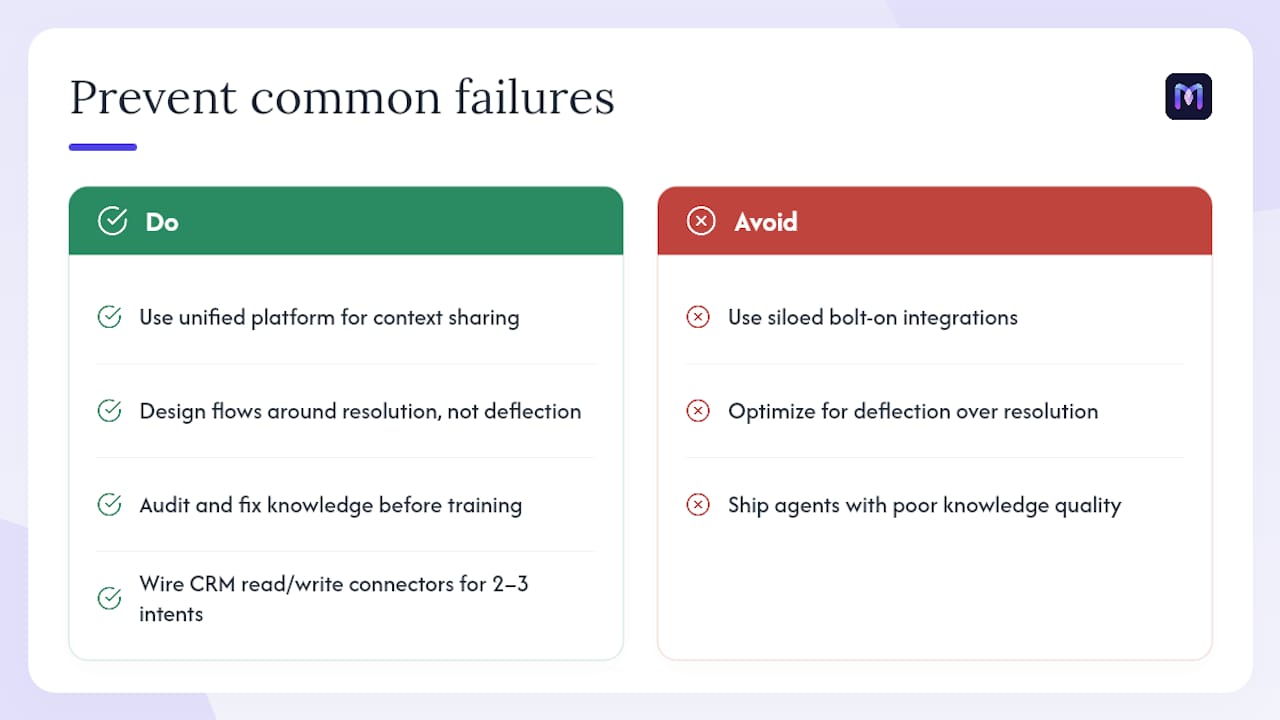
Siloed, bolt-on integrations drop context the moment a call escalates. When the virtual agent and the live-agent desktop run on separate platforms, the human picks up a cold call with no history. Unified platform architecture solves this by sharing context natively. Industry data shows first-generation agents built as bolt-ons consistently produce worse escalation and containment outcomes than those built on unified platforms.
Deflection-first design optimizes for calls avoided rather than issues resolved. An agent that ends a conversation without solving the problem inflates containment numbers while destroying CSAT. Design every flow around resolution, not avoidance.
Poor knowledge quality produces confident wrong answers. Before you train any agent, fix your knowledge architecture: audit your FAQ content, resolve contradictions, and assign ownership for ongoing updates.
Operational controls to add before launch: explicit escalation contracts (when and how to hand off), intent confidence thresholds that trigger graceful fallback, and a named owner for post-launch tuning. An industry survey reported via Zoom found 79% of organizations running AI voice/chat agents plan to upgrade or replace them by 2027, a direct consequence of these early design failures.
Pro Tip: Before adding any new integration to your pilot, wire up CRM-backed read/write connectors for your 2–3 chosen intents first. Proving end-to-end data flow on a narrow scope is faster to debug and gives you clean evidence for your go/no-go gate.
What impact should you realistically expect?
Track metrics that measure actual resolution, not just activity. Worknet’s benchmarks for tier-1 queries point to 40–60% true deflection (no reopen within 7 days) and 30–50% AHT reduction on human-assisted tickets, with payback typically in 3–9 months depending on scale and integration complexity.
Priority KPIs to track from day one:
- True deflection: Resolved without reopen within 7 days. This is the only deflection metric that matters.
- CSAT delta: AI-handled interactions vs. human-handled, measured separately.
- FCR (first-contact resolution): Did the agent solve the issue in one session?
- AHT reduction: On tickets that do escalate, is the human agent spending less time because context arrived intact?
- Time-to-escalation accuracy: Is the agent escalating at the right moment, not too early and not too late?
Avoid vanity metrics. Containment rate alone masks poor outcomes if reopens are high. Also monitor tooling side effects: duplicate writes, failed tool calls, and latency spikes are early warning signals that integrations need attention. Early signals from a scoped pilot typically appear within the first few weeks; meaningful operational impact on AHT and CSAT usually takes 2–3 months, once integrations and escalation tuning are complete.
What should you demand from an enterprise AI agent platform?
Use this checklist to separate marketing claims from production readiness.
- Integration depth: Pre-built connectors with authenticated read/write access to your CRM, OMS, billing system, and scheduling tools. Demand idempotent writes and schema validation to prevent duplicate records.
- Escalation quality: Full conversation history and detected intent must arrive at the live agent’s desktop. Test this in your pilot, not after go-live.
- Security and compliance: SOC 2 Type II, ISO 27001, GDPR readiness, and HIPAA support where your use case requires it. Role-based access, audit logs, and transcript redaction controls are non-negotiable for regulated industries.
- Low-code configurability: A visual flow builder and prebuilt industry templates let your ops team iterate without waiting on engineering for every change.
- Observability: Audio playback, full transcripts, tool-call traces, and intent confidence scores. You cannot tune what you cannot see.
- Rollout controls: Traffic gates, rollback capability, and admin controls for phased expansion.
- SLA and pricing transparency: Understand per-interaction costs, overage terms, and what happens to your data if you leave.
Vendor-proof artifacts to request: integration test evidence from a comparable deployment, pilot metrics with methodology, current security certifications, and sample escalation logs showing context carry in action. Hamming adds sandboxed side-effect checks and saved evidence for every rollout gate as non-negotiable requirements before live writes go active.
How do you run a pilot and scale it safely?
Pick 2–3. Confirm you have clean data and working API access for each.
Phase 1 (pilot, weeks 1–8): Connect 1–2 read/write integrations, configure dialogue flows, run scenario tests with sandboxed tool calls, set rollout gates, and limit pilot traffic to a defined percentage of inbound volume. Track your KPIs from day one.
Phase 2 (scale, months 2–6): Expand to additional intents, deepen integration coverage, tune STT and NLU models, add multilingual support, and build out reporting dashboards.
| Milestone | Acceptance Criteria |
|---|---|
| Integration go/no-go | Read/write tool calls succeed in sandbox with zero duplicate writes |
| Intent success threshold | Target intent handled correctly in >85% of test scenarios |
| Escalation correctness | Full context reliably arrives at live agent desktop in escalated sessions |
| Latency budget | Voice response latency under 1.5 seconds at the 95th percentile |
| No-regression gate | High-risk flows (billing writes, cancellations) pass full regression before traffic increase |
Does your use case actually fit AI agents?
Not every contact center scenario is a good fit. Use these criteria before committing to a build.
Volume threshold: AI agents deliver ROI at scale. If a given intent handles fewer than a few hundred contacts per month, the tuning and integration investment may not pay back within a reasonable window. High-volume, repeating intents are the right starting point.
Inquiry complexity: Structured, predictable requests (order status, password reset, appointment booking) are strong fits. Highly nuanced or emotionally sensitive situations, like a complex insurance dispute or a patient in distress, still need human judgment. Design your escalation triggers accordingly.
Customer demographics: Older customer segments or those with accessibility needs may require voice-first design with slower pacing and clearer confirmation steps. Younger, digital-native customers often prefer chat with rich formatting. Both channels need separate evaluation rubrics.
Data readiness: If your CRM data is incomplete or your knowledge base is contradictory, the agent will surface those problems at scale. Fix data quality before deployment, not after.
Cloud vs. on-premises: which deployment model fits your enterprise?
Most enterprise contact centers today deploy AI agents on cloud infrastructure, and for good reason. Cloud deployments offer faster provisioning, automatic model updates, and elastic scaling during volume spikes. The tradeoff is that your conversation data and tool-call logs live in a vendor-managed environment, which requires careful review of data residency agreements and subprocessor lists.
On-premises deployments give your security and compliance teams direct control over data storage, network boundaries, and audit access. They suit organizations in heavily regulated industries, like healthcare or financial services, where data sovereignty requirements or internal policy prohibit cloud-hosted conversation data. The cost is higher: you own infrastructure provisioning, model updates, and uptime.
A hybrid model, where the orchestration layer and LLM inference run in your private cloud while STT and TTS use managed cloud APIs, is increasingly common. It balances control with operational simplicity. Whatever model you choose, confirm the vendor supports your chosen architecture and can provide architecture diagrams, data flow documentation, and third-party audit reports.
Data privacy and regulatory compliance for enterprise AI agents
Compliance is not a post-launch checklist item. Build it into your pilot design.
GDPR: If any of your customers are EU residents, your AI agent is processing personal data. You need a lawful basis for processing, a data retention policy for transcripts, and a mechanism for honoring deletion requests. Confirm your vendor’s data processing agreement covers subprocessors and cross-border transfers.
HIPAA: Any voice or chat agent handling protected health information (PHI), such as appointment scheduling for a healthcare provider, must operate under a signed Business Associate Agreement (BAA) with your vendor. Transcript storage, access controls, and audit logging must meet HIPAA’s technical safeguard requirements.
PCI DSS: If your agent touches payment card data, even to read a last-four-digits confirmation, scope that flow carefully. Many teams route payment steps to a DTMF (touch-tone) capture path that keeps card data out of the AI layer entirely.
Transcript redaction: Require automatic redaction of PII (Social Security numbers, card numbers, dates of birth) in stored transcripts. This is a vendor feature to verify before signing, not something to retrofit later.
General information only: confirm current regulatory requirements with qualified legal counsel for your specific industry and jurisdiction.
What does enterprise AI agent deployment actually cost?
Costs fall into three buckets, and the third one surprises most buyers.
Initial investment: Platform setup, integration development, and dialogue flow configuration. Low-code platforms with prebuilt connectors reduce this significantly. Expect engineering time for CRM and OMS integrations even on no-code platforms, because your data schemas are unique.
Ongoing operational expenses: SaaS subscription fees (typically per-interaction or per-minute for voice, per-session for chat), plus internal headcount for post-launch tuning, knowledge base maintenance, and QA. Budget for a part-time owner in ops or CX, not just an IT ticket queue.
Hidden costs to watch for: Overage fees when volume spikes, per-seat charges for the live-agent assist features, data egress fees if you pull transcripts into your data warehouse, and the cost of re-integration if you switch vendors. Ask vendors for a fully-loaded cost estimate that includes your projected volume, not just the base subscription rate. AI productivity benchmarks consistently show that organizations underestimate ongoing tuning costs and overestimate first-year automation rates, so build conservative assumptions into your business case.
What ops and engineering should internalize before launch
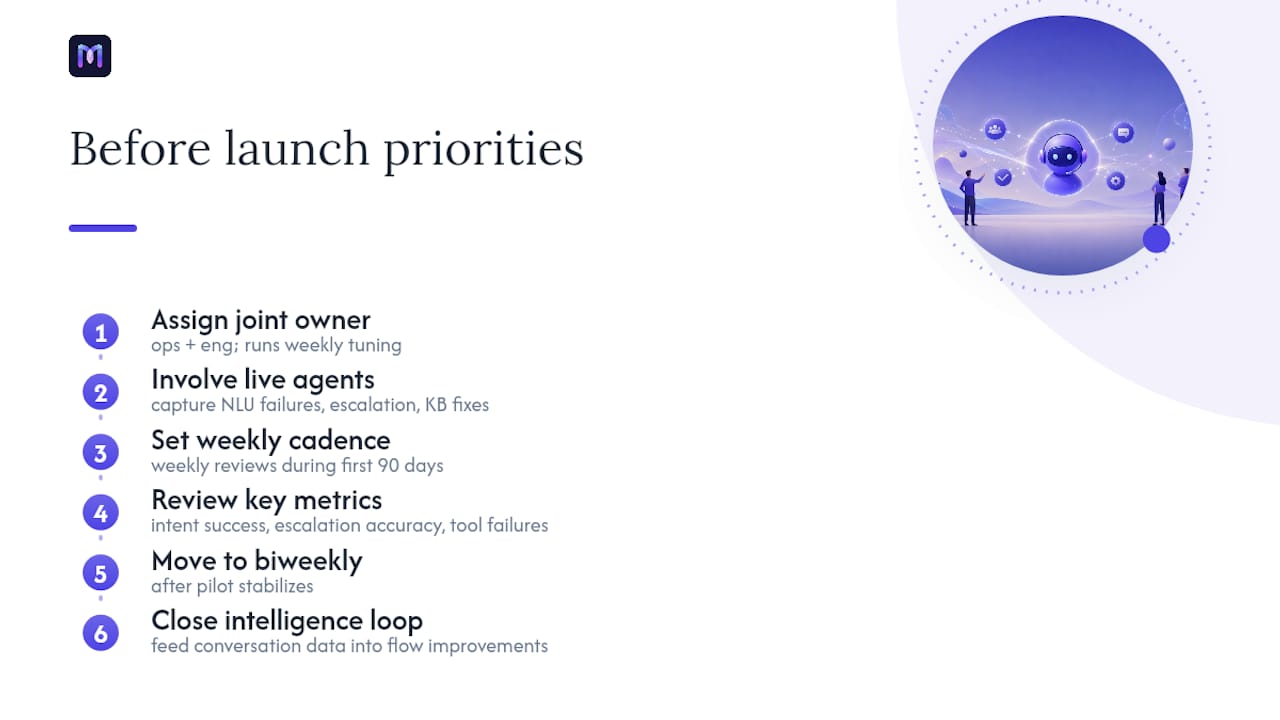
The projects that stall after a promising pilot almost always share one trait: ownership was unclear. Engineering built the integrations, ops configured the flows, and neither team owned the post-launch tuning cadence. The agent drifted, CSAT slipped, and no one had a mandate to fix it.
The fix is structural. Assign a joint owner from ops and engineering before the pilot starts. That person runs the weekly tuning review, owns the intent success dashboard, and has authority to pause traffic if a flow regresses. Involve your live agents early, not as an afterthought. They know which customer phrasings break the NLU, which escalation triggers fire too late, and which knowledge base entries are outdated. Their input in week two of the pilot is worth more than any synthetic test suite.
There is also a cultural point worth stating plainly: agents who fear replacement disengage from the tuning process. Show them the data. When AI handles password resets and order lookups, agents spend more time on the complex, high-value interactions where human judgment matters. AI’s role in enterprise CX is to lift the repetitive load, not replace the people who handle the hard calls.
Set a weekly cadence for the first 90 days: review intent success rates, escalation accuracy, and any tool-call failures. Then move to biweekly once the pilot stabilizes. The intelligence loop, from conversation data back to flow improvements, is what separates a deployment that compounds value from one that plateaus.
Monobot gives you a faster path from pilot to production
Contact centers that need faster containment, measurable CSAT lift, and agent hours back on their calendar have a direct path with Monobot. The platform’s low-code AI Agent Builder lets your ops team configure voice and chat flows without waiting on engineering for every iteration, and industry templates for healthcare, banking, retail, logistics, and IT support compress your time-to-value significantly.

Monobot’s native voice and chat integration means context carries through escalation without custom middleware. Live agent assist surfaces real-time suggestions during handoffs, and interaction telemetry gives you audio playback, full transcripts, and tool-call traces from day one. Enterprise security posture includes the certifications your procurement team will ask for. Bring your intent list, your key integrations, and your success metrics to a demo, and Monobot’s team will scope a pilot you can run in 60–90 days. Request your demo to get started.
Sources
- AI virtual agents for contact centers (Zoom blog)
- AI Voice Agent Implementation Checklist: From Prototype to Production (Hamming AI Resources)
- How to Measure ROI of AI Customer Support in B2B SaaS (Worknet)
FAQ
What are enterprise AI agents in a contact center context?
They are voice and chat assistants that handle routine customer service tasks end-to-end, including billing, order status, scheduling, and IT support, without requiring a human agent for every interaction.
What containment rates can enterprise AI agents realistically achieve?
Zoom’s reported deployments cite 98% chat containment and 76% voice containment within three months in high-performing implementations.
How long does it take to see ROI from an enterprise AI agent pilot?
Early signals typically appear within the first few weeks of a scoped pilot. Meaningful AHT and CSAT impact usually takes 2–3 months once integrations and escalation tuning are complete, with payback windows of 3–9 months depending on scale and complexity.
What security certifications should an enterprise AI agent vendor hold?
At minimum, look for SOC 2 Type II and ISO 27001. For healthcare use cases, require a signed BAA and HIPAA-compliant data handling. Verify transcript redaction controls and role-based access before signing.
Can Monobot support a 60–90 day enterprise pilot?
Yes. Monobot’s low-code Agent Builder, prebuilt industry templates, and native voice and chat integration are designed for fast pilot deployment. You can configure flows, connect integrations, and track KPIs through the platform’s built-in telemetry within the pilot window.