



Automating CSAT improvement comes down to three elements: timed post-resolution surveys, combined numeric and open-text sentiment analysis, and immediate detractor routing. Get those three working together and you can see measurable CSAT lift within a few months. The fastest path to a pilot:
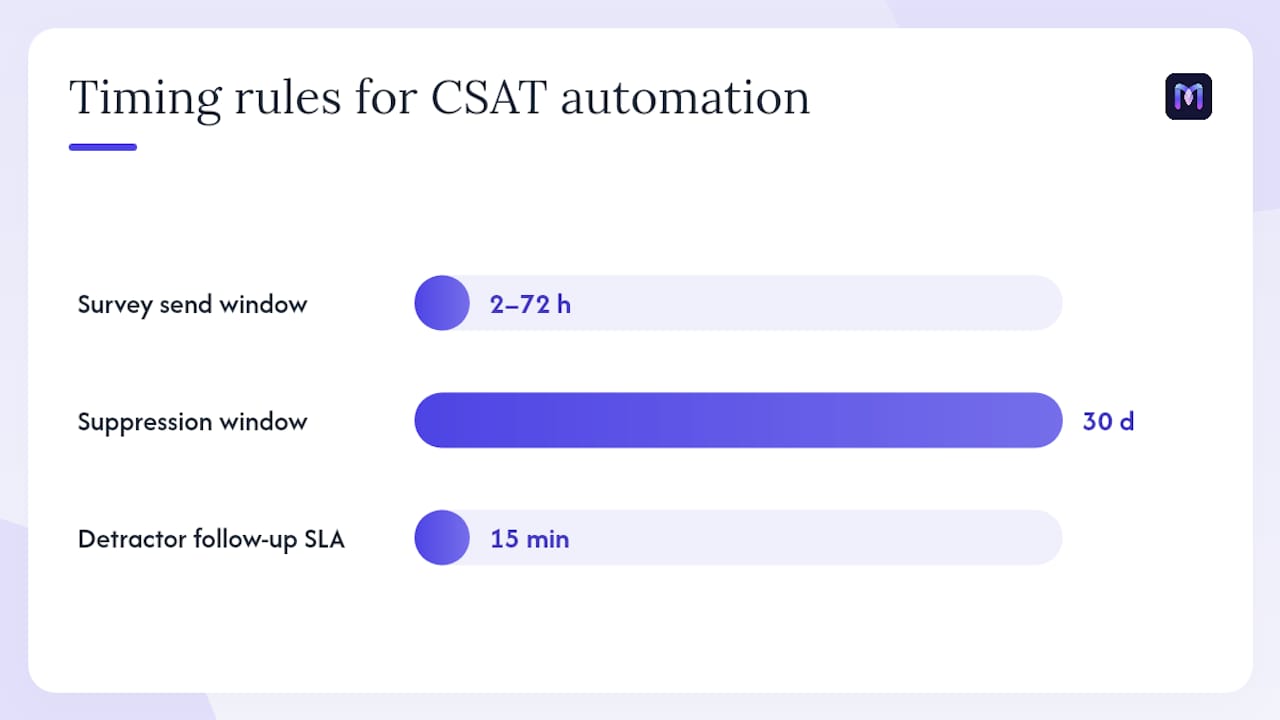
- Instrument a trigger on ticket close or chat end, set the survey window to 2–72 hours after the event
- Enable sentiment and theme detection on every open-text response, not just the ones with low numeric scores
- Set a detractor SLA of 15 minutes from response to CRM task creation and owner notification
Key Takeaways
Automating CSAT improvement requires timed surveys, combined numeric and open-text analysis, and a sub-15-minute detractor SLA — all three working together, not in isolation.
| Point | Details |
|---|---|
| Survey timing window | Send CSAT surveys 2–72 hours after resolution; suppress repeat sends for 30 days per customer. |
| Combined score analysis | Pair numeric scores with sentiment and theme classification to catch hidden detractors and false positives. |
| Detractor SLA | Route flagged responses to the account owner within 15 minutes — batch recovery the next day converts far fewer. |
| Pilot scope and timeline | Start with 1–2 queues; expect clean data in 2–6 weeks and measurable CSAT lift in 8–16 weeks. |
| Monobot fit | Monobot automates up to 80% of interactions and covers every vendor checklist item — real-time webhooks, AI classification, CRM tasks, and live dashboards. |
Table of Contents
- Why CSAT improvement automation matters — and what it can’t fix
- Core automation tactics that move CSAT
- How to build your CSAT automation step by step
- What KPIs to track and when to expect results
- Testing and governance to keep your automation reliable
- Common pitfalls that skew CSAT data — and how to fix them
- How to evaluate CSAT automation vendors — and where Monobot fits
- What CSAT automation actually delivers — and what it doesn’t
- Data privacy and compliance in CSAT automation
- What leaders who ran this rollout wish they’d known
- Monobot gives you a ready platform for this pilot
- Sources
- FAQ
Why CSAT improvement automation matters — and what it can’t fix
Automation removes the two biggest killers of CSAT data quality: timing lag and manual triage. A survey sent the next morning captures a different emotional state than one sent two hours after resolution. Automated routing means a detractor’s response reaches the account owner in minutes, not after a weekly review meeting.
The ROI case is concrete. Faster detractor recovery reduces churn risk on accounts that would otherwise go silent. Automated theme classification surfaces product and process failures faster than manual tagging, so your team fixes root causes instead of chasing individual complaints.
Pro Tip: Prioritize trigger points where customer emotion peaks: ticket close, billing events, and renewal windows. Those three moments generate the highest-signal CSAT data and the highest recovery value when a detractor is caught quickly.
Core automation tactics that move CSAT
The AI CSAT Survey Agent blueprint recommends sending transactional surveys inside a 2–72 hour window, allowing one active survey per customer, and suppressing repeat sends for 30 days. That suppression window matters: without it, frequent customers get surveyed after every interaction and response quality drops fast.
The five tactics that consistently move the needle:
- Post-resolution surveys with suppression rules. Fire a one-question CSAT immediately after ticket close or chat end. Apply a 30-day suppression window per customer and sample 1-in-5 interactions for high-volume queues to control fatigue.
- Combined numeric and open-text analysis. A score of 3 out of 5 tells you a customer is unhappy. The open-text tells you why. Combining numeric scores with sentiment and theme classification prevents false negatives — a passive 4 who mentions “billing error” is a detractor in disguise. Practitioners consistently flag this as the single biggest gap in basic CSAT setups.
- Detractor routing with a 15-minute SLA. When a response is flagged as negative, the system creates a CRM task, tags the account as at-risk, and notifies the account owner in real time. A 15-minute follow-up SLA converts far more unhappy customers into retained accounts than next-day batch recovery.
- Agent assist during live interactions. Real-time suggestions during a call or chat reduce handle time and improve first-contact resolution before a survey is ever sent. Fewer escalations mean fewer detractors.
- Proactive outreach for at-risk accounts. Trigger outreach when a customer submits multiple tickets in a short window, hits a billing failure, or approaches renewal with unresolved issues. Catching dissatisfaction before the survey arrives is the highest-leverage move in the playbook.
Pro Tip: For high-volume queues, survey 1-in-5 interactions rather than every one. You get statistically valid signal without exhausting customers — and your response rates stay high enough to trust the data.
How to build your CSAT automation step by step
Follow this sequence to go from zero to a running pilot in 4–8 weeks.
- Define goals. Set a target CSAT lift (e.g., 5–10 points), a target first-call resolution improvement, and a minimum sample size for statistical confidence before you call results valid.
- Instrument feedback sources. Choose your triggers: ticket close, chat end, renewal event. Capture the customer ID and ticket ID at the trigger point so every response links back to a CRM record.
- Design decision logic and SLAs. Set the survey window (2–72 hours), the suppression rule (30 days), the detractor threshold (e.g., score ≤ 3), and the follow-up SLA (15 minutes from response to owner notification).
- Build integrations. Connect survey delivery, AI text analysis, CRM updates, and team notifications. A practical architecture uses webhook-based triggers, a lightweight data store, an AI classifier, and Slack or Teams alerts to create tasks automatically.
- Run a pilot on 1–2 queues. Use a staged rollout or A/B split. Measure response rate, sentiment distribution, and detractor recovery rate for 2–6 weeks before expanding.
- Roll out with a checklist. Assign owners for trigger hygiene, classifier monitoring, and SLA compliance. Train CSMs to act on automated tags and tasks without waiting for manual confirmation.
Key integration requirements for the pilot:
- Survey delivery connected to your ticketing system via webhook
- AI classifier receiving open-text and returning sentiment label + theme tags
- CRM receiving bi-directional updates (score, sentiment, theme, follow-up status)
- Slack or Teams receiving real-time detractor alerts with account context
What KPIs to track and when to expect results
Primary metrics to watch:
- CSAT (response-rate adjusted, not raw average)
- Detractor recovery rate — percentage of flagged detractors who receive follow-up within SLA
- First-call resolution (FCR) — tracks whether agent assist and KB improvements are working
- Average handle time (AHT) — a leading indicator of agent assist effectiveness
- Churn-risk tags created — volume and trend, not just count
Secondary metrics:
- Survey response rate (target: above 20% for transactional surveys)
- Sample bias indicators (are certain segments over- or under-represented?)
- Agent satisfaction scores (automation should reduce agent burden, not add to it)
- Operational cost per contact
Timeline expectations: Expect several weeks to reach data quality you can trust — stable response rates, clean trigger hygiene, and a classifier with validated recall. Stable CSAT lift typically appears after a few months. Leading signals (detractor recovery rate, response rate) appear first; lagging signals (CSAT trend, churn reduction) follow.
A simple ROI frame: if your automation saves each agent 20 minutes per shift on manual triage and follow-up, and you have 30 agents, that’s 10 hours of recovered capacity daily. Redirect that toward proactive outreach on at-risk accounts and the churn math changes quickly. Platforms that analyze 100% of interactions and surface composite satisfaction scores accelerate this by eliminating sampling blind spots.
Testing and governance to keep your automation reliable
Broken automation is worse than no automation — it sends surveys at the wrong time, misroutes detractors, and erodes trust in the data.
Regression testing playbook:
- Before every change to survey logic or classifier thresholds, run the new config against a set of 100 recent historical responses and compare output to the previous baseline.
- Test webhook payloads end-to-end: confirm the survey fires, the response stores correctly, the classifier returns a label, and the CRM task is created within the SLA window.
- Validate notification payloads in Slack or Teams — confirm the right account owner receives the alert with the correct account context.
- After rollout, monitor response rates and sentiment distribution daily for the first two weeks. A sudden drop in response rate or a spike in neutral scores usually signals a trigger or suppression misconfiguration.
Governance rules to set from day one:
- Only designated admins can modify suppression windows or detractor thresholds
- Raw open-text responses are visible only to roles with explicit data access (privacy compliance)
- All configuration changes are logged with timestamp and owner for audit
- Classifier re-training is scheduled quarterly or triggered when recall drops below your defined threshold
For observability across your AI agents, build a daily health dashboard that surfaces response rate anomalies, SLA breach counts, and classifier confidence distributions.
Common pitfalls that skew CSAT data — and how to fix them
- Survey fatigue from oversampling. Sending a survey after every interaction tanks response rates and biases data toward frustrated customers who respond more often. Fix: apply a 30-day suppression window and 1-in-5 sampling for high-volume queues. Good questionnaire automation practices reinforce this approach.
- Blind reliance on numeric scores. A 4 looks like a promoter until you read “I guess it was fine but the billing issue is still open.” Tie sentiment and theme analysis to your routing workflows so hidden detractors get flagged.
- Slow detractor follow-up. Batch recovery the next morning converts a fraction of what a 15-minute SLA does. Set the SLA, monitor breach rates, and escalate when the team misses it.
- Duplicate or ambiguous triggers. A customer who contacts you via chat and then calls gets two surveys in an hour. Audit your trigger logic before launch and add deduplication by customer ID within a session window.
Pro Tip: Build a rejection log for edge-case open-text responses — legal threats, refund demands, escalation requests. Route these to a human reviewer immediately rather than letting the classifier handle them automatically. One mishandled legal comment processed as a routine detractor creates real liability.
How to evaluate CSAT automation vendors — and where Monobot fits
Use this checklist when evaluating any platform:
- Real-time webhooks — surveys must fire on ticket completion without manual triggers. Automated webhook-based survey delivery is table stakes for any serious implementation.
- Sentiment and theme classification accuracy — validate recall on 100 recent open-text responses before committing. Platforms that support dynamic segmentation and AI-priority routing reduce manual triage significantly.
- CRM bi-directional updates — score, sentiment, theme, and follow-up status must write back to the customer record automatically.
- Configurable suppression and sampling — you need to set suppression windows and sampling rates without engineering help.
- Detractor SLA automation — the platform must create tasks and fire notifications within your defined SLA window, not on a polling schedule.
- Observability and analytics — real-time dashboards showing response rates, sentiment trends, and SLA compliance by queue or agent.
- No-code customization and templates — your team should be able to adjust survey logic, thresholds, and routing rules without a developer.
- Enterprise security and compliance — role-based access to raw open-text, audit logs, and data retention controls.
Monobot maps to every item on that list. The platform automates up to 80% of inbound calls and chats, delivers real-time sentiment analysis, and creates CRM tasks automatically when a detractor threshold is crossed. Its agent assist features surface real-time suggestions during live interactions, reducing handle time before a survey is ever triggered. Industry templates for healthcare, banking, retail, and logistics mean you can deploy a working pilot without building from scratch. For a full enterprise evaluation framework, Monobot’s observability layer tracks classifier performance and SLA compliance in real time.
Evaluation tip: Run a small proof-of-concept on one queue. Measure end-to-end latency from survey response to CRM task creation, and validate classifier recall on 100 recent open-text responses before expanding.
What CSAT automation actually delivers — and what it doesn’t
CSAT automation, in practice, means replacing manual survey sends, manual score reviews, and manual follow-up assignments with event-driven workflows that operate in real time. The realistic outcome for a well-configured system: higher response rates (because surveys arrive while the experience is fresh), faster detractor recovery (because routing is immediate), and cleaner root-cause data (because every response is classified, not just the ones someone had time to read).
What it does not deliver: a substitute for product quality, pricing competitiveness, or a customer success motion that lacks human judgment. Automation surfaces the signal. Humans still have to act on it strategically.
Data privacy and compliance in CSAT automation
Open-text survey responses are personal data under most U.S. state privacy laws, including the California Consumer Privacy Act (CCPA) and its amendment, the CPRA. That means your automation stack needs explicit data handling controls from day one.
Key requirements to address:
- Data minimization: collect only what you need. A one-question CSAT with an optional open-text field is usually sufficient; avoid collecting PII in the survey itself.
- Access controls: raw open-text responses should be accessible only to roles with a legitimate business need. Role-based access controls (RBAC) are non-negotiable.
- Retention limits: define how long raw responses are stored. Most teams set 12–24 months; anything longer needs a documented justification.
- Vendor data processing agreements (DPAs): every tool in your stack — survey delivery, AI classifier, CRM — needs a signed DPA that specifies how data is processed and stored.
- Opt-out handling: customers who opt out of communications must be excluded from survey triggers. Your suppression logic should integrate with your CRM’s opt-out flags, not run independently.
Treat compliance as a configuration requirement, not an afterthought. Build it into your suppression rules and access governance from the first day of your pilot.
What leaders who ran this rollout wish they’d known
The teams that get the most out of CSAT automation are rarely the ones with the most sophisticated tech stack. They’re the ones who set conservative thresholds early, trained their CSMs to trust automated tags, and resisted the urge to automate everything at once.
One governance misstep that comes up repeatedly: a team grants broad access to raw open-text responses during the pilot “for visibility,” then struggles to lock it down after rollout when the data contains sensitive customer complaints. The fix is straightforward — define access roles before you go live, not after. It takes 30 minutes to configure and saves a painful retrofit later.
On timelines: don’t promise leadership a CSAT lift in the first month. The first 2–6 weeks are about data quality — clean triggers, stable response rates, a classifier you’ve validated. The lift comes in weeks 8–16. Set that expectation early and you’ll have the runway to do it right.
Cross-functional ownership matters more than most teams expect. The CSM team, the support ops team, and the data team all need a named owner in the pilot. When detractor alerts fire and no one has been trained to act on them, the automation becomes noise.
Monobot gives you a ready platform for this pilot
Monobot delivers the full CSAT automation stack in one platform: real-time webhooks that fire on ticket close or chat end, AI sentiment and theme classification on every response, automatic CRM task creation when a detractor threshold is crossed, and live dashboards that show SLA compliance and sentiment trends by queue. You don’t need to stitch together a Zapier workflow, a Google Sheet, and a separate NLP API — it’s already integrated.

The fastest way to validate the approach is a multi-week pilot on one or two queues using Monobot’s IT helpdesk template or any of its industry-specific configurations. You get real detractor recovery data, classifier recall you can measure, and a clear ROI signal before committing to a full rollout. Monobot and the team will scope the pilot with you.
Sources
- AI CSAT Survey Agent: A Build Blueprint for Customer Satisfaction Automation (2026)
- How to Set Up Automated Customer Satisfaction (CSAT) Feedback Collection with AI Workflows — Tech Daily Shot
- Unlock drivers of great CX and build close loop action with iCSAT
- Easy Feedback – Automated CSAT & NPS for IT Service Providers
FAQ
What is CSAT improvement automation?
CSAT improvement automation replaces manual survey sends, score reviews, and follow-up assignments with event-driven workflows. Surveys fire automatically after resolution, AI classifies responses, and detractors are routed to the right owner in real time.
How quickly can you see CSAT lift from automation?
Expect 2–6 weeks to reach reliable data quality and 8–16 weeks for a stable, measurable CSAT lift. Leading indicators like detractor recovery rate appear first.
What is the right detractor follow-up SLA?
The recommended SLA is 15 minutes from survey response to CRM task creation and owner notification. Follow-up within that window converts significantly more unhappy customers into retained accounts than next-day batch processes.
How does Monobot support CSAT automation?
Monobot provides real-time webhooks, AI sentiment and theme classification, automatic CRM task creation, agent assist, and live dashboards — covering every item on a standard vendor evaluation checklist with no-code configuration and industry-specific templates.
What privacy rules apply to CSAT open-text data in the U.S.?
Open-text survey responses are personal data under laws like the CCPA and CPRA. You need role-based access controls, defined retention limits, signed data processing agreements with every vendor in your stack, and CRM-integrated opt-out suppression.