


For non-technical teams that need fast, enterprise-ready chat and voice automation, Monobot is the practical no-code choice. It combines minute-scale setup, ready-made templates, and integrations that keep your customer data under control. If you’re evaluating options this quarter, start with a free setup or a live demo before committing to a longer contract.
TL;DR:
- Most no-code chatbot builders, including Monobot, enable quick setup with templates and integrations, often in minutes to hours for simple flows.
- They rely on visual drag-and-drop interfaces, which limit control over complex logic but allow non-technical teams to deploy functional bots rapidly.
- These platforms best serve use cases like FAQ deflection, lead qualification, order tracking, and internal helpdesks, typically without custom coding.
- Verification points include native channel support, knowledge-base sourcing for AI responses, real-time analytics, and seamless CRM integrations.
- Scaling becomes challenging when conversation flows reach dozens of branches or complex business rules, requiring hybrid solutions with custom API work.
Table of Contents
- What Is a No-Code Chatbot Builder?
- Who Actually Benefits From No-Code Chatbots?
- What Can You Actually Build With It?
- What Features Actually Matter When You’re Evaluating Vendors?
- How Do You Choose the Right Platform and Run a Pilot?
- How Long Does Setup Take and What Does It Cost?
- Does Monobot Meet the Buyer Checklist?
- Where Do No-Code Platforms Hit a Ceiling?
- What Actually Goes Wrong When Teams Build These Bots?
- How Do You Monitor and Improve a Bot After Launch?
- What Support and Training Do Vendors Actually Provide?
- How Do Popular No-Code Chatbot Builders Compare?
- What Does the Research Actually Support?
- Ready to See It Running on Your Own Use Case?
- Sources
- FAQ
What Is a No-Code Chatbot Builder?
A no-code chatbot builder is a visual platform that lets you design, train, and launch a conversational agent by dragging blocks, filling in templates, and connecting data sources, without writing a line of code. You build the conversation the way you’d build a flowchart: a customer says something, the bot checks a condition, then it replies, escalates, or triggers an action in another system.
That’s different from low-code platforms, which still expect someone to touch a script or API call for anything beyond basic logic, and from custom-built bots, which require engineers to write and maintain the entire conversational layer from scratch. The no-code approach trades some flexibility for speed. You give up pixel-level control over every edge case, but you gain the ability to launch a working bot in an afternoon instead of a quarter.
Modern platforms fold large language models (LLMs) into this visual layer, so the bot doesn’t just match keywords. It can understand a customer typing “my package never showed up” and route that intent correctly even though the phrase never appears in your training examples. Microsoft’s own architecture guidance on natural language processing technology choices lays out the core tension here: you can lean on a hosted LLM for broad language understanding, or fine-tune a model on your own data, or anchor answers to a knowledge base that limits the bot to vetted content. Most no-code builders now default to the third option for anything customer-facing, because a knowledge base keeps the bot from confidently inventing an answer that sounds right but isn’t.
That’s the practical difference between a chatbot that annoys customers and one that earns their trust: the good ones are constrained to say what you’ve actually told them, not whatever the underlying model thinks is plausible.
Under the hood, most platforms in this category route conversations through connectors similar to what Microsoft Azure’s AI Bot Service documents. A visual flow editor, a channel layer that publishes the same bot to your website, WhatsApp, and Messenger, and an integration layer that talks to your CRM or ticketing system. You never see any of that plumbing. You see boxes, arrows, and a preview window. That abstraction is the entire point of “no-code,” and it’s why a customer service manager with zero engineering background can build something that would have taken a developer team weeks a few years ago.
Who Actually Benefits From No-Code Chatbots?
No-code builders are built for people who own an outcome, not a codebase. If your job title includes “customer service manager,” “operations lead,” “product owner,” or “contact center supervisor,” you’re the intended user, not an afterthought.
Small teams get outsized value here because they usually don’t have a developer to spare for chatbot maintenance, let alone a build. A five-person support team drowning in the same 20 questions can automate the repetitive half of their inbox in a week, without filing an IT ticket. Mid-size and enterprise teams use the same tools differently: they’re less interested in “can we build a bot” and more interested in whether it fits their existing stack, meets security requirements, and scales across multiple departments without duplicating work.
The clearest fits for a no-code approach:
- Teams that need to launch fast and iterate based on real conversations, not a six-month spec document.
- Operations leaders trying to cut response times without adding headcount.
- Businesses running templated interactions, appointment booking, order status, FAQ deflection, that don’t need custom logic for every edge case.
- Contact centers wanting to combine chat and voice automation under one dashboard instead of managing separate systems.
Where no-code starts to strain is when your conversation logic depends on deep, proprietary business rules that don’t map cleanly to a visual flow, or when you need a bot embedded inside a highly specialized internal tool with no available connector. That’s when an engineering-led build, or at least a hybrid approach with custom API work layered on top of a no-code base, makes more sense. Buyer research from G2 consistently shows ease-of-use and integration depth as the top two factors driving which category a buyer picks, which tells you most teams land in the no-code camp by choice, not by default.
What Can You Actually Build With It?
The honest answer is: most of what generates repetitive tickets or missed revenue in a typical support or sales operation. Template-driven builders exist because the same handful of use cases show up in nearly every industry.
- FAQ deflection and ticket triage. A bot answers the questions that make up 60 to 80 percent of most support queues, hours, pricing, return policy, then routes anything unusual to a human agent with context already attached.
- Lead capture and qualification. A website visitor chats in, answers three or four qualifying questions, and the bot books a meeting directly on a sales rep’s calendar or pushes a scored lead into the CRM.
- Order status and appointment scheduling. Customers check where their package is or reschedule an appointment without ever waiting on hold, and the bot pulls live data instead of giving a canned response.
- Onboarding sequences. New customers or employees get walked through setup steps conversationally, which converts better than a static help article because the bot answers follow-up questions in the moment.
- Combined voice and chat flows. A caller and a website visitor can hit the same underlying logic, so a business doesn’t have to build and maintain two separate automation systems for the same intent.
- Internal IT and HR helpdesk. Employees ask “how do I reset my VPN password” or “how many vacation days do I have left” and get an instant answer instead of opening a ticket that sits for two days.
None of these require custom code, and all of them show up as pre-built or near-pre-built templates on most serious platforms. SendPulse documents that its visual builder lets users publish a working bot across channels like WhatsApp, Messenger, and Telegram using templates, often in under 15 minutes for a simple flow. That’s the benchmark worth holding vendors to: if a basic FAQ bot takes longer than a lunch break to configure, the platform’s templates aren’t doing their job.
What Features Actually Matter When You’re Evaluating Vendors?
Most vendor pitches sound identical until you dig into specifics. Here’s the checklist that actually separates a platform you’ll still be using in a year from one you’ll quietly abandon after three months.
Visual flow editor and templates. Open the editor before you sign anything. You want drag-and-drop logic, conditional branching, and enough pre-built templates (support, booking, lead qualification) that you’re customizing rather than building from a blank canvas.
AI/LLM integration and training sources. Ask exactly where the bot pulls its answers from. A platform anchored to your uploaded knowledge base will hallucinate far less than one relying purely on a general-purpose model, a distinction Microsoft’s NLP architecture guidance treats as foundational, not optional.
Channel support. Confirm the bot publishes to your website widget, WhatsApp, Messenger, and Slack from the same underlying flow, not as separate builds you have to maintain in parallel.
CRM and third-party integrations. This is where a lot of platforms quietly fall short. HubSpot’s own documentation notes that CRM-connected bots can personalize replies and trigger workflows automatically, which is the difference between a bot that just chats and one that actually moves a deal or a ticket forward. Test the webhook behavior directly: does data sync in real time, or does it batch every few hours?
Human handoff. Every bot eventually hits a question it can’t answer. Check how smoothly it hands the conversation to a live agent, and whether that agent sees the full chat history or starts from zero.
Analytics and reporting. You need visibility into deflection rates, drop-off points, and conversation volume without exporting a spreadsheet manually every week.
Security and onboarding support. Ask what certifications and controls the vendor maintains, and how much hands-on help you get during setup versus a self-serve knowledge base.
A quick bullet-list version of what to verify in any trial:
- Can you edit a flow live and see the change reflected instantly, without a republish delay?
- Does the AI answer strictly from your uploaded content, or does it wander into generic responses?
- Are integrations native, or do they require a third-party connector tool to bridge the gap?
- What does the analytics dashboard actually show on day one versus after 30 days of data?
Pro Tip: Bring your three hardest real customer questions into every vendor demo and ask the sales rep to build the flow live. If they can’t do it in the room, your team won’t be able to do it alone after purchase either.
How Do You Choose the Right Platform and Run a Pilot?
Skip the feature-by-feature spreadsheet for a minute. The fastest path to a good decision is defining what “success” looks like before you touch a single vendor’s website.
- Define your goal and KPI first. Pick one number: percentage of tickets deflected, leads qualified per week, or hours of agent time saved. Vague goals like “improve customer experience” produce vague pilots that never get a clean yes or no.
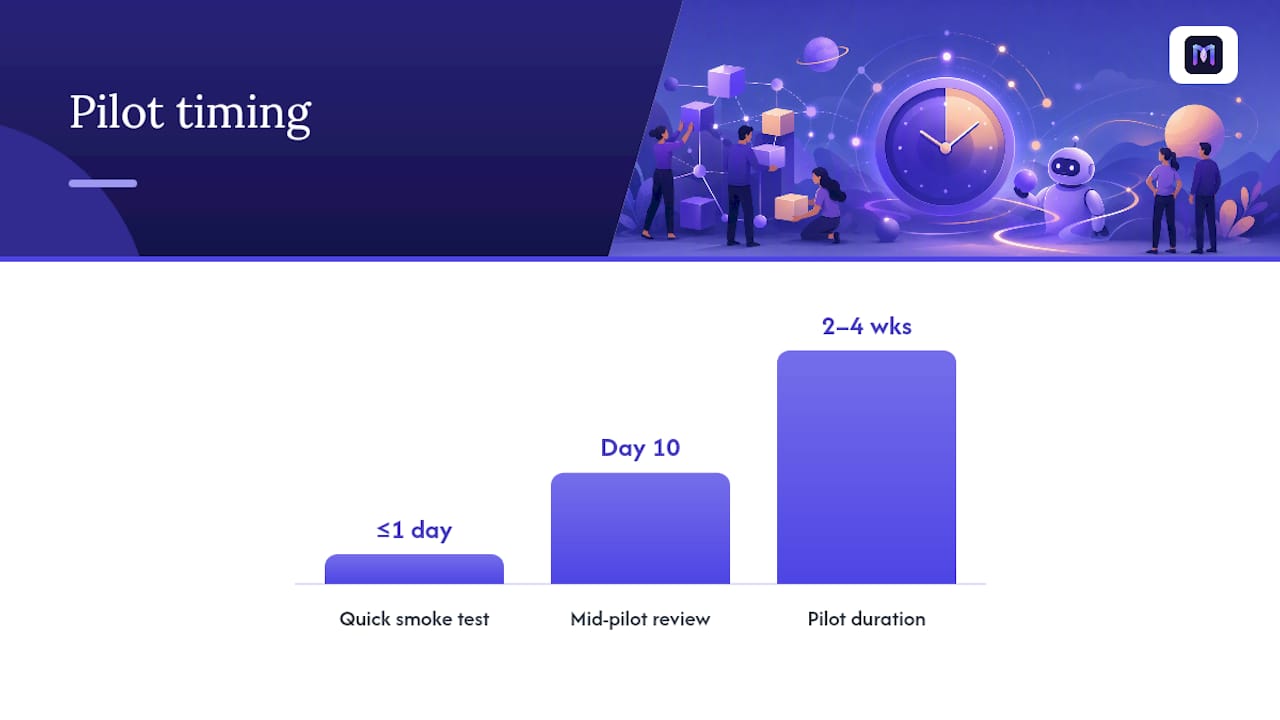
- Build a shortlist using a smoke test. Sign up for the free trial of two or three platforms and try to replicate one real use case, not a demo script the vendor hands you. If you can’t get a basic flow live within a day using their templates, cross it off.
- Scope a pilot with a fixed duration. Two to four weeks is usually enough to see real conversation data. Set a specific KPI target going in (for example, “deflect 40% of billing questions”) so the pilot has a clear pass or fail outcome, not an open-ended trial that drifts forever.
- Assign rollout tasks before launch day. Someone owns the knowledge base content, someone owns the integration test with your CRM or ticketing system, and someone owns reviewing the first week of transcripts for gaps.
- Ask vendors the questions that expose weak platforms fast. How long does a typical customer take to go live? What happens to conversation data, where is it stored, and who can access it? What’s included in support versus what requires an upsell?
Red flags worth walking away from: a vendor who can’t answer the data-residency question directly, a demo that only works with their pre-loaded sample data, or a pricing page that hides usage-based costs until you’re already mid-contract.
Pro Tip: Run your pilot KPI review on day 10, not day 30. If deflection or lead quality isn’t trending in the right direction by the halfway mark, you’ll want time to adjust the flow before the pilot officially ends, not after.
The comparative research on this is fairly consistent: category roundups generally agree that the right platform depends on whether you’re optimizing for speed of launch or depth of custom control, and most non-technical teams should weight speed far more heavily than they initially assume.
How Long Does Setup Take and What Does It Cost?
A simple FAQ or booking bot built from a template can go live in minutes to a few hours, largely because vendors like SendPulse design their editors specifically to get a basic flow published fast. A more involved pilot, one that connects to your CRM, pulls live order data, or spans both chat and voice, typically takes one to two weeks when you include content review, integration testing, and a short internal training pass for your team.
Pricing in this category generally follows one of a few shapes:
- Free tier. Usually capped on conversation volume or feature depth, useful for testing but rarely enough for production use at scale.
- Per-conversation or per-resolution pricing. You pay based on volume, which scales cleanly with usage but requires forecasting to avoid surprise bills during a traffic spike.
- Seat-based pricing. Priced per agent or admin user, common on platforms built around human-agent collaboration tools.
- Usage-based add-ons. Voice minutes, LLM token consumption, and premium integrations often sit outside the base plan and are the most common source of budget surprises.
Here’s a worked example using generic, illustrative numbers rather than any specific vendor’s rate card: imagine a mid-size support team running roughly 5,000 conversations a month. If the platform’s usage-based pricing lands around a modest per-conversation rate, the monthly cost sits in a predictable, budgetable range, well below the cost of even one additional full-time support hire. The math tends to favor automation almost immediately once your ticket volume clears a few thousand a month, because a human agent’s fully loaded cost dwarfs almost any usage-based software fee.
When negotiating, ask directly for trial credits or an extended free period tied to your pilot’s KPI window rather than accepting the vendor’s default 7 or 14 day trial, which is rarely long enough to gather meaningful conversation data.
Does Monobot Meet the Buyer Checklist?
Running through the checklist from the sections above, here’s how Monobot lines up against what non-technical buyers actually need to verify.
- Non-code customization. Flows, templates, and conversation logic are built visually, with no engineering resource required to launch or edit a bot.
- Templates across industries. Ready-made flows exist for healthcare, banking, retail, logistics, HR, and IT, so a pilot starts from a relevant structure instead of a blank screen.
- Combined voice and chat. Both channels run through the same platform, which matters if your contact center wants one dashboard instead of two disconnected systems.
- Integrations that preserve data control. CRM and third-party connections sync contact and ticket data without forcing you to migrate systems.
- Analytics built in. Conversation-level reporting and interaction dashboards give you visibility into deflection and resolution without a manual export.
The platform’s automation capability is designed to handle a substantial portion of inbound calls and chats, enabling a volume reduction that can significantly impact a support team’s staffing math rather than just trimming a few minutes off average handle time.
Deployment is designed to be fast, often within minutes for a basic template-driven flow, matching the “minute-to-hours” expectation set earlier in this guide. For teams that want to verify security posture before committing sensitive data, data security controls are worth reviewing directly, and the platform overview walks through the full feature set including real-time agent assistance and sentiment analysis.
Where Do No-Code Platforms Hit a Ceiling?
Scalability in a no-code builder is real, but it isn’t infinite. Conversation volume itself rarely breaks anything; modern platforms handle thousands of simultaneous chats without a hiccup. The ceiling shows up in logic complexity instead.
A flow with a dozen branching conditions is easy to build visually. A flow with 200 branching conditions, each depending on data pulled from three different systems, becomes genuinely hard to manage inside a drag-and-drop canvas, not because the platform can’t technically run it, but because a human maintaining that flow starts losing track of what connects to what. That’s the real limit: cognitive load on your team, not processing power on the vendor’s servers.
Customization runs into a similar wall around highly specific business logic. If your pricing model has 40 exceptions based on customer tier, region, and contract type, a no-code visual flow can encode that, but it stops being faster to build than custom code somewhere around exception number 20. Most platforms address this with API and webhook access that lets a developer extend a no-code base without rebuilding it, offering a practical middle ground rather than an all-or-nothing choice.
The other limit is data structure. A no-code bot pulling from a clean, well-organized knowledge base performs far better than one pointed at years of scattered internal documents. Scaling a bot successfully often means investing in your content organization before you invest in a fancier platform.
What Actually Goes Wrong When Teams Build These Bots?
The most common failure isn’t a broken integration. It’s a bot that launches with too little training content, then gets judged as “not smart enough” within a week when the real problem is a thin knowledge base.
A second recurring mistake: teams build the happy path beautifully and forget to design what happens when the bot doesn’t understand the customer. If your fallback response is a generic “I didn’t get that, can you rephrase?” repeated three times in a row, customers abandon the chat and trust erodes fast. A well-designed handoff to a human agent, with context preserved, prevents most of that damage.
Scope creep kills more pilots than technical limitations do. A team starts with “let’s automate order status” and ends up trying to launch five use cases simultaneously before any of them get proper testing. Ship one flow well, measure it, then expand.
Ignoring multilingual or tone mismatches trips up global teams specifically: a bot trained entirely on formal English support tickets sounds stiff and off-putting when deployed to a market or channel with a more casual customer base.
And the quietest failure mode: nobody owns the bot after launch. It goes live, performs fine for a month, then slowly drifts out of date as products change and nobody updates the content behind it. Assign an owner before day one, not after something breaks.
How Do You Monitor and Improve a Bot After Launch?
Launch day is the start of the work, not the finish line. The bots that keep performing well six months in are the ones someone actively reviews, not the ones left running on autopilot.
Weekly transcript review catches problems fast: read a sample of conversations where the bot handed off to a human, or where a customer clearly got frustrated, and you’ll spot content gaps within the first few sessions. Dashboard analytics, the kind available through interaction and reporting tools, should track deflection rate, average resolution time, and drop-off points so you’re not relying on gut feeling to know whether the bot is actually helping.
Set a monthly cadence for updating the knowledge base as products, policies, or pricing change. A bot answering last quarter’s return policy is worse than no bot at all, because it actively misinforms customers with apparent confidence.
A/B testing specific flows, two different greeting messages, two different qualifying question orders, gives you data instead of guesses about what converts better. And feed customer feedback directly into flow revisions: if customers keep asking a question the bot can’t answer, that’s a content gap to close within days, not a backlog item for next quarter.
What Support and Training Do Vendors Actually Provide?
Support quality varies more across this category than almost any other feature, and it’s the one buyers check least carefully before signing.
Baseline offerings typically include a self-serve knowledge base and video tutorials for getting a first flow live. Beyond that, platforms diverge: some offer live chat or email support included in every tier, while others reserve phone support or a dedicated account manager for enterprise contracts only. Onboarding assistance matters more than most buyers expect. A vendor that offers a guided setup call in week one saves your team days of trial and error compared to one that hands you documentation and disappears.
Ask specifically whether ongoing optimization help is included or billed separately. Some vendors treat the initial build as the full service; others include periodic check-ins to review performance and suggest flow improvements. For non-technical teams without an in-house automation specialist, that ongoing support often matters more than any single feature on the checklist.
How Do Popular No-Code Chatbot Builders Compare?
No two platforms in this category solve the exact same problem equally well, and the honest comparison is less about which is “best” and more about which trade-off fits your situation.
Entry-level, template-heavy platforms optimize for speed. You’ll get a working bot in minutes, generous free tiers, and dead-simple visual editors, but you often hit a ceiling on integration depth and advanced logic once your use case grows past FAQ deflection. These fit small teams launching their first automation with no budget for a learning curve.
Marketing and CRM-native platforms optimize for personalization. Bots connect tightly to contact records and trigger workflows automatically, which is powerful if your primary goal is lead nurturing, but the chatbot itself is often treated as one feature inside a much larger suite rather than the core product, and pricing tends to scale with your entire CRM footprint, not just the bot.
Enterprise-oriented platforms optimize for control and compliance. You get deeper security certifications, granular permissions, and support for complex multi-department deployments, but the setup process takes longer and typically involves a sales-assisted onboarding rather than instant self-serve signup.
Voice-plus-chat platforms, Monobot among them, optimize for contact centers that want one system handling both channels instead of stitching together separate tools. The trade-off worth knowing upfront: unifying voice and chat under one platform pays off fastest for teams with real call volume, less so for a business that’s purely chat-based with no phone support line at all.
What Does the Research Actually Support?
The conventional pitch on no-code chatbot builders treats “no code” as the whole story, as if removing engineering effort automatically solves the customer service problem. It doesn’t. The teams that get real ROI treat the platform as a tool for organizing existing knowledge, not a replacement for having that knowledge organized in the first place. A bot pointed at a messy, contradictory set of internal documents will underperform no matter how good the visual editor is.
What’s genuinely underrated is the speed-to-value argument. Most buyers spend weeks evaluating features that barely matter for their actual use case while ignoring the one question that predicts success or failure: can a non-technical person on your team keep this thing updated without help? Platforms win or lose in month three, not day one.
Prioritize a narrow, well-scoped pilot with a real KPI over a sprawling multi-use-case launch. Speed to a measurable result beats theoretical completeness every time.
— Alex
Ready to See It Running on Your Own Use Case?
Reading about deflection rates and template libraries only gets you so far. The fastest way to know if a no-code chatbot builder fits your team is watching your own FAQ or booking flow come together in real time, not scrolling through another feature comparison.

Monobot’s setup process is built around that exact test: you bring a real use case, whether it’s appointment scheduling, order status, or lead qualification, and see it live inside minutes using industry templates for healthcare, banking, retail, and logistics. Because voice and chat run through the same AI agent builder, you’re not stitching together two separate systems just to cover both channels. Integrations sync with your existing CRM without a data migration project, and the analytics dashboard shows deflection and resolution data from day one, not after a month of guesswork.
If you’re ready to move past evaluation and into a real pilot, get a free setup and have a working flow built around your actual customer questions before your next team meeting.
Sources
For readers who want to go deeper on the technical and buyer-research side of this topic: Microsoft’s Azure AI Bot Service documentation covers multi-channel bot architecture, while its NLP technology choices guide explains knowledge-base versus fine-tuning trade-offs. SendPulse documents fast, template-driven setup, HubSpot covers CRM-connected bot behavior, and AICPA’s SOC framework outlines the security controls worth verifying before production deployment. For marketing-specific optimization tactics, this guide on conversational AI content is worth a read.
- Natural language processing: technology choices | Microsoft Learn
- Free Visual Chatbot Builder (No-Code) | SendPulse
- G2 product reviews
FAQ
Can I Build a Chatbot Without Coding?
Yes. No-code platforms use visual, drag-and-drop editors and pre-built templates, so a non-technical team member can design, launch, and edit a working bot without writing any code.
Is There a Free No-Code Chatbot Builder Available?
Most platforms in this category, including Monobot, offer a free tier or free setup option, though free plans typically cap conversation volume or limit advanced integrations compared to paid tiers.
Is There a Free AI Chatbot With No Restrictions?
No widely available AI chatbot builder offers truly unrestricted free use. Every free tier comes with limits on conversation volume, channels, or features, and unrestricted access generally requires a paid plan.
Which AI Model Powers Most No-Code Chatbot Builders?
No-code platforms typically integrate with major large language models and pair them with a business’s own knowledge base to keep answers accurate, rather than relying on any single named AI system.
How Fast Can a No-Code Chatbot Go Live?
A simple template-based bot can go live in minutes, while a bot requiring CRM integration or custom data connections usually takes one to two weeks to launch a full pilot.