


Fine tuning a chatbot means adjusting the pieces you control after launch: intents, conversation flows, the knowledge base behind retrieval, integrations, and the metrics you watch every week. It has nothing to do with retraining a language model’s weights. The first move is always the same: pick one to three high-volume, low-complexity intents and instrument the events around them before you touch a single response. Everything else in this guide builds from that one decision.
TL;DR:
- Focusing on three well-instrumented, high-volume intents from the start yields better results than launching with many broad intents that can silently fail.
- Prioritizing data from multiple sources and narrowly scoped intents ensures more accurate retrieval and easier scaling of the knowledge base.
- Regular weekly measurement and rapid feedback loops are essential to identify and fix fallback, handoff, and knowledge gaps before they impact customers.
- Using a no-code platform streamlines ongoing fine-tuning, intent adjustments, and analytics, reducing reliance on engineering resources and enabling faster deployment.
- Handling out-of-distribution inputs with clear deflections and deferring to humans builds customer trust and prevents misunderstandings from eroding confidence.
Table of Contents
- What Is the Fastest Way to Fine Tune a Chatbot in the First 90 Days?
- Which Intents and Data Sources Should You Prioritize First?
- How Should You Structure a Knowledge Base for Reliable Chatbot Answers?
- What Flow and Response Rules Actually Improve Containment?
- What Integrations and Handoff Data Does a Production Bot Need?
- What KPIs Should You Track in the Weekly Optimization Loop?
- How Do You Safely Test and Roll Out Chatbot Changes?
- How Do You Prepare and Clean Data for Chatbot Fine Tuning?
- How Do You Choose the Right Model and Base Platform for Tuning?
- What Hyperparameter Adjustments Matter for a No-Code Chatbot?
- How Should a Chatbot Handle Out-of-Distribution Inputs?
- How Do You Turn Customer Feedback Into Chatbot Improvements?
- What Ethical Safeguards Belong in a Chatbot Fine Tuning Program?
- Author Perspective: Prioritization Trade-Offs for Contact-Center Leaders
- Fine Tune Your Chatbot Faster With a No-Code Platform Built for the Loop
- Sources
- FAQ
What Is the Fastest Way to Fine Tune a Chatbot in the First 90 Days?
Treat the first quarter as a sequence, not a wish list. Skipping ahead to flashy features before your foundation is measured is the single most common way teams waste a fine tuning cycle.
- Weeks 1 to 2: Prioritize intents against real conversation volume and assign each one a success metric (resolution, containment, or handoff rate).
- Weeks 2 to 4: Turn on session and event-level analytics before editing a single flow, so you have a true before-and-after baseline.
- Weeks 3 to 6: Prepare knowledge sources, set access controls, and write explicit escalation rules for anything the bot shouldn’t touch.
- Ongoing from week 4: Name an owner and put a weekly optimization meeting on the calendar. Without a name attached, tuning quietly stops.
Pro Tip: Resist the urge to launch with fifteen intents. Contact centers that start with three well-instrumented intents almost always outperform those that launch wide and thin, because every added intent multiplies the paths that can silently fail.
Which Intents and Data Sources Should You Prioritize First?
Good intent mapping starts with evidence, not guesswork. Export a sample of roughly 200 recent interactions and tag each one with its primary customer goal. Patterns emerge fast: a handful of goals usually account for the bulk of volume, and targeting the top 5 to 10 automatable intents often covers 60% to 75% of everything customers ask for.
Once you have your sample, cluster similar requests into groups and rank each cluster by two factors: how often it occurs and how mechanically simple it is to resolve. “Where’s my order” beats “why did my shipment get rerouted through three warehouses” every time, even if both are technically about order status.
Pull your source data from more than one place:
- Chat transcripts from the current bot or live-chat tool
- Call transcripts from recorded voice interactions
- CRM tickets tagged by category or resolution type
- Help-center search queries and zero-result searches
- IVR menu selections and abandonment points
Keep each intent scoped narrowly. An intent that tries to cover “billing” broadly will collide with three other intents and confuse your routing logic. Split it into “billing dispute,” “payment method update,” and “invoice request” instead.
How Should You Structure a Knowledge Base for Reliable Chatbot Answers?
Retrieval quality lives or dies on how you chunk your content. Knowledge for retrieval-augmented generation works best as self-contained sections: one topic per chunk, the short answer stated up front, and a clear heading that matches how a customer would actually phrase the question.
Attach metadata to every chunk, not just a title. At minimum, tag product area, user role, plan tier, language, and a last-reviewed date. That last field matters more than people assume: stale answers about a pricing tier that changed two quarters ago are one of the most common causes of a chatbot confidently giving a wrong answer.
Build in guardrails before you build in personality:
- Require the bot to ground every factual answer in a retrieved source, not general model knowledge
- Set a confidence threshold below which the bot defers instead of guessing
- Write explicit refusal rules for anything outside scope, especially medical, legal, or account-specific questions
- Filter personally identifiable information out of anything the model logs or reuses
A retrieval gap doesn’t fix itself. Every time the bot misses, log it, triage it into a content backlog, and re-index after the knowledge base updates. Left alone, that gap will resurface weekly with the exact same customer complaint attached to it.
What Flow and Response Rules Actually Improve Containment?
Every flow needs four structural pieces: a clear entry point, an information-gathering sequence, decision branches based on what the customer actually needs, and a defined exit state. Flow architecture without explicit branches and exits is how conversations quietly loop until the customer gives up.
At the message level, two rules do most of the work:
- The two-sentence rule. State the answer or ask the question in two sentences or fewer. Longer responses get skimmed, not read.
- Advance the conversation. Every bot message should move the customer one step closer to resolution, never restate information they already gave.
- Ask only what’s needed for the next step. Collecting an account number before you know the customer even needs one wastes a turn and feels like an interrogation.
Fallbacks need three levels, not one blanket “I didn’t understand that.” Try a clarifying question first, offer a narrowed menu second, and hand off to a human third; a good handoff should feel invisible rather than like a transfer, with the agent already holding context the customer doesn’t have to repeat.
What Integrations and Handoff Data Does a Production Bot Need?
A chatbot that lives in isolation from your other systems will always cap out at simple FAQ work. Production deployments need real connections: your CRM, your ticketing system, the order database, identity or SSO for verification, and telephony or transcription if voice is in scope.
When a conversation escalates, the payload that goes to the human agent matters as much as the escalation trigger itself. At minimum, pass along the detected intent, every field the bot already collected, the steps it attempted, its confidence score, and account identifiers. An agent who has to ask the customer to repeat everything the bot already knows erases whatever goodwill the automation built.
- Check permissions and role-based access before the bot ever surfaces private account data
- Route based on urgency and topic, not just a first-come queue
- Apply SLA-based queueing so high-priority handoffs don’t sit behind routine ones
Pro Tip: Build your handoff summary format before you launch, not after your first bad escalation. Retrofitting context-passing into a live system always costs more than designing it up front. Our practical escalation playbook walks through the payload structure in more detail.
What KPIs Should You Track in the Weekly Optimization Loop?
Fine tuning without a measurement loop is just editing blind. The discipline that separates programs that improve from programs that stall is a weekly Measure, Analyze, Retrain, Redeploy cycle built on eight core events: session start and end, user message with intent and confidence, bot response source, handoff triggered, fallback triggered, goal completed, and CSAT submitted.
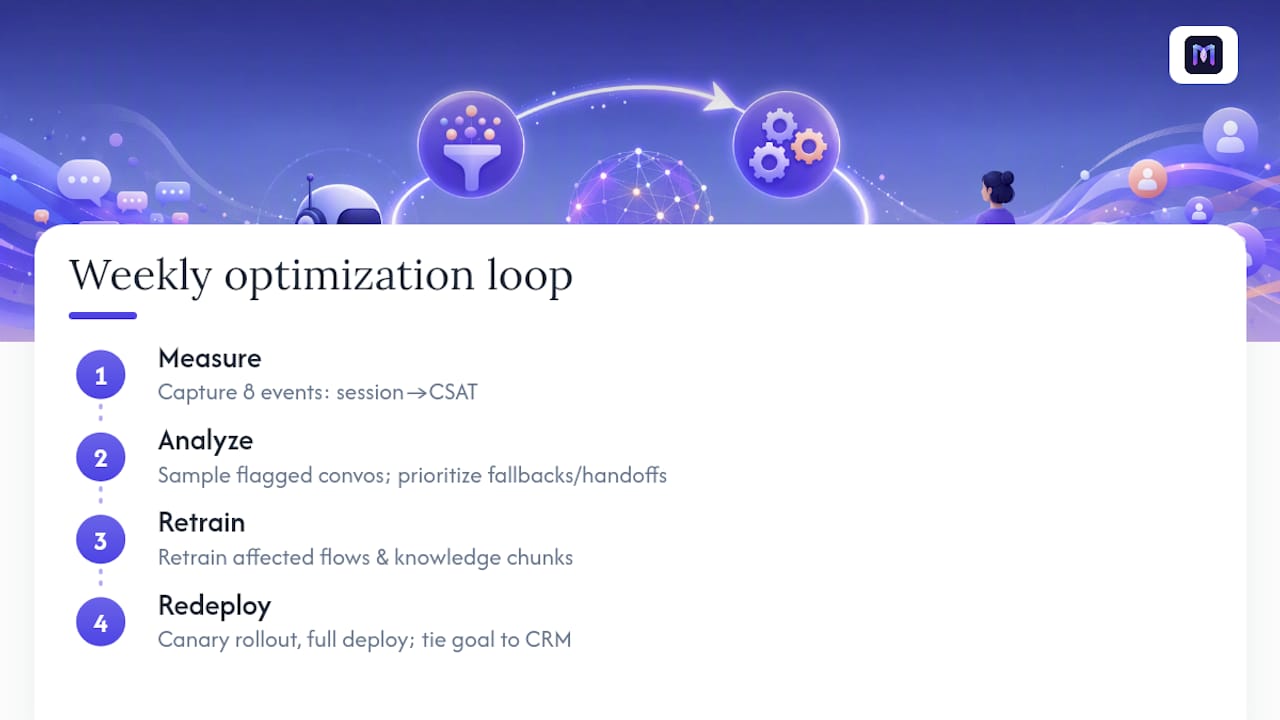
Bridge these events into your CRM so a “goal completed” event ties back to an actual ticket closure or sale. Measurement without that feedback loop is just reporting; it tells you what happened but never what to fix.
Run the cycle every week: pull a sample of flagged conversations, prioritize the fallback and handoff clusters with the highest volume, retrain the affected flow or knowledge chunk, and promote it through a canary rollout before it hits every customer. Our conversation analytics guide breaks the event schema down further.
How Do You Safely Test and Roll Out Chatbot Changes?
Never push a change to 100% of traffic on faith. A golden test set of your highest-volume conversations, run automatically before every deploy, catches regressions before customers do.
- Route new changes through a canary group first: watch the first 500 conversations closely for shifts in containment, fallback rate, or CSAT.
- Roll back immediately if any core metric regresses beyond your set threshold, rather than waiting for a full week of data.
- Sample a batch of LLM-generated responses weekly and classify them for hallucination or off-brand tone, independent of customer complaints.
- Reserve small weekly tweaks for the regular cadence, and save bigger architectural changes for scheduled, lower-traffic release windows.
How Do You Prepare and Clean Data for Chatbot Fine Tuning?
Messy training data produces a bot that sounds confident and answers wrong. Before any tuning begins, the conversation logs, knowledge documents, and intent labels you feed the system need a cleaning pass, because a chatbot only reflects the quality of what it’s shown.

Start with deduplication. Support teams often export the same ticket thread twice, or log a retried customer message as two separate entries. Duplicate entries inflate a low-value intent’s apparent popularity and skew your prioritization.
Next, normalize formatting. Customer messages come in with typos, abbreviations, and inconsistent capitalization; knowledge documents come in with inconsistent headings and leftover formatting from whatever tool wrote them originally. Standardizing this before ingestion improves how consistently your retrieval layer matches a query to the right chunk.
Strip anything sensitive. Account numbers, payment details, and any personally identifiable information need to be filtered out of training examples and logs before they’re used to refining responses, both for compliance and to avoid the bot ever surfacing one customer’s data to another.
Finally, resolve labeling conflicts. If two team members tagged similar conversations with different intent names, the system learns an inconsistent signal. A single shared taxonomy, reviewed by one owner, prevents intents from silently splitting into near-duplicates that compete with each other for the same customer queries. Clean data takes longer up front but shortens every optimization cycle that follows.
How Do You Choose the Right Model and Base Platform for Tuning?
For a no-code contact-center deployment, the practical question isn’t which raw model architecture to select. It’s which platform’s underlying model and retrieval setup best support the intents you’ve already prioritized, since most no-code platforms abstract the model layer entirely.
What matters at your level of control is how the platform handles retrieval grounding, how well it supports the industry template closest to your use case, and how much configuration it exposes without requiring engineering resources. A healthcare-specific template with HIPAA-aware handling behaves very differently from a generic retail template, even if both sit on similar underlying model infrastructure.
Evaluate a platform’s base setup against three practical questions: Can it ingest your existing knowledge base without a rebuild? Does it support the channel mix you need, voice, chat, or both? And does it give you visibility into why it chose a given response, so you can audit and correct it? A platform that treats its model as a black box makes every later tuning step slower, because you’re debugging blind.
Industry templates matter here more than architecture debates. Starting from a template built for logistics or banking gives you a pre-mapped intent set and a knowledge structure aligned to that industry’s common questions, which shortens the distance to your first working version considerably compared to building every flow from a blank canvas.
What Hyperparameter Adjustments Matter for a No-Code Chatbot?
In a no-code operational context, “hyperparameters” aren’t learning rates or batch sizes. They’re the tunable settings your platform exposes: confidence thresholds, response length limits, retrieval depth, and escalation sensitivity. Getting these wrong causes most of the false starts teams see in month one.
Confidence threshold is the highest-leverage setting. Set it too low and the bot answers questions it shouldn’t, guessing its way into wrong information. Set it too high and it escalates constantly, defeating the purpose of automation. Start conservative, then loosen it gradually as your knowledge base proves reliable across a few weeks of real traffic.
Retrieval depth, how many knowledge chunks the bot pulls before answering, needs similar care. Pulling too few chunks risks missing the right answer; pulling too many risks the bot blending unrelated information into a muddled response. Most teams find a narrow range works across the majority of intents, then adjust per-intent only where testing shows a specific miss pattern.
Response length and tone settings affect containment more than teams expect. A verbose bot that explains context the customer didn’t ask for increases abandonment. Escalation sensitivity, how many failed turns trigger a handoff, should scale with intent complexity: a password reset can tolerate one failed attempt before escalating, while a billing dispute might reasonably need two or three.
Adjust one setting at a time and measure before changing the next. Stacking multiple threshold changes in the same week makes it impossible to know which one moved the needle.
How Should a Chatbot Handle Out-of-Distribution Inputs?
Every chatbot eventually meets a question it was never built for, a customer asking about a product you don’t sell, a request in an unsupported language, or a topic that’s simply outside scope. How the bot handles that moment determines whether the customer trusts it again.
The wrong response is a generic error or a flat “I don’t understand.” That reads as broken rather than intentional. The right response acknowledges the limit plainly and offers a next step: a narrowed set of topics it can help with, or a direct route to a human.
Detecting these inputs starts with the same confidence threshold discussed above. When retrieval confidence drops below the set floor, the bot should recognize that as a signal to deflect gracefully rather than force an answer from thin evidence. Log every one of these low-confidence events specifically, separate from your regular fallback tracking, because out-of-distribution patterns often cluster around a gap you can close: a new product line, a policy change, or a seasonal spike in an unaddressed topic.
Review this log weekly alongside your fallback data. If the same off-topic request appears repeatedly, it may not be out-of-distribution at all. It may be a signal that your intent scope needs to expand. The line between “unsupported” and “not yet supported” moves constantly in a live deployment, and treating every miss as permanent scope creep rather than a signal wastes a genuine expansion opportunity.
How Do You Turn Customer Feedback Into Chatbot Improvements?
CSAT scores and thumbs-up ratings tell you something happened, not why. Turning that raw feedback into an actual fix requires a structured loop, not just a dashboard someone glances at monthly.
Start by tagging every negative rating with the intent and flow step where it occurred, not just the overall conversation. A single bad exchange in an otherwise fine conversation shouldn’t tank your read on an entire intent. Pull explicit comment text where customers leave it. Comments almost always contain more diagnostic value than the numeric score alone, since customers will often name the exact sentence that confused them.
Route feedback into two separate backlogs: content gaps (the knowledge base was missing or wrong) and flow gaps (the conversation asked the wrong question or branched incorrectly). These need different owners and different fixes. A content gap gets resolved by writing or restructuring a knowledge chunk; a flow gap gets resolved by redesigning the branch logic itself.
Close the loop visibly. When a fix ships in response to a feedback pattern, note it in your weekly optimization review so the team sees direct cause and effect between what customers said and what changed. Teams that treat feedback review as a separate, occasional exercise from the regular optimization cadence consistently lag those who fold it into the same weekly rhythm as KPI review.
What Ethical Safeguards Belong in a Chatbot Fine Tuning Program?
Bias in a customer-service bot rarely looks like an obvious failure. It shows up as small, quiet gaps: a bot that handles standard English phrasing well but stumbles on regional dialects, or one that resolves billing questions faster for customers who type in a certain style. These patterns compound because they’re the kind no one flags unless someone is specifically looking for them.
Build a review step into your regular testing cycle that checks resolution and fallback rates across different customer segments, not just the aggregate. If containment rates differ meaningfully by language, phrasing style, or channel, that’s a signal worth investigating before it becomes a pattern of unequal service.
Transparency matters just as much as fairness. Customers should know they’re talking to an automated assistant, and the bot should never imply certainty it doesn’t have. A confidence threshold that’s too permissive doesn’t just risk wrong answers, it risks a bot stating incorrect information with the same tone as verified fact, which erodes trust faster than an honest “I’m not sure.”
Data handling deserves the same scrutiny. Every piece of customer information the bot collects, stores, or passes along during a handoff should follow the same access controls and PII filtering discussed earlier in this guide, with extra care in regulated industries like healthcare or finance where a mishandled detail carries real consequences. Building these checks into the same weekly review cycle as your KPIs, rather than treating them as a separate compliance exercise, keeps fairness and accuracy from becoming an afterthought.
Author Perspective: Prioritization Trade-Offs for Contact-Center Leaders
Most teams over-invest in features and under-invest in scope discipline. Starting narrow with three intents and instrumenting every event around them beats launching wide with thirty and guessing at what broke. Knowledge quality and handoff design quietly do more work than any flashy new capability.
Name one owner for the weekly cadence. Small changes made every week compound; big quarterly rewrites tend to introduce regressions nobody catches until customers complain. And protect the fallback path like it matters, because it does: a customer who gets a graceful handoff forgives an automation gap. One who hits a dead end doesn’t come back.
— Alex
Fine Tune Your Chatbot Faster With a No-Code Platform Built for the Loop
Everything in this guide, intent prioritization, knowledge tuning, weekly measurement, canary rollouts, takes real operational effort no matter which platform you run it on. A no-code platform can help remove the engineering bottleneck from that effort, so your team spends its time on judgment calls, not configuration files.

The no-code builder lets you adjust intents, flows, and knowledge sources directly, without a developer ticket for every tweak. Ready-to-use industry templates give you a pre-mapped starting intent set for healthcare, banking, retail, logistics, and more, so your first 90 days start from a working structure instead of a blank canvas. The Workspace AI Copilot surfaces real-time suggestions to human agents during handoffs, and built-in analytics dashboards track the exact KPIs your weekly optimization loop needs, automation rate, fallback rate, handoff rate, without a separate reporting stack. Integration-ready connectors and structured conversation-summary fields make escalations to your CRM or ticketing system carry full context, so agents never start from zero.
Plans start at $200 a month with Starter, scaling through Growth, Business, and Enterprise as your intent list and volume grow. If you’re ready to see the builder and analytics loop in action, book a demo and bring your top five intents with you.
Sources
For deeper reading on the practices in this guide: HubSpot’s AI knowledge base guidance covers practical RAG setup, the chatbot analytics guide details KPI and event-schema design, and Mallow’s flow design guide walks through handoff protocols. For response tone and prompt specificity, see this guide to instructing AI models.
- AI Chatbot Analytics Guide | Authority Solutions
- AI Chatbot Knowledge Base: Structure, Safety & Handoff
- Chatbot flow design – How to get it right for support, sales, and internal workflows – Mallow Technologies
FAQ
What Does It Mean to Fine Tune a Chatbot?
In an operational context, it means adjusting intents, conversation flows, knowledge sources, integrations, and settings after launch, not retraining the underlying language model. It’s an ongoing configuration process, run through a no-code platform like Monobot, rather than a one-time technical event.
How Often Should You Retrain or Update a Chatbot?
Most optimized programs run a weekly Measure, Analyze, Retrain, Redeploy cycle, making small changes based on fallback and handoff data rather than waiting for quarterly overhauls. Bigger architectural changes get scheduled separately, during lower-traffic release windows.
What Metrics Matter Most for Chatbot Performance?
Automation rate, fallback rate, handoff rate, and containment are the core four, backed by an event schema covering session starts, user messages with confidence scores, and goal completions.
How Many Intents Should a Chatbot Launch With?
Start with 5 to 10 automatable intents drawn from your highest-volume conversation data, since the top intents in most support queues cover 60% to 75% of total volume. Adding intents before the first set is fully instrumented usually creates more overlap and confusion than value.
What Does Monobot Cost for a Contact Center Team?
Monobot’s Starter plan begins at 200 USD per month, with Growth at 500 USD and Business at 1000 USD per month, each scaling in features and usage. Enterprise pricing and add-ons like HIPAA compliance at 1000 USD per month are available on request through the pricing page.